Argo CD MCP and OpenShift Lightspeed
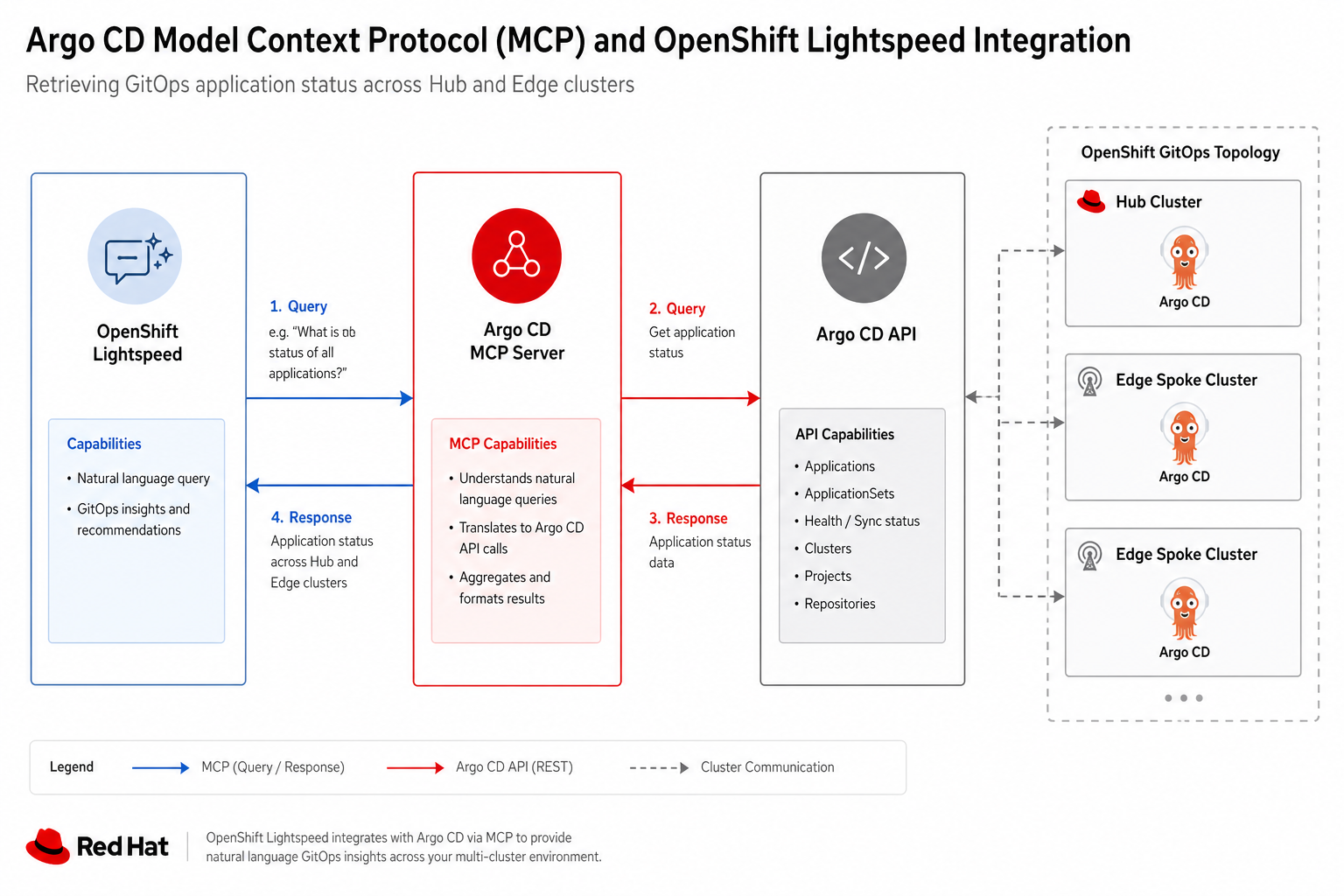
This module walks through the Argo CD Model Context Protocol (MCP) stack deployed on the hub. The MCP server lets AI assistants — including OpenShift Lightspeed — query and sync GitOps applications across hub, east, and west without full cluster-admin privileges.
You verify what is running today and see how an operator connects Lightspeed to the in-cluster MCP endpoint.
What you will do
As guest (register first) you will:
-
Browse Argo CD applications on the hub (
vp-gitops) -
Confirm the argocd-mcp Deployment and in-cluster MCP endpoint
-
Trace the multi-cluster token chain:
ai-agent→ Vault →token-registry.json -
Review example OpenShift Lightspeed prompts that call MCP GitOps tools
|
OpenShift GitOps, ACM, and the community mcp-for-argocd image work together. OpenShift Lightspeed in Developer Hub is the optional MCP client — it may be disabled in this sandbox ( |
End-to-end flow
| Step | What happens |
|---|---|
1 |
Chart |
2 |
Chart |
3 |
Chart |
4 |
OpenShift Lightspeed (or any MCP client) calls argocd-mcp.argocd-mcp.svc.cluster.local:3000/mcp |
5 |
The assistant lists applications, reads sync status, or triggers allowed sync operations |
The ai-agent user can get and sync applications and get logs. It cannot delete applications or run prune operations.
Step 1 — Log in and open Argo CD
https://vp-gitops-server-vp-gitops.apps.cluster.example.comLog in with guest (register first) / Welcome123! (or use the embedded terminal).
hub-login guest (register first)
oc get applications.argoproj.io -n vp-gitops --no-headers | wc -l
oc get applications.argoproj.io -n vp-gitops -o custom-columns=NAME:.metadata.name,SYNC:.status.sync.status,HEALTH:.status.health.status | head -12
Browse the Argo CD UI: filter by project or search for models-as-a-service, showroom, or neuroface-gateway.
Step 2 — Verify the MCP server pod
argocd-mcp-status=== argocd-mcp deployment ===
NAME READY UP-TO-DATE AVAILABLE
argocd-mcp 1/1 1 1
=== MCP pod ===
NAME READY STATUS
argocd-mcp-xxxxxxxxxx-xxxxx 1/1 Running
=== In-cluster endpoint ===
http://argocd-mcp.argocd-mcp.svc.cluster.local:3000/mcp# charts/all/argocd-mcp/templates/deployment.yaml (excerpt)
image: ghcr.io/argoproj-labs/mcp-for-argocd:v0.8.0
command: ["node", "dist/index.js", "http", "--stateless"]
# Health: GET /healthz on port 3000Step 3 — Inspect the ai-agent local user
hub-login guest (register first)
oc get secret ai-agent-local-user -n vp-gitops -o jsonpath='{.metadata.name}{" exists\n"}'
oc get argocd vp-gitops -n vp-gitops -o yaml | grep -A8 'localUsers:' | head -10
The MCP Deployment reads hub credentials from Secret argocd-mcp-hub-creds and a multi-cluster registry from argocd-mcp-token-registry (east/west URLs and tokens).
oc get secret -n argocd-mcp | grep argocd-mcp
oc get configmap argocd-mcp-hub-export -n vp-gitops -o jsonpath='Keys: {.data}' 2>/dev/null | head -c 200
echo|
Token values are platform-managed. Workshop users can confirm Secrets and ConfigMaps exist without copying tokens into the lab terminal. |
Step 4 — List applications the MCP user can reach
From the terminal (read-only for your user):
oc get applications.argoproj.io -n vp-gitops -o custom-columns=NAME:.metadata.name,CLUSTER:.spec.destination.name,NAMESPACE:.spec.destination.namespace | grep -E 'NAME|hub|east|west' | head -15In the Argo CD UI, open an application such as hub-models-as-a-service or hub-showroom and review App Details, Sync Status, and Resource tree.
Step 5 — OpenShift Lightspeed integration
OpenShift Lightspeed in Developer Hub can register MCP servers so the assistant invokes tools (for example list_applications, get_application, sync_application) against Argo CD.
https://developer-hub.apps.cluster.example.com/|
In this sandbox, the Lightspeed plugin may be disabled ( |
What an operator configures
| Setting | Value |
|---|---|
MCP transport |
HTTP (stateless) |
MCP URL (in-cluster) |
|
Allowed operations |
Scoped by |
Example Lightspeed prompts (when MCP is wired)
Use prompts like these once an instructor enables Lightspeed and registers the Argo CD MCP server:
Which Argo CD applications on the hub are OutOfSync?Show sync and health status for the models-as-a-service application.List applications deployed to the east spoke cluster.The assistant calls MCP tools backed by mcp-for-argocd instead of requiring direct oc access.
Step 6 — Verify spoke token export (optional)
If east/west spokes are synced, the hub ConfigMap receives exported credentials:
hub-login guest (register first)
oc get configmap argocd-mcp-hub-export -n vp-gitops -o yaml | grep -E '^  (east|west|hub)-' | head -6
Spoke-side charts argocd-local-users and argocd-mcp-spoke-export must be synced on east and west before east/west keys appear.
What you learned
-
argocd-mcpexposes a stateless HTTP MCP endpoint for multi-cluster Argo CD -
Local user
ai-agentenforces least-privilege GitOps automation -
OpenShift Lightspeed consumes MCP tools to answer GitOps questions in natural language
-
You can always fall back to the Argo CD UI and
oc get applicationsfor the same visibility
Next
Continue with Module 06 — Vault and secrets management.