OpenShift AI step-by-step
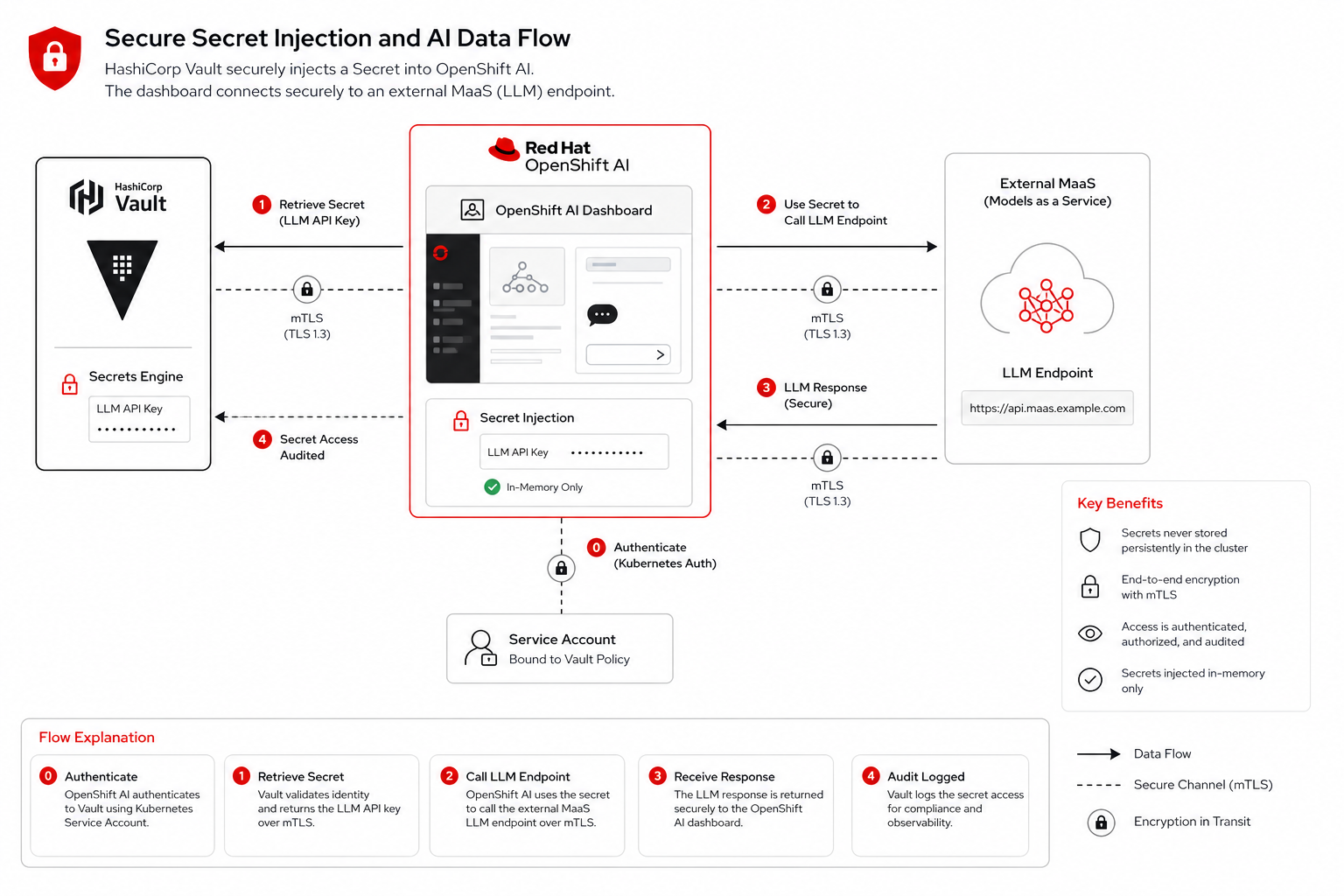
OpenShift AI on the hub hosts the dashboard, model connections, and (in later modules) Native MaaS. This module shows where LLM credentials and edge inference (YOLO) live before you expose them through gateway routes.
Open the OpenShift AI dashboard
https://rhods-dashboard-redhat-ods-applications.apps.cluster.example.comLog in with your workshop credentials.
Explore maas-workshop
hub-login guest (register first)
oc get namespace maas-workshop
In the dashboard: Data Science Projects → maas-workshop → browse model connections (Llama Scout 17B, Granite 3.2, etc.).
List MaaS model connections
oc get secret -n maas-workshop -l opendatahub.io/dashboard=true \
-o custom-columns=NAME:.metadata.name,TYPE:.metadata.annotations.opendatahub\.io/connection-typeNAME TYPE
openshift-ai-maas-credentials generic
Secret openshift-ai-maas-credentials is synced from Vault path secret/hub/maas-credentials via External Secrets Operator (see Module 06 — Vault).
|
Verify DataScienceCluster on hub
hub-login guest (register first)
oc get datasciencecluster -o custom-columns=NAME:.metadata.name,PHASE:.status.phase
oc get dscinitialization -o custom-columns=NAME:.metadata.name,PHASE:.status.phaseNAME PHASE
default-dsc Ready
NAME PHASE
default-dsci ReadyGitOps configuration
# charts/all/openshift-ai-hub/templates/all.yaml (excerpt)
apiVersion: dscinitialization.opendatahub.io/v2
kind: DSCInitialization
metadata:
  name: default-dsci
---
apiVersion: datasciencecluster.opendatahub.io/v2
kind: DataScienceCluster
metadata:
  name: default-dsc
spec:
  components:
    dashboard:
      managementState: Managed
    kserve:
      managementState: Managed
      defaultDeploymentMode: RawDeployment
# charts/all/openshift-ai-hub/values.yaml (excerpt)
maas:
endpoint: "https://maas-rhdp.apps.maas.redhatworkshops.io"
credentialsSecretName: openshift-ai-maas-credentials
models:
- id: llama-scout-17b
displayName: Llama Scout 17B (workshop default)Test MaaS from hub
hub-login guest (register first)
curl -sk https://rhods-dashboard-redhat-ods-applications.apps.cluster.example.com/ -o /dev/null -w "OpenShift AI dashboard: HTTP %{http_code}\n"OpenShift AI dashboard: HTTP 200What you learned
-
OpenShift AI exposes the dashboard and
maas-workshopproject for exploration -
NeuroFace chat and Lightspeed reach LLMs through AI Gateway (
https://ai-gateway.apps.cluster.example.com/v1) -
DSCInitialization and DataScienceCluster CRs are GitOps-managed
-
Platform API keys (
ai-gateway-platform-keys) are auto-generated in Vault at install time
Next
Continue with Module 04 — Discover RHCL Gateway objects.