Native Models as a Service in OpenShift AI
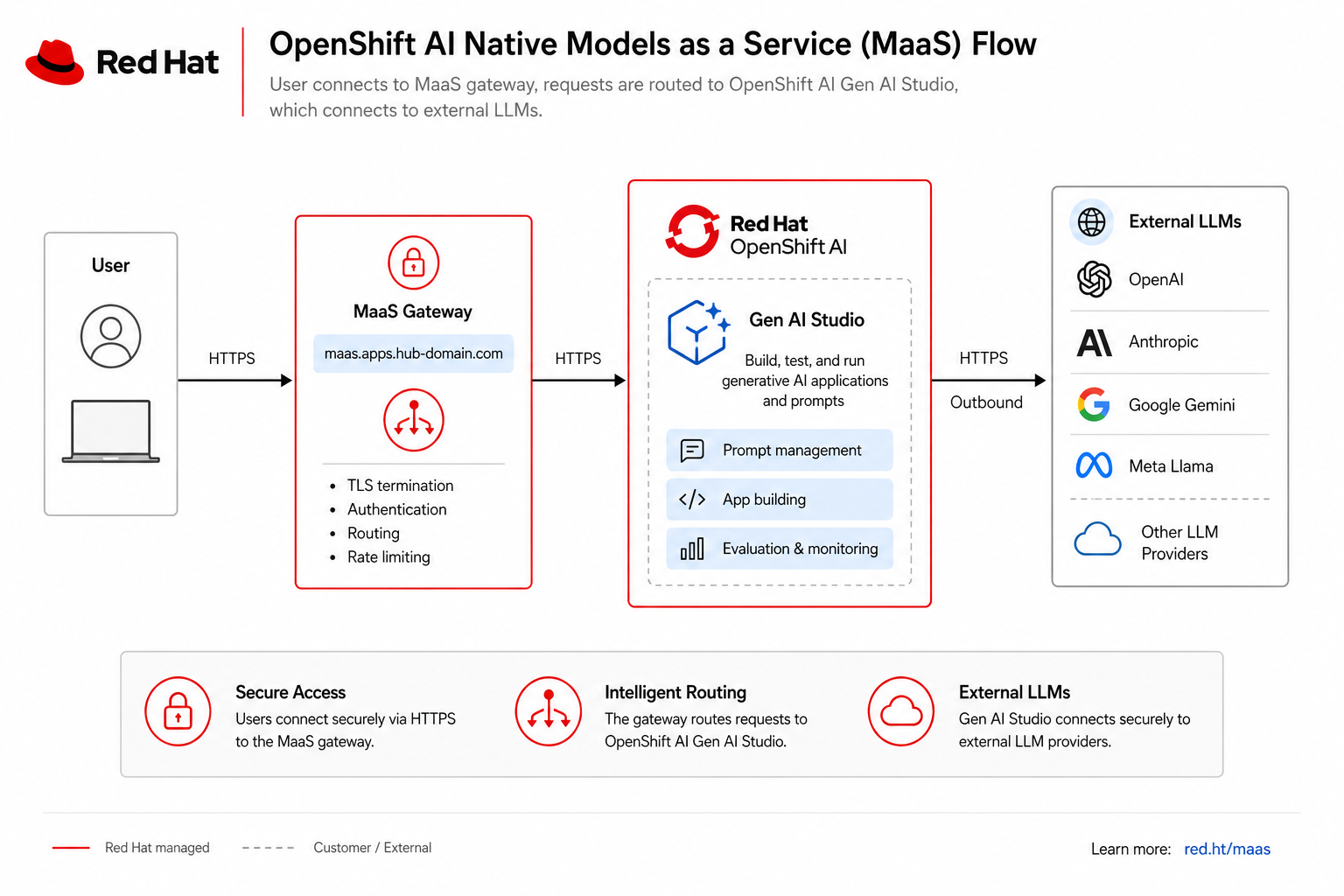
This module covers Native MaaS in Red Hat OpenShift AI (RHOAI) 3.4: Connectivity Link, the MaaS gateway, Gen AI Studio API keys, and the maas-workshop-users group that includes your workshop user (guest (register first)).
This is the recommended path for new LLM integrations. Module 05 — AI Gateway API key shows the legacy Kuadrant AI Gateway path (https://ai-gateway.apps.cluster.example.com/v1). Both paths can run in parallel during migration; this lab focuses on the native dashboard experience.
What you will do
As guest (register first) you will:
-
Open the OpenShift AI dashboard and confirm Gen AI Studio / Models as a Service navigation
-
Verify GitOps-managed MaaS CRs (
Tenant,Subscription,AuthPolicy) and group membership -
Create an API key in the dashboard (not Developer Hub Kuadrant)
-
Call
https://maas.apps.cluster.example.com/v1/chat/completionswith a Bearer token
|
Product stack: OpenShift AI 3.4 + Red Hat Connectivity Link gateway class |
Architecture overview
| Layer | Component |
|---|---|
Dashboard |
Gen AI Studio, API key management, Auth Policies (enabled in |
Control plane |
MaaS Tenant, Subscription, AuthPolicy CRs in |
Gateway |
|
Upstream |
External RHDP endpoint |
Step 1 — Open the OpenShift AI dashboard
-
Log in to the hub console or open the dashboard directly:
https://rhods-dashboard-redhat-ods-applications.apps.cluster.example.com-
Use
guest (register first)/Welcome123!. -
Confirm the left navigation shows Models as a Service and Gen AI Studio entries (patched by the
models-as-a-servicechart).
|
If those menu items are missing, an instructor can verify |
Step 2 — Confirm your workshop group membership
Workshop users user1 through user30 belong to OpenShift group maas-workshop-users, which grants access to the MaaS subscription and auth policy.
hub-login guest (register first)
oc get group maas-workshop-users -o jsonpath='{.users[*]}{"\n"}' | tr ' ' '\n' | grep -E '^user[0-9]+$' | head -5
oc auth can-i create apikeys.maas.opendatahub.io --as=guest (register first) -n models-as-a-service 2>/dev/null || echo "(API key RBAC may be dashboard-only)"user1
user2
user3
...Step 3 — Inspect MaaS GitOps resources
maas-native-statusOr run the commands individually:
hub-login guest (register first)
oc get tenant,externalmodel,maassubscription,maasauthpolicy -n models-as-a-service
oc get tenant default-tenant -n models-as-a-service \
  -o jsonpath='Tenant Ready: {.status.conditions[?(@.type=="Ready")].status}{"\n"}'
oc get gateway maas-default-gateway -n openshift-ingress \
-o jsonpath='Gateway hostname: {.spec.listeners[0].hostname}{"\n"}'NAME READY
default-tenant True
Tenant Ready: True
Gateway hostname: maas.apps.cluster.example.com# charts/all/models-as-a-service/templates/maas-crs.yaml (excerpt)
apiVersion: maas.opendatahub.io/v1alpha1
kind: Tenant
metadata:
name: default-tenant
namespace: models-as-a-service
---
apiVersion: maas.opendatahub.io/v1alpha1
kind: MaaSSubscription
metadata:
name: maas-workshop-subscription
spec:
owner:
groups:
- kind: Group
name: maas-workshop-usersStep 4 — Browse models in Gen AI Studio
-
In the OpenShift AI dashboard, open Gen AI Studio (or Models as a Service → Models).
-
Locate workshop models such as:
-
Llama Scout 17B (workshop default)
-
Granite 3.2 8B Instruct (Lightspeed default)
-
DeepSeek R1 Distill Qwen 14B
-
CodeLlama 7B Instruct
-
These map to ExternalModel CRs that proxy the upstream RHDP endpoint.
Step 5 — Create an API key in the dashboard
-
Navigate to Gen AI Studio → API keys (or Models as a Service → API keys).
-
Click Create API key, give it a name (for example
workshop-guest (register first)), and copy the key.
|
Store the key immediately — you cannot retrieve the full secret again after closing the dialog. Do not share the key; it grants access to your MaaS subscription quota. |
Step 6 — Test inference on the native MaaS gateway
Replace <your-maas-api-key> with the key from Step 5.
export MAAS_API_KEY="<your-maas-api-key>"
curl -sk -H "Authorization: Bearer ${MAAS_API_KEY}" \
  -H "Content-Type: application/json" \
  -d '{"model":"llama-scout-17b","messages":[{"role":"user","content":"Summarize PPE detection in one sentence"}]}' \
  "https://maas.apps.cluster.example.com/v1/chat/completions" | head -c 500
echo{
"id": "chatcmpl-xxx",
"object": "chat.completion",
"choices": [{
"message": {
"role": "assistant",
"content": "PPE detection uses computer vision..."
}
}]
}Step 7 — List models on the native gateway
curl -sk -H "Authorization: Bearer ${MAAS_API_KEY}" \
  "https://maas.apps.cluster.example.com/v1/models" | python3 -m json.tool 2>/dev/null | head -25
Compare with the AI Gateway path
| Path | URL | Auth |
|---|---|---|
Native MaaS (this module, recommended) |
Bearer token from Gen AI Studio |
|
AI Gateway (Kuadrant, legacy) (Module 05) |
Kuadrant |
What you learned
-
RHOAI 3.4 native MaaS exposes Gen AI Studio and API key management in the dashboard
-
Workshop users in
maas-workshop-userssubscribe to shared models viaMaaSSubscription -
Traffic enters through Gateway
maas-default-gatewayon hostnamemaas.apps.cluster.example.com -
The legacy Kuadrant AI Gateway path remains available until operators disable
apis.maas.enabled
Next
Continue with Module 10 — Argo CD MCP and OpenShift Lightspeed.