Welcome and orientation
Welcome to the AI Computer Vision at the Edge workshop. In about 2 hours you deploy a personal NeuroFace instance, explore OpenShift AI (including Native MaaS), discover RHCL Gateway objects, test inference with curl, and verify the Argo CD MCP stack for GitOps automation. Module 08 — CRD reference is optional read-only reference (+15 min).
What this pattern deploys
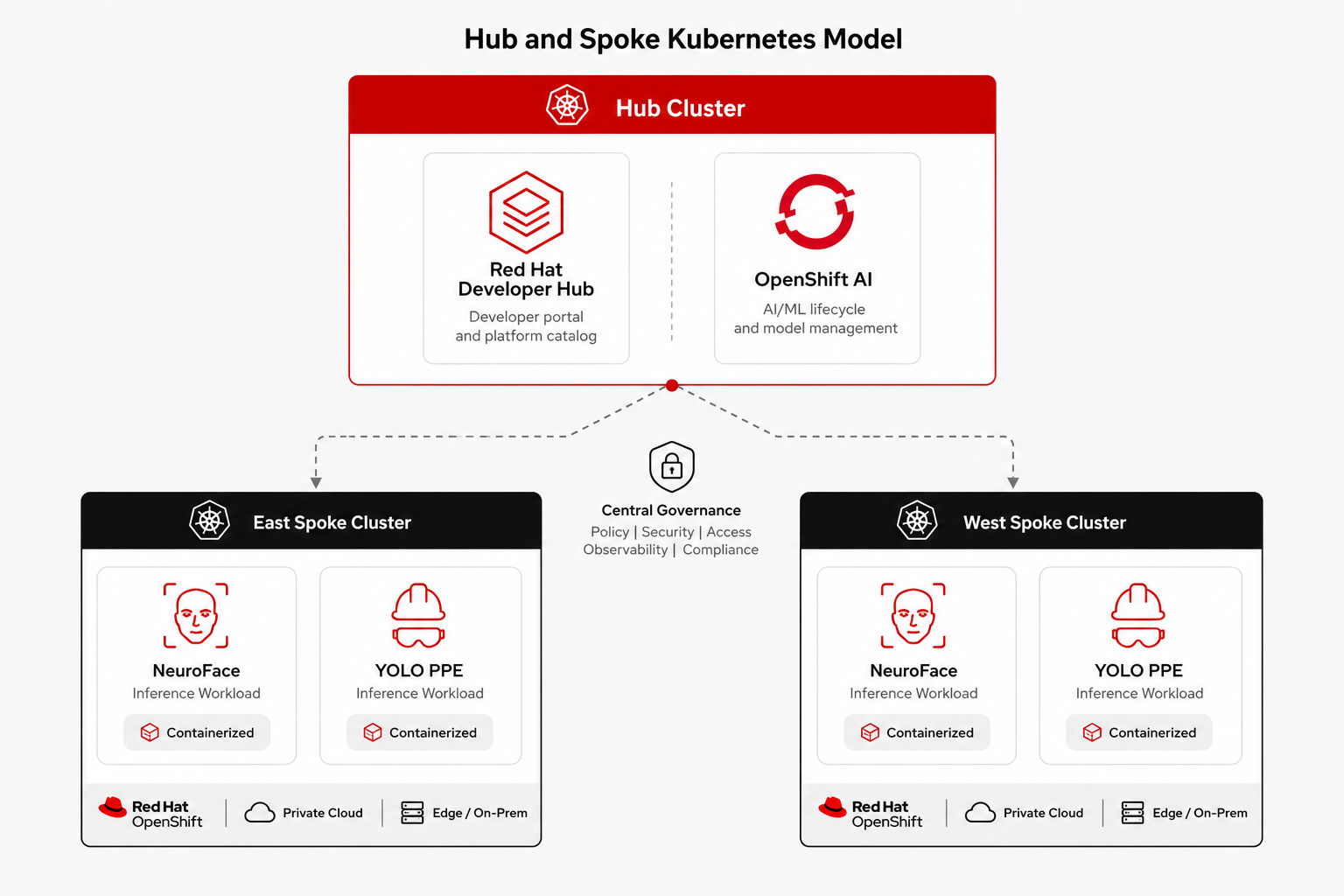
The Validated Pattern installs 1 hub + 2 spokes (east and west) with GitOps-managed components:
| Cluster | Key components |
|---|---|
Hub |
RHACM, ACS Central, GitLab, Developer Hub, OpenShift AI, RHCL Gateway, Vault, Showroom |
East / West spokes |
NeuroFace, YOLO PPE inference, Skupper interconnect, ambient Service Mesh |
Quick access links
| Component | URL |
|---|---|
OCP Console (hub) |
|
Developer Hub |
|
GitLab |
|
OpenShift AI dashboard |
rhods-dashboard-redhat-ods-applications.apps.cluster.example.com |
NeuroFace (RHCL gateway) |
|
Showroom (this guide) |
Log in with your workshop user
Use your assigned user (user1 through user30) with password Welcome123!:
-
OCP Console — HTPasswd identity provider
workshop-users -
Developer Hub — Keycloak realm
backstage -
GitLab and DevSpaces — provisioned per user
hub-login guest (register first)
Your assigned user appears in the badge at the top after registration (guest (register first)). apps.cluster.example.com is the hub cluster apps domain injected by Showroom from pattern values.
|
Verify platform health
Check that ArgoCD applications are synced and healthy:
oc get applications -n vp-gitops -o custom-columns=NAME:.metadata.name,SYNC:.status.sync.status,HEALTH:.status.health.status | head -15NAME SYNC HEALTH
acm Synced Healthy
vault Synced Healthy
platform-users Synced Healthy
observability Synced Healthy
developer-hub Synced Healthy
...Verify platform services
Confirm key hub endpoints respond:
curl -sk -o /dev/null -w "Console:       HTTP %{http_code}
" https://console-openshift-console.apps.cluster.example.com/
curl -sk -o /dev/null -w "ArgoCD:        HTTP %{http_code}
" https://vp-gitops-server-vp-gitops.apps.cluster.example.com/
curl -sk -o /dev/null -w "Vault:         HTTP %{http_code}
" https://vault-vault.apps.cluster.example.com/
curl -sk -o /dev/null -w "Developer Hub: HTTP %{http_code}
" https://developer-hub.apps.cluster.example.com/
curl -sk -o /dev/null -w "GitLab:        HTTP %{http_code}
" https://gitlab.apps.cluster.example.com/
curl -sk -o /dev/null -w "Showroom:      HTTP %{http_code}
" https://showroom-showroom.apps.cluster.example.com/Console: HTTP 200
ArgoCD: HTTP 200
Vault: HTTP 200
Developer Hub: HTTP 200
GitLab: HTTP 200
Showroom: HTTP 200How GitOps deploys the platform
ArgoCD on each cluster reads values-hub.yaml, values-east.yaml, or values-west.yaml and deploys applications in sync waves. Wave 0 runs first (GitOps, users), then operators, then workloads.
The excerpt below shows the hub application list. Each entry becomes an ArgoCD Application.
# values-hub.yaml — clusterGroup.applications (excerpt)
applications:
  openshift-gitops:
    name: openshift-gitops
    syncWave: "0"
  platform-users:
    name: platform-users
    syncWave: "0"
  observability:
    name: observability
    syncWave: "1"
  acm:
    name: acm
    chart: acm
    syncWave: "1"
  developer-hub:
    name: developer-hub
    syncWave: "4"
  openshift-ai-hub:
    name: openshift-ai-hub
    syncWave: "5"
  neuroface-gateway:
    name: neuroface-gateway
    syncWave: "6"
  showroom:
    name: showroom
    syncWave: "5"
After sync waves complete, re-run the ArgoCD health check from Verify platform health to confirm applications reached Synced / Healthy.
Two paths to LLM inference (MaaS)
This pattern exposes two parallel mechanisms for reaching hosted LLMs. Both can run during migration; choose based on your integration:
| Path | Module | Endpoint | Auth | When to use |
|---|---|---|---|---|
AI Gateway (Kuadrant, legacy) |
Kuadrant |
Existing apps wired to Developer Hub Kuadrant (NeuroFace chat, Lightspeed) |
||
Native MaaS (RHOAI 3.4, recommended) |
Bearer token from Gen AI Studio |
New integrations; dashboard-native API key management |
Module 04b — OIDC lab is optional but recommended if you need JWT access to the Computer Vision API (neuroface-cv).
Terminology (quick reference)
Use these canonical names in the rest of the lab:
-
AI Gateway (Kuadrant, legacy) — HTTPRoute
ai-maas, hostnameai-gateway.apps.cluster.example.com. Not a separate route fromai-maas. -
Native MaaS — Gateway
maas-default-gateway, hostnamemaas.apps.cluster.example.com. Managed by OpenShift AI 3.4 CRs (Tenant,MaaSSubscription, etc.). -
Gen AI Studio / Models as a Service — OpenShift AI dashboard menu entries for native MaaS. [PENDIENTE DE CONFIRMAR] which menu item hosts API key creation in your RHOAI build.
-
NeuroFace — your per-user app (chat + PPE UI) at
neuroface.apps.cluster.example.com/user/guest (register first)/. -
NeuroFace CV / Computer Vision API — shared YOLO inference API at
neuroface-cv.apps.cluster.example.com, OIDC-protected (realmcv). -
RHBK —
keycloak.apps.cluster.example.comfor admin/account consoles;sso.apps.cluster.example.comis the OIDC issuer URL in policies (do not usessofor login UI). -
Red Hat Service Interconnect (Skupper) — cross-cluster tunnel between hub Listeners and spoke Connectors.
Workshop placeholders: guest (register first) (registration badge), apps.cluster.example.com (hub apps domain), %EAST_DOMAIN% / %WEST_DOMAIN% (spoke domains), https://workshop-registration.apps.cluster.example.com (user assignment portal).
What you learned
-
The pattern spans hub + east + west with GitOps-managed components
-
Workshop users log in with
userN/Welcome123! -
ArgoCD sync waves control deployment order
-
LLM traffic can use AI Gateway (legacy) or Native MaaS (recommended) — see the comparison table above
Next
Continue with Module 02 — Deploy your NeuroFace from Developer Hub.