From 3scale to Connectivity Link
Migration Workshop — four strategies to Connectivity Link · Powered by Kuadrant
Total duration: ~3–3.5 hours · strategies below are the core story · +~30 min optional VM lab
Welcome
Migrate API management from Red Hat 3scale API Management to Red Hat Connectivity Link (Kuadrant) with a clear set of strategies — not a single button.
Why migrate (business view): teams want APIs that ship with the same GitOps cadence as the rest of the platform — less dual admin planes, clearer ownership for platform vs product teams, and a path that does not lock gateway policy into a separate CMS. Connectivity Link puts auth, rate limits, and discovery next to the workloads on Gateway API.
The workshop ships four complementary approaches. Explore pre-deployed 3scale and Connectivity Link apps side by side, then pick the path that fits your team.
URLs that contain {cluster_domain} or apps.cluster.example.com are placeholders. On a deployed showroom they are replaced automatically with your cluster ingress domain. On GitHub Pages they remain examples and will not resolve — use this site as documentation preview only.
|
| Workshop usernames and passwords are ephemeral lab credentials. They exist only for this disposable environment. Do not reuse the same password patterns or share production secrets in training materials. |
Migration strategies (first impression)
| Strategy | Role | Module |
|---|---|---|
Developer Hub — Golden Path |
Self-service Software Template: scaffolder → Gitea → Argo CD → Kuadrant CRDs + catalog. The GitOps golden path for platform teams. |
|
Kuadrant Console |
Day-2 operate Connectivity Link in OpenShift Console: API Products, keys, traffic, Grafana / Swagger. |
|
Migration Toolkit |
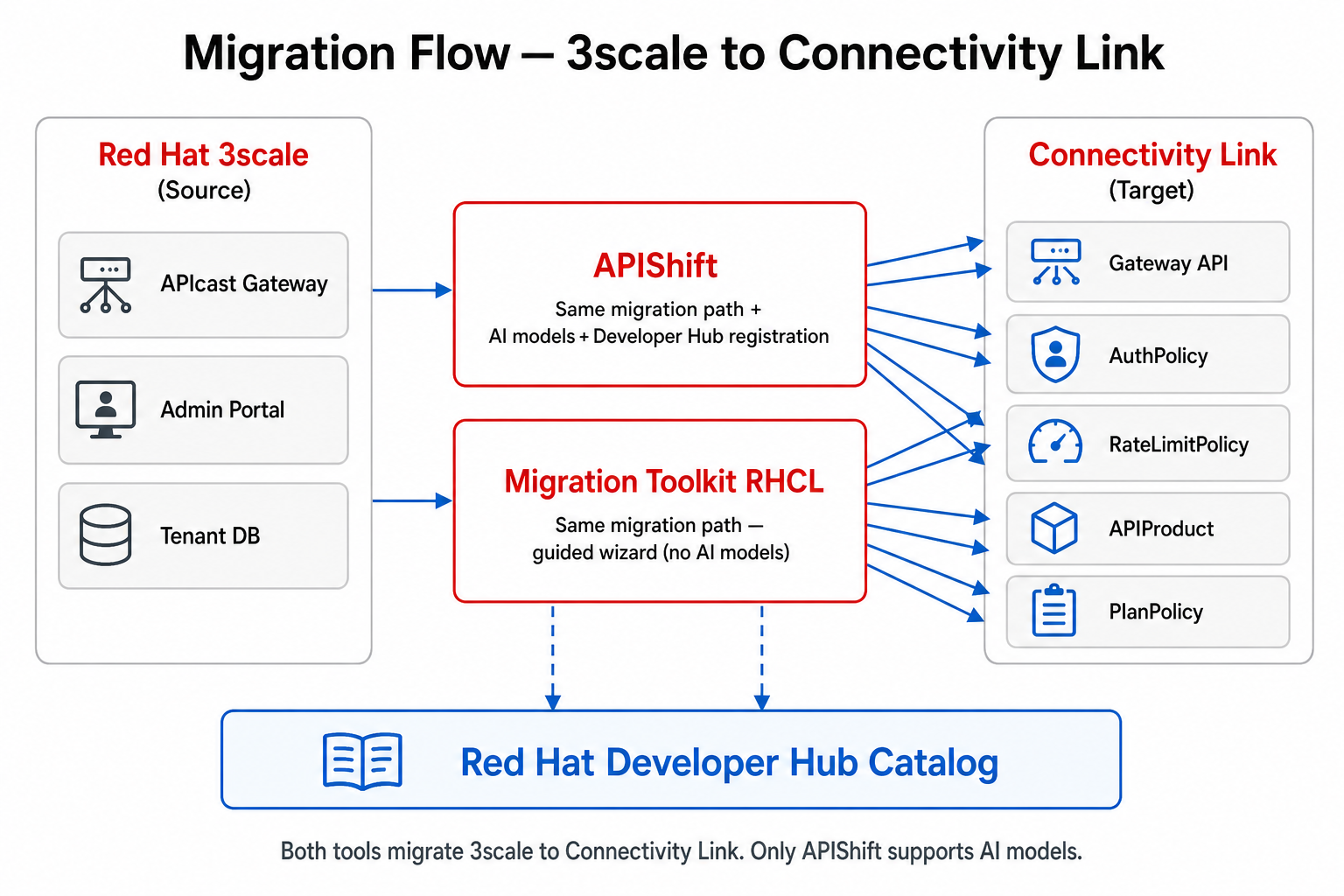
Guided wizard against a live 3scale Admin API — discover Products / Plans and produce CL config (no AI). |
|
APIShift |
Same migration core as the Toolkit, plus AI assist ( |
| Run at least the Golden Path (module 7) in the lab. Use Toolkit or APIShift when you want a GUI against real 3scale Admin API data; use Kuadrant Console after policies exist. |
What you will learn
-
Name the four migration strategies and when to use each
-
Understand why organizations migrate from 3scale to Connectivity Link
-
Explore the architecture (Developer Hub, Argo CD, Keycloak, Kuadrant, 3scale, Istio)
-
Inspect 3scale vs Connectivity Link apps (OIDC + API Key) and compare side by side
-
Execute the Developer Hub Golden Path Software Template
-
Practice Kuadrant Console, Migration Toolkit, and APIShift
-
Verify the migrated application; (optional) provision a RHEL VM behind Connectivity Link
Pre-deployed scenarios
| Application | Auth Model | 3scale Namespace | Connectivity Link Namespace |
|---|---|---|---|
Neuralbank (banking API) |
OIDC (Keycloak) |
|
|
NFL Wallet (wallet API) |
API Key |
|
|
Namespace names are not symmetric on purpose. Neuralbank CL lives in neuralbank-stack (full stack chart name); NFL Wallet CL lives in nfl-wallet-prod (existing prod-style target). Source namespaces both use the -3scale suffix. Memorize the pair from this table — do not assume -stack / -cl for every app.
|
Environment access
Your credentials:
-
Username:
user1 -
Password:
Welcome123!
Cluster sizing and recommended profiles: 0. Prerequisites & Sizing.
Treat user1 / Welcome123! as lab-only accounts. Rotate or discard them after the session.
|
For non-OAuth admin consoles (Argo CD, Grafana, Gitea, Keycloak, 3scale, APIShift, Migration Toolkit), print URLs and secrets from a machine with oc access:
./scripts/get-credentials.sh
Workshop platform links
Strategy entry points first; then supporting platform tools.
| Tool | URL |
|---|---|
Developer Hub (Golden Path) |
https://backstage-developer-hub-developer-hub.apps.cluster.example.com |
Kuadrant Console (day-2) |
OpenShift Console → Connectivity Link plugin — https://console-openshift-console.apps.cluster.example.com |
Migration Toolkit |
|
APIShift |
|
Gitea |
|
ArgoCD |
https://openshift-gitops-server-openshift-gitops.apps.cluster.example.com |
Keycloak |
|
Grafana |
|
Kiali |
https://kiali-openshift-cluster-observability-operator.apps.cluster.example.com |
Mailpit |
https://n8n-mailpit-openshift-lightspeed.apps.cluster.example.com |
OpenShift Console |
Prefer the showroom Terminal tab for oc / curl (/terminal/). The Developer Hub tab embeds Backstage in an iframe — OIDC login often fails inside that frame. If the panel is blank or stuck on login, open Developer Hub in a new browser tab from the links table above.
|
Workshop flow

| On a shared laptop or projector, zoom the browser or open the image full-width so the five boxes stay readable. |
Text alternative — Golden Path (Developer Hub) steps:
-
Start in Developer Hub (Software Templates / catalog) — the Golden Path.
-
Scaffold or migrate — manifests land in Gitea.
-
Argo CD syncs desired state to OpenShift.
-
Istio Gateway + Kuadrant policies (AuthPolicy / RateLimitPolicy / PlanPolicy) enforce traffic.
-
Operate and migrate with the other strategies: Kuadrant Console, Migration Toolkit, APIShift.
Start here
-
Skim the Migration strategies table above — that is the workshop thesis.
-
Complete 0. Prerequisites & Sizing (~10 min).
-
Continue with 1. Migration Overview.
If something breaks later, see 14. Troubleshooting.