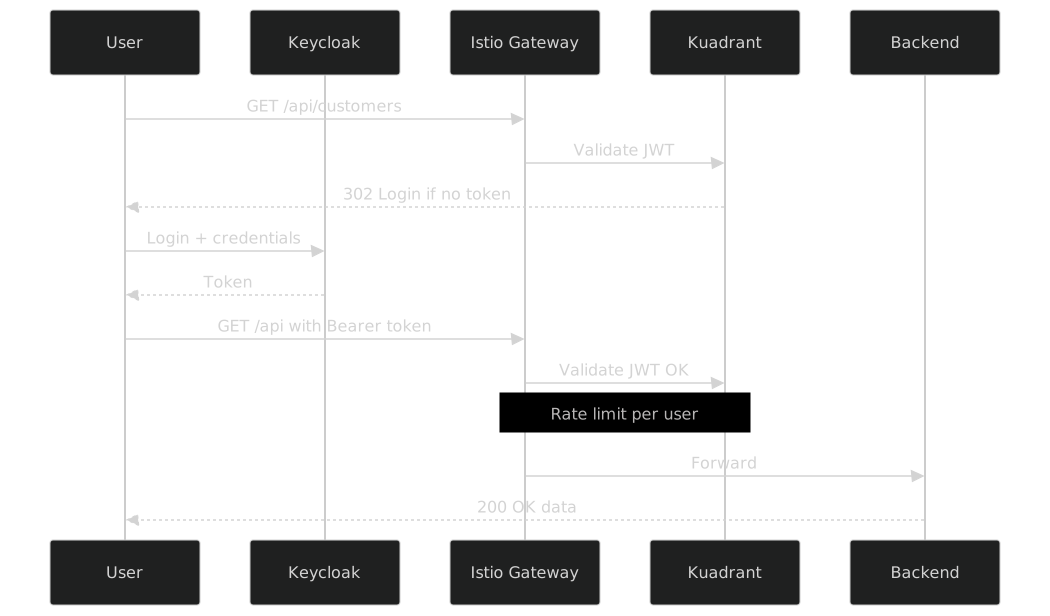
Connectivity Link: OIDC Authentication (Neuralbank)
Estimated time: ~20 minutes
Learning objectives
-
Trace Neuralbank traffic through Gateway, HTTPRoute, OIDCPolicy, and RateLimitPolicy
-
Obtain a Keycloak token and call the API successfully
-
Contrast this OIDC path with the 3scale Product configuration from module 3
In this module you will explore how Red Hat Connectivity Link protects the Neuralbank API with OIDCPolicy integrated with Keycloak, plus RateLimitPolicy for traffic control.
Context
Neuralbank uses the full Connectivity Link pattern:
| Resource | Function |
|---|---|
Gateway (Istio) |
HTTPS entry point |
HTTPRoute |
Routes |
OIDCPolicy |
OIDC authentication with Keycloak (Bearer token) |
RateLimitPolicy |
60 req/min per authenticated user |
Step 1: Inspect the Gateway
oc get gateway -n neuralbank-stackExpected output:
NAME                 CLASS   ADDRESS                                          PROGRAMMED
neuralbank-gateway   istio   neuralbank-gateway-istio.neuralbank-stack.svc    True
Inspect the listeners:
oc get gateway neuralbank-gateway -n neuralbank-stack -o jsonpath='{.spec.listeners[*].name}' ; echoStep 2: Explore the HTTPRoute
oc get httproute -n neuralbank-stackThe HTTPRoute neuralbank-api-route routes requests to neuralbank-backend-svc:8080 for paths /api and /q:
oc get httproute neuralbank-api-route -n neuralbank-stack -o yaml | grep -A5 "matches:" | head -15Step 3: Explore the OIDCPolicy
The OIDCPolicy is the key Connectivity Link resource that protects the HTTPRoute with OIDC authentication:
oc get oidcpolicy -n neuralbank-stackInspect the configuration:
oc get oidcpolicy neuralbank-oidc -n neuralbank-stack -o yamlKey configuration points:
-
provider.issuerURL— points to the Keycloak realm (https://rhbk.apps.cluster.example.com/realms/neuralbank) -
provider.clientID— the OIDC client configured in Keycloak -
auth.tokenSource— extracts the Bearer token from theAuthorizationheader -
targetRef— points to the HTTPRouteneuralbank-api-route
How it works internally
The OIDCPolicy automatically generates an AuthPolicy under the hood:
oc get authpolicy -n neuralbank-stackYou will see two AuthPolicies:
| AuthPolicy | Function |
|---|---|
|
Validates the JWT token against Keycloak |
|
Handles the OIDC redirect callback flow |
Step 4: Explore the RateLimitPolicy
oc get ratelimitpolicy -n neuralbank-stackoc get ratelimitpolicy neuralbank-customers-ratelimit -n neuralbank-stack -o yamlConfiguration: 60 requests per minute per authenticated user. The counter uses auth.identity.username to isolate rate limits per OIDC user.
Step 5: Test the OIDC flow from the browser
Open the Neuralbank URL:
https://neuralbank.{cluster_domain}
You will be automatically redirected to the Keycloak login screen (realm neuralbank). Enter your workshop credentials (user1 / Welcome123!). After authentication you are redirected back to the API.
Step 6: Test with curl
6.1 — Without token (302 redirect)
curl -s -o /dev/null -w "HTTP Status: %{http_code}\n" \
  https://neuralbank.{cluster_domain}/api/v1/customers
Expected: HTTP Status: 302 (redirect to Keycloak).
6.2 — Get a Bearer Token from Keycloak
TOKEN=$(curl -s -X POST \
  "https://rhbk.{cluster_domain}/realms/neuralbank/protocol/openid-connect/token" \
  -H "Content-Type: application/x-www-form-urlencoded" \
  -d "grant_type=password" \
  -d "client_id=neuralbank-frontend" \
  -d "username={user_name}" \
  -d "password={user_password}" \
  | python3 -c "import json,sys; print(json.load(sys.stdin)['access_token'])")

echo "Token (first 50 chars): ${TOKEN:0:50}..."
6.3 — List all customers
curl -s -H "Authorization: Bearer $TOKEN" \
  "https://neuralbank.{cluster_domain}/api/v1/customers" \
  | python3 -m json.tool
6.4 — Get a customer by ID
curl -s -H "Authorization: Bearer $TOKEN" \
  "https://neuralbank.{cluster_domain}/api/v1/customers/1" \
  | python3 -m json.tool
6.5 — Get credit score
curl -s -H "Authorization: Bearer $TOKEN" \
  "https://neuralbank.{cluster_domain}/api/v1/customers/1/credit-score" \
  | python3 -m json.tool
6.6 — Create a new customer
curl -s -X POST \
  -H "Authorization: Bearer $TOKEN" \
  -H "Content-Type: application/json" \
  -d '{
    "nombre": "Workshop",
    "apellido": "Demo",
    "email": "workshop.demo@neuralbank.io",
    "tipoCliente": "PERSONAL",
    "ciudad": "Buenos Aires",
    "pais": "Argentina"
  }' \
  "https://neuralbank.{cluster_domain}/api/v1/customers" \
  | python3 -m json.tool