Connectivity Link: API Key Authentication (NFL Wallet)
Estimated time: ~20 minutes
Learning objectives
-
Contrast OIDC vs API Key auth models on Connectivity Link
-
Call NFL Wallet with
X-API-Keyagainst AuthPolicy + RateLimitPolicy -
Relate labeled Secrets and PlanPolicy tiers to consumer identity
In this module you will explore how Red Hat Connectivity Link protects the NFL Wallet API with AuthPolicy based on API Key — a different model from Neuralbank’s OIDC, ideal for machine-to-machine (M2M) integrations.
OIDC vs API Key
| Aspect | Neuralbank (OIDC) | NFL Wallet (API Key) |
|---|---|---|
Auth type |
JWT Bearer token |
API Key header |
Flow |
Redirect to login page |
No redirect, static key |
Use case |
Interactive users (web) |
M2M integrations, scripts |
Header |
|
|
Key management |
Keycloak issues tokens |
Kubernetes Secrets |
Rate limit |
Per authenticated user |
Global (all keys) |
Step 1: Inspect resources in OpenShift
echo "=== Gateway ===" && \
oc get gateway -n nfl-wallet-prod && echo && \
echo "=== HTTPRoute ===" && \
oc get httproute -n nfl-wallet-prod && echo && \
echo "=== AuthPolicy ===" && \
oc get authpolicy -n nfl-wallet-prod && echo && \
echo "=== RateLimitPolicy ===" && \
oc get ratelimitpolicy -n nfl-wallet-prod && echo && \
echo "=== APIProduct ===" && \
oc get apiproduct -n nfl-wallet-prod
Step 2: Explore the AuthPolicy
oc get authpolicy nfl-wallet-apikey -n nfl-wallet-prod -o yamlKey points:
-
authentication.api-key-auth.apiKey.selector— selects Secrets with labelsapp: nfl-walletandkuadrant.io/apikey: "true" -
credentials.customHeader.name: X-API-Key— the key is sent via theX-API-Keyheader -
unauthenticated.code: 401— returns 401 for missing/invalid keys (no redirect)
How API Keys are stored
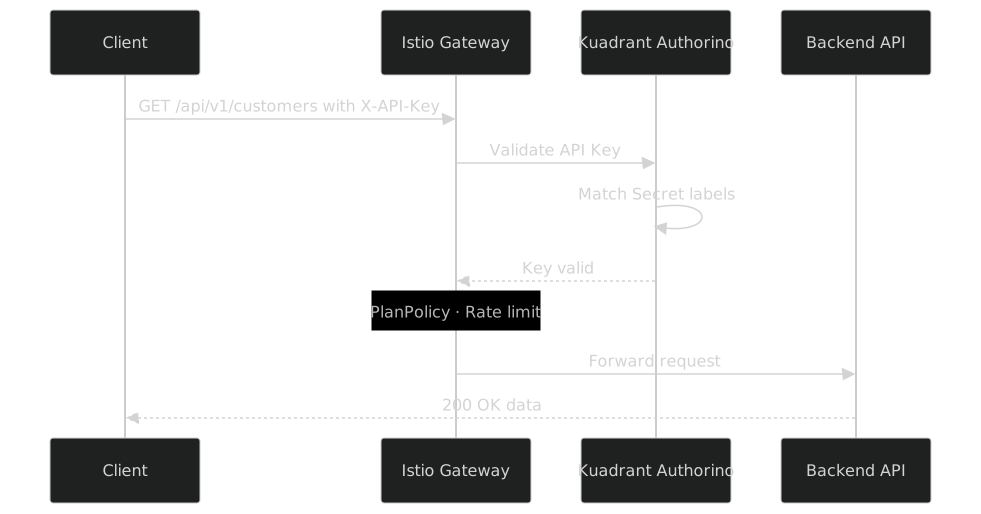
Keys are Kubernetes Secrets with special labels that Authorino detects automatically:
oc get secrets -n nfl-wallet-prod -l kuadrant.io/apikey=trueoc get secret nfl-wallet-apikey-admin -n nfl-wallet-prod -o jsonpath='{.data.api_key}' | base64 -d ; echoOutput: nfl-wallet-demo-key-2024
Step 3: Test the API with curl
3.1 — Without API Key (401)
curl -s -o /dev/null -w "HTTP Status: %{http_code}\n" \
  https://nfl-wallet.{cluster_domain}/api/v1/customers
Expected: HTTP Status: 401
3.2 — With valid API Key
curl -s -H "X-API-Key: nfl-wallet-demo-key-2024" \
  "https://nfl-wallet.{cluster_domain}/api/v1/customers" \
  | python3 -m json.tool
3.3 — Get a customer by ID
curl -s -H "X-API-Key: nfl-wallet-demo-key-2024" \
  "https://nfl-wallet.{cluster_domain}/api/v1/customers/1" \
  | python3 -m json.tool
3.4 — Create a new customer
curl -s -X POST \
  -H "X-API-Key: nfl-wallet-demo-key-2024" \
  -H "Content-Type: application/json" \
  -d '{
    "nombre": "API Key",
    "apellido": "Test",
    "email": "apikey.test@wallet.io",
    "tipoCliente": "EMPRESA",
    "ciudad": "Miami",
    "pais": "USA"
  }' \
  "https://nfl-wallet.{cluster_domain}/api/v1/customers" \
| python3 -m json.toolStep 4: Rate limiting
The RateLimitPolicy allows 120 requests per minute:
oc get ratelimitpolicy nfl-wallet-ratelimit -n nfl-wallet-prod -o yamlRun a burst to test:
for i in $(seq 1 10); do
  code=$(curl -s -o /dev/null -w '%{http_code}' \
    -H "X-API-Key: nfl-wallet-demo-key-2024" \
    "https://nfl-wallet.{cluster_domain}/api/v1/customers")
  echo "Request $i: HTTP $code"
done
All 10 should return 200. Extending to 130+ requests in one minute triggers 429 Too Many Requests.
A 429 means Limitador is working. For demos that need more headroom, use a Secret with secret.kuadrant.io/plan-id: pro, or flush counters with oc rollout restart deployment/limitador-limitador -n kuadrant-system (see Troubleshooting).
|
Step 5: Create your own API Key
oc create secret generic my-apikey-{user_name} \
  --from-literal=api_key=my-custom-key-$(date +%s) \
  -n nfl-wallet-prod

oc label secret my-apikey-{user_name} \
  app=nfl-wallet \
  kuadrant.io/apikey=true \
  authorino.kuadrant.io/managed-by=authorino \
  -n nfl-wallet-prod
Kuadrant detects the new Secret automatically. Test:
MY_KEY=$(oc get secret my-apikey-{user_name} -n nfl-wallet-prod -o jsonpath='{.data.api_key}' | base64 -d)

curl -s -H "X-API-Key: $MY_KEY" \
  "https://nfl-wallet.{cluster_domain}/api/v1/customers" \
  | python3 -m json.tool
Step 6: PlanPolicy — Usage tiers
Inspect the PlanPolicy:
oc get planpolicy -n nfl-wallet-prod -o yaml| Plan | Daily Limit | Per-Minute Limit | Use Case |
|---|---|---|---|
free |
100 req/day |
10 req/min |
Evaluation and testing |
basic |
1,000 req/day |
60 req/min |
Development |
pro |
10,000 req/day |
300 req/min |
Production |
The plan is assigned via the secret.kuadrant.io/plan-id annotation on the API Key Secret:
metadata:
  labels:
    app: nfl-wallet
    kuadrant.io/apikey: "true"
  annotations:
    secret.kuadrant.io/plan-id: "basic"
Step 7: Swagger UI and gateway CORS
Open Swagger against the gateway host (not the backend Service DNS):
https://nfl-wallet.{cluster_domain}/q/swagger-ui
Click Authorize, enter nfl-wallet-demo-key-2024, and test the endpoints directly.
Browser “Try it out” often sends Authorization: Bearer <key> and a CORS preflight (OPTIONS). AuthPolicy expects X-API-Key. On the Kuadrant Console demo gateway this workshop ships an Istio EnvoyFilter (Lua) that answers CORS preflight and maps Bearer → X-API-Key. See the architecture diagram Service Mesh Pattern — EnvoyFilter Lua and Architecture. For NFL Wallet, prefer the X-API-Key header in curl; use Swagger Authorize as API key when the UI offers that scheme.
|
Day-2 alternative: create and reveal keys in Kuadrant Console instead of only oc create secret.
Summary
You have explored the API Key Auth model of Connectivity Link:
-
AuthPolicy with
apiKeyuses Kubernetes Secrets for authentication -
API Keys are managed via labels — Authorino discovers them automatically
-
PlanPolicy defines tiered rate limits (free/basic/pro)
-
APIProduct publishes the API in the Developer Hub portal