APIShift
Estimated time: ~15 minutes · Strategy: APIShift
Learning objectives
-
Run an APIShift migration plan against a 3scale Product
-
Register the migrated component into Developer Hub
-
Explain how AI assist (
litemaas) differentiates APIShift from Migration Toolkit
APIShift is one of the four workshop strategies: an end-to-end migration console. It performs the same 3scale → Connectivity Link migration path as the Migration Toolkit, and adds two capabilities on top:
-
AI model assist (shared workshop
litemaasendpoint / model) -
Developer Hub catalog registration via the Scaffolder API
Migration flow
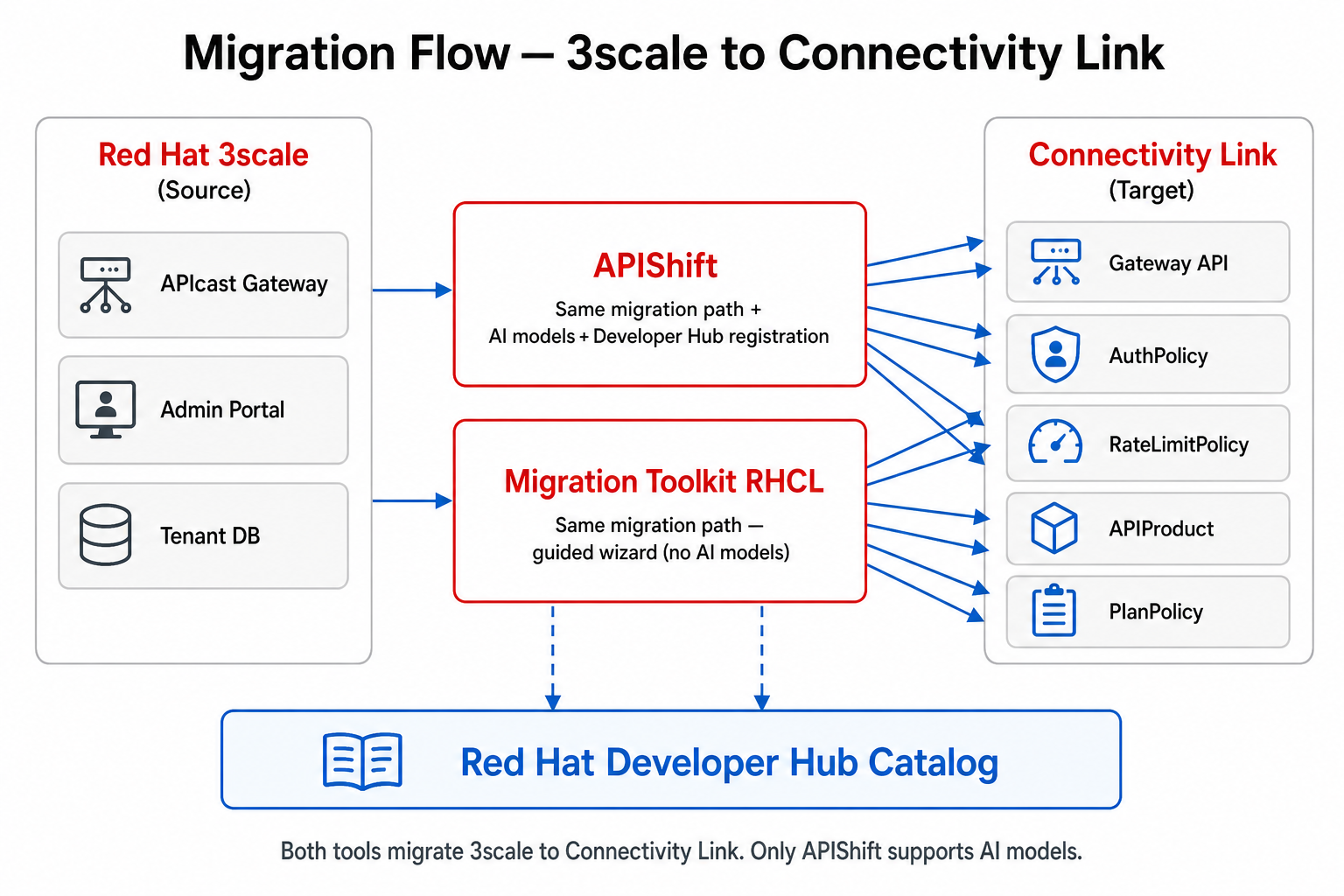
| Stage | What happens |
|---|---|
Discover |
Connect to 3scale Admin API ( |
Transform |
Map Products / Plans / auth models to Gateway API + Kuadrant policies |
Target |
Apply or stage Connectivity Link resources ( |
Register |
Call Developer Hub Scaffolder ( |
AI assist (APIShift only) |
Optional calls to the workshop LLM ( |
Access
Typical route on this cluster (host name may still say gateforge; the product is APIShift):
https://gateforge-gateforge.<cluster-domain>
Print URLs and related secrets:
./scripts/get-credentials.sh
Required tokens (not OpenShift OAuth)
APIShift does not use OpenShift OAuth for its migration APIs. Two tokens must be real (not placeholders) after a fresh deploy:
| Setting | Source on cluster | Symptom if wrong |
|---|---|---|
|
Secret |
Cannot list 3scale Products |
|
Secret |
|
On this GitOps stack those values live in the ArgoCD Application field-content-helm-apishift spec.source.helm.valuesObject (or equivalent). Patch them after install if the chart still has placeholder-set-in-argocd.
AI assist (APIShift differentiator)
APIShift can call the workshop LLM endpoint using the shared litemaas values. Migration Toolkit does not use AI models.
litemaas:
  apiUrl: "https://maas-rhdp.apps.maas.redhatworkshops.io/v1"
  model: "qwen3-14b"
  apiKey: ""   # inject — never commit
See the repository README section Configuring an AI / LLM Model.
Walkthrough
-
Open APIShift → configure / verify 3scale connection.
-
Select a Product (for example Neuralbank or NFL Wallet) and create a migration plan.
-
Review generated Connectivity Link objects (AuthPolicy / OIDCPolicy, RateLimitPolicy, HTTPRoute).
-
Confirm registration into Developer Hub — the new Component should appear in the catalog.
-
Open the component in Developer Hub (Topology / CI / CD tabs) and compare with the side-by-side CL namespaces.
Related UIs
-
Migration Toolkit — same migration path without AI / catalog registration
-
Kuadrant Console — operate API Products and keys after migration
-
Golden Path (Developer Hub) — Software Template → Gitea → Argo CD