Migration Toolkit RHCL
Estimated time: ~15 minutes · Strategy: Migration Toolkit
Learning objectives
-
Open the Migration Toolkit UI and use pre-configured 3scale defaults
-
Discover Products / Plans and review proposed Connectivity Link mappings
-
Contrast this guided path with APIShift (same migration, no AI)
The Migration Toolkit is one of the four workshop strategies: a guided Quarkus + PatternFly application that connects to a 3scale Admin API, discovers Products / Backends / Plans, and helps you produce Connectivity Link (Kuadrant) configuration.
Where it fits
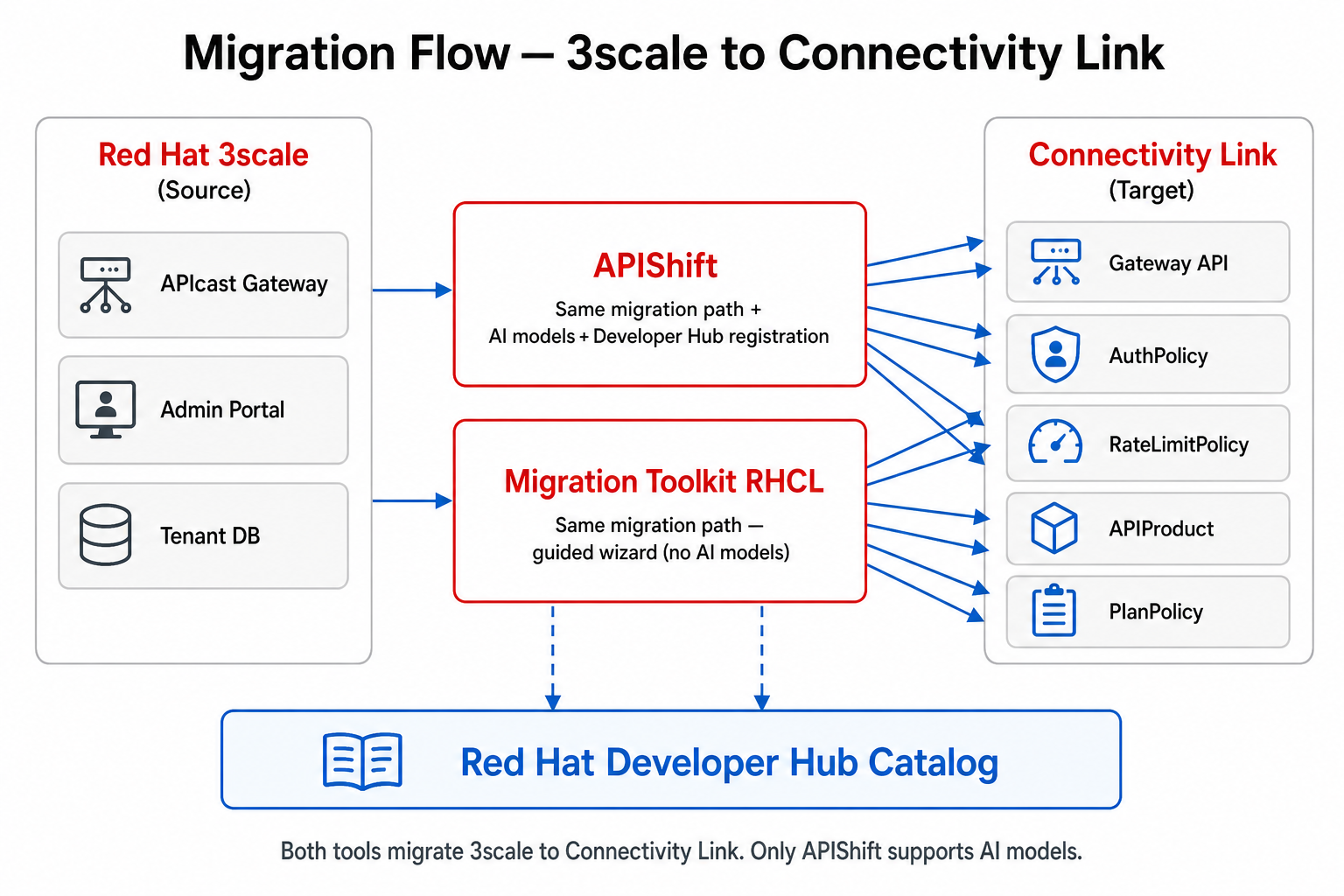
APIShift and Migration Toolkit perform the same 3scale → Connectivity Link migration. Prefer APIShift when you also need AI model assist or automated catalog registration into Developer Hub.
Access
-
Obtain the URL (typical pattern):
https://migration-toolkit.<cluster-domain>
-
Or run the helper script from a machine with
ocaccess:./scripts/get-credentials.sh
-
Open the Connection page.
Pre-configured 3scale connection
On this workshop cluster the toolkit can ship with defaults from environment variables:
-
THREESCALE_DEFAULT_URL— Admin portal URL (for examplehttps://3scale-admin.<domain>;) -
THREESCALE_DEFAULT_TOKEN— Admin access token (from Secretsystem-seedkeyADMIN_ACCESS_TOKEN)
The backend exposes GET /api/defaults. The frontend auto-fills the Connection form when threescale.configured is true.
Helm values (chart migration-toolkit-rhcl):
backend:
  threescale:
    defaultUrl: "https://3scale-admin.<domain>"
    defaultToken: "<from Secret / Argo valuesObject>"
Never commit real access tokens to Git. Inject them via ArgoCD valuesObject or Secret references.
|
Typical walkthrough
-
Open Migration Toolkit → confirm 3scale URL + token are filled → Test connection.
-
Create or select a migration project.
-
Discover Products and Application Plans from 3scale.
-
Review the proposed Connectivity Link mapping (Gateway API HTTPRoute, AuthPolicy / OIDCPolicy, RateLimitPolicy, PlanPolicy, APIProduct).
-
Export or apply manifests into the target namespace (GitOps via Gitea + ArgoCD in the full workshop path).
Runtime components
| Resource | Purpose |
|---|---|
Namespace |
Isolates the toolkit Deployment + PostgreSQL |
Frontend Route |
PatternFly UI |
Backend Service |
Quarkus REST API + |
PostgreSQL |
Stores projects and connection settings |
Next
-
Validate generated policies with Verify and Test.
-
Operate day-2 APIs with Kuadrant Console.
-
Or run the same migration with AI + Developer Hub registration via APIShift.