OpenClaw (optional)
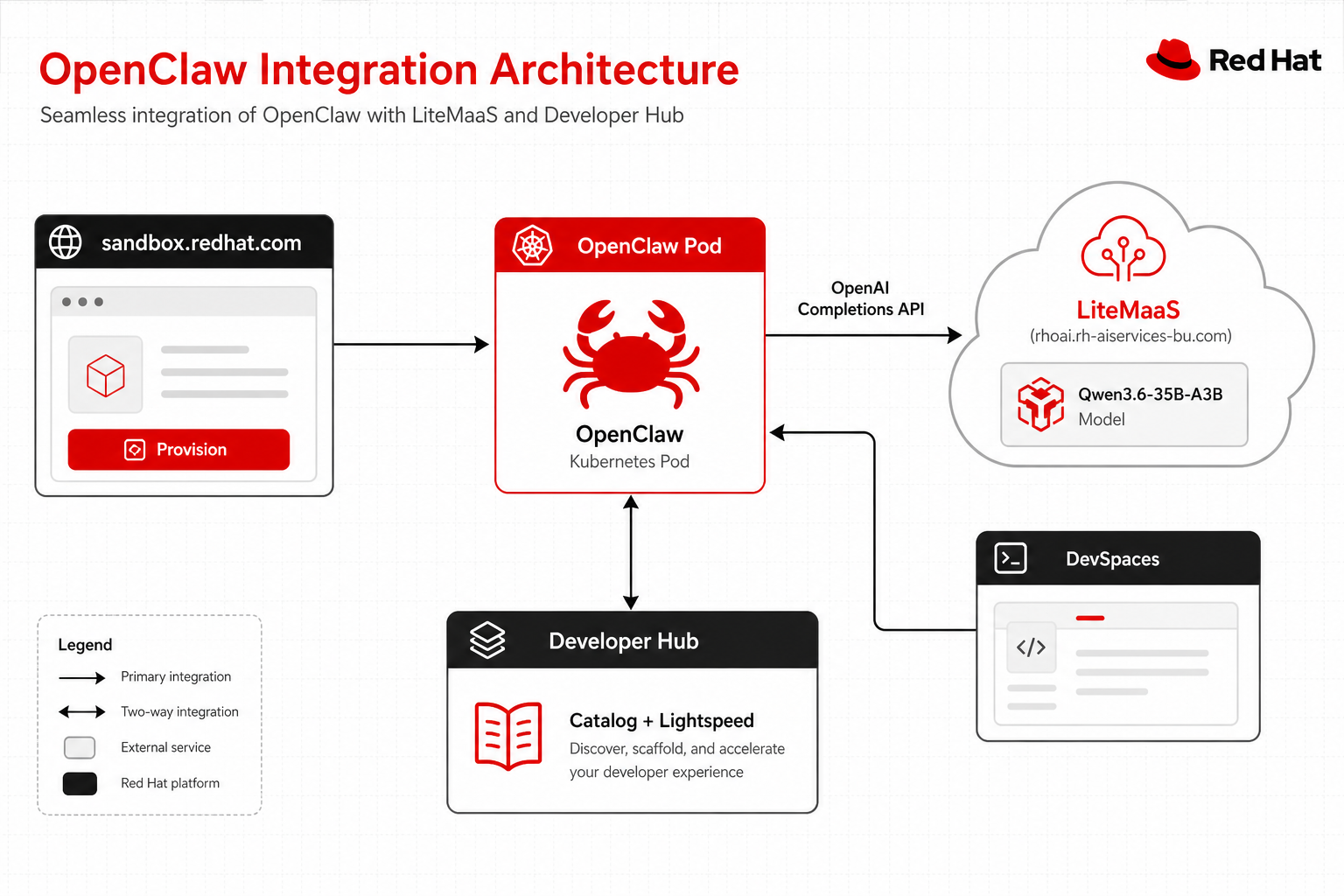
OpenClaw is a personal AI assistant you provision from sandbox.redhat.com — not from this Helm chart. It runs in your Developer Sandbox namespace with a managed lifecycle.
This page explains how OpenClaw relates to the RHDH agent stack and how to wire it safely.
New: OpenClaw + Qwen Tool Calling journey
See the OpenClaw journey for a step-by-step visual guide to provisioning OpenClaw with a private Qwen3.6-35B-A3B model (with tool calling) via LiteMaaS.
Role in the architecture
OpenClaw is a third AI client, alongside Hub Lightspeed and DevSpaces Continue. It does not replace the chart’s MCP servers.
| Client | How you get it | Typical model path |
|---|---|---|
| Lightspeed | Chart (Hub sidecar) | LiteLLM → shared Granite/Qwen |
| Continue (DevSpaces AI) | Chart Devfiles + Sandbox DevSpaces | LiteLLM Route + litellm-master-key |
| OpenClaw | Provision on sandbox.redhat.com | LiteMaaS Qwen (tool calling) or external vendor key |
Prerequisites
| Requirement | Notes |
|---|---|
| OpenClaw provisioned | Card on sandbox.redhat.com → Provision |
| LiteMaaS API key | Bearer token for litemaas.rhoai.rh-aiservices-bu.com (recommended for tool calling) |
| This chart installed | Optional for OpenClaw itself; needed only if you also want LiteLLM chat fallback |
| Quota headroom | OpenClaw adds its own Deployment + PVC; stop unused DevSpaces workspaces first |
Recommended path: LiteMaaS Qwen with tool calling
The LiteMaaS gateway (litemaas.rhoai.rh-aiservices-bu.com) serves Qwen3.6-35B-A3B — a model that supports function/tool calling (tool_choice=auto). This is the recommended path for OpenClaw on Developer Sandbox because:
- Full agentic capabilities (exec, read, write, kubectl)
- OpenAI Completions API compatible
- No need for external vendor keys (Anthropic, OpenAI, etc.)
Provision via sandbox.redhat.com
- Go to sandbox.redhat.com and click Provision on the OpenClaw card
- Select Custom / Self-Hosted as the AI provider
- Fill the form:
| Field | Value |
|---|---|
| Endpoint URL | https://litemaas.rhoai.rh-aiservices-bu.com/v1 |
| API Format | OpenAI Completions |
| API Key | Your LiteMaaS bearer token (sk-...) |
| Model Name | Qwen3.6-35B-A3B |
| Display Name | Qwen 3.6 35B-A3B (Tool Calling) |
- Click Provision — OpenClaw deploys as a pod in your namespace
Warning: Never commit API keys
The LiteMaaS API key is stored securely as a Kubernetes Secret by the provisioner. Never add it to git, values.yaml, or ConfigMaps.
Verify with curl
curl -X POST https://litemaas.rhoai.rh-aiservices-bu.com/v1/chat/completions \
  -H "Authorization: Bearer $LITEMAAS_API_KEY" \
  -H "Content-Type: application/json" \
  -d '{
    "model": "Qwen3.6-35B-A3B",
    "messages": [
      {"role": "user", "content": "Hello, world!"}
    ]
  }'
See the OpenClaw journey carousel for the full visual walkthrough.
Alternative: external vendor API key
If you prefer a commercial provider, shared Sandbox models (Granite / Qwen) do not support function calling (tool_choice=auto). OpenClaw’s agent loop needs tool calls, so bring your own provider key.
Configure OpenClaw (Control UI or ~/.openclaw/openclaw.json) with your provider:
{
  agents: {
    defaults: {
      model: { primary: "anthropic/claude-sonnet-4-5" },
      sandbox: { mode: "off" },
    },
  },
  env: {
    ANTHROPIC_API_KEY: "sk-ant-...",
  },
}
Use OpenClaw’s onboard / Control UI Config tab if you prefer a form over raw JSON5. Follow OpenClaw configuration for the exact provider fields for your vendor.
Tip: Sandbox tool sandboxing
OpenClaw can sandbox tools with Docker (
agents.defaults.sandbox.mode: non-main|all). Developer Sandbox does not expose a Docker socket or privileged DinD. Keepsandbox.mode: "off"so tools run inside the OpenClaw pod under the provisioned ServiceAccount.
Optional: LiteLLM as chat-only custom provider
You can point OpenClaw at this chart’s LiteLLM Route for chat without tools (same Granite/Qwen aliases as Continue).
- Get the Route and master key:
export NAMESPACE=$(oc project -q)
oc get route -n "${NAMESPACE}" | grep litellm
export LITELLM_KEY=$(oc get secret rhdh-agent-sandbox-secrets -n "${NAMESPACE}" \
  -o jsonpath='{.data.litellm-master-key}' | base64 -d)
- Example custom provider (adjust host to your Route):
{
  models: {
    mode: "merge",
    providers: {
      "sandbox-litellm": {
        baseUrl: "https://rhdh-agent-sandbox-litellm-<namespace>.apps.<cluster>/v1",
        apiKey: "${LITELLM_MASTER_KEY}",
        api: "openai-completions",
        models: [
          { id: "granite", name: "Granite (Sandbox)", reasoning: false, input: ["text"] },
          { id: "qwen3", name: "Qwen3 (Sandbox)", reasoning: false, input: ["text"] },
        ],
      },
    },
  },
  agents: {
    defaults: {
      model: { primary: "sandbox-litellm/granite" },
      sandbox: { mode: "off" },
    },
  },
}
Warning: Chat-only with shared models
With Granite/Qwen via LiteLLM, OpenClaw will not get reliable tool calls. Use this path only for plain Q&A. For agentic work (code, shell, multi-step tools), use LiteMaaS Qwen or an external API key.
Wire Hub MCP Actions into OpenClaw (proven)
There is no OpenClaw plugin for Developer Hub. OpenClaw is the MCP client; Hub already exposes catalog/TechDocs tools at /api/mcp-actions/v1.
On Developer Sandbox, OpenClaw egress goes through claw-proxy with an allowlist. Do not only edit ~/.openclaw/openclaw.json — declare MCP on the Claw CR so the operator:
- Injects
mcp.serversinto the gateway config - Adds the Hub Route host to the proxy allowlist
- Injects the bearer token from a Secret (gateway never stores the raw key in git)
DEV_NS="$(oc project -q)"   # chart namespace (*-dev)
CLAW_NS="$(oc get project -o jsonpath='{range .items[*]}{.metadata.name}{"\n"}{end}' | grep -- '-claw$' | head -1)"
export HUB_HOST="$(oc get route -n "$DEV_NS" -l app.kubernetes.io/name=developer-hub -o jsonpath='{.items[0].spec.host}')"
MCP_TOKEN="$(oc get secret rhdh-agent-sandbox-secrets -n "$DEV_NS" -o jsonpath='{.data.mcp-token}' | base64 -d)"

oc create secret generic hub-mcp-credentials -n "$CLAW_NS" \
  --from-literal=mcp-token="$MCP_TOKEN" \
  --dry-run=client -o yaml | oc apply -f -

oc get claw claw -n "$CLAW_NS" -o json > /tmp/claw.json
python3 - <<'PY' | oc apply -f -
import json, os
hub = os.environ["HUB_HOST"]
obj = json.load(open("/tmp/claw.json"))
creds = [c for c in (obj["spec"].get("credentials") or []) if c.get("name") != "hub-mcp"]
creds.append({
  "name": "hub-mcp",
  "domain": hub,
  "type": "bearer",
  "secretRef": [{"name": "hub-mcp-credentials", "key": "mcp-token"}],
  "allowedPaths": ["/api/mcp-actions/"],
})
obj["spec"]["credentials"] = creds
obj["spec"]["mcpServers"] = {
  "hub-mcp-actions": {
    "url": f"https://{hub}/api/mcp-actions/v1",
    "transport": "streamable-http",
    "credentialRef": "hub-mcp",
  }
}
obj.pop("status", None)
obj.get("metadata", {}).pop("managedFields", None)
print(json.dumps(obj))
PY
Verify inside the gateway pod:
oc exec -n "$CLAW_NS" deploy/claw -c gateway -- openclaw mcp probe
# expect: hub-mcp-actions: 4 tools (catalog + TechDocs)
Use streamable-http (not sse) against current RHDH MCP Actions — SSE returns HTTP 405.
Ask OpenClaw something like: List Hub Components tagged agent — it should call query-catalog-entities.
Upstream plugin docs (OpenClaw-native plugins, not Hub): OpenClaw Plugins.
What this chart does not do
- Does not deploy OpenClaw (no
openclaw:block invalues.yaml). - Does not create OpenClaw Secrets or Routes (those live in the
*-clawnamespace). - Does not ship an OpenClaw UI plugin inside Developer Hub.
- ClusterIP OpenShift/Kubernetes MCP remains Hub-local; OpenClaw reaches Hub MCP over the public Hub Route via the Sandbox claw-proxy allowlist.
Identity reminder
| Identity | OpenClaw |
|---|---|
| Hub Guest | No access to OpenClaw provisioning or cluster secrets |
| OpenShift Sandbox user | Provisions OpenClaw, supplies LLM keys, may read litellm-master-key for chat-only wiring |
See also
- OpenClaw journey — visual carousel walkthrough
- Architecture — full stack diagram
- Lightspeed & models — why shared models drop
tool_choice - Troubleshooting — OpenClaw + shared models
- OpenClaw docs — upstream gateway / config reference