 Event-Driven Architecture & Industrial Edge
DevSpaces + Continue AI (Granite)
Red Hat OpenShift Dev Spaces provides cloud-native workspaces with Continue AI pre-configured to use IBM Granite 3.1 2B Instruct served by OpenShift AI (KServe + llama.cpp). Developers can generate Apache Camel YAML DSL routes using AI-assisted code generation directly inside the IDE.
Architecture
| Component | Role |
|---|---|
DevSpaces |
Cloud-native IDE based on Eclipse Che — runs in OpenShift with pre-installed extensions |
Continue AI |
Open-source AI coding assistant (VS Code extension) — chat, autocomplete, inline edit |
Granite 3.1 2B Instruct |
IBM’s small-footprint LLM (Q4_K_M GGUF) running on llama.cpp via KServe |
OpenShift AI (KServe) |
Model serving platform — hosts the Granite model as an InferenceService with OpenAI-compatible API |
Kaoto |
Visual designer for Apache Camel routes — edit YAML DSL through drag-and-drop |
Workspace Configuration
Devfile
Each workspace is defined by a devfile.yaml that configures the container, extensions, and startup tasks:
schemaVersion: 2.2.2
metadata:
  name: my-camel-cdc-route
components:
  - name: tools
    container:
      image: registry.redhat.io/devspaces/udi-rhel9:latest
      memoryLimit: 2Gi
      cpuLimit: "1"
commands:
  - id: install-extensions
    exec:
      component: tools
      commandLine: |
        export LD_LIBRARY_PATH=/checode/checode-linux-libc/ubi9/ld_libs/openssl:/checode/checode-linux-libc/ubi9/ld_libs/core:/usr/lib64
        CHE_CODE=/checode/checode-linux-libc/ubi9/bin/che-code
        EXT_DIR=/checode/checode-linux-libc/ubi9/extensions
        $CHE_CODE --extensions-dir $EXT_DIR --install-extension redhat.vscode-kaoto --force
        $CHE_CODE --extensions-dir $EXT_DIR --install-extension redhat.vscode-apache-camel --force
        $CHE_CODE --extensions-dir $EXT_DIR --install-extension Continue.continue --force
        $CHE_CODE --extensions-dir $EXT_DIR --install-extension redhat.vscode-yaml --force
        $CHE_CODE --extensions-dir $EXT_DIR --install-extension redhat.java --force
        $CHE_CODE --extensions-dir $EXT_DIR --install-extension redhat.vscode-quarkus --force
  - id: setup-project
    exec:
      component: tools
      commandLine: |
        chmod +x /projects/my-camel-cdc-route/mvnw
        mkdir -p /home/user/.continue && cp /projects/my-camel-cdc-route/continue-config.json /home/user/.continue/config.json
events:
  postStart:
    - install-extensions
    - setup-project
The LD_LIBRARY_PATH must reference the ubi9 subdirectories (ld_libs/openssl and ld_libs/core). The extensions directory is /checode/checode-linux-libc/ubi9/extensions. Using incorrect paths causes silent installation failures.
|
Pre-installed Extensions
| Extension | Purpose |
|---|---|
|
Visual Camel route designer |
|
Camel YAML DSL language support |
|
AI coding assistant |
|
YAML language support |
|
Java language server |
|
Quarkus development tools |
Continue AI Configuration
The continue-config.json file connects Continue to the Granite model served by OpenShift AI:
{
  "models": [
    {
      "title": "Granite 3.1 2B (OpenShift AI)",
      "model": "granite-3.1-2b-instruct-Q4_K_M.gguf",
      "apiBase": "http://granite-llm-predictor.neuroface.svc.cluster.local:8080/v1",
      "provider": "openai",
      "apiKey": "no-key",
      "contextLength": 8192,
      "completionOptions": {
        "maxTokens": 1024
      }
    }
  ],
  "tabAutocompleteModel": {
    "title": "Granite 3.1 2B Autocomplete",
    "model": "granite-3.1-2b-instruct-Q4_K_M.gguf",
    "apiBase": "http://granite-llm-predictor.neuroface.svc.cluster.local:8080/v1",
    "provider": "openai",
    "apiKey": "no-key",
    "contextLength": 8192,
    "completionOptions": {
      "maxTokens": 128
    }
  },
  "allowAnonymousTelemetry": false
}
Model Serving — Granite on llama.cpp
The Granite model runs as a KServe InferenceService with a custom ServingRuntime:
| Parameter | Value |
|---|---|
Model |
|
Runtime |
|
Context size |
8192 tokens |
Threads |
8 |
Parallel slots |
1 |
API |
OpenAI-compatible ( |
Endpoint |
|
DevSpaces IDE with Continue AI
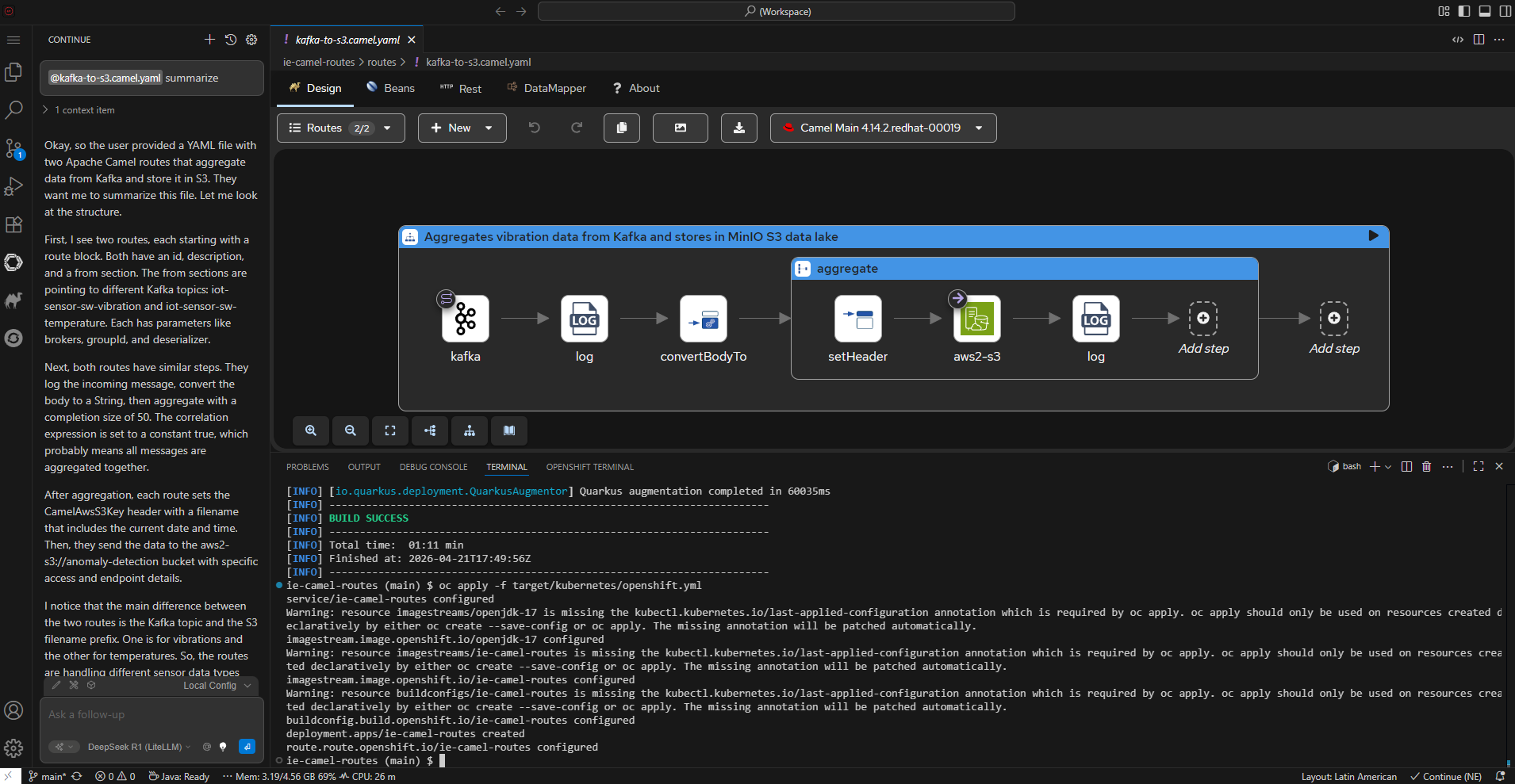
The screenshot shows a DevSpaces workspace with the Continue AI panel open on the left side. The AI assistant uses the Granite 3.1 2B model served by OpenShift AI to generate Apache Camel routes.
Creating Camel Routes with AI
Workflow
-
Create a new file:
touch routes/my-new-route.camel.yaml -
Open the file in the editor
-
Press
Ctrl+Ito open Continue’s inline edit, or use the chat panel -
Type a prompt describing the route — use
@to include project context -
Continue generates the YAML DSL code directly in the file
-
Open the file with Kaoto to visualize and refine the route
Using Project Context (@ Providers)
Continue is pre-configured with context providers that give the AI visibility into your project. Type @ in the chat to see available options:
| Provider | What it does |
|---|---|
|
Include a specific file as context (e.g. the existing CDC route) |
|
Search relevant snippets across the entire project automatically |
|
Reference all code from a specific folder (e.g. |
|
Include the file you have open in the editor |
|
Show the full project file structure |
|
Include current linter errors and warnings from the active file |
Using @File routes/cdc-to-mail.camel.yaml before a prompt gives the model a real example of the expected YAML DSL structure and produces much better results.
|
Prompts for Working with the camel-kaoto Component
The project has a sample route at routes/cdc-to-mail.camel.yaml. Use it as a reference when asking the AI to generate new routes.
Basic — Generate routes from scratch
| Prompt | What it generates |
|---|---|
|
A Kafka consumer route following the same structure as the existing CDC route |
|
A Kafka-to-REST route modeled after the existing template |
|
A health-check timer route (no Kafka dependency) |
Intermediate — Content-based routing and transformations
| Prompt | What it generates |
|---|---|
|
Extends the choice pattern with a delete-operation handler |
|
A multi-branch content-based router for order processing |
|
Route with XML marshalling instead of JSON |
Advanced — Multi-step integrations
| Prompt | What it generates |
|---|---|
|
A multi-step enrichment pipeline: Kafka → unmarshal → REST enrich → marshal → REST notify |
|
A route with try/catch error handling and dead-letter queue |
|
An aggregation route that batches Kafka messages before sending |
Context & Exploration
| Prompt | What it does |
|---|---|
|
Analyzes the project structure, routes, and configuration |
|
Provides a detailed walkthrough of each step in the route |
|
Lists and describes all routes found in the project |
|
Explains how Quarkus discovers and loads Camel routes |
Keep prompts concise. The Granite 2B model (8192 token context) works best with short, direct instructions. When including files via @File, avoid adding too many large files at once.
|
Developer Hub Integration
The software template in Developer Hub creates new Camel CDC projects with:
-
Pre-configured
devfile.yamlwith all extensions -
continue-config.jsonpointing to the Granite model -
Maven wrapper with Quarkus 3.15
-
Sample CDC route (
cdc-to-mail.camel.yaml) -
Correct DevSpaces factory URL for one-click workspace creation
Access Developer Hub: https://developer-hub.
Troubleshooting
| Issue | Solution |
|---|---|
Extensions not visible after workspace start |
Reload the browser with F5 — extensions install in |
|
Run |
Continue shows "context size exceeded" |
The model’s |
Workspace opens with "generateName: empty" |
Use the factory URL with the raw devfile: |