Event-Driven Architecture & Industrial Edge
NeuroFace CV — Computer Vision Pipeline
Overview
The NeuroFace Computer Vision pipeline extends the demo’s event-driven architecture, integrating face recognition with event streaming via Kafka and email notifications.
Components
| Component | Function | Namespace |
|---|---|---|
NeuroFace Frontend |
Angular app for face registration and live detection via webcam (WebRTC) |
|
NeuroFace Backend |
FastAPI + OpenCV API with LBPH recognizer — trains labels and exposes |
|
OpenVINO Model Server (OVMS) |
Intel inference server serving |
|
Model PVC |
1 Gi PersistentVolumeClaim storing Intel Model Zoo |
|
Jupyter Workbench |
OpenShift AI notebook for model experimentation |
|
CV Processor |
Python microservice (UBI9) — polls OVMS |
|
Kafka Topic |
|
|
Kafka Consumer |
Same Python process — consumes events and routes by |
|
Mailpit |
SMTP + HTTP API — receives HTML emails formatted by event type |
|
Event Flow
The CV Processor runs a continuous polling loop:
-
Register face — The user registers a face in the NeuroFace UI (webcam → Frontend → Backend LBPH)
-
Poll OVMS —
GET /v1/configevery 30 seconds to check model status -
Poll Backend —
GET /api/labelsevery 30 seconds to detect newly registered faces -
Produce to Kafka — Publishes JSON events to topic
cv.face.detections(SASL_SSL authenticated) -
Consume from Kafka — The same process reads events and routes by
event_type -
Send email — Formats HTML and sends
POST /api/v1/sendto Mailpit
Event Types
| Type | Description | Recipient |
|---|---|---|
|
A new label is detected in the |
Security Admin — |
|
OVMS |
ML Ops — |
Kafka Event Schema
{
  "event_type": "person_registered",
  "timestamp": "2025-06-15T14:32:00Z",
  "source": "neuroface-lbph",
  "person_name": "Max",
  "face_count": 1,
  "detection_method": "lbph",
  "camera_id": "label-registry"
}
{
"event_type": "ovms_model_status",
"timestamp": "2025-06-15T14:32:30Z",
"source": "openvino-model-server",
"model_name": "face-detection-retail-0005",
"model_server": "ovms",
"ovms_response": { "face-detection-retail-0005": { "model_version_status": [{"state": "AVAILABLE"}] } },
"camera_id": "ovms-monitor"
}PPE Safety Detection (YOLO + OpenShift AI + Kafka)
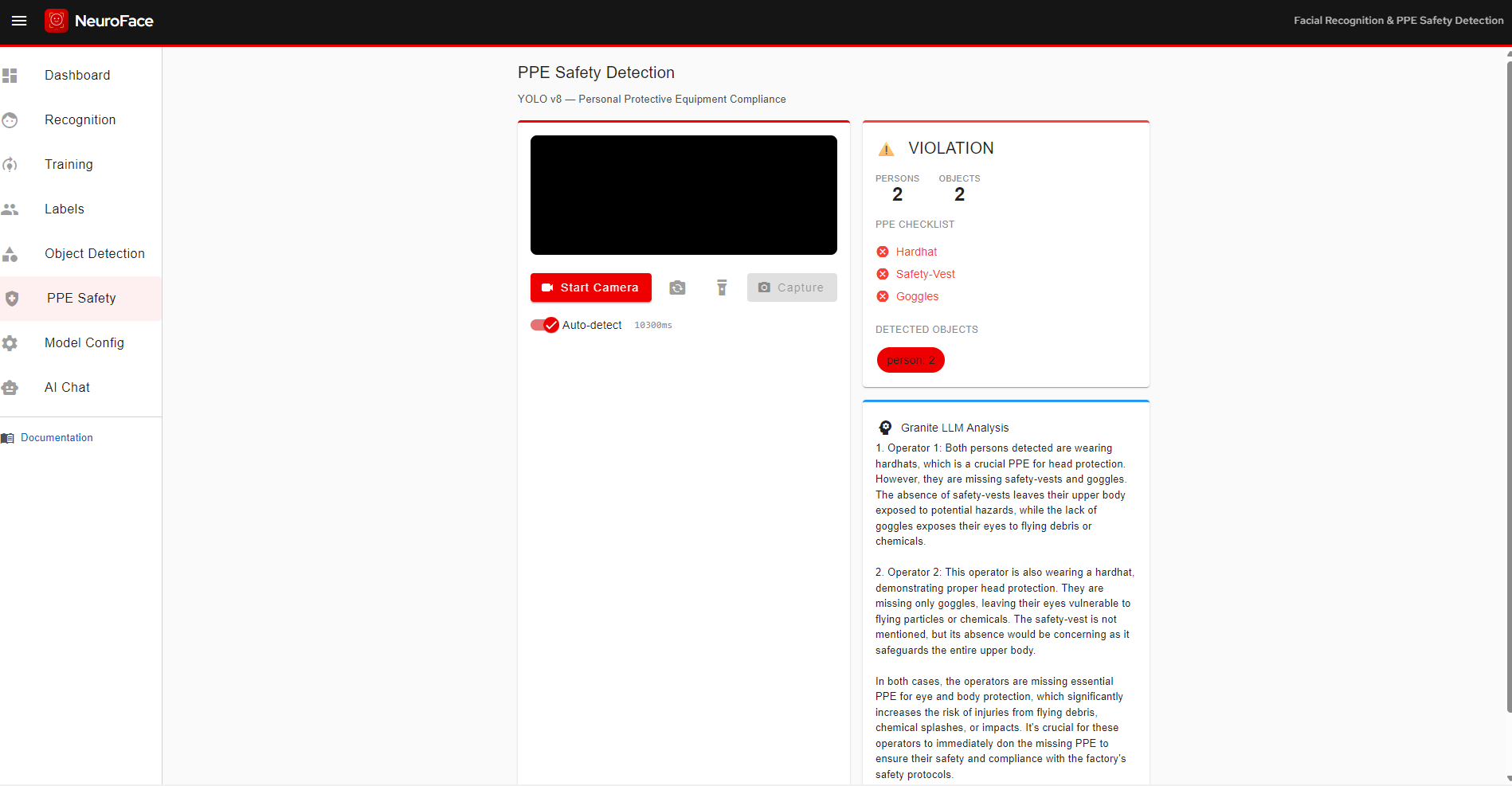
The PPE Safety Detection module extends the NeuroFace platform with real-time Personal Protective Equipment monitoring. Webcam frames are sent to a YOLOv8n serving endpoint for object detection, and a Granite 3.1 LLM generates natural-language safety analysis when violations are detected. Events are published to Kafka for compliance dashboards.
PPE Architecture
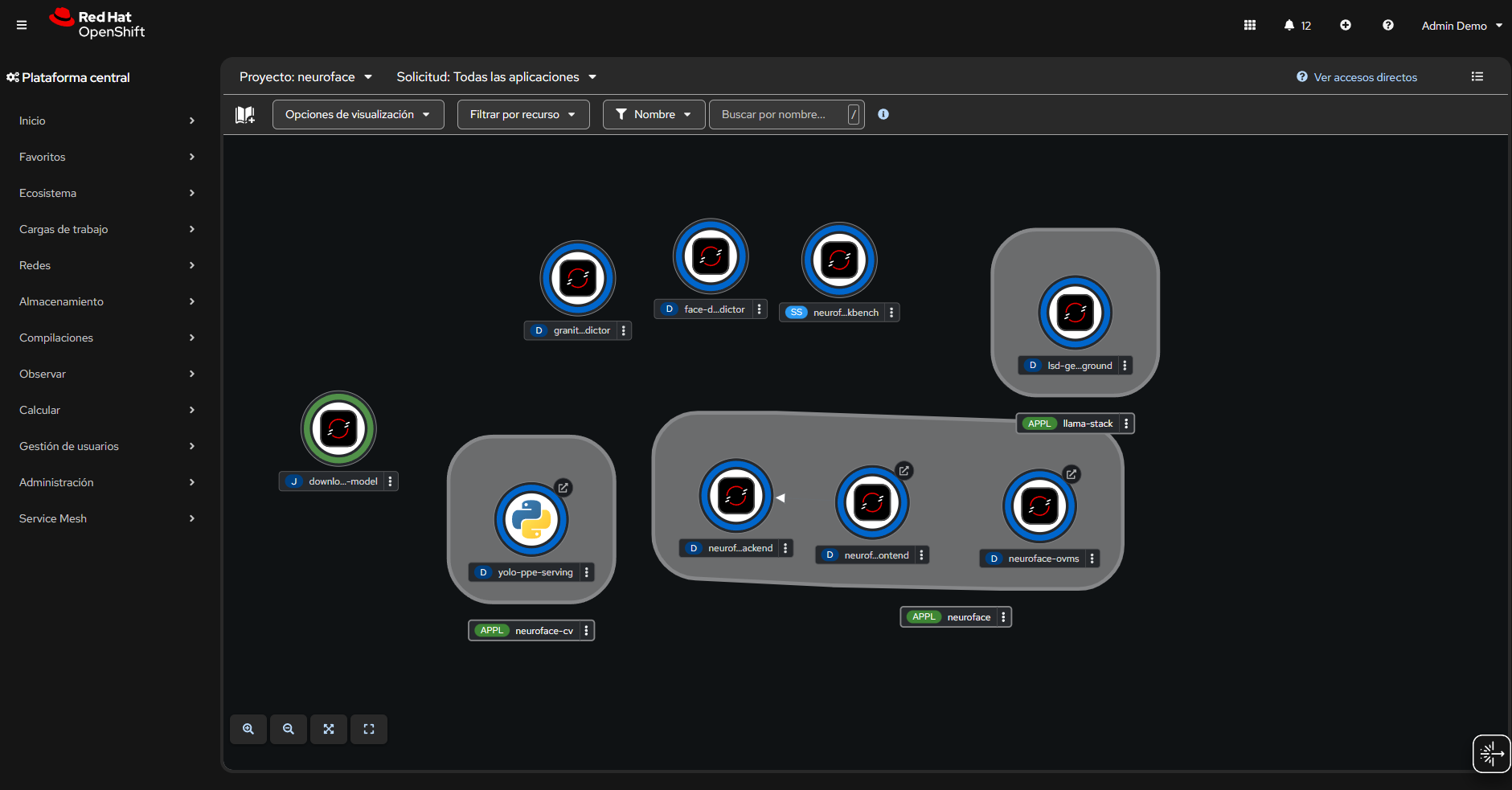
| Component | Role | Namespace |
|---|---|---|
YOLO PPE Serving |
Python HTTP server running Ultralytics YOLOv8n — receives JPEG, returns bounding boxes and class labels |
|
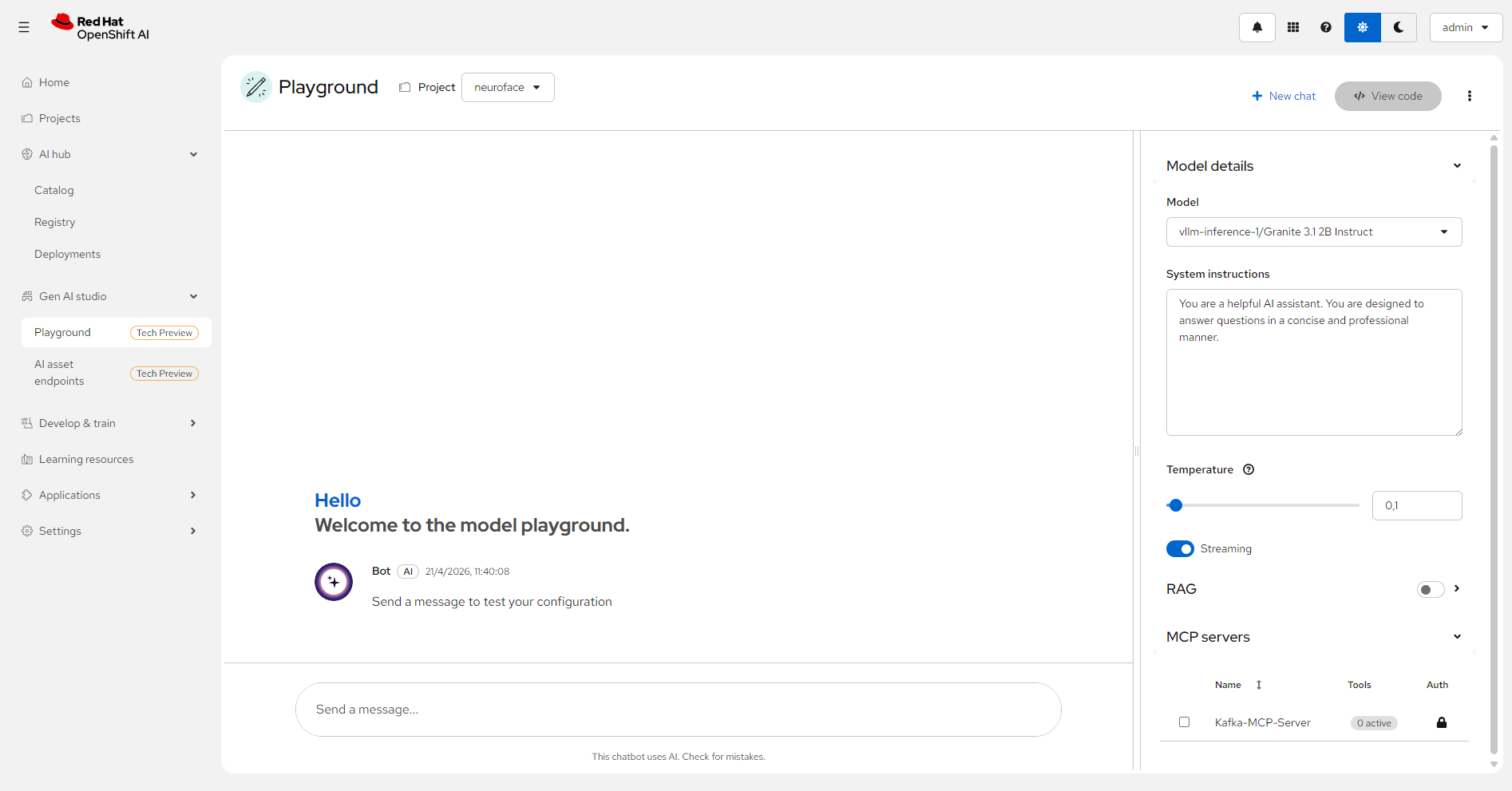
Granite 3.1 2B LLM |
KServe InferenceService — generates safety analysis on PPE violations |
|
Kafka Topic |
|
|
Kafka DLQ |
|
|
Jupyter Workbench |
|
|
PPE Data Flow
Each webcam frame follows this path:
-
Capture — Angular frontend captures a frame via WebRTC
-
YOLO Inference — Backend forwards to YOLO serving (
/v1/predict), gets bounding boxes with class names and confidence scores -
Compliance Check — Backend compares detections against expected PPE classes (
hardhat,safety-vest,goggles) and assigns status:compliant,violation, orno_persons -
LLM Analysis (on violation) — Granite 3.1 generates a safety analysis explaining risks
-
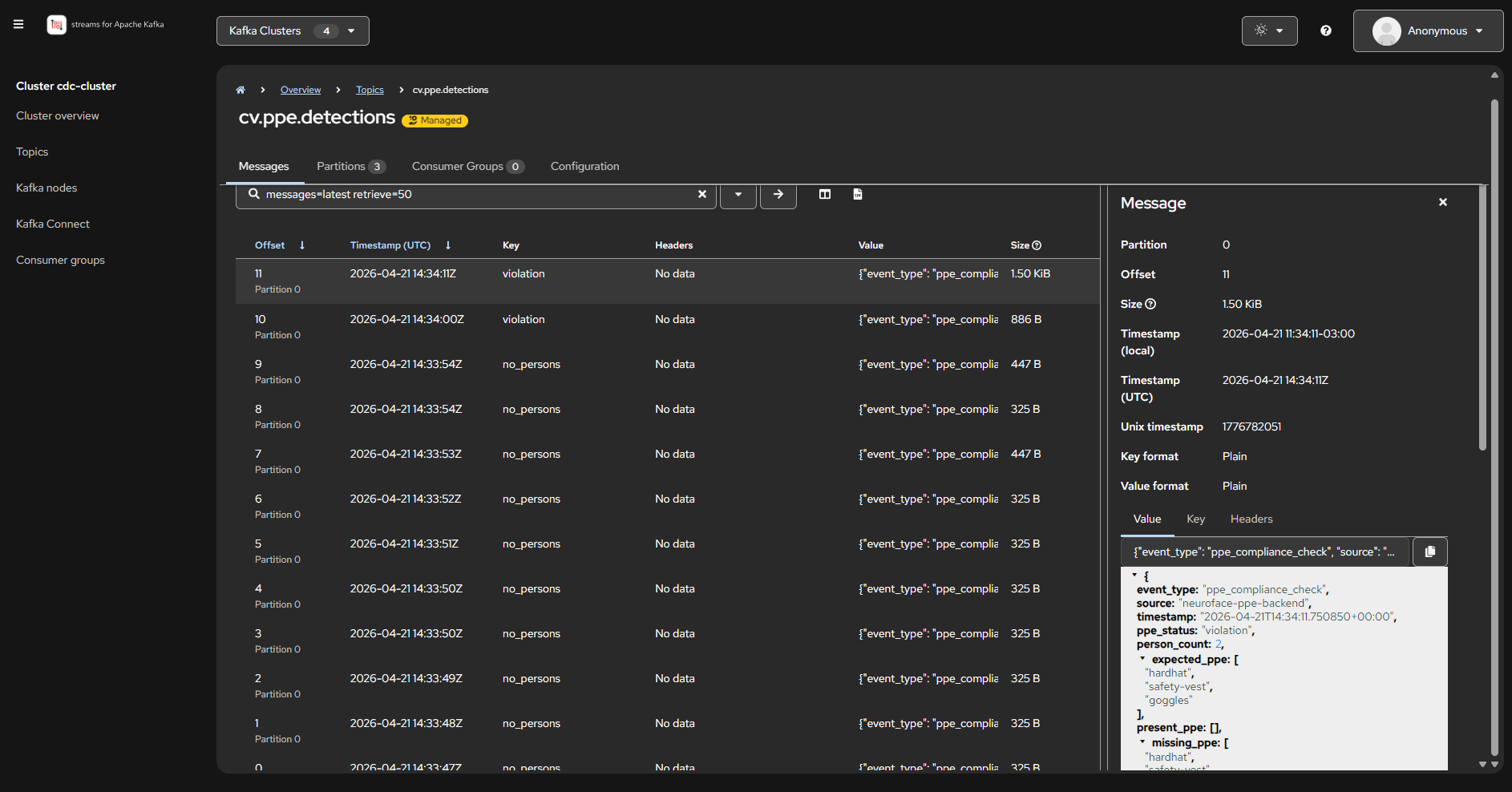
Kafka Publish — Full detection event published to
cv.ppe.detections -
Notebook Consumption — Jupyter renders compliance dashboards with matplotlib
PPE Kafka Event
{
  "event_type": "ppe_compliance_check",
  "source": "neuroface-ppe-backend",
  "timestamp": "2026-04-19T18:30:00Z",
  "ppe_status": "violation",
  "person_count": 1,
  "expected_ppe": ["hardhat", "safety-vest", "goggles"],
  "present_ppe": ["safety-vest"],
  "missing_ppe": ["hardhat", "goggles"],
  "detections": [
    {"class_name": "person", "confidence": 0.92, "bbox": {"x1": 120, "y1": 50, "x2": 380, "y2": 470}},
    {"class_name": "safety-vest", "confidence": 0.87, "bbox": {"x1": 145, "y1": 180, "x2": 355, "y2": 390}}
  ],
  "llm_analysis": "PPE violation: 1 operator missing hardhat and goggles. Risk: head injury and eye exposure. Immediate corrective action required."
}
Security
-
Kafka: SASL_SSL with SCRAM-SHA-512 (credentials
cdc-userfrom Kubernetes Secret) -
Kafka Console OIDC: Authenticated via Keycloak (RHBK) — roles:
platformadmin→ admin,userN→ viewer -
OVMS / YOLO: Cluster-internal access only (no external Route)
-
LLM endpoint: KServe with ServiceAccount token injection
-
Inter-namespace traffic: All Kafka connections use TLS
Integration with OpenShift AI
The NeuroFace model is served through OpenShift AI using KServe:
| Resource | Detail |
|---|---|
ServingRuntime |
|
InferenceService |
|
Jupyter Workbench |
|
GitOps and Argo CD
All CV pipeline resources are deployed via GitOps:
-
field-content-neuroface-cv: Argo CD Application for OVMS, InferenceService, CV Processor, Notebook -
field-content-mailpit: Argo CD Application for Mailpit (SMTP sink) -
field-content-kafka-console: Console with OIDC enabled
The full definition is in examples/helm/components/neuroface-cv/templates/all.yaml.