Deploying With the Helm Chart
The solution can be deployed to Kubernetes or OpenShift using the provided Helm chart under helm/nfl-wallet. The chart deploys:
- webapp — Vue frontend (with optional OpenShift Route, TLS edge + redirect).
- api-customers — Customers API.
- api-bills — Buffalo Bills wallet API.
- api-raiders — Las Vegas Raiders wallet API.
Each API has a Service, optional PVC for SQLite, and optional API key injection from a Secret. The webapp proxies /api-customers, /api-bills, and /api-raiders to the internal API services, so only the webapp Route is needed for external access by default.
Prerequisites
- Images built and pushed to a registry (e.g. Quay). See the repo root
build-push-quay.shif applicable. - Kubernetes 1.19+ or OpenShift.
- Helm 3.
Install (default)
kubectl create namespace nfl-wallet

helm install nfl-wallet ./helm/nfl-wallet -n nfl-wallet
Default values use the Quay namespace and image names defined in values.yaml. Only the webapp gets an OpenShift Route by default.
Enable biometric authentication (RHBK + NeuroFace)
Deploy with Red Hat Build of Keycloak and NeuroFace biometric second factor. Users authenticate with username/password followed by facial recognition:
helm install nfl-wallet ./helm/nfl-wallet -n nfl-wallet \
  --set "rhbk-neuroface.enabled=true" \
  --set "webapp.keycloakUrl=https://<release>-rhbk-neuroface-<namespace>.apps.<cluster>"
Note:
keycloakUrlmust be the RHBK base URL without/realms/<name>— keycloak-js appends the realm path automatically fromwebapp.keycloakRealm(defaultneuroface). The Keycloak URL is the OpenShift Route created for the RHBK deployment. You can retrieve it with:oc get route -l app.kubernetes.io/name=rhbk-neuroface -o jsonpath='{.items[0].spec.host}'
The chart pre-loads the realm with 7 mock customer accounts (matching the Customers API seed data). On first login each user must complete biometric enrollment (facial capture). Subsequent logins use facial verification as second factor.
Tuning biometric parameters
Override the confidence threshold, number of enrollment images, and camera resolution:
helm install nfl-wallet ./helm/nfl-wallet -n nfl-wallet \
  --set "rhbk-neuroface.enabled=true" \
  --set "webapp.keycloakUrl=https://<release>-rhbk-neuroface-<namespace>.apps.<cluster>" \
  --set "rhbk-neuroface.biometric.confidenceThreshold=75" \
  --set "rhbk-neuroface.biometric.maxEnrollmentImages=8" \
  --set "rhbk-neuroface.biometric.cameraWidth=1280" \
  --set "rhbk-neuroface.biometric.cameraHeight=720"
| Parameter | Description | Default |
|---|---|---|
confidenceThreshold |
Minimum confidence percentage (0–100) to accept a facial match during verification. Higher values are stricter. | 65.0 |
maxEnrollmentImages |
Number of facial images captured during biometric enrollment. More images improve recognition accuracy. | 5 |
cameraWidth |
Camera capture width in pixels. | 640 |
cameraHeight |
Camera capture height in pixels. | 480 |
Camera resolution presets:
| Preset | Width × Height | Recommended for |
|---|---|---|
| QVGA | 320 × 240 | Low-bandwidth / embedded devices |
| VGA (default) | 640 × 480 | Standard webcams, good balance of speed and quality |
| HD 720p | 1280 × 720 | Higher accuracy, requires more processing |
| Full HD 1080p | 1920 × 1080 | Maximum detail, higher CPU/memory usage |
Tip: Higher resolutions improve facial recognition accuracy but increase enrollment time and network payload. VGA (640×480) is recommended for most deployments.
| Mock user | Password | Role |
|---|---|---|
john.doe |
changeme (temporary) |
wallet-user |
jane.smith |
changeme (temporary) |
wallet-user |
robert.johnson |
changeme (temporary) |
wallet-user |
maria.garcia |
changeme (temporary) |
wallet-user |
james.wilson |
changeme (temporary) |
wallet-user |
emily.brown |
changeme (temporary) |
wallet-user |
maxpizarro |
neuroface |
wallet-user, biometric-admin |
ESPN API key (Connectivity Link)
When the ESPN endpoint is proxied through a Gateway secured with Connectivity Link, pass the API key so the scoreboard ticker can authenticate:
helm install nfl-wallet ./helm/nfl-wallet -n nfl-wallet \
  --set "espn.apiKey=<your-api-key>" \
  --set "espn.apiUrl=/public/nfl"
The X-API-Key header is sent with every ESPN API request when espn.apiKey is set.
Override image registry / namespace
helm install nfl-wallet ./helm/nfl-wallet -n nfl-wallet \
  --set imageNamespace=your-quay-namespace
Disable the webapp Route
helm install nfl-wallet ./helm/nfl-wallet -n nfl-wallet --set webapp.route.enabled=false
Helm chart values (reference)
| Key | Description | Default |
|---|---|---|
global.imageRegistry |
Image registry | quay.io |
global.imagePullSecrets |
Pull secrets | [] |
imageNamespace |
Registry namespace for images | maximilianopizarro |
topology.applicationName |
OpenShift Topology app.kubernetes.io/part-of |
nfl-wallet |
apiCustomers.image, tag |
api-customers image | nfl-wallet-api-customers:latest |
apiCustomers.replicaCount |
Replicas | 1 |
apiCustomers.service.port |
Service port | 8080 |
apiCustomers.persistence.enabled, size |
PVC for SQLite | true, 1Gi |
apiBills.image, tag |
api-bills image | nfl-api-bills:latest |
apiBills.replicaCount |
Replicas | 1 |
apiBills.service.port |
Service port | 8081 |
apiBills.persistence.enabled, size |
PVC for SQLite | true, 1Gi |
apiBills.rateLimit.permitLimit |
Rate limit: max requests per window (per IP) for /api-bills | 100 |
apiBills.rateLimit.windowSeconds |
Rate limit window (seconds) | 60 |
apiRaiders.image, tag |
api-raiders image | nfl-wallet-api-raiders:latest |
apiRaiders.replicaCount |
Replicas | 1 |
apiRaiders.service.port |
Service port | 8082 |
apiRaiders.persistence.enabled, size |
PVC for SQLite | true, 1Gi |
webapp.image, tag |
webapp image | nfl-wallet-webapp:latest |
webapp.replicaCount |
Replicas | 1 |
webapp.service.port |
Service port | 5173 |
webapp.route.enabled |
Create OpenShift Route for webapp | true |
webapp.route.host |
Override Route host | "" |
webapp.route.tls.termination |
Route TLS (edge, passthrough, reencrypt) | edge |
webapp.route.tls.insecureEdgeTerminationPolicy |
HTTP→HTTPS redirect | Redirect |
webapp.keycloakUrl |
RHBK base URL (without /realms/<name>) |
"" |
webapp.keycloakRealm |
Keycloak realm name | neuroface |
webapp.keycloakClientId |
OIDC client ID | nfl-wallet-app |
webapp.apiCustomersUrl, apiBillsUrl, apiRaidersUrl |
Override API base URLs (browser) | "" |
espn.enabled |
Enable ESPN scoreboard ticker | true |
espn.apiUrl |
ESPN API endpoint URL | public ESPN API |
espn.apiKey |
X-API-Key for ESPN proxy (Connectivity Link) | "" |
rhbk-neuroface.enabled |
Deploy RHBK + NeuroFace biometric auth | false |
rhbk-neuroface.biometric.confidenceThreshold |
Minimum confidence % for facial match (0–100) | 65.0 |
rhbk-neuroface.biometric.maxEnrollmentImages |
Images captured during enrollment | 5 |
rhbk-neuroface.biometric.cameraWidth |
Camera capture width (px) | 640 |
rhbk-neuroface.biometric.cameraHeight |
Camera capture height (px) | 480 |
apiKeys.enabled |
Create Secret and inject API keys | false |
apiKeys.customers, bills, raiders |
API key per API (X-API-Key) | "" |
gateway.enabled |
Create Gateway + HTTPRoutes | false |
gateway.className |
GatewayClass (e.g. istio, openshift-gateway) | istio |
gateway.existingGatewayName |
Use existing Gateway | "" |
gateway.route.enabled |
OpenShift Route for Gateway (edge + redirect) | true when gateway enabled |
gateway.route.host, targetPort |
Gateway Route host and port | "", http |
authorizationPolicy.enabled |
Istio AuthorizationPolicy for X-API-Key | false |
authorizationPolicy.requireForCustomers, requireForBills, requireForRaiders |
Apply policy per API | true each |
Generate Helm package and index.yaml (docs folder)
To publish the chart as a Helm repo from the docs folder (e.g. for GitHub Pages):
- From the repo root run:
- Linux/macOS:
./scripts/helm-package-docs.sh - Windows (PowerShell):
.\scripts\helm-package-docs.ps1
- Linux/macOS:
- This creates
docs/nfl-wallet-<version>.tgzand updates (or creates)docs/index.yaml. - Commit and push
docs/nfl-wallet-*.tgzanddocs/index.yaml. - Users can then add the repo and install:
helm repo add nfl-wallet https://maximilianopizarro.github.io/NFL-Wallet
helm repo update
helm install nfl-wallet nfl-wallet/nfl-wallet -n nfl-wallet
For more details and security/topology options, see the Helm chart README in the repo.
OpenShift Topology view
When deployed to OpenShift, the chart adds labels and the app.openshift.io/connects-to annotation so the Developer Topology view groups the app and shows connectors from the webapp to the three APIs.
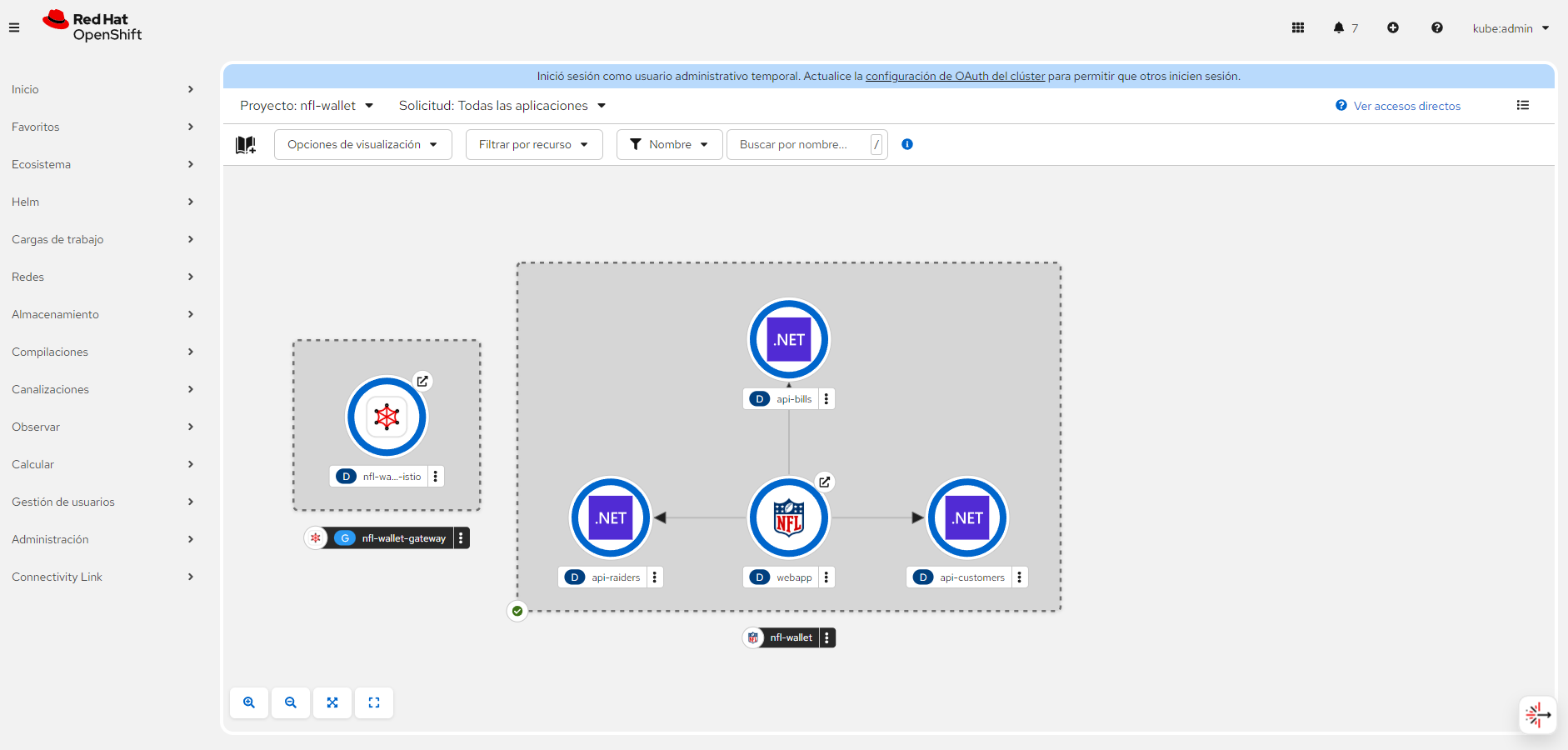 Stadium Wallet in OpenShift Topology (webapp → api-customers, api-bills, api-raiders). Click to enlarge.