
Adding the Connectivity Link (Gateway Layer)
You can expose the webapp and the three APIs through the Gateway API (Connectivity Link) by enabling the gateway in the Helm chart. The chart then creates:
- A Gateway (if you do not use an existing one).
- Four HTTPRoutes: one for the webapp (path
/) and three for the APIs (/api-customers,/api-bills,/api-raiders), with URL rewrite so the backends receive/api/.... - An OpenShift Route for the Gateway with TLS edge and redirect (optional, configurable).
Commands to Enable the Gateway
Install with gateway enabled (new install):
kubectl create namespace nfl-wallet

helm install nfl-wallet ./helm/nfl-wallet -n nfl-wallet --set gateway.enabled=true
On OpenShift, use the platform GatewayClass (e.g. openshift-gateway):
helm install nfl-wallet ./helm/nfl-wallet -n nfl-wallet \
  --set gateway.enabled=true \
  --set gateway.className=openshift-gateway
Reuse an existing Gateway in the same namespace:
helm install nfl-wallet ./helm/nfl-wallet -n nfl-wallet \
  --set gateway.enabled=true \
  --set gateway.existingGatewayName=my-gateway
Upgrade an existing release to add the gateway:
helm upgrade nfl-wallet ./helm/nfl-wallet -n nfl-wallet --set gateway.enabled=true
Gateway-related values
| Value | Description | Default |
|---|---|---|
gateway.enabled |
Create Gateway + HTTPRoutes | false |
gateway.className |
GatewayClass name (e.g. istio, openshift-gateway) |
istio |
gateway.existingGatewayName |
Use existing Gateway instead of creating one | "" |
gateway.hostnames |
Hostnames for all HTTPRoutes (needed for Kuadrant; ensures / and APIs match the gateway host) |
[] |
gateway.route.enabled |
Create OpenShift Route for the Gateway (edge + redirect) | true when gateway enabled |
gateway.route.name |
Name of the Route resource | nfl-wallet-gateway |
gateway.route.targetPort |
Target port of the Gateway Service | http |
Two gateway routes? If you see both nfl-gateway (→ nfl-wallet-gateway-istio) and nfl-wallet-gateway (→ nfl-wallet-gateway), the first is usually created by the platform (Istio/OpenShift) and the second by this chart. To keep only one gateway URL, set gateway.route.enabled: false so the chart does not create a Route; use the platform route (e.g. nfl-gateway) and set gateway.hostnames to that host when using Kuadrant policies.
What gets created
- Gateway (if
gateway.existingGatewayNameis not set): one Gateway resource. - HTTPRoutes:
nfl-wallet-webapp(path/),nfl-wallet-api-customers,nfl-wallet-api-bills,nfl-wallet-api-raiderswith path prefix and URL rewrite to/api. Whengateway.hostnamesis set, all four HTTPRoutes get that hostname so the gateway matches the public host (e.g. for a single platform route). - OpenShift Route
nfl-wallet-gateway: exposes the Gateway with TLS edge and HTTP→HTTPS redirect (whengateway.route.enabledis true).
The frontend remains available via the webapp Route as before; the gateway Route provides an alternate entry point for the same backends.
Install AuthPolicy and RateLimitPolicy together (Kuadrant)
To install both Kuadrant AuthPolicy (X-API-Key for /api-bills) and RateLimitPolicy (e.g. 100/min) you must set all of these to true:
| Value | Required for |
|---|---|
gateway.enabled=true |
Gateway, HTTPRoutes, both policies |
gateway.rateLimitPolicy.enabled=true |
RateLimitPolicy |
gateway.authPolicy.enabled=true |
AuthPolicy |
gateway.authPolicy.bills.enabled=true |
AuthPolicy for api-bills |
One-liner (replace the host or use the next block):
helm upgrade nfl-wallet ./helm/nfl-wallet -n nfl-wallet \
  --set gateway.enabled=true \
  --set gateway.rateLimitPolicy.enabled=true \
  --set gateway.authPolicy.enabled=true \
  --set gateway.authPolicy.bills.enabled=true \
  --set gateway.hostnames[0]=nfl-gateway-nfl-wallet.apps.cluster-XXX.sandbox.opentlc.com
With host from the Route (Bash):
GWHOST=$(kubectl get route -n nfl-wallet -l app.kubernetes.io/component=gateway -o jsonpath='{.items[0].spec.host}')
helm upgrade nfl-wallet ./helm/nfl-wallet -n nfl-wallet \
  --set gateway.enabled=true \
  --set gateway.rateLimitPolicy.enabled=true \
  --set gateway.authPolicy.enabled=true \
  --set gateway.authPolicy.bills.enabled=true \
  --set gateway.hostnames[0]="$GWHOST"
Then verify:
kubectl get authpolicy,ratelimitpolicy -n nfl-wallet
Kuadrant RateLimitPolicy (optional)
If the Kuadrant operator is installed in the cluster, you can enable a rate limit for /api-bills (default 100 requests per minute):
helm upgrade nfl-wallet ./helm/nfl-wallet -n nfl-wallet \
  --set gateway.enabled=true \
  --set gateway.rateLimitPolicy.enabled=true
Related values: gateway.rateLimitPolicy.bills.limit (default 100), gateway.rateLimitPolicy.bills.window (default 1m).
How to test the rate limit
-
Deploy with gateway and rate limit enabled (and Kuadrant installed):
helm upgrade nfl-wallet ./helm/nfl-wallet -n nfl-wallet \
  --set gateway.enabled=true \
  --set gateway.rateLimitPolicy.enabled=true
If you use API keys for the APIs, include the header in requests (e.g.
-H "X-API-Key: your-apikey"). -
Get the gateway URL (OpenShift):
oc get route -n nfl-wallet -l app.kubernetes.io/component=gateway -o jsonpath='{.items[0].spec.host}'Or list routes and use the one that targets the gateway:
oc get route -n nfl-wallet. -
Send requests to
/api-billsto verify behavior. Example with 20 requests (PowerShell):$host = "nfl-wallet-gateway-nfl-wallet.apps.your-domain.com" # replace with your host $url = "https://$host/api-bills/" 1..20 | ForEach-Object { $r = Invoke-WebRequest -Uri $url -Method GET -UseBasicParsing -Headers @{ "X-API-Key" = "test" } -ErrorAction SilentlyContinue Write-Host "$_ : $($r.StatusCode)" }Bash:
HOST="nfl-wallet-gateway-nfl-wallet.apps.your-domain.com"
for i in $(seq 1 20); do
  code=$(curl -s -o /dev/null -w "%{http_code}" -H "X-API-Key: test" "https://$HOST/api-bills/")
  echo "$i : $code"
done
With the default limit (100 per minute), the first 100 responses in a minute are 200; after that you get 429 (Too Many Requests). To trigger 429, run more than 100 requests in one minute (e.g.
seq 1 105). -
Check the RateLimitPolicy status:
kubectl get ratelimitpolicy -n nfl-wallet
kubectl describe ratelimitpolicy nfl-wallet-api-bills-ratelimit -n nfl-wallet
The resource should be applied; if Kuadrant is configured correctly, the limit is enforced at the gateway.
Note: The rate limiting component may run in the Kuadrant operator namespace (e.g.
kuadrant-system) or inside the gateway data plane, so you may not see a dedicated “limitator” pod in thenfl-walletnamespace topology.
Kuadrant AuthPolicy for /api-bills (optional)
If the Kuadrant operator is installed, you can secure the /api-bills route with an AuthPolicy that requires the X-API-Key header (any non-empty value), with a custom JSON 403 body when the header is missing. This uses Kuadrant/Authorino at the gateway instead of Istio AuthorizationPolicy on the workload.
Enable it with:
helm upgrade nfl-wallet ./helm/nfl-wallet -n nfl-wallet \
  --set gateway.enabled=true \
  --set gateway.authPolicy.enabled=true \
  --set gateway.authPolicy.bills.enabled=true
When this is enabled, the chart does not create the Istio AuthorizationPolicy for api-bills (Kuadrant enforces the same rule at the gateway). The policy allows requests that include any non-empty X-API-Key header and returns 403 with a configurable JSON body otherwise.
Important: If the AuthConfig in istio-system shows “No hosts linked to the resource” (AuthPolicy stays Enforced: False), set gateway.hostnames to the gateway’s public hostname so Kuadrant can link the AuthConfig to your host. Get the host from the Route, then upgrade with it:
GWHOST=$(kubectl get route -n nfl-wallet -l app.kubernetes.io/component=gateway -o jsonpath='{.items[0].spec.host}')
helm upgrade nfl-wallet ./helm/nfl-wallet -n nfl-wallet \
  --set gateway.enabled=true \
  --set gateway.authPolicy.enabled=true \
  --set gateway.authPolicy.bills.enabled=true \
  --set gateway.hostnames[0]="$GWHOST"
After a short while, kubectl get authconfig -n istio-system should show the AuthConfig as READY (1/1) and the AuthPolicy as Enforced.
| Value | Description | Default |
|---|---|---|
gateway.hostnames |
List of hostnames for the gateway (required for Kuadrant AuthConfig to link; use the Route host) | [] |
gateway.authPolicy.enabled |
Enable Kuadrant AuthPolicy for the gateway routes | false |
gateway.authPolicy.bills.enabled |
Apply AuthPolicy to the api-bills HTTPRoute | false |
gateway.authPolicy.bills.unauthorizedBody |
JSON string for 403 response body | {"error":"Forbidden","message":"Missing or invalid X-API-Key header."} |
If you get 500 on /api-bills/... (with or without X-API-Key) and the AuthConfig in istio-system has spec.hosts set to a hash instead of your gateway host, patch it so Authorino can match the request:
# Find the AuthConfig that backs the bills AuthPolicy (name is a hash)
kubectl get authconfig -n istio-system -o jsonpath='{range .items[*]}{.metadata.name}{"\t"}{.spec.hosts[0]}{"\n"}{end}' | head -20

# Patch the one that has the hash as host (replace HASH with the name, e.g. d17c85a098a189a7f6e791f60c3fdeec93daaf45a9e4986b67391d9d24350ece)
kubectl patch authconfig HASH -n istio-system --type=json -p='[{"op":"replace","path":"/spec/hosts","value":["nfl-gateway-nfl-wallet.apps.cluster-zrg7z.zrg7z.sandbox489.opentlc.com"]}]'
Use your actual gateway host in value. After the patch, requests without X-API-Key should return 403 and with the header 200 (or whatever the API returns).
If you get 500 and the AuthPolicy status shows Enforced: False (“waiting for AuthConfig to sync”):
- The gateway may be calling Authorino before the AuthConfig is ready, which can result in 500. Wait a minute and check again:
kubectl get authpolicy nfl-wallet-api-bills-auth -n nfl-wallet -o jsonpath='{.status.conditions}'. - When
EnforcedisTrue, requests withoutX-API-Keyshould get 403 with your JSON body; with a valid header they should reach the backend (200 or 404/5 from the API). - To see why the policy is not enforced, list and describe the AuthConfig that Kuadrant creates:
kubectl get authconfig -n nfl-walletandkubectl describe authconfig <name> -n nfl-wallet. Check the AuthConfig status and any Authorino/Kuadrant operator logs.
Gateway metrics (Total Requests, Successful Requests, Error Rate)
The gateway is implemented by Istio (or OpenShift Gateway, which uses Envoy/Istio). The proxy exposes metrics that Prometheus can scrape; from these you get Total Requests, Successful Requests, and Error Rate.
For observability with the Cluster Observability Operator (ThanosQuerier, PodMonitor/ServiceMonitor for the gateway, UIPlugin), see config/observability/README.md in the repository.
Configuration (Cluster Observability Operator)
Apply the YAMLs in config/observability/: ThanosQuerier, PodMonitor or ServiceMonitor for the gateway, and UIPlugin. The operator will then scrape the gateway traffic and metrics will appear in the observability UI.
Prometheus queries (reference)
Once metrics are scraped, use these in Prometheus (or Grafana / OpenShift Metrics):
| Metric | Prometheus query (example for namespace nfl-wallet) |
|---|---|
| Total Requests (rate) | sum(rate(istio_requests_total{connection_security_policy="none"}[5m])) or filter by destination_workload_namespace="nfl-wallet" |
| Successful Requests (2xx rate) | sum(rate(istio_requests_total{response_code=~"2.."}[5m])) (add same namespace filter if needed) |
| Error Rate | sum(rate(istio_requests_total{response_code=~"5.."}[5m])) / sum(rate(istio_requests_total[5m])) or use response_code=~"4.." for client errors |
Adjust labels to match your mesh. In the observability UI (UIPlugin) you can query istio_requests_total and the expressions above.
Connectivity Link overview
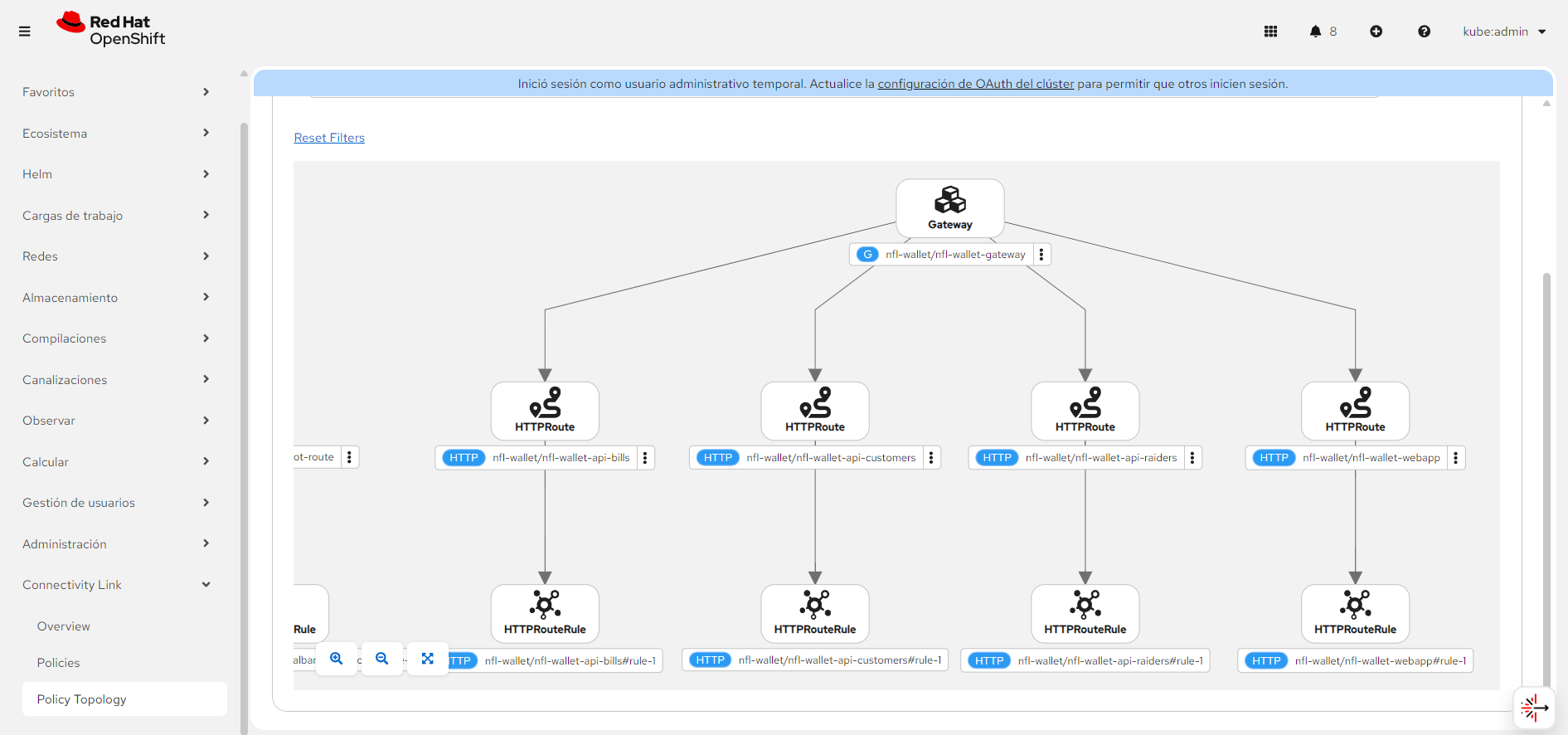 Connectivity Link: Gateway API and HTTPRoutes exposing the webapp and APIs (Customers, Bills, Raiders). Click to enlarge.
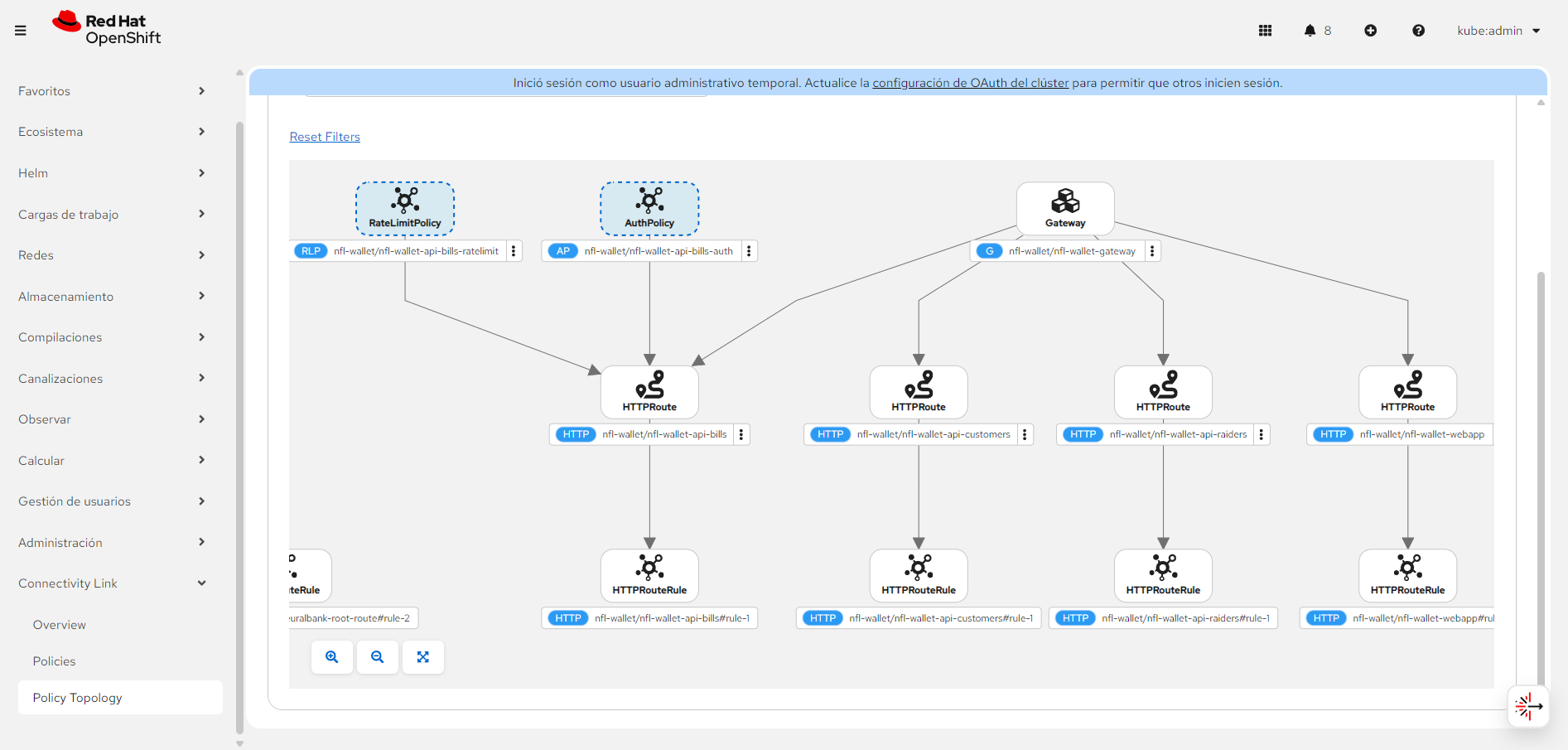 Connectivity Link with Kuadrant AuthPolicy (X-API-Key) and RateLimitPolicy on
 /api-bills. Click to enlarge.