
Stadium Wallet
Official Installation, Testing & Architecture Guide — Complete digital wallet ecosystem for stadiums on Red Hat OpenShift.
Table of Contents
- Executive Summary
- Architecture & Data Flows
- Technology Stack
- Infrastructure Prerequisites
- GitOps Installation Guide
- Service Mesh 3 (Ambient Mode)
- Connectivity Link & Gateway API
- Security: API Keys & Policies
- Multi-Cluster GitOps with ACM
- Red Hat Developer Hub (Kuadrant Plugin)
- Observability
- Canary / Blue-Green Deployments
- Test Plan & Validation (QA)
- API Reference
- Troubleshooting
- Publish to Artifact Hub
- Appendix — Screenshots
1. Executive Summary
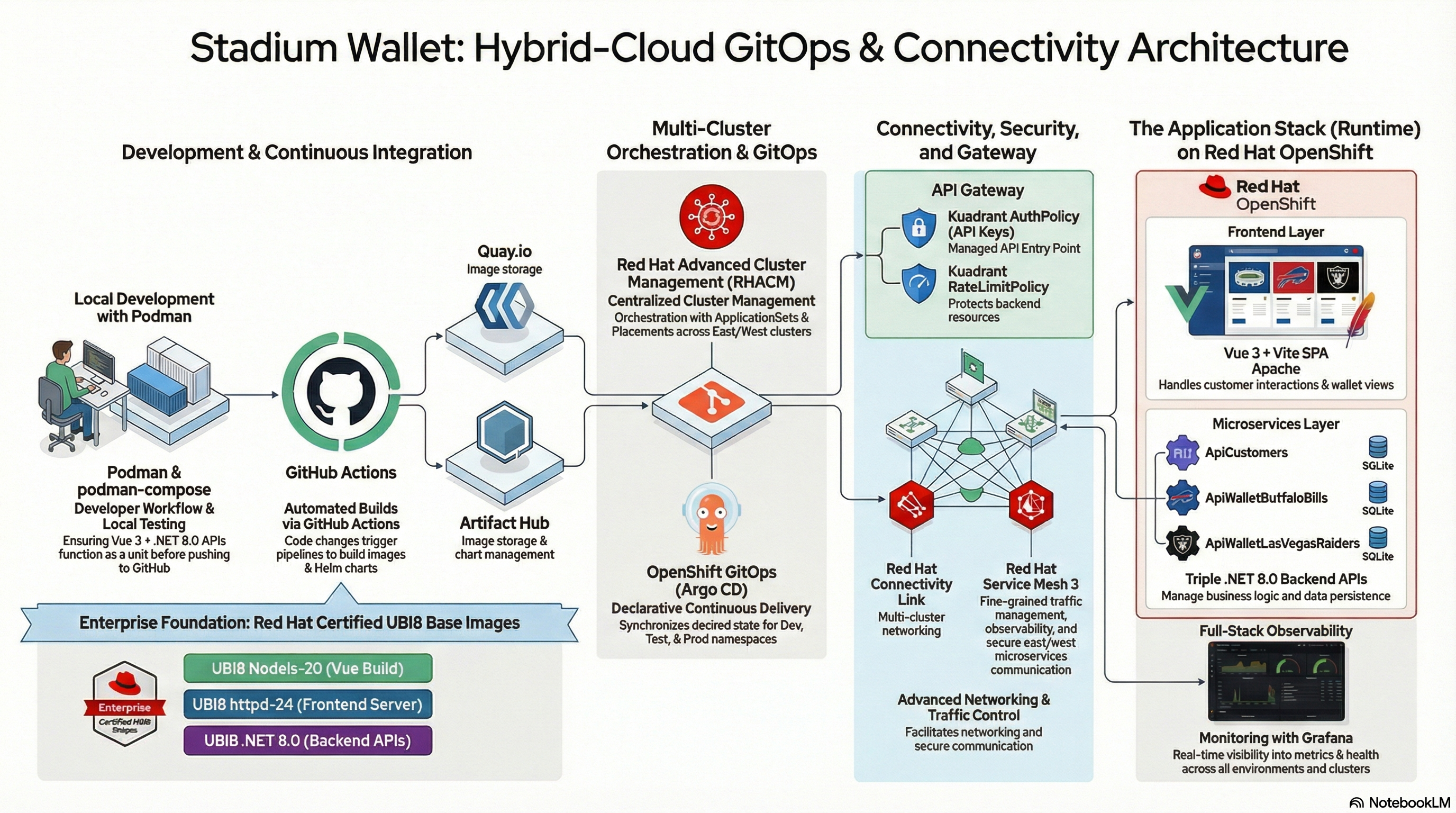 High-level architecture of the Stadium Wallet ecosystem.
This document provides the definitive guide for deploying, configuring, and validating the Stadium Wallet ecosystem. The platform adopts a modern approach based on GitOps, Zero-Trust security without sidecars via OSSM3 (Ambient Mode), and comprehensive API lifecycle management through Kuadrant and Red Hat Developer Hub.
The system is composed of an interactive frontend (Vue.js) and three core microservices (.NET 8):
| Microservice | Function |
|---|---|
| api-customers | Centralized identity and customer profile management |
| api-bills | Transactional logic for the Buffalo Bills venue |
| api-raiders | Transactional logic for the Las Vegas Raiders venue |
The microservices interact with external data sources (ESPN API) securely and auditably to obtain real-time sports data.
Declarative GitOps
Continuous synchronization with OpenShift GitOps (ArgoCD) — all state is defined in Git.
Zero-Trust without Sidecars
OSSM3 Ambient Mode: automatic mTLS without sidecar container injection.
Complete Observability
Grafana, Prometheus, Kiali, TempoStack and OpenTelemetry for full visibility.
Federated Multi-Cluster
Hub-and-Spoke topology with ACM, deployed across East and West clusters.
Related Resources
| Resource | Description |
|---|---|
| Build a zero trust environment with Red Hat Connectivity Link | Red Hat Developer article: Zero Trust architecture with OIDC/Keycloak and NeuralBank |
| Red Hat Connectivity Link — Documentation v1.3 | Official product documentation |
| Red Hat Connectivity Link — Product | Product page with overview and use cases |
| Kuadrant — Documentation | Upstream project docs (AuthPolicy, RateLimitPolicy, DNSPolicy) |
| Kuadrant — Project | Open source project site |
| Getting Started with Connectivity Link on OpenShift | Quick start guide on Red Hat Developer |
| OSSM3 Ambient Mode — Multi-Cluster Demo | Francisco Raposo’s repo: Ansible playbooks for OSSM3, Bookinfo and multi-cluster observability |
| Connectivity Link — Developer Hub Deployment | GitOps deployment of RHDH on Red Hat Developer Sandbox with Kuadrant, Keycloak, MCP and RBAC |
| Stadium Wallet GitOps — Documentation Site | Operational guides: architecture, getting started, ACM deploy, gateway policies, QA scripts |
| RHBK NeuroFace Biometric Flow | RHBK 26.0 with biometric facial 2FA via NeuroFace SPI — Helm chart, demo videos and architecture |
| NeuroFace — Facial Recognition Service | FastAPI + Angular 17 facial recognition webapp with OpenCV LBPH / dlib |
2. Architecture & Data Flows
2.1 Three-Tier Architecture
The solution is structured in a modern three-tier model:
| Tier | Component | Technology Stack | Function | Scalability |
|---|---|---|---|---|
| Frontend | webapp (SPA) | Vue 3, Vite, vue-router, Apache (UBI8 httpd-24) | UI for login, balance inquiries and QR code generation for payments | Stateless — OpenShift HPA |
| Backend API | 3 Independent Microservices | .NET 8.0 ASP.NET Core | ApiCustomers (identity), ApiWalletBuffaloBills (Bills transactions), ApiWalletLasVegasRaiders (Raiders transactions) | Independently deployable and scalable |
| Data | Persistent Storage | SQLite (customers.db, buffalobills.db, lasvegasraiders.db) | Local persistence per API | Strict data isolation |
Production Note: For full production deployments, SQLite databases should be migrated to high-availability solutions such as PostgreSQL on OpenShift, potentially using the Crunchy Data operator.
2.2 Network Architecture & Service Mesh Diagram
graph TD
    subgraph Management_Plane["Management Plane"]
        DevHub["Red Hat Developer Hub<br/>API Portal"]
        Argo["OpenShift GitOps<br/>Continuous Sync"]
    end

    subgraph Cluster["OpenShift Cluster — Namespace: nfl-wallet"]
        GW["Gateway API / Kuadrant Ingress"]

        subgraph Mesh["OSSM3 Ambient Mesh — Zero-Trust"]
            Z["ztunnel<br/>L4 Secure Overlay / mTLS"]
            WP["Waypoint Proxy<br/>L7 Auth / Routing"]
            UI["webapp<br/>Vue.js :5173"]
            CAPI["api-customers<br/>.NET 8 :8080"]
            BAPI["api-bills<br/>.NET 8 :8080"]
            RAPI["api-raiders<br/>.NET 8 :8080"]
        end
    end

    subgraph External["External Services"]
        ESPN["ESPN Public API<br/>Scoreboards & Stats"]
    end

    User((End User)) --> GW
    Dev((Developer)) --> DevHub
    Argo -- "Applies Manifests" --> Cluster

    GW --> Z
    Z <--> UI
    UI -- "API Calls" --> Z
    Z <--> WP
    WP --> CAPI
    WP --> BAPI
    WP --> RAPI

    RAPI -- "Egress Traffic" --> ESPN
    BAPI -- "Egress Traffic" --> ESPN
2.3 Multi-Cluster Topology & Federation
The system utilizes a Hub-and-Spoke model, governed by Red Hat platform and management tools:
- Hub Cluster (Control Plane): Red Hat Advanced Cluster Management (ACM), OpenShift GitOps (ArgoCD), Centralized Observability Hub (Prometheus, Grafana, Kiali).
- Data Clusters East/West (Spoke): Application workloads, OSSM3 in Ambient Mode, federation via HBONE (HTTP/2-Based Encryption).
graph TD
    subgraph Hub["Hub — OpenShift GitOps + ACM"]
        ACM_YAML["app-nfl-wallet-acm.yaml"]
        Placement["Placement<br/>nfl-wallet-gitops-placement"]
        GitOps["GitOpsCluster<br/>creates east/west secrets"]
        ACM_Decision["app-nfl-wallet-acm-cluster-decision.yaml"]
        AppSet["ApplicationSet — matrix<br/>clusterDecisionResource × list: dev, test, prod"]
        Apps["Applications:<br/>nfl-wallet-namespace-clusterName"]

        ACM_YAML --> Placement
        ACM_YAML --> GitOps
        ACM_Decision --> AppSet
        AppSet --> Apps
    end

    subgraph East["Cluster East"]
        E_Dev["nfl-wallet-dev"]
        E_Test["nfl-wallet-test"]
        E_Prod["nfl-wallet-prod"]
    end

    subgraph West["Cluster West"]
        W_Dev["nfl-wallet-dev"]
        W_Test["nfl-wallet-test"]
        W_Prod["nfl-wallet-prod"]
    end

    Apps --> East
    Apps --> West
2.4 Application Flow Diagram
sequenceDiagram
    participant U as User
    participant W as WebApp
    participant C as ApiCustomers
    participant B as ApiWalletBuffaloBills
    participant R as ApiWalletLasVegasRaiders

    U->>W: Open app (Home)
    W->>C: GET /api/Customers
    C-->>W: List of customers
    W-->>U: Show customer list

    U->>W: Click customer
    W->>C: GET /api/Customers/{id}
    W->>B: GET /api/Wallet/balance/{customerId}
    W->>B: GET /api/Wallet/transactions/{customerId}
    W->>R: GET /api/Wallet/balance/{customerId}
    W->>R: GET /api/Wallet/transactions/{customerId}

    C-->>W: Customer details
    B-->>W: Buffalo Bills balance + transactions
    R-->>W: Las Vegas Raiders balance + transactions

    W-->>U: Customer + Buffalo Bills + Las Vegas Raiders wallets
2.5 User Flow
flowchart LR
    A[Landing: Customer list] --> B[Select customer]
    B --> C[Customer wallets page]
    C --> D[Buffalo Bills wallet]
    C --> E[Las Vegas Raiders wallet]
    D --> F[Balance & transactions]
    E --> F
2.6 ESPN API Integration
The api-bills and api-raiders microservices require real-time sports data.
- Endpoint:
https://site.api.espn.com/apis/site/v2/sports/football/nfl/scoreboard - Egress Management: OSSM3 Ambient Mode intercepts outbound HTTP requests via the node’s ztunnel, enabling latency monitoring and egress policy enforcement without the performance penalty of sidecar container injection.
- ESPN API Key (Connectivity Link): When the ESPN endpoint is proxied through a Gateway secured with Connectivity Link, the Helm chart accepts
espn.apiKeyandespn.apiUrlvalues so the ticker can authenticate through the policy layer.
3. Technology Stack
| Component | Technology | Purpose |
|---|---|---|
| Frontend | Vue 3, Vite, vue-router | SPA served by Apache (UBI8) |
| Backend | .NET 8.0 ASP.NET Core (x3) | Microservices: Customers, Bills, Raiders |
| Data | SQLite | One database per API |
| Containers | Podman / OpenShift | Build and images on Quay.io |
| Orchestration | OpenShift 4.20+, Kubernetes | Container platform |
| GitOps | OpenShift GitOps (ArgoCD) | Declarative synchronization |
| Service Mesh | OSSM 3.2 (Sail Operator, Ambient Mode) | Zero-Trust, mTLS, L7 routing |
| Gateway | Gateway API, Kuadrant | Ingress, Rate Limiting, Auth |
| Observability | Prometheus, Grafana, Kiali, TempoStack, OpenTelemetry | Metrics, traces, topology |
| Multi-Cluster | ACM (Advanced Cluster Management) | Hub-and-Spoke, federation |
| Developer Portal | Red Hat Developer Hub (RHDH) | API catalog, self-service |
4. Infrastructure Prerequisites
4.1 Cluster Requirements
| Requirement | Details | Rationale |
|---|---|---|
| OpenShift Container Platform | Version 4.20 or newer, with cluster-admin privileges | Ensures compatibility with OSSM 3.2 and latest Kuadrant policies |
| Topology | Minimum of three distinct clusters: Hub (ACM/GitOps), East (Workloads), West (Workloads) | Essential for validating multi-cluster federation and resilience |
| SNO (Single Node OpenShift) | When deploying on SNO for PoC, increase maxPods (recommended minimum: 500) |
Accommodates Service Mesh and Kuadrant control plane demands |
4.2 Required Operators
The following operators must be installed and configured by the Cluster Admin:
- OpenShift GitOps — Declarative repository synchronization
- OpenShift Service Mesh 3 (Sail Operator) — Istio Ambient Mode control plane
- Gateway API Operator — Service routing and exposure
- Kuadrant Operator — Rate Limiting and Auth Policies
- Red Hat Developer Hub (RHDH) — API portal with Kuadrant plugin
4.3 Local Tooling
| Tool | Usage |
|---|---|
oc CLI |
Login to all three cluster contexts |
| .NET 8.0 SDK + Node.js 20 | Local development and pre-deployment validation |
| Podman | Building, managing and local testing of UBI8 container images |
| Ansible | Multi-cluster initialization playbook execution |
| Helm 3 | nfl-wallet chart deployment |
5. GitOps Installation Guide
Why GitOps
Stadium Wallet adopts GitOps as its deployment model because it solves fundamental problems in platform operations:
- Reproducibility: The complete cluster state is declared in Git. Any environment (dev, test, prod) can be recreated from scratch by applying the same manifests
- Auditability: Every infrastructure change has a commit with author, date, and message. No more “manual changes” that get lost — Git is the source of truth
- Drift detection: ArgoCD continuously compares the desired state (Git) against the actual state (cluster) and alerts or auto-corrects deviations
- Declarative rollback: Reverting a problematic deployment is a
git revert— ArgoCD automatically reconciles to the previous state
“Rather than manually configuring each component, you define the desired state in code, and GitOps ensures that state is achieved and maintained.” — Build a zero trust environment with Red Hat Connectivity Link
Installation is performed declaratively via OpenShift GitOps (ArgoCD), not through imperative commands.
5.1 Local Execution with Podman Compose
For local development, the full stack runs with Podman Compose:
# From the repo root
podman-compose up -d --build

# Access the application
# http://localhost:5160
Local services:
- api-customers — Port 5001
- api-buffalo-bills — Port 5002
- api-las-vegas-raiders — Port 5003
- webapp — Port 5160
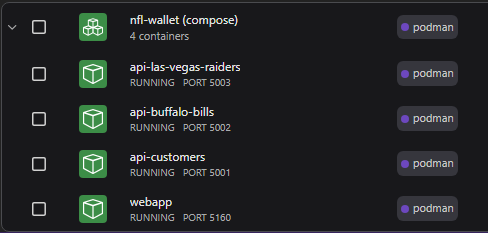 Running the stack with Podman Compose: webapp and three APIs in local containers.
5.2 Development with Red Hat OpenShift Dev Spaces
The repository includes a devfile.yaml for Red Hat OpenShift Dev Spaces, enabling development and testing in a cloud IDE without installing .NET or Node.js locally.
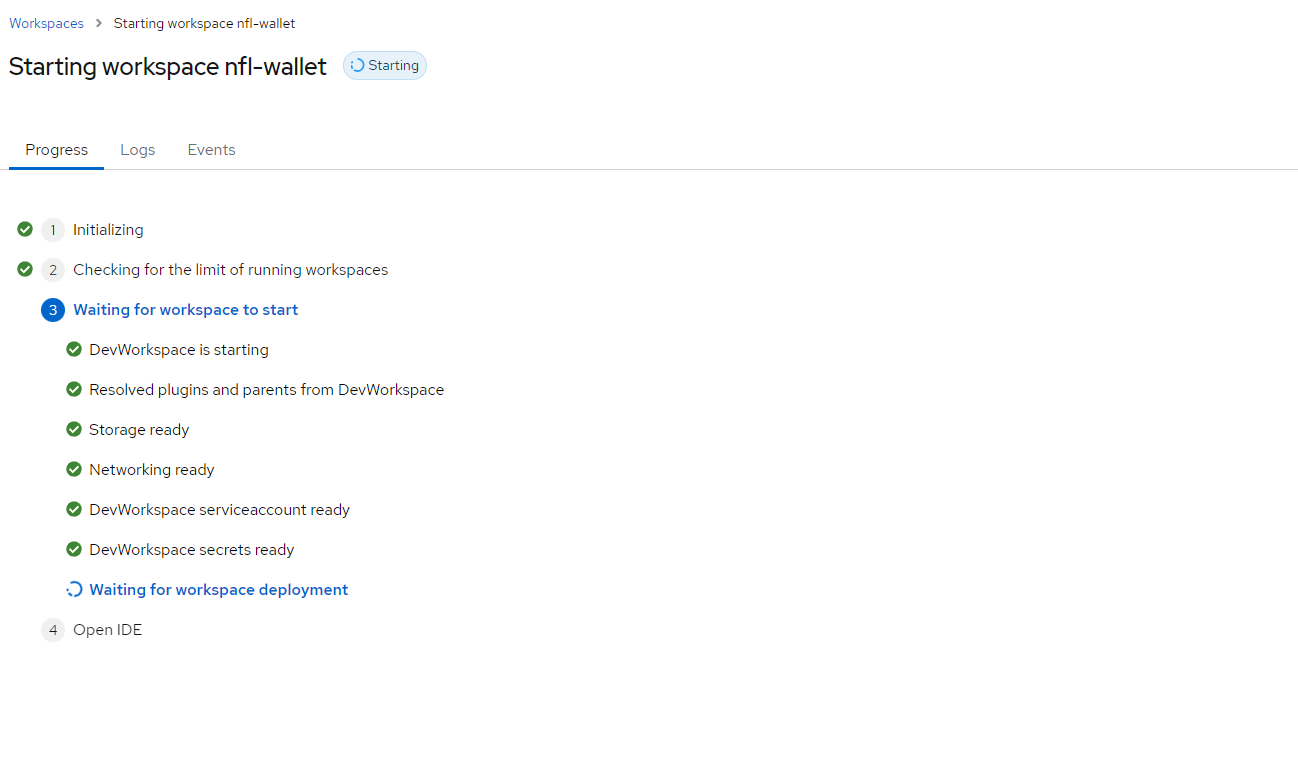 OpenShift Dev Spaces workspace with the Stadium Wallet project.
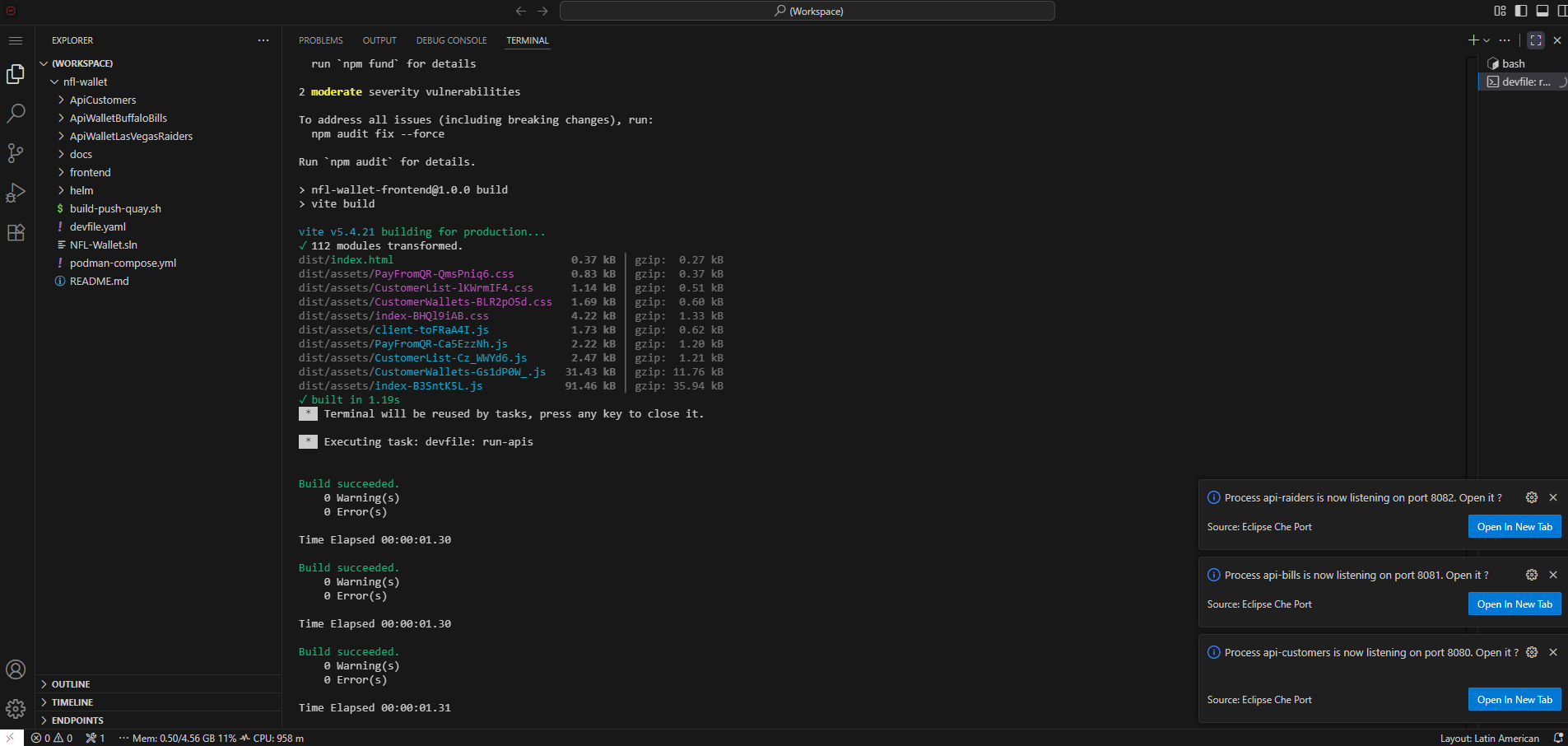 Build and run in Dev Spaces: compile and start the webapp and APIs from the workspace.
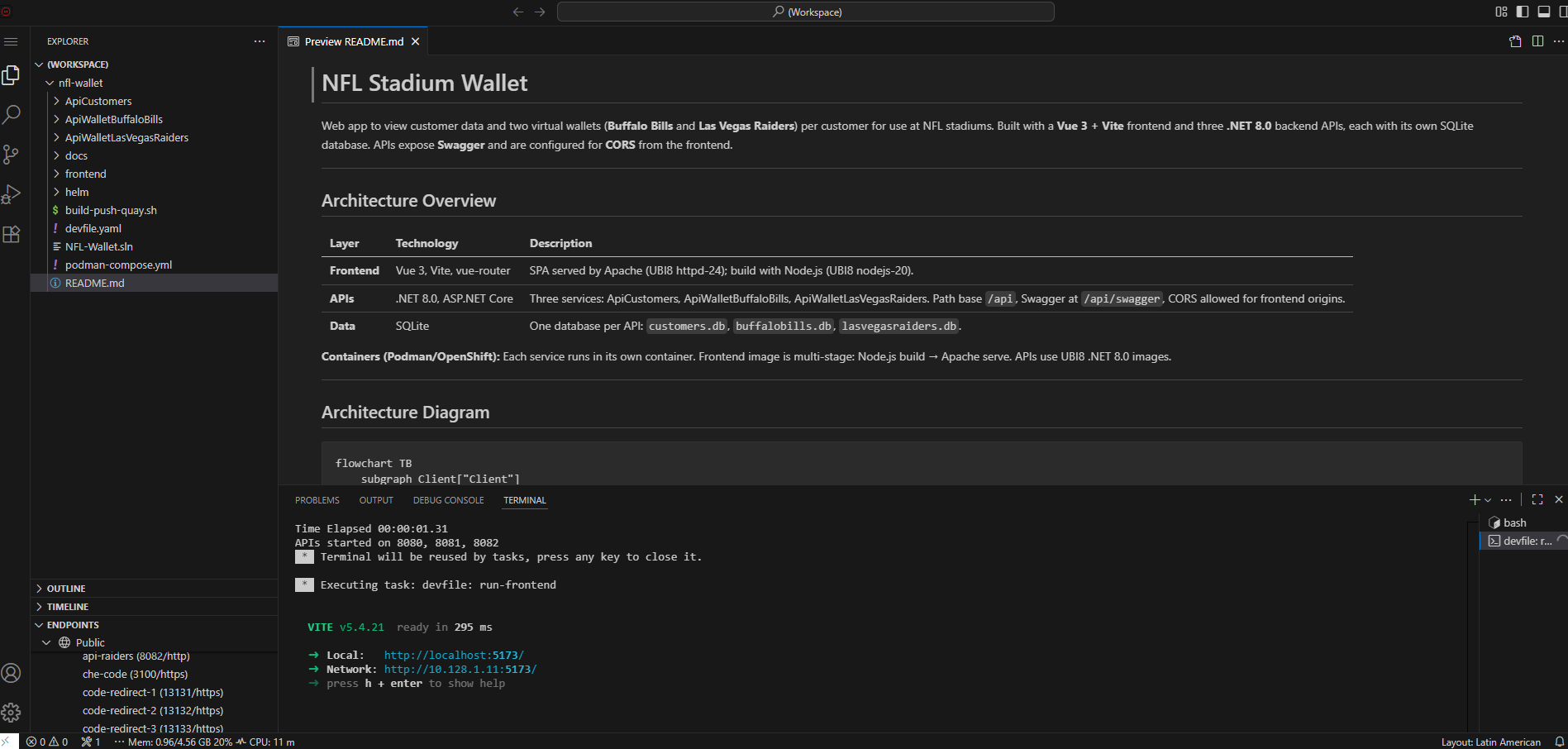 App running from Dev Spaces: frontend and APIs served from the cloud workspace.
5.3 Helm Chart Deployment
kubectl create namespace nfl-wallet

helm install nfl-wallet ./helm/nfl-wallet -n nfl-wallet
Chart Values (Reference)
| Key | Description | Default |
|---|---|---|
global.imageRegistry |
Image registry | quay.io |
imageNamespace |
Registry namespace | maximilianopizarro |
apiCustomers.service.port |
Service port | 8080 |
apiBills.service.port |
Service port | 8081 |
apiRaiders.service.port |
Service port | 8082 |
webapp.service.port |
Service port | 5173 |
webapp.route.enabled |
Create OpenShift Route | true |
gateway.enabled |
Create Gateway + HTTPRoutes | false |
gateway.className |
GatewayClass | istio |
apiKeys.enabled |
Create Secret and inject API keys | false |
authorizationPolicy.enabled |
Istio AuthorizationPolicy for X-API-Key | false |
observability.rhobs.enabled |
RHOBS resources (ThanosQuerier, PodMonitor, UIPlugin) | false |
rhbk-neuroface.enabled |
Deploy RHBK with NeuroFace biometric 2FA | false |
webapp.keycloakUrl |
RHBK base URL for Keycloak-js | — |
webapp.keycloakRealm |
Keycloak realm name | neuroface |
rhbk-neuroface.biometric.confidenceThreshold |
Facial match confidence % | 65 |
rhbk-neuroface.biometric.maxEnrollmentImages |
Enrollment captures | 5 |
rhbk-neuroface.biometric.cameraWidth |
Camera width px | 640 |
rhbk-neuroface.biometric.cameraHeight |
Camera height px | 480 |
espn.apiKey |
ESPN API key for Connectivity Link gateway | — |
espn.apiUrl |
ESPN proxy path | /public/nfl |
gateway.oidcPolicy |
Enable OIDC AuthPolicy per HTTPRoute (test) | false |
5.4 Apply the ArgoCD Root Application
apiVersion: argoproj.io/v1alpha1
kind: Application
metadata:
  name: nfl-wallet-production
  namespace: openshift-gitops
spec:
  project: default
  source:
    repoURL: 'https://github.com/maximilianopizarro/nfl-wallet-gitops.git'
    targetRevision: HEAD
    path: helm/nfl-wallet
  destination:
    server: 'https://kubernetes.default.svc'
    namespace: nfl-wallet
  syncPolicy:
    automated:
      prune: true
      selfHeal: true
    syncOptions:
      - CreateNamespace=true
Once applied, ArgoCD will deploy Deployments, Services, HTTPRoutes, and Kuadrant policies in order.
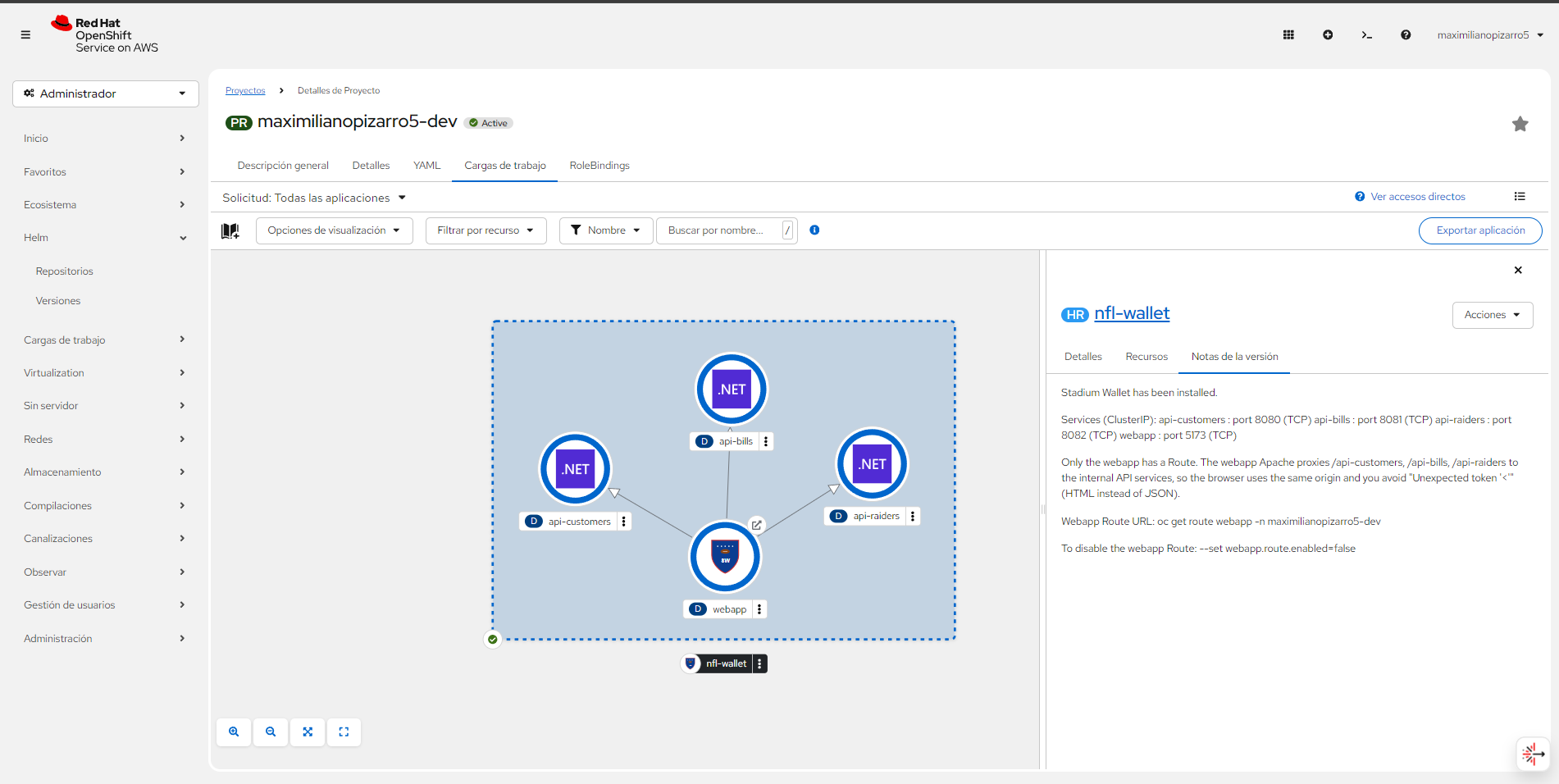 Topology view in OpenShift: webapp → api-customers, api-bills, api-raiders.
6. Service Mesh 3 (Ambient Mode)
OpenShift Service Mesh 3 (OSSM3) implements a Zero Trust security model at the network layer: every connection between services is automatically authenticated and encrypted via mTLS, regardless of its origin. The principle is “never trust, always verify” — no service can communicate with another without presenting a valid cryptographic identity issued by the mesh CA. This eliminates implicit trust based on network topology and provides defense in depth against lateral movement.
Related reading: The article Build a zero trust environment with Red Hat Connectivity Link dives deeper into integrating Service Mesh with Connectivity Link and Kuadrant to build a complete Zero Trust architecture.
6.1 Zero-Sidecar Security Model
OSSM 3.2 in Ambient Mode separates L4 and L7 security functions into specialized components:
| Component | Layer | Function |
|---|---|---|
| ztunnel | L4 | Node-level security: mTLS for all East-West traffic, L4 telemetry, transport encryption |
| Waypoint Proxy | L7 | Dedicated per-service Envoy proxy: advanced L7 telemetry, complex HTTP routing, access control |
Waypoints are strategically deployed for api-customers, api-bills, and api-raiders without injecting sidecars into the application pods.
Traditional Sidecar vs. Ambient Mode
In the traditional sidecar model, each pod receives an automatically injected istio-proxy container. This doubles memory and CPU consumption per workload, increases startup latency, and complicates debugging (each pod has 2+ containers).
Ambient Mode eliminates this complexity by separating responsibilities:
| Aspect | Sidecar | Ambient |
|---|---|---|
| mTLS | Proxy per pod | ztunnel per node (DaemonSet) |
| Containers per pod | 2+ (app + sidecar) | 1 (app only) |
| Memory overhead | ~50-100 MB per sidecar | Shared per node |
| L7 policies | Sidecar Envoy | Waypoint Proxy (optional, per service) |
| Operational complexity | High (injection, rollout disruptions) | Low (no injection, no disruptions) |
The result is the same mTLS security with lower resource overhead and reduced operational complexity.
Real Resource Impact
Data published by the Istio community shows the concrete savings that Ambient Mode delivers at scale:
“Ambient mode’s shared ztunnel uses about 1 GB of memory for 300 pods on 10 nodes. By contrast, sidecar mode deploys a proxy per pod, consuming approximately 21 GB of memory for the same 300 pods.”
This represents a ~95% reduction in memory consumption dedicated to the mesh. Additionally, since ztunnel operates as a DaemonSet (one process per node), overhead scales with the number of nodes rather than pods, making Ambient Mode particularly efficient for platforms with high microservice density.
| Metric | Sidecar (300 pods / 10 nodes) | Ambient (300 pods / 10 nodes) |
|---|---|---|
| Mesh memory | ~21 GB | ~1 GB |
| Proxies deployed | 300 (one per pod) | 10 ztunnels + selective waypoints |
| Additional startup latency | Yes (sidecar injection) | No |
Source: Istio — Ambient Mode Overview · “Start with L4 security and selectively add L7 features only to services that need them.”
6.2 Ambient Mode Enrollment
The namespace enrolls in the mesh via a label, automatically applied by ArgoCD:
apiVersion: v1
kind: Namespace
metadata:
  name: nfl-wallet
  labels:
    istio.io/dataplane-mode: ambient
Validation: Application pods do NOT have the istio-proxy container, but traffic is encrypted via mTLS managed by the ztunnel DaemonSet.
Verify that ztunnel is intercepting namespace traffic:
# Confirm pods do NOT have sidecar (1/1 containers)
oc get pods -n nfl-wallet -o custom-columns=NAME:.metadata.name,CONTAINERS:.spec.containers[*].name,READY:.status.containerStatuses[*].ready

# Verify ztunnel is active and processing traffic
oc logs -n ztunnel -l app=ztunnel --tail=20 | grep "nfl-wallet"

# Confirm SPIFFE identity assigned to workloads
oc exec -n ztunnel $(oc get pod -n ztunnel -l app=ztunnel -o name | head -1) -- curl -s localhost:15000/config_dump | grep "nfl-wallet"
6.3 Waypoint Proxy
The Waypoint Proxy is deployed only when L7 policies are required (HTTP routing, AuthPolicy, advanced telemetry). If a service only needs mTLS (L4), ztunnel is sufficient and no Waypoint is needed — this reduces resource consumption.
When to use each component:
| Need | Component | Stadium Wallet Example |
|---|---|---|
| mTLS + basic telemetry | ztunnel (L4) | webapp ↔ apis communication |
| AuthPolicy / RateLimitPolicy | Waypoint (L7) | API Key validation on api-customers |
| Advanced HTTP routing | Waypoint (L7) | URL rewrite in HTTPRoutes |
| Distributed traces (L7 spans) | Waypoint (L7) | Spans in Jaeger/Tempo |
The Waypoint integrates natively with Kuadrant policies: when an AuthPolicy or RateLimitPolicy references an HTTPRoute, the Waypoint executes L7 validation in coordination with Authorino and Limitador.
apiVersion: gateway.networking.k8s.io/v1
kind: Gateway
metadata:
  name: nfl-wallet-waypoint
  namespace: nfl-wallet
  labels:
    istio.io/waypoint-for: service
spec:
  gatewayClassName: istio-waypoint
  listeners:
  - name: mesh
    port: 15008
    protocol: HBONE
6.4 Federation & Trust
Multi-cluster federation establishes a unified trust domain between East and West clusters. The process is based on three pillars:
- Shared Root CA: A single Root CA securely distributed and trusted by all Data Clusters (East/West). Each cluster generates intermediate certificates from this CA, allowing SPIFFE identities (
spiffe://cluster.local/ns/nfl-wallet/sa/api-customers) to be recognized by both clusters - meshNetworks: Configuration objects defining cross-cluster network reachability and which gateways to use for reaching remote networks
- East-West HBONE Gateways: Secure L4 transport via HBONE for multi-primary service discovery and encrypted cross-region communication. The HBONE protocol encapsulates mTLS traffic over HTTP/2 CONNECT, traversing firewalls and load balancers without requiring additional ports
Reference: The ossm3-ambient-mode repo contains Ansible scripts to automate shared CA generation, remote secret exchange, and meshNetworks configuration between clusters.
7. Connectivity Link & Gateway API
Red Hat Connectivity Link is a Kubernetes-native framework that unifies Gateway API, policy management (authentication, rate limiting), and DNS into a declarative experience. Based on the upstream Kuadrant project, Connectivity Link allows defining connectivity policies as CRDs that are automatically applied to the Gateway, eliminating the need to manually configure proxies, rate limiters, and auth servers.
In the context of Stadium Wallet, Connectivity Link orchestrates:
- Ingress via Kubernetes Gateway API (replacing traditional OpenShift Routes)
- Rate Limiting via RateLimitPolicy + Limitador (quota engine written in Rust)
- Authentication via AuthPolicy + Authorino (API Key validation)
- DNS via DNSPolicy for multi-cluster failover with Route 53
Official documentation:
Why Gateway API Instead of Traditional Ingress
Migrating from Ingress to Gateway API is not an aesthetic choice — it is an operational necessity with a concrete timeline:
- Ingress NGINX reaches end of support in March 2026. Projects depending on this controller will need to migrate to actively maintained alternatives. Gateway API is the official Kubernetes project recommendation.
- Gateway API reached GA in October 2023 (v1.0) and is already supported by all major controllers: Istio, Envoy Gateway, HAProxy, Traefik, NGINX Gateway Fabric, and Cilium.
- Vendor-specific Ingress annotations (like
nginx.ingress.kubernetes.io/*) create controller lock-in. Gateway API uses typed CRDs with schema validation — no magic annotations.
“Kuadrant extends Gateway API to add a connectivity management API that makes it easy for platform engineers and application developers to collaborate on connectivity concerns.” — kuadrant.io
The fundamental advantage of Gateway API is separation of concerns through formal CRDs: the platform team controls the Gateway, development teams control their HTTPRoute, and security policies are applied as independent attachments. This eliminates the need to coordinate annotations on a single shared Ingress resource.
Sources: Kubernetes Gateway API · Introducing ingress2gateway · Red Hat Connectivity Link — Now GA
7.1 Ingress with HTTPRoute
The Kubernetes Gateway API is the standard replacing the traditional Ingress resource. Its main advantage is separation of concerns: the infrastructure team defines the Gateway resource (listeners, protocols, certificates), while development teams define their own HTTPRoute (paths, backends, rewrites). This separation is formalized through CRDs:
| CRD | Responsible | Function |
|---|---|---|
GatewayClass |
Provider (Istio/Envoy) | Defines the controller implementing the Gateway |
Gateway |
Platform Engineer | Listeners (ports, protocols, TLS), global policies |
HTTPRoute |
Developer | Path/header routing, backends, URL rewrite |
ReferenceGrant |
Platform Engineer | Authorizes cross-namespace references |
apiVersion: gateway.networking.k8s.io/v1
kind: HTTPRoute
metadata:
  name: nfl-wallet-frontend
spec:
  parentRefs:
  - name: nfl-gateway
  rules:
  - matches:
    - path:
        type: PathPrefix
        value: /
    backendRefs:
    - name: webapp
      port: 5173
Four HTTPRoutes are created: webapp (/), api-customers (/api-customers), api-bills (/api-bills), api-raiders (/api-raiders), with URL rewrite to the backend.
7.2 Enable Gateway
The Gateway defines listeners that accept external traffic. In Stadium Wallet, the Helm chart creates a Gateway with an HTTP listener managed by the Istio/Envoy controller from Connectivity Link:
apiVersion: gateway.networking.k8s.io/v1
kind: Gateway
metadata:
  name: nfl-wallet-gateway
  namespace: nfl-wallet
spec:
  gatewayClassName: openshift-gateway
  listeners:
  - name: http
    port: 8080
    protocol: HTTP
    allowedRoutes:
      namespaces:
        from: Same
Deploy via Helm:
helm install nfl-wallet ./helm/nfl-wallet -n nfl-wallet \
  --set gateway.enabled=true \
  --set gateway.className=openshift-gateway
7.3 Rate Limiting with Kuadrant
Kuadrant implements rate limiting through two components: the RateLimitPolicy (declarative CRD defining the rules) and Limitador (service maintaining in-memory counters and evaluating quotas). The enforcement flow is:
- A request arrives at the Gateway (Envoy)
- Envoy queries Limitador with descriptors defined in the RateLimitPolicy
- Limitador evaluates counters (time window + limit) and responds allow/deny
- If the limit is exceeded, the Gateway returns 429 Too Many Requests before the request reaches the backend
apiVersion: kuadrant.io/v1beta2
kind: RateLimitPolicy
metadata:
  name: api-customers-limit
spec:
  targetRef:
    group: gateway.networking.k8s.io
    kind: HTTPRoute
    name: api-customers-route
  limits:
    "customer-api-standard":
      rates:
      - limit: 100
        duration: 1
        unit: minute
Rate Limiting Tiers
Stadium Wallet defines three access tiers applied through PlanPolicy in combination with the Kuadrant plugin in RHDH:
| Tier | Limit | Use Case |
|---|---|---|
| Bronze | 100 req/day | Evaluation and development |
| Silver | 500 req/day | Applications in testing |
| Gold | 1000 req/day | Production |
Enable Rate Limiting + Auth:
helm upgrade nfl-wallet ./helm/nfl-wallet -n nfl-wallet \
  --set gateway.enabled=true \
  --set gateway.rateLimitPolicy.enabled=true \
  --set gateway.authPolicy.enabled=true \
  --set gateway.authPolicy.bills.enabled=true
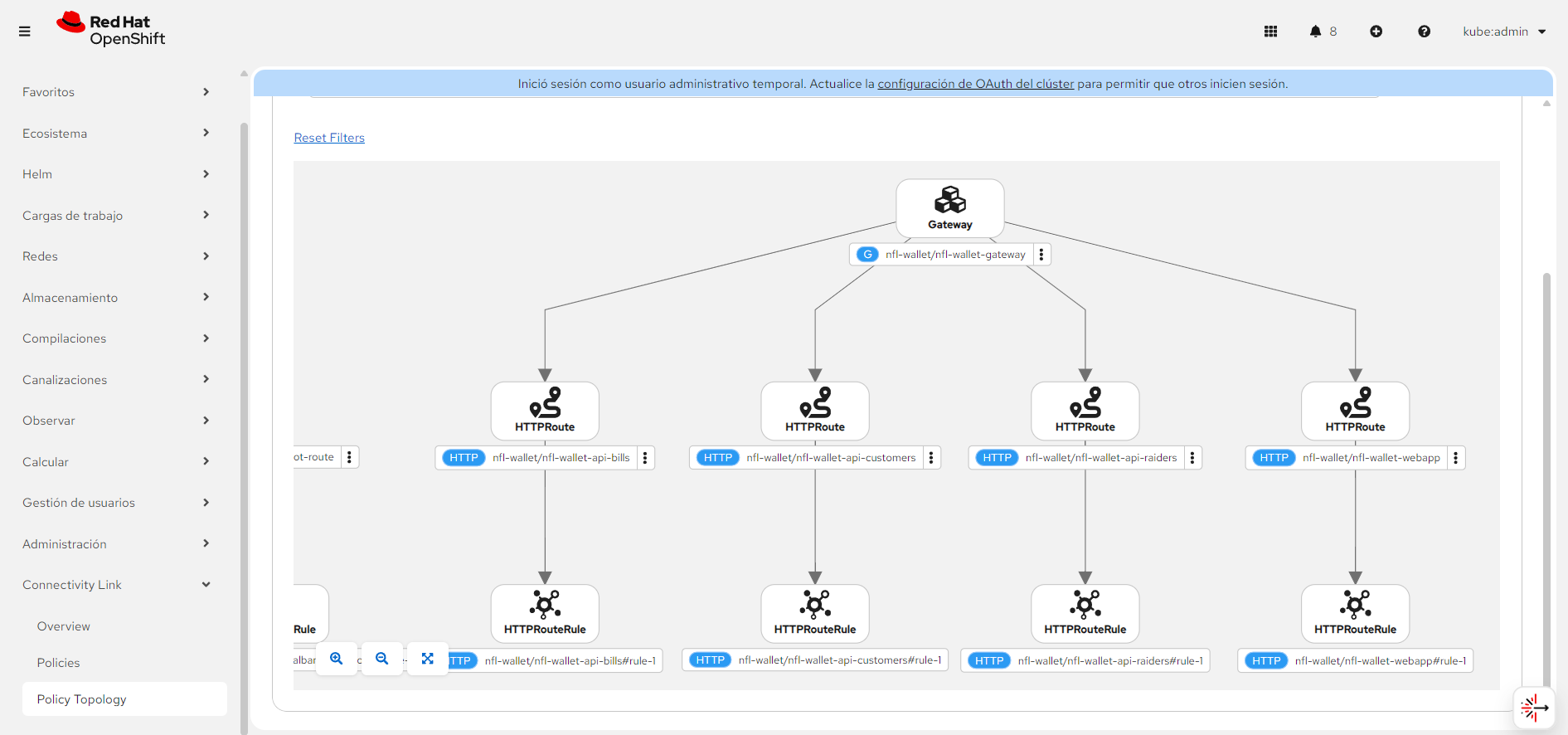 Connectivity Link: Gateway API and HTTPRoutes exposing webapp and APIs.
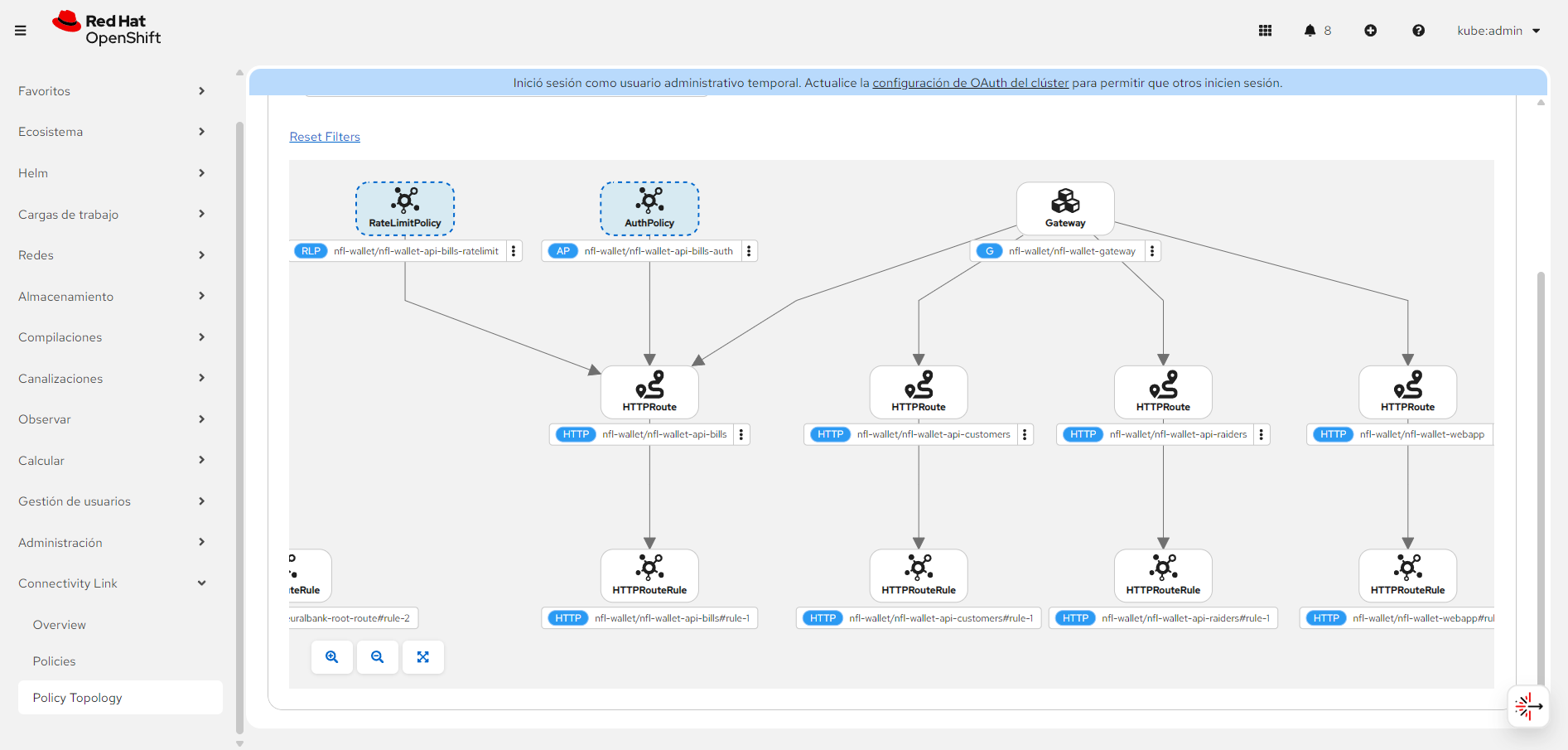 Connectivity Link with Kuadrant AuthPolicy (X-API-Key) and RateLimitPolicy on /api-bills.
8. Security: API Keys & Policies
Security in Stadium Wallet is implemented across multiple layers, following the defense-in-depth principle. The end-to-end flow of an authenticated request is:
- The request arrives at the Gateway (Envoy managed by Connectivity Link)
- Authorino intercepts the request and searches for credentials: extracts the
X-Api-Keyheader and compares it against Kubernetes Secrets with the labelapi: nfl-wallet-prod - If the credential is valid, OPA evaluates the Rego rules defined in the AuthPolicy
- Limitador verifies the consumer hasn’t exceeded their quota (based on their Tier: bronze/silver/gold)
- If all validations pass, the request is forwarded to the backend with mTLS (ztunnel/Waypoint)
- If authentication fails → 403 Forbidden; if quota fails → 429 Too Many Requests
Authentication models supported by Connectivity Link: Stadium Wallet uses API Keys as its authentication mechanism. Connectivity Link also supports OIDC/OAuth2 with providers like Red Hat build of Keycloak, as demonstrated in the article Build a zero trust environment with Red Hat Connectivity Link with the NeuralBank application. Both models are complementary and can coexist in the same cluster.
8.1 Two Security Models
| Model | Location | CRD | Use Case |
|---|---|---|---|
| Istio AuthorizationPolicy | Service Mesh (workload) | security.istio.io/v1 |
Direct pod-level validation |
| AuthPolicy with Authorino | Gateway (Kuadrant) | kuadrant.io/v1 |
Gateway-level validation with custom 403 |
8.2 Istio AuthorizationPolicy
apiVersion: security.istio.io/v1
kind: AuthorizationPolicy
metadata:
  name: api-raiders-require-apikey
spec:
  selector:
    matchLabels:
      app: api-raiders
  action: ALLOW
  rules:
    - when:
        - key: request.headers[x-api-key]
          values: ["*"]
8.3 Kuadrant AuthPolicy (Gateway)
The AuthPolicy is Kuadrant’s CRD for defining authentication and authorization rules at the Gateway or HTTPRoute level. Internally, Kuadrant delegates execution to Authorino, which acts as an external authorization server (ext-authz) integrated with Envoy.
How Authorino discovers credentials: Authorino searches for Kubernetes Secrets containing specific labels (e.g., api: nfl-wallet-prod). When a request includes the X-Api-Key header, Authorino compares the value against all Secrets matching the label selector. This mechanism allows dynamic API Key provisioning and revocation without restarting any component — simply create or delete a Secret with the corresponding label.
apiVersion: kuadrant.io/v1
kind: AuthPolicy
metadata:
  name: nfl-wallet-api-bills-auth
spec:
  targetRef:
    group: gateway.networking.k8s.io
    kind: HTTPRoute
    name: nfl-wallet-api-bills
  rules:
    authorization:
      require-apikey:
        opa:
          rego: |
            allow = true {
              input.context.request.http.headers["x-api-key"] != ""
            }
    response:
      unauthorized:
        body:
          value: '{"error":"Forbidden","message":"Missing or invalid X-API-Key header."}'
        headers:
          content-type:
            value: application/json
8.4 Security by Environment
Stadium Wallet implements a progressive security strategy where each environment increases the level of protection. This allows rapid iteration in development, integration validation in test, and full Zero Trust in production:
| Environment | API Key | AuthPolicy | Biometric Login | Mesh Model |
|---|---|---|---|---|
| Dev | Not required | No authentication | RHBK + NeuroFace (chart 0.1.3) | Sidecar mode (istio-injection: enabled) |
| Test | nfl-wallet-customers-key |
AuthPolicy + API keys + OIDC policy | RHBK + NeuroFace (chart 0.1.3) | Ambient mode (istio.io/dataplane-mode: ambient) |
| Prod | nfl-wallet-customers-key |
AuthPolicy + API keys + canary route | — (chart 0.1.1) | Ambient mode + Waypoint proxies |
- Dev with biometric login allows developers to test the RHBK + NeuroFace facial authentication flow without API key restrictions
- Test with auth + OIDC validates both API Key and OIDC/JWT authentication models — Kuadrant AuthPolicy objects target individual HTTPRoutes and validate tokens issued by the RHBK realm
- Prod with auth + canary + ambient guarantees full Zero Trust: mTLS on all inter-service traffic, credential validation at the Gateway, rate limiting by Tier, and canary deployment capability for safe rollouts
Biometric Authentication (RHBK + NeuroFace)
Chart version 0.1.3 includes Red Hat build of Keycloak (RHBK) with NeuroFace biometric facial authentication as an optional Helm dependency. Users authenticate with username/password followed by facial recognition as a second factor (2FA).
The chart pre-loads the realm with 7 mock customer accounts (matching the Customers API seed data). On first login each user must complete biometric enrollment (facial capture). Subsequent logins use facial verification as second factor.
Component Architecture
The biometric system consists of two containers deployed in the same namespace, connected via a custom Keycloak SPI:
┌─────────────────────────────────┐     ┌──────────────────────────────────┐
│  RHBK (Keycloak 26 — UBI9)     │     │  NeuroFace Backend (FastAPI)     │
│                                 │     │                                  │
│  ┌───────────────────────────┐  │     │  POST /api/images   ← enrollment│
│  │ Biometric SPI (JAR)       │  │     │  POST /api/train    ← training  │
│  │                           │──┼─────┼─►POST /api/recognize ← verify   │
│  │ • BiometricAuthenticator  │  │     │  GET  /api/health   ← health    │
│  │   (2FA facial login)      │  │     │  GET  /api/labels   ← labels    │
│  │                           │  │     │                                  │
│  │ • BiometricEnrollment     │  │     └──────────────────────────────────┘
│  │   (delegated registration)│  │
│  └───────────────────────────┘  │     ┌──────────────────────────────────┐
│                                 │     │  NeuroFace Frontend (Angular 17) │
│  Realm: neuroface               │     │  ← Protected by OIDC client     │
│  Client: neuroface-app          │     │     "neuroface-app"              │
│  Flow: biometric browser        │     └──────────────────────────────────┘
│  Flow: biometric registration   │
└─────────────────────────────────┘
SPI Components
The biometric capability is implemented as a Keycloak SPI (Service Provider Interface) packaged as a JAR deployed into the RHBK image:
| Provider | Type | ID | Description |
|---|---|---|---|
| BiometricAuthenticator | Authenticator | biometric-authenticator |
2FA via NeuroFace /api/recognize |
| BiometricEnrollment | Required Action | biometric-enrollment |
Multi-image facial enrollment on first login |
| NeuroFaceClient | Internal | — | HTTP client for NeuroFace REST API |
Realm Configuration
| Component | Details |
|---|---|
| Clients | neuroface-app (public, PKCE S256), neuroface-backend (bearer-only) |
| Browser Flow | biometric browser — cookie OR (password + facial 2FA) |
| Registration Flow | biometric registration — delegated creation |
| Required Action | biometric-enrollment — facial enrollment on first login |
| Roles | biometric-user, biometric-admin |
| Group | biometric-enrolled — auto-assigned after enrollment |
NeuroFace API Endpoints
NeuroFace is a facial recognition service built with FastAPI and Angular 17, containerized with Red Hat UBI9 images. The SPI communicates with these endpoints:
| Endpoint | Method | Usage |
|---|---|---|
/api/health |
GET | Health check before biometric operations |
/api/images |
POST | Upload facial images during enrollment (multipart) |
/api/train |
POST | Train the recognition model after enrollment |
/api/recognize |
POST | Verify facial identity during 2FA login |
/api/labels |
GET | List registered biometric labels |
Authentication Flows
1. Delegated Creation with Biometric Enrollment:
sequenceDiagram
    participant Admin as KC Admin
    participant User as User
    participant RHBK as RHBK (Keycloak)
    participant SPI as Biometric SPI
    participant NF as NeuroFace API

    Admin->>RHBK: Create user + assign Required Action<br/>"biometric-enrollment"
    User->>RHBK: First login with temporary credentials
    RHBK->>SPI: Trigger biometric enrollment
    SPI->>User: Webcam: capture 3–5 images<br/>from different angles
    User-->>SPI: Facial images (base64)
    SPI->>NF: POST /api/images (label=username)
    SPI->>NF: POST /api/train
    NF-->>SPI: Model trained
    SPI->>RHBK: biometric_enrolled = true<br/>User joins group "biometric-enrolled"
2. Login with Biometric Second Factor (2FA):
sequenceDiagram
    participant User as User
    participant RHBK as RHBK (Keycloak)
    participant SPI as Biometric SPI
    participant NF as NeuroFace API

    User->>RHBK: Username + Password
    RHBK->>SPI: Trigger 2FA verification
    SPI->>User: Webcam: capture facial image
    User-->>SPI: Facial image (base64)
    SPI->>NF: POST /api/recognize { image: base64 }
    NF-->>SPI: { label, confidence }
    alt label == username AND confidence >= threshold
        SPI->>RHBK: Verification OK
        RHBK-->>User: Access granted
    else No match or low confidence
        SPI->>RHBK: Verification failed
        RHBK-->>User: Access denied
    end
Deployment
helm install nfl-wallet ./helm/nfl-wallet -n nfl-wallet \
  --set "rhbk-neuroface.enabled=true" \
  --set "webapp.keycloakUrl=https://<release>-rhbk-neuroface-<namespace>.apps.<cluster>"
Note:
keycloakUrlmust be the RHBK base URL without/realms/<name>— keycloak-js appends the realm path automatically fromwebapp.keycloakRealm(defaultneuroface).
Helm Chart Values
RHBK (Keycloak):
| Parameter | Default | Description |
|---|---|---|
rhbk.image.repository |
registry.redhat.io/rhbk/keycloak-rhel9 |
RHBK image |
rhbk.image.tag |
26.0 |
Image tag |
rhbk.replicas |
1 |
Replicas |
rhbk.resources.limits.cpu |
1 |
CPU limit |
rhbk.resources.limits.memory |
1Gi |
Memory limit |
admin.username / admin.password |
admin / admin |
Bootstrap admin credentials |
Biometric Settings:
| Parameter | Description | Default |
|---|---|---|
biometric.confidenceThreshold |
Minimum facial match confidence (0–100) | 65 |
biometric.maxEnrollmentImages |
Number of enrollment captures | 5 |
biometric.webcamWidth × webcamHeight |
Camera resolution (px) | 640 × 480 |
Camera resolution presets: QVGA 320×240, VGA 640×480 (default), HD 720p 1280×720, Full HD 1920×1080. Higher resolution improves accuracy but increases processing time. The ApplicationSet enables biometric login for dev and test with 1920 × 1080 (FHD).
NeuroFace Subchart:
| Parameter | Default | Description |
|---|---|---|
neuroface.enabled |
true |
Deploy NeuroFace subchart |
neuroface.backend.aiModel |
lbph |
AI model (lbph / dlib) |
neuroface.backend.replicas |
1 |
Backend replicas |
neuroface.frontend.replicas |
1 |
Frontend replicas |
neuroface.chat.enabled |
true |
Enable AI chat (Granite LLM) |
neuroface.persistence.enabled |
true |
Enable persistent storage |
neuroface.persistence.size |
1Gi |
PVC size |
neuroface.route.enabled |
true |
Create NeuroFace OpenShift Route |
Source: RHBK NeuroFace Biometric Flow — Full documentation, demo videos, screenshots, and Helm chart reference. Charts available on Artifact Hub (rhbk-neuroface) and Artifact Hub (neuroface).
OIDC Policy (Test Environment)
In test, the chart’s gateway.oidcPolicy is enabled. This creates Kuadrant AuthPolicy objects (one per API HTTPRoute) that validate OIDC JWT tokens issued by the RHBK realm. The OIDC policies target individual HTTPRoutes (api-customers, api-bills, api-raiders) and coexist with the existing API key AuthPolicy on the Gateway.
The OIDC issuer URL follows the pattern:
https://nfl-wallet-rhbk-neuroface-nfl-wallet-test.apps.<cluster-domain>/realms/neuroface
8.5 Namespace Access Restriction (Test / Prod)
In a multi-environment setup on the same cluster, it is critical that test services cannot access prod services and vice versa. OSSM3 in Ambient Mode provides this isolation through Istio AuthorizationPolicy at the namespace level.
Isolation principle
Each namespace (nfl-wallet-test, nfl-wallet-prod) applies an AuthorizationPolicy that only allows traffic originating from the same namespace and from the mesh system (gateways, waypoints):
# Access restriction: only same-namespace traffic in PROD
apiVersion: security.istio.io/v1
kind: AuthorizationPolicy
metadata:
  name: restrict-cross-namespace
  namespace: nfl-wallet-prod
spec:
  action: ALLOW
  rules:
  # Allow traffic from the same namespace
  - from:
    - source:
        namespaces: ["nfl-wallet-prod"]
  # Allow traffic from the Istio gateway/waypoint
  - from:
    - source:
        namespaces: ["istio-system"]
  # Allow traffic from ztunnel (ambient mode)
  - from:
    - source:
        namespaces: ["ztunnel"]
# Equivalent restriction for TEST
apiVersion: security.istio.io/v1
kind: AuthorizationPolicy
metadata:
  name: restrict-cross-namespace
  namespace: nfl-wallet-test
spec:
  action: ALLOW
  rules:
  - from:
    - source:
        namespaces: ["nfl-wallet-test"]
  - from:
    - source:
        namespaces: ["istio-system"]
  - from:
    - source:
        namespaces: ["ztunnel"]
Isolation result
| Source → Destination | Allowed | Mechanism |
|---|---|---|
| nfl-wallet-test → nfl-wallet-test | Yes | Same-namespace rule |
| nfl-wallet-prod → nfl-wallet-prod | Yes | Same-namespace rule |
| nfl-wallet-test → nfl-wallet-prod | No | Blocked by AuthorizationPolicy |
| nfl-wallet-prod → nfl-wallet-test | No | Blocked by AuthorizationPolicy |
| nfl-wallet-dev → nfl-wallet-prod | No | Blocked by AuthorizationPolicy |
| istio-system → nfl-wallet-prod | Yes | Gateway/Waypoint ingress |
| External (via Gateway) → nfl-wallet-prod | Yes | Traffic enters through istio-system |
Applied via Kustomize
The AuthorizationPolicies are included in each Kustomize overlay:
nfl-wallet/overlays/test/restrict-cross-namespace.yaml
nfl-wallet/overlays/prod/restrict-cross-namespace.yaml
nfl-wallet/overlays/test-east/restrict-cross-namespace.yaml
nfl-wallet/overlays/prod-west/restrict-cross-namespace.yaml
ArgoCD automatically syncs these policies when deploying each environment.
Dev without restriction: The dev environment (
nfl-wallet-dev) intentionally does not apply this restriction to facilitate development and cross-service debugging.
8.5.1 Cross-Namespace Policies with Gateway API & Istio
Beyond workload-level AuthorizationPolicy, the Gateway API and Istio offer additional mechanisms to control traffic between namespaces. These options operate at different layers (L4/L7) and provide varying granularity.
Option 1: ReferenceGrant (native Gateway API)
The ReferenceGrant resource (formerly ReferencePolicy) from the Gateway API controls which namespaces can reference resources in another namespace. This is useful for restricting which HTTPRoutes can point to Services in another namespace:
# Allow ONLY HTTPRoutes from nfl-wallet-prod
# to reference the gateway in istio-system
apiVersion: gateway.networking.k8s.io/v1beta1
kind: ReferenceGrant
metadata:
  name: allow-prod-to-gateway
  namespace: istio-system
spec:
  from:
  - group: gateway.networking.k8s.io
    kind: HTTPRoute
    namespace: nfl-wallet-prod
  to:
  - group: ""
    kind: Service
Without a corresponding ReferenceGrant, HTTPRoutes from nfl-wallet-test cannot reference the Gateway in another namespace, preventing accidental route exposure between environments.
Option 2: Istio PeerAuthentication (strict mTLS per namespace)
PeerAuthentication enforces strict mTLS in a namespace, ensuring that only pods with a valid SPIFFE identity from the same trust domain can communicate:
apiVersion: security.istio.io/v1
kind: PeerAuthentication
metadata:
  name: strict-mtls
  namespace: nfl-wallet-prod
spec:
  mtls:
    mode: STRICT
Combined with AuthorizationPolicy, this ensures that even if a rogue pod attempts to send traffic, the ztunnel will reject the connection if it doesn’t have a valid mTLS certificate from the allowed namespace.
Option 3: Sidecar Resource (egress control per namespace)
The Istio Sidecar resource (also functional in Ambient Mode through Waypoints) limits the hosts to which a namespace can send outbound traffic:
apiVersion: networking.istio.io/v1
kind: Sidecar
metadata:
  name: restrict-egress
  namespace: nfl-wallet-test
spec:
  egress:
  - hosts:
    # Can only communicate with services in its own namespace
    - "./nfl-wallet-test/*"
    # And with the Istio system
    - "istio-system/*"
This prevents test services from discovering or attempting to connect to production services, as they won’t be visible in the service registry.
Option 4: Gateway Listeners with allowedRoutes (namespace scoping)
Gateway Listeners can restrict which namespaces can create HTTPRoutes that reference them:
apiVersion: gateway.networking.k8s.io/v1
kind: Gateway
metadata:
  name: nfl-wallet-gateway
  namespace: nfl-wallet-prod
spec:
  gatewayClassName: istio
  listeners:
  - name: prod-listener
    port: 443
    protocol: HTTPS
    tls:
      mode: Terminate
      certificateRefs:
      - name: prod-tls-cert
    allowedRoutes:
      namespaces:
        from: Same                   # Only HTTPRoutes from the same namespace
# Shared Gateway that accepts routes from specific namespaces
apiVersion: gateway.networking.k8s.io/v1
kind: Gateway
metadata:
  name: shared-gateway
  namespace: istio-system
spec:
  gatewayClassName: istio
  listeners:
  - name: prod-only
    port: 443
    protocol: HTTPS
    hostname: "*.prod.nfl-wallet.com"
    allowedRoutes:
      namespaces:
        from: Selector
        selector:
          matchLabels:
            environment: production  # Only namespaces with this label
  - name: test-only
    port: 443
    protocol: HTTPS
    hostname: "*.test.nfl-wallet.com"
    allowedRoutes:
      namespaces:
        from: Selector
        selector:
          matchLabels:
            environment: test
Option 5: Kuadrant RateLimitPolicy per namespace
Kuadrant allows applying RateLimitPolicy directly to the Gateway, with differentiated limits by source namespace. This prevents one environment from monopolizing shared resources:
apiVersion: kuadrant.io/v1beta2
kind: RateLimitPolicy
metadata:
  name: per-namespace-limits
  namespace: istio-system
spec:
  targetRef:
    group: gateway.networking.k8s.io
    kind: Gateway
    name: shared-gateway
  limits:
    "test-namespace-limit":
      rates:
      - limit: 50
        duration: 1
        unit: minute
      when:
      - selector: metadata.filter_metadata.istio_authn.source.namespace
        operator: eq
        value: nfl-wallet-test
    "prod-namespace-limit":
      rates:
      - limit: 500
        duration: 1
        unit: minute
      when:
      - selector: metadata.filter_metadata.istio_authn.source.namespace
        operator: eq
        value: nfl-wallet-prod
Options Comparison
| Mechanism | Layer | What It Controls | When to Use |
|---|---|---|---|
| AuthorizationPolicy | L4/L7 | Who can send traffic to a workload | Basic namespace isolation |
| ReferenceGrant | API | Which namespaces can create routes to a Gateway/Service | Control which environments use which gateways |
| PeerAuthentication | L4 | Requires strict mTLS for all traffic | Guarantee cryptographic identity |
| Sidecar (egress) | L7 | Which hosts a namespace can send traffic to | Limit service discovery |
| allowedRoutes | API | Which namespaces can create HTTPRoutes on a listener | Scoping shared gateways |
| RateLimitPolicy | L7 | How many requests per namespace | Prevent one environment from abusing the gateway |
Recommendation: For Stadium Wallet, we combine AuthorizationPolicy (workload isolation), PeerAuthentication STRICT (mandatory mTLS), and allowedRoutes on the Gateway (route scoping per namespace). This combination provides defense in depth.
8.6 Multi-Cluster Failover with DNSPolicy & Route 53
To achieve geographic high availability and automatic failover between East and West clusters, Kuadrant integrates DNSPolicy with Amazon Route 53 (or other compatible DNS providers). This ensures that if one cluster fails, traffic is automatically redirected to the healthy cluster.
DNS Failover Architecture
graph TD
    DNS["Route 53 — DNS<br/>stadium-wallet.example.com<br/>Routing Policy: Failover / Weighted"]

    DNS -- "Health Check East" --> East
    DNS -- "Health Check West" --> West

    subgraph East["Cluster East — Primary"]
        E_GW["nfl-wallet-gateway-istio"]
        E_Web["webapp"]
        E_Cust["api-customers"]
        E_Bills["api-bills"]
        E_Raiders["api-raiders"]
        E_GW --> E_Web
        E_GW --> E_Cust
        E_GW --> E_Bills
        E_GW --> E_Raiders
    end

    subgraph West["Cluster West — Secondary"]
        W_GW["nfl-wallet-gateway-istio"]
        W_Web["webapp"]
        W_Cust["api-customers"]
        W_Bills["api-bills"]
        W_Raiders["api-raiders"]
        W_GW --> W_Web
        W_GW --> W_Cust
        W_GW --> W_Bills
        W_GW --> W_Raiders
    end
DNSPolicy Definition with Kuadrant
Kuadrant provides the DNSPolicy CRD that binds to the Gateway and automatically manages DNS records:
apiVersion: kuadrant.io/v1
kind: DNSPolicy
metadata:
  name: nfl-wallet-dns-failover
  namespace: nfl-wallet-prod
spec:
  targetRef:
    group: gateway.networking.k8s.io
    kind: Gateway
    name: nfl-wallet-gateway
  providerRefs:
  - name: aws-route53-credentials    # Secret with Route 53 credentials
  routingStrategy: loadbalanced       # Strategy: loadbalanced or simple
  loadBalancing:
    geo: us-east-1                    # Geographic region for this cluster
    defaultGeo: true                  # Default if geo doesn't match
    weight: 120                       # Relative weight for weighted routing
Provider Configuration (Route 53)
The AWS credentials Secret for Route 53:
apiVersion: v1
kind: Secret
metadata:
  name: aws-route53-credentials
  namespace: nfl-wallet-prod
type: Opaque
data:
  AWS_ACCESS_KEY_ID: <base64>
  AWS_SECRET_ACCESS_KEY: <base64>
  AWS_REGION: <base64>               # us-east-1
DNS Routing Strategies
| Strategy | Behavior | Use Case |
|---|---|---|
| simple | Single A/CNAME record | Single cluster, no failover |
| loadbalanced | Multiple records with health checks | Multi-cluster with automatic failover |
Failover with Health Checks
When using routingStrategy: loadbalanced, Kuadrant automatically configures:
- Route 53 Health Checks: Verify that the Gateway endpoint responds in each cluster
- Weighted DNS Records: Distribute traffic between East and West based on configured weights
- Automatic Failover: If the East health check fails, Route 53 stops resolving to East and sends all traffic to West
# DNSPolicy for Cluster East (Primary)
apiVersion: kuadrant.io/v1
kind: DNSPolicy
metadata:
  name: nfl-wallet-dns-east
  namespace: nfl-wallet-prod
spec:
  targetRef:
    group: gateway.networking.k8s.io
    kind: Gateway
    name: nfl-wallet-gateway
  providerRefs:
  - name: aws-route53-credentials
  routingStrategy: loadbalanced
  loadBalancing:
    geo: us-east-1
    defaultGeo: true
    weight: 120
# DNSPolicy for Cluster West (Secondary)
apiVersion: kuadrant.io/v1
kind: DNSPolicy
metadata:
  name: nfl-wallet-dns-west
  namespace: nfl-wallet-prod
spec:
  targetRef:
    group: gateway.networking.k8s.io
    kind: Gateway
    name: nfl-wallet-gateway
  providerRefs:
  - name: aws-route53-credentials
  routingStrategy: loadbalanced
  loadBalancing:
    geo: us-west-2
    defaultGeo: false
    weight: 80
Result: DNS Resolution
| Scenario | East Health | West Health | DNS Resolution |
|---|---|---|---|
| Normal | Healthy | Healthy | 60% East / 40% West (by weights 120:80) |
| East Down | Unhealthy | Healthy | 100% West (automatic failover) |
| West Down | Healthy | Unhealthy | 100% East |
| Both Down | Unhealthy | Unhealthy | No resolution (alert) |
Note: DNSPolicy requires the Kuadrant operator to have access to the Route 53 API (or configured DNS provider). Credentials should be managed with External Secrets Operator or Sealed Secrets in production.
9. Multi-Cluster GitOps with ACM
Why Red Hat Advanced Cluster Management
In a real production environment, a single OpenShift instance is not enough. Requirements for high availability, data locality, and regulatory compliance demand distributing workloads across multiple clusters. However, managing N clusters independently multiplies operational complexity: N sets of policies, N network configurations, N manual deployments.
Red Hat Advanced Cluster Management (ACM) solves this with a Hub-and-Spoke model:
- Centralized hub: A management cluster that defines policies, placements, and configurations for all managed clusters
- Managed clusters (East/West): Workload clusters that receive their configurations from the hub, eliminating drift and manual configuration
- Placement API: Dynamically selects which clusters receive each workload based on labels, capacity, or affinity rules
- GitOpsCluster: Connects ACM with ArgoCD — ACM automatically registers managed clusters as ArgoCD targets, generating the required Secrets without manual intervention
In Stadium Wallet, ACM automatically generates 6 ArgoCD Applications (dev/test/prod × east/west) from a single ApplicationSet with clusterDecisionResource, ensuring that any Git change propagates identically to all clusters.
9.1 Deployment Modes
With ACM (Hub + Managed Clusters East/West)
# 1. Placements + GitOpsCluster (creates east/west secrets in ArgoCD)
kubectl apply -f app-nfl-wallet-acm.yaml -n openshift-gitops

# 2. ApplicationSet (generates 6 Applications)
kubectl apply -f app-nfl-wallet-acm-cluster-decision.yaml -n openshift-gitops
Without ACM (Independent East/West)
kubectl apply -f app-nfl-wallet-east.yaml -n openshift-gitops
kubectl apply -f app-nfl-wallet-west.yaml -n openshift-gitops
9.2 Environments, Chart Versions and Namespaces
Each Application deploys two sources: (1) Kustomize overlays (namespace, Route, AuthPolicy, Secrets) and (2) the Stadium Wallet Helm chart from the HelmChartRepository.
| Environment | Namespace | Chart Version | Features |
|---|---|---|---|
| Dev | nfl-wallet-dev |
0.1.3 | Gateway route + RHBK biometric login (NeuroFace) |
| Test | nfl-wallet-test |
0.1.3 | Gateway + AuthPolicy + API keys + ESPN route + RHBK biometric login + OIDC policy |
| Prod | nfl-wallet-prod |
0.1.1 | Gateway + canary + AuthPolicy + API keys (no biometric login) |
9.3 Kustomize Overlay Structure
| Path | Use |
|---|---|
nfl-wallet/overlays/dev |
Single-cluster dev |
nfl-wallet/overlays/test |
Single-cluster test |
nfl-wallet/overlays/prod |
Single-cluster prod |
nfl-wallet/overlays/dev-east |
ACM: dev on east |
nfl-wallet/overlays/dev-west |
ACM: dev on west |
nfl-wallet/overlays/test-east |
ACM: test on east |
nfl-wallet/overlays/test-west |
ACM: test on west |
nfl-wallet/overlays/prod-east |
ACM: prod on east |
nfl-wallet/overlays/prod-west |
ACM: prod on west |
9.4 GitOps Repository Structure
.
├── app-nfl-wallet-acm.yaml                   # Placements + GitOpsCluster (ACM)
├── app-nfl-wallet-acm-cluster-decision.yaml  # ApplicationSet (list generator)
├── app-nfl-wallet-east.yaml                  # ApplicationSet east (no ACM)
├── app-nfl-wallet-west.yaml                  # ApplicationSet west (no ACM)
├── kuadrant.yaml                             # Kuadrant CR
├── nfl-wallet/                               # Kustomize (routes, AuthPolicy, API keys)
│   ├── base/                                 # gateway route
│   ├── base-canary/                          # canary route (prod)
│   └── overlays/                             # dev, test, prod + east/west
├── kuadrant-system/                           # Authorino/Limitador resource patches
├── nfl-wallet-observability/                 # Grafana + ServiceMonitors
├── observability/                            # Grafana Operator base
├── developer-hub/catalog/nfl-wallet/         # Backstage catalog (Domain, System, Components, APIs)
├── docs/                                     # Documentation
└── scripts/                                  # force-sync-apps, test-apis, etc.
9.5 Kuadrant Resource Requirements
Default operator resources (100m CPU / 32Mi RAM) cause 20s+ latency on the ext-authz call from the gateway to Authorino, especially in sandboxes with mTLS enabled. The kuadrant-resources ApplicationSet deploys resource patches to both clusters using ServerSideApply:
kubectl apply -f app-kuadrant-resources.yaml -n openshift-gitops
| Component | CPU Request | Memory Request | CPU Limit | Memory Limit |
|---|---|---|---|---|
| Authorino | 500m | 256Mi | 2 | 1Gi |
| Limitador | 250m | 128Mi | 1 | 256Mi |
Resources are in kuadrant-system/ (Kustomize). ArgoCD uses selfHeal: true so they are reapplied if operators reset them.
Gateway proxy: The
nfl-wallet-gateway-istioDeployment is tracked by the nfl-wallet ArgoCD Application (Istio creates it from the Helm chart Gateway). Including it inkuadrant-resourcescausesSharedResourceWarning. If gateway proxy resources are too low, apply manually:kubectl apply -f kuadrant-system/gateway-resources.yaml.
9.6 Canary Testing (0.1.3 on Prod)
To test chart 0.1.3 with biometric login in a production context:
- Change
chartVersionfrom"0.1.1"to"0.1.3"for the prod entry in the ApplicationSet - Add the RHBK Helm values (copy from the dev/test conditional block)
- Push and let ArgoCD sync. Access the canary URL to verify the biometric login
- If approved, keep
0.1.3. If not, revertchartVersionto"0.1.1"and push again
ArgoCD as the reconciliation engine: The following screenshots show how ArgoCD manages the Applications generated by the ApplicationSet. Each Application corresponds to an environment/cluster combination and syncs independently, enabling selective rollbacks per environment without affecting the rest.
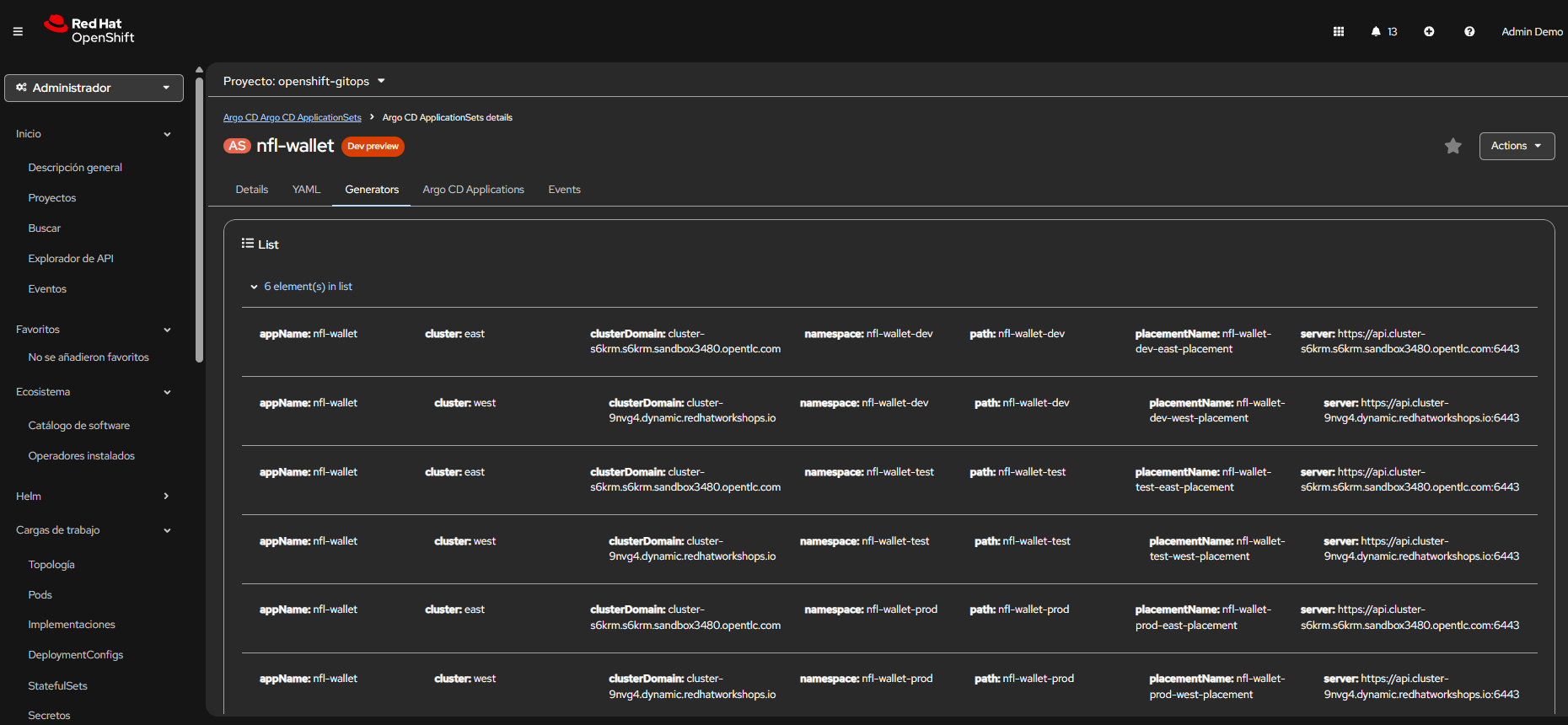 OpenShift GitOps (ArgoCD) — Applications and sync status.
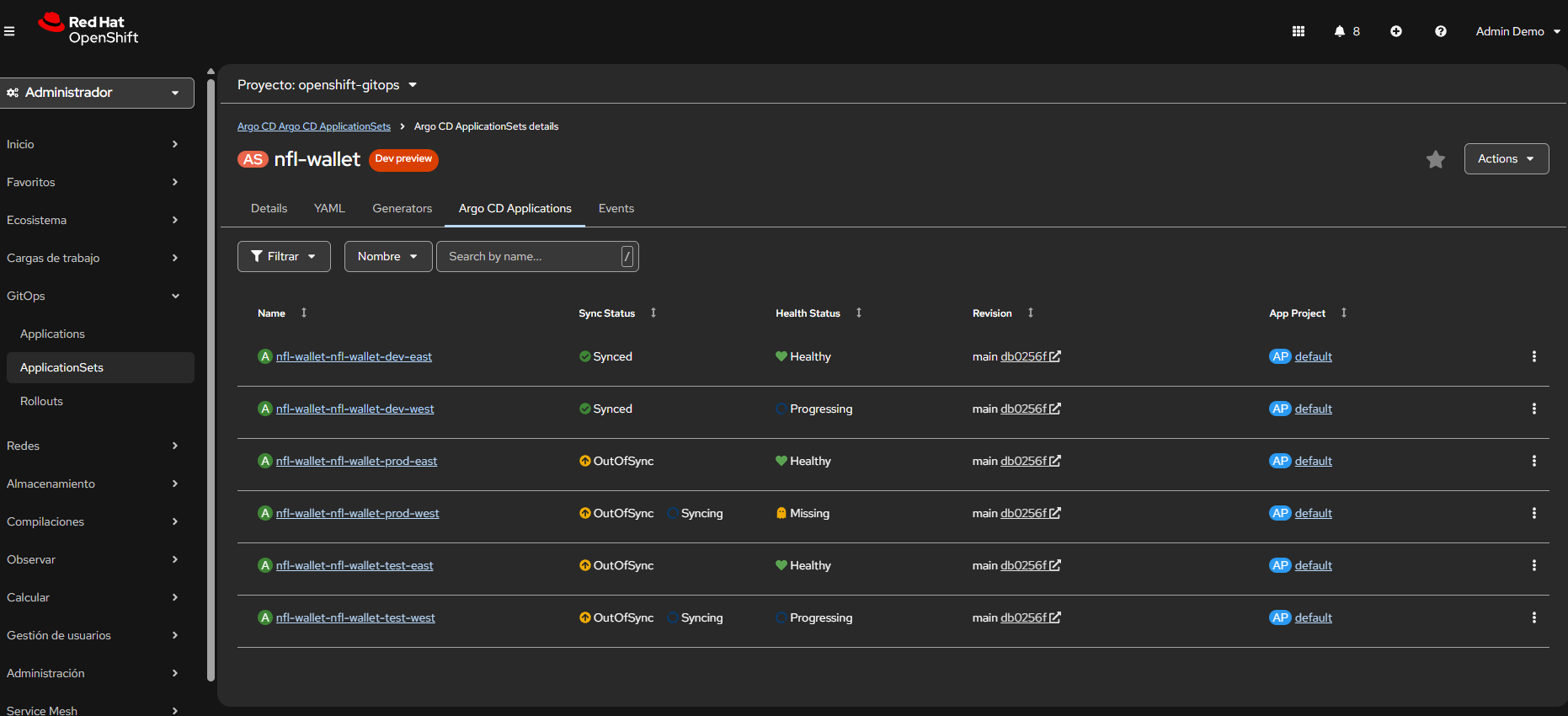 ArgoCD — Detail of Applications generated by the ApplicationSet.
ACM as the multi-cluster control plane: ACM provides a unified view of all managed clusters. The hub distributes network, security, and compliance policies to East and West consistently, while the Placement API dynamically decides where each workload is deployed.
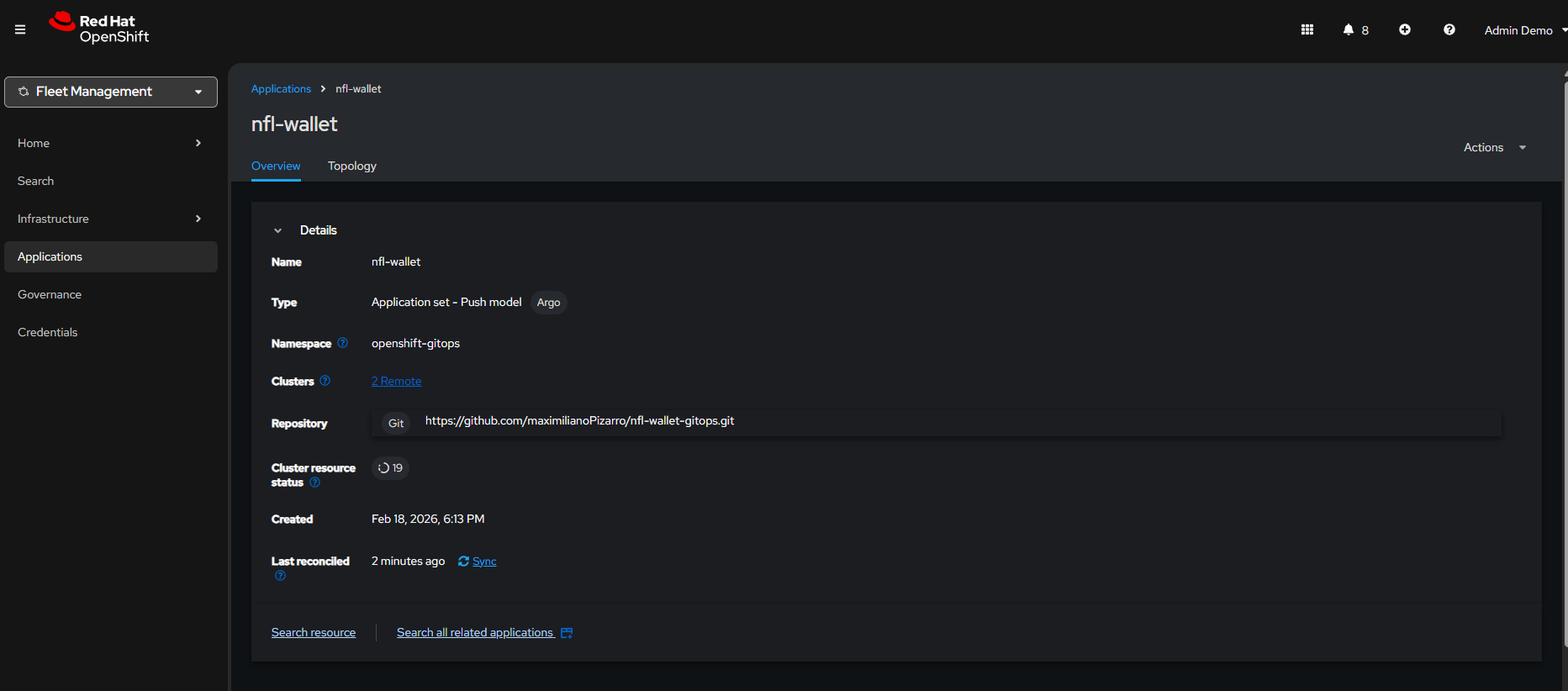 ACM — Topology with hub and managed clusters (East, West).
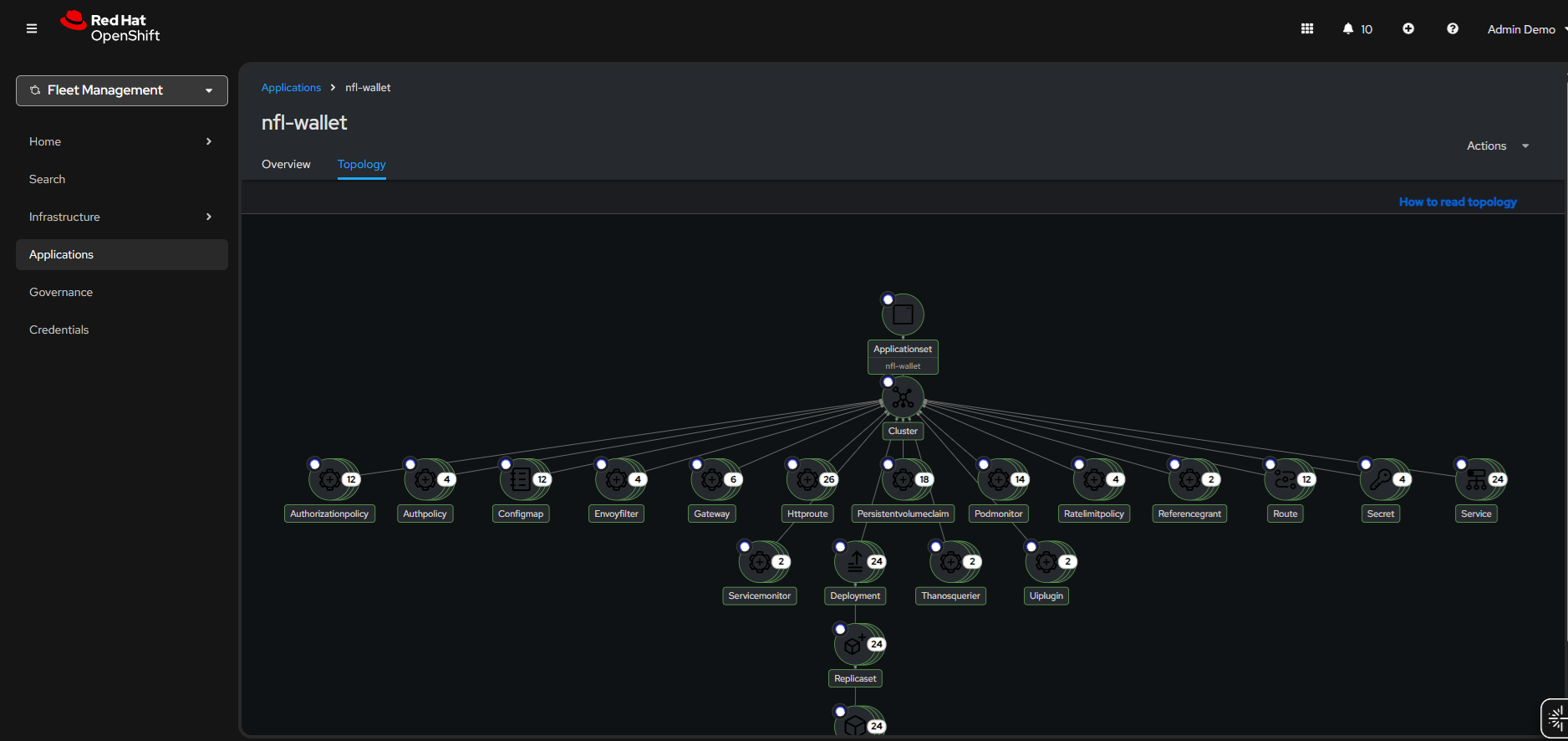 ACM — ApplicationSet and the 6 generated Applications (dev/test/prod × east/west).
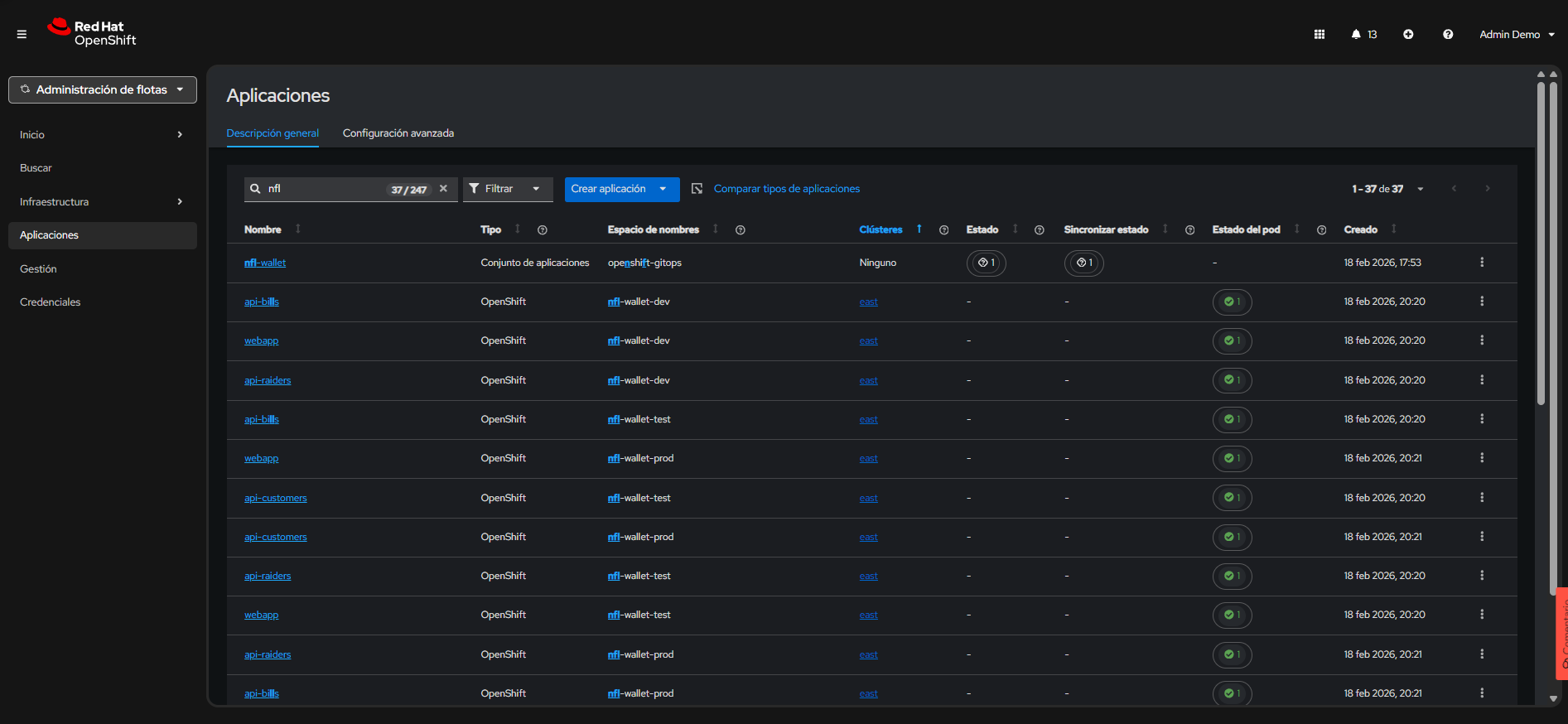 ACM — Overview of applications deployed on managed clusters.
9.7 GitOps Repository Documentation Site
The Stadium Wallet GitOps documentation site provides detailed, step-by-step guides for every aspect of the GitOps deployment. It complements this document with operational runbooks and environment-specific instructions.
Available Guides
| Guide | Description |
|---|---|
| Architecture | Placement, ApplicationSet matrix, multi-cluster topology (ACM and standalone) |
| Getting Started | Prerequisites, clone, verify Kustomize, deploy east/west or ACM — 10-step walkthrough |
| ARGO-ACM-DEPLOY | ACM logic: ManagedClusterSetBinding, Placement, GitOpsCluster, application order |
| Gateway Policies | AuthPolicy (API key), RateLimitPolicy, OIDC policy, RHBK biometric login, canary route |
| Observability | Grafana Operator, ServiceMonitors, run-tests.sh traffic scripts |
| QA Test Plan | Automated qa-test-plan.sh — 10 end-to-end tests (GitOps sync, mesh, auth, rate limiting, cross-cluster) |
| QA Diagrams | Visual Mermaid flowcharts for each QA test case with YAML resource references |
| ApplicationSet | ApplicationSet YAML reference and matrix generator details |
| Troubleshooting | Common issues: ApplicationSet RBAC, OutOfSync, 503 errors, CSR approval |
Deployment Modes
The site documents two deployment modes, each with its own getting-started path:
With ACM (Hub + Managed Clusters):
# 1. Placements + GitOpsCluster (creates east/west secrets in ArgoCD)
kubectl apply -f app-nfl-wallet-acm.yaml -n openshift-gitops

# 2. ApplicationSet (generates 6 Applications: dev/test/prod × east/west)
kubectl apply -f app-nfl-wallet-acm-cluster-decision.yaml -n openshift-gitops

# 3. Kuadrant resource patches (Authorino, Limitador scaling)
kubectl apply -f app-kuadrant-resources.yaml -n openshift-gitops
Without ACM (Independent East/West):
kubectl apply -f app-nfl-wallet-east.yaml -n openshift-gitops
kubectl apply -f app-nfl-wallet-west.yaml -n openshift-gitops
Gateway Policies by Environment
The site details how Kustomize overlays apply different security policies per environment:
| Environment | Overlay Contents | Chart |
|---|---|---|
| Dev | Gateway route, namespace-mesh (istio-injection), RHBK biometric login |
0.1.3 |
| Test | Gateway route, AuthPolicy, API keys, ESPN route, PlanPolicy, RHBK biometric login, OIDC policy | 0.1.3 |
| Prod | Gateway route, canary route, AuthPolicy, API keys, PlanPolicy (no biometric) | 0.1.1 |
The OIDC policy in test creates Kuadrant AuthPolicy objects per API HTTPRoute that validate JWT tokens from the RHBK realm, coexisting with the existing API key AuthPolicy on the Gateway.
Automated QA Script
The qa-test-plan.sh script runs the full test suite from the hub cluster against both east and west:
export CLUSTER_DOMAIN_EAST="cluster-east.sandbox.opentlc.com"
export CLUSTER_DOMAIN_WEST="cluster-west.sandbox.opentlc.com"
export API_KEY_TEST="nfl-wallet-customers-key"
export API_KEY_PROD="nfl-wallet-customers-key"

./scripts/qa-test-plan.sh
The script validates GitOps sync, ambient mesh enrollment, ESPN egress, rate limiting, AuthPolicy enforcement, cross-cluster reachability, observability stack health, Swagger UI, RHBK NeuroFace endpoints, and resource scaling — producing a PASS/FAIL report for each test case.
Source: Stadium Wallet GitOps — Documentation Site — Complete operational guides, architecture diagrams, and automated QA scripts.
10. Red Hat Developer Hub
Red Hat Developer Hub (RHDH), based on the upstream Backstage project, provides a developer self-service experience where developers can discover APIs, request access, and obtain credentials without tickets, manual operations intervention, or knowledge of the underlying infrastructure. This inner-loop approach reduces friction between development and platform teams.
API governance is centralized through Kuadrant on the backend and RHDH on the frontend. The Kuadrant Plugin for RHDH connects both worlds: APIs are automatically registered in the Backstage catalog via annotations in GitOps manifests, and access policies (Tiers, AuthPolicy, RateLimitPolicy) are discovered and managed from the portal.
Tier to CRD Mapping
Access tiers defined in RHDH materialize as Kuadrant CRDs in the cluster:
| RHDH Tier | Kuadrant CRD | Limit | Secret Label |
|---|---|---|---|
| Bronze | PlanPolicy + RateLimitPolicy |
100 req/day | tier: bronze |
| Silver | PlanPolicy + RateLimitPolicy |
500 req/day | tier: silver |
| Gold | PlanPolicy + RateLimitPolicy |
1000 req/day | tier: gold |
When an administrator defines a Tier via PlanPolicy, Kuadrant automatically creates the corresponding RateLimitPolicy. When a developer requests access from RHDH, Kuadrant provisions the Secret with the API Key and labels that Authorino uses for validation.
10.1 Self-Service Flow
- Discovery: In the RHDH catalog, locate
nfl-wallet-api-customers(Type: API - OpenAPI, Lifecycle: production) - Request Access: Click + Request API Access
- Tier Configuration: Select
silver (500 per daily) - Use Case (optional): Technical or business justification
- Approval & Provisioning: Kuadrant orchestrates credential creation (API Key or OIDC Token)
- Enforcement: Gateway API intercepts, validates the credential and enforces the 500 requests/day limit
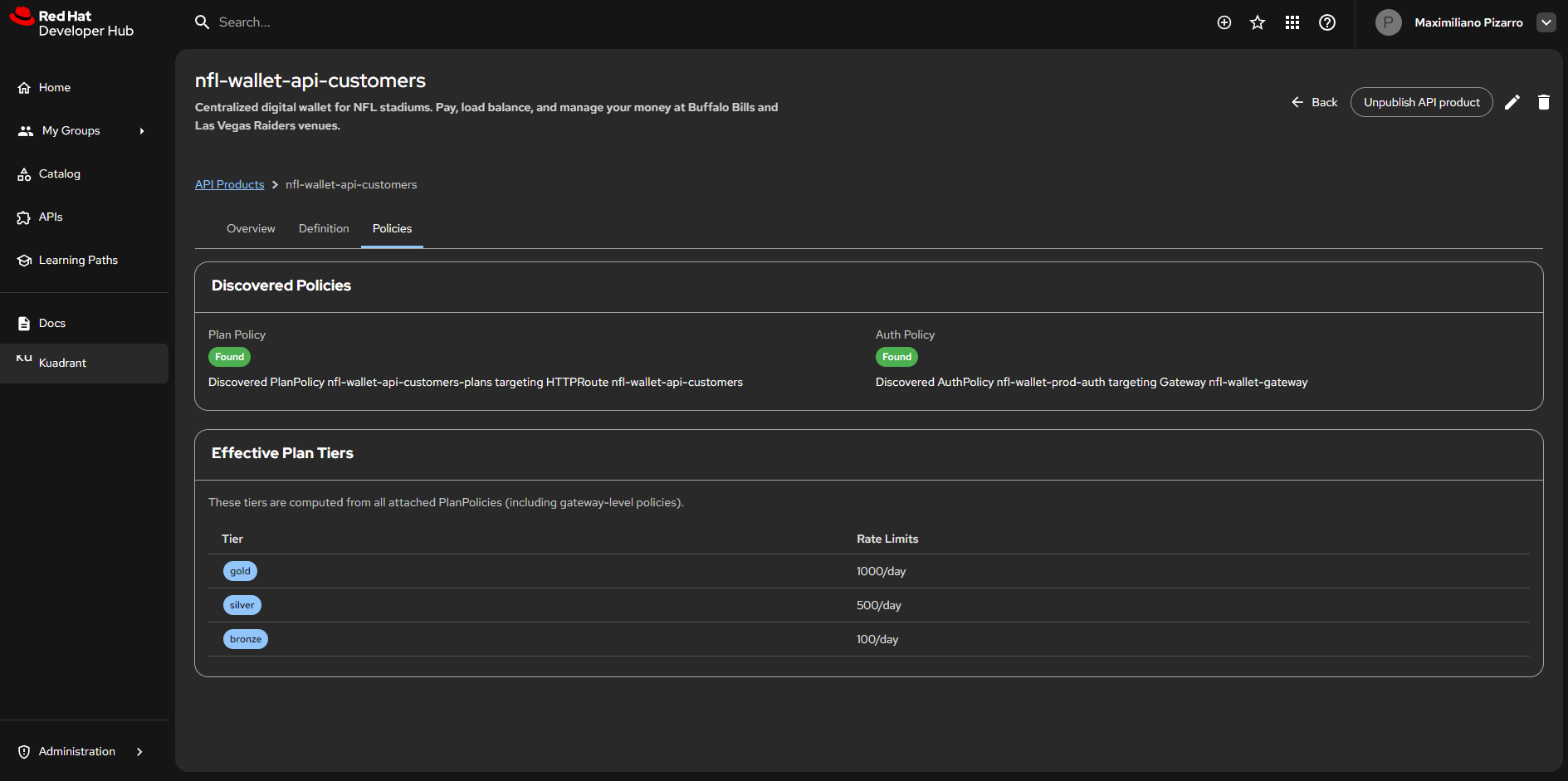 Red Hat Developer Hub — Kuadrant Plugin: Policies view for nfl-wallet-api-customers. PlanPolicy and AuthPolicy discovered. Effective tiers: gold (1000/day), silver (500/day), bronze (100/day).
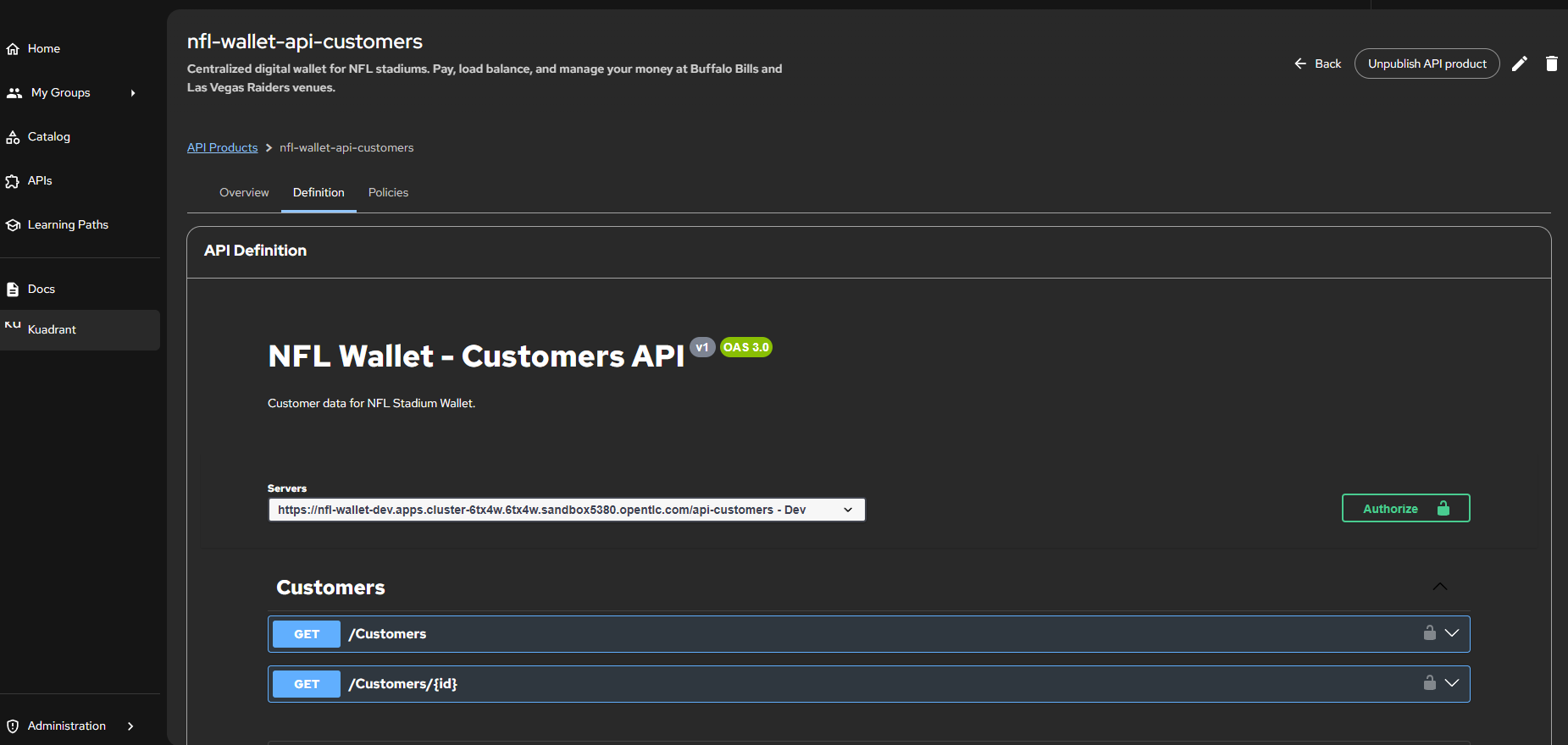 Red Hat Developer Hub — API Definition: Stadium Wallet - Customers API v1 (OAS 3.0). Endpoints GET /Customers and GET /Customers/{id} with Authorize button for authentication.
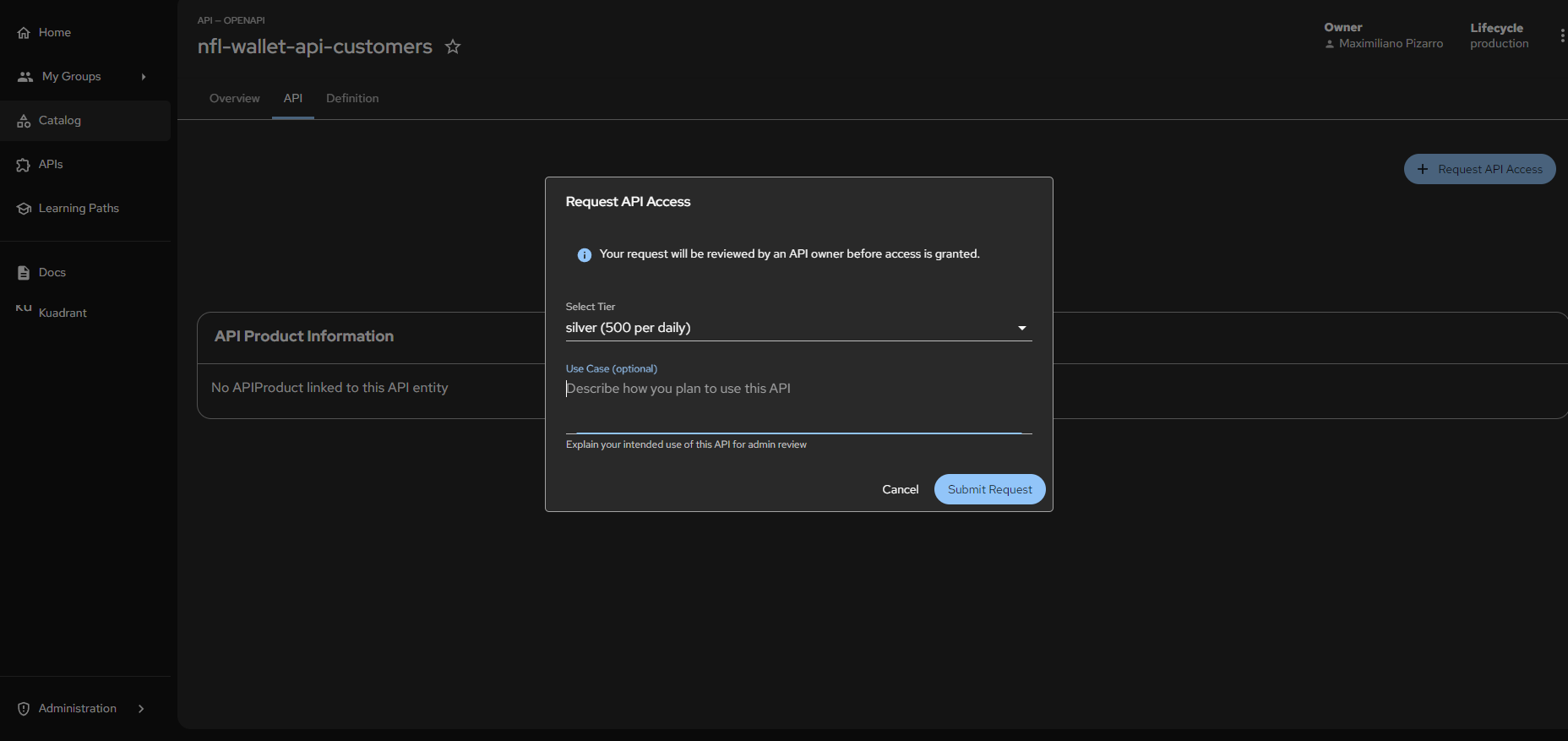 Red Hat Developer Hub — Access request flow: “Request API Access” modal with Tier selection (silver - 500 per daily) and Use Case field. Owner: Maximiliano Pizarro, Lifecycle: production.
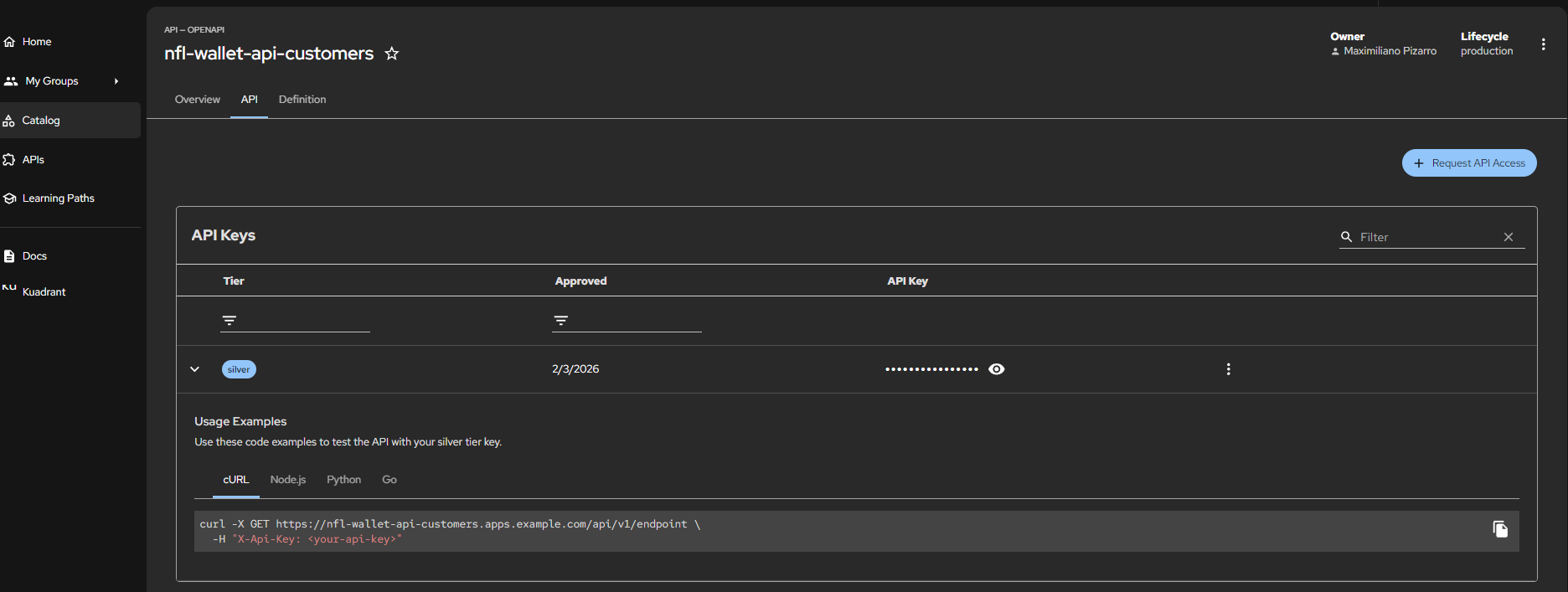 Red Hat Developer Hub — Provisioned API Keys: Silver tier approved (2/3/2026), generated API Key with usage examples in cURL, Node.js, Python and Go.
10.2 Using the API Key from Developer Hub
Once access is approved in RHDH, the portal generates an API Key linked to the requested Tier. This key is stored as a Kubernetes Secret with the label api: <namespace> (e.g. api: nfl-wallet-prod), which is the mechanism Authorino (Kuadrant) uses to discover and validate credentials.
Complete flow: from portal to request
- RHDH generates the Secret with the API Key and assigns the label
api: nfl-wallet-prod:
apiVersion: v1
kind: Secret
metadata:
  name: consumer-api-key-silver-<hash>
  namespace: nfl-wallet-prod
  labels:
    api: nfl-wallet-prod
    authorino.kuadrant.io/managed-by: authorino
    tier: silver
type: Opaque
data:
  api_key: <base64-encoded-key>
-
AuthPolicy references the label
api: nfl-wallet-prodas the credential selector. When a request arrives, Authorino searches all Secrets with that label and validates that theX-Api-Keyheader matches one of them. -
The consumer uses the key obtained from the RHDH portal in their requests:
# cURL example (as shown in the RHDH portal)
curl -X GET https://nfl-wallet-prod.apps.cluster.example.com/api-customers/Customers \
  -H "X-Api-Key: <your-api-key>"
# Python example (as shown in the RHDH portal)
import requests

headers = {"X-Api-Key": "<your-api-key>"}
response = requests.get(
    "https://nfl-wallet-prod.apps.cluster.example.com/api-customers/Customers",
    headers=headers
)
- The Gateway validates the request: if the key matches a Secret with the correct label and the Tier has not exceeded its quota (e.g., 500 req/day for silver), the request reaches the backend. Otherwise, it returns 403 Forbidden or 429 Too Many Requests.
Relationship: Label → AuthPolicy → Secret
sequenceDiagram
    participant Portal as RHDH Portal
    participant K8s as Kubernetes Cluster<br/>nfl-wallet-prod
    participant Auth as Authorino
    participant Backend as Backend API

    Portal->>K8s: Request API Access (Tier: silver)
    K8s->>K8s: Approve → Create Secret<br/>label: api=nfl-wallet-prod, tier=silver

    Note over Portal,K8s: Consumer obtains API Key from portal

    rect rgb(240, 248, 255)
        Portal->>Auth: Request with X-Api-Key header
        Auth->>K8s: Search Secrets with label<br/>api=nfl-wallet-prod
        K8s-->>Auth: Secret found
        alt Valid key within quota
            Auth->>Backend: 200 OK → Forward request
        else Invalid key
            Auth-->>Portal: 403 Forbidden
        else Quota exceeded
            Auth-->>Portal: 429 Too Many Requests
        end
    end
Important: API Key Secrets must exist in the same namespace as the AuthPolicy. For production, use Sealed Secrets or External Secrets Operator instead of committing keys directly to Git.
10.3 Deployment on Red Hat Developer Sandbox (Connectivity Link)
Stadium Wallet’s Developer Hub deployment is also validated on the Red Hat Developer Sandbox through the connectivity-link GitOps repository. This repository provides a consolidated ApplicationSet that deploys the entire Connectivity Link stack — including RHDH, Keycloak, Service Mesh, Kuadrant, and the NeuralBank demo application — on a single OpenShift cluster with automated Ansible provisioning.
Architecture
The Connectivity Link repository uses an ApplicationSet with sync_wave ordering to deploy all infrastructure components in the correct sequence:
| Sync Wave | Components |
|---|---|
| Wave 0 | OpenShift GitOps operator |
| Wave 1 | Namespaces (developer-hub, rhbk, neuralbank, etc.) |
| Wave 2 | Operators (RHBK Operator, RBAC configurations) |
| Wave 3 | Infrastructure (Service Mesh, RHCL Operator, Developer Hub) |
| Wave 4–7 | Applications (NeuralBank Stack, LiteMaaS, NFL-Wallet catalog) |
RHDH Custom Resource
Developer Hub is deployed using the rhdh.redhat.com/v1alpha3 Backstage CRD with a declarative configuration:
apiVersion: rhdh.redhat.com/v1alpha3
kind: Backstage
metadata:
  name: developer-hub
spec:
  application:
    appConfig:
      configMaps:
      - name: app-config-rhdh
    dynamicPluginsConfigMapName: dynamic-plugins-rhdh
    extraEnvs:
      secrets:
      - name: secrets-rhdh
      - name: developer-hub-k8s-sa-token
        key: token
    extraFiles:
      configMaps:
      - name: rhdh-rbac-policy
    replicas: 1
    route:
      enabled: true
  database:
    enableLocalDb: true
  deployment:
    patch:
      spec:
        template:
          spec:
            automountServiceAccountToken: true
Dynamic Plugins
The deployment includes pre-configured dynamic plugins that extend RHDH functionality:
| Plugin | Purpose | Status |
|---|---|---|
| Kuadrant (frontend + backend) | API Products, API Keys, PlanPolicy, RateLimitPolicy, AuthPolicy management | Enabled |
| Keycloak Org | User/group synchronization from Keycloak realms | Enabled |
| GitLab Scaffolder | Software Templates for creating new components from GitLab | Enabled |
| Kubernetes Backend | In-cluster resource visibility (pods, deployments, services) | Enabled |
| Tekton | CI/CD pipeline visualization (PipelineRuns, TaskRuns) | Enabled |
| MCP Actions (backend) | Model Context Protocol server for AI-assisted interactions | Enabled |
| Quickstart | Guided onboarding experience | Enabled |
| RBAC | Role-based access control UI and policy management | Enabled |
| Lightspeed | AI chat assistant (llama-stack backend) | Disabled (version conflicts) |
RBAC Permission Model
The deployment implements a hierarchical RBAC model with three permission tiers, synchronized from Keycloak groups:
platform-team (full access)
  ├── infrastructure
  ├── platformengineers
  └── rhdh

application-team (limited access)
  ├── developers
  └── devteam1

authenticated-users (read-only)
  └── all logged-in users
| Role | Catalog | Scaffolder | Plugins | RBAC Policies |
|---|---|---|---|---|
| Platform Team | Full CRUD | Full access | Install/Uninstall | Full CRUD |
| Application Team | Read-only | Execute templates | — | — |
| Authenticated Users | Read-only | Execute templates | — | — |
Catalog Integration
The app-config.yaml configures automatic catalog discovery from GitLab, registering Stadium Wallet APIs alongside other Connectivity Link components:
| Catalog Provider | Repository | Content |
|---|---|---|
nfl-wallet |
maximilianoPizarro/NFL-Wallet |
API definitions (OpenAPI), Component entities |
nfl-wallet-catalog |
connectivity-link/developer-hub/catalog/ |
dev/test/prod Component entities, API Products |
neuralbank-stack |
connectivity-link/neuralbank-stack/ |
NeuralBank demo (OIDC reference app) |
rhbk |
connectivity-link/rhbk/ |
Keycloak deployment |
operators |
connectivity-link/operators/ |
Operator subscriptions |
groups |
connectivity-link/groups/ |
Domains, Systems, Users, Groups |
Quick Start
# 1. Fork the repository
git clone https://gitlab.com/maximilianoPizarro/connectivity-link.git

# 2. Login to OpenShift (cluster-admin required)
oc login --token=<token> --server=https://api.<cluster>:6443

# 3. Run the automated installer (updates domain, installs operators, deploys all)
./install.sh

# 4. Access Developer Hub
open https://developer-hub.apps.<cluster-domain>
The installer script (install.sh) automates the full deployment: it detects the cluster domain, updates all manifest references, installs the OpenShift GitOps operator, and applies the consolidated applicationset-instance.yaml that deploys all components via ArgoCD.
Source: connectivity-link/developer-hub — Full deployment manifests, dynamic plugins configuration, RBAC policies, and Ansible playbooks.
11. Observability
Why This Observability Stack
In a microservices architecture with a multi-cluster Service Mesh, observability is not a “nice to have” — it is an operational requirement. Without visibility into what happens in the mesh, diagnosing a 5xx error or latency degradation requires manually sifting through logs from multiple pods across multiple clusters.
The chosen stack covers the four dimensions of cloud-native observability:
| Dimension | Tool | What It Answers |
|---|---|---|
| Metrics | Prometheus + promxy | How many requests per second? What is the error rate? How is p99 latency trending? |
| Dashboards | Grafana | How do environments compare? Are there anomalies on a specific cluster? |
| Mesh topology | Kiali | Which services communicate with each other? Where is traffic concentrated? Are there broken circuits? |
| Distributed traces | TempoStack + OpenTelemetry | How long does each hop take in a request? Where is the bottleneck? |
Each component integrates natively with Istio/OSSM3: ztunnel and Waypoint Proxies emit metrics and spans automatically via the OTLP protocol, without instrumenting application code. This means that enrolling a namespace in Ambient Mode enables observability “for free” for all L4 and L7 traffic.
11.1 Observability Stack
| Component | Function |
|---|---|
| Prometheus + promxy | Fan-out proxy for metrics from East and West |
| Grafana | Dashboards: request rate, response codes, duration, error rate |
| Kiali | Real-time Service Mesh federated topology |
| TempoStack | Distributed tracing backend (Jaeger-compatible) |
| OpenTelemetry | Instrumentation with OTLP/HTTP — L7 spans from Waypoint proxies |
11.2 Enable Observability with Helm
helm upgrade nfl-wallet ./helm/nfl-wallet -n nfl-wallet --install \
  --set gateway.enabled=true \
  --set observability.rhobs.enabled=true \
  --set observability.rhobs.thanosQuerier.enabled=true \
  --set observability.rhobs.podMonitorGateway.enabled=true \
  --set observability.rhobs.uiPlugin.enabled=true
11.3 Grafana Dashboard
The “Stadium Wallet – All environments” dashboard includes:
- Environment (namespace) variable to filter by nfl-wallet-dev, test, prod
- Panels: request rate, response codes, duration, error rate, rate by service
11.4 Prometheus Queries (Reference)
| Metric | Example Query |
|---|---|
| Total Requests (rate) | sum(rate(istio_requests_total[5m])) |
| Successful Requests (2xx) | sum(rate(istio_requests_total{response_code=~"2.."}[5m])) |
| Error Rate | sum(rate(istio_requests_total{response_code=~"5.."}[5m])) / sum(rate(istio_requests_total[5m])) |
11.5 Traffic Test Script
export CLUSTER_DOMAIN="cluster-thmg4.thmg4.sandbox4076.opentlc.com"
export API_KEY_TEST="nfl-wallet-customers-key"
export API_KEY_PROD="nfl-wallet-customers-key"
./observability/run-tests.sh all
| Command | Description |
|---|---|
./observability/run-tests.sh all |
Run dev, test and prod |
./observability/run-tests.sh dev |
Dev only (no API key) |
./observability/run-tests.sh test |
Test only (with API_KEY_TEST) |
./observability/run-tests.sh prod |
Prod only (with API_KEY_PROD) |
./observability/run-tests.sh loop |
Continuous loop: dev + test + prod |
Aggregated metrics (Grafana): The “Stadium Wallet – All environments” dashboard allows comparing the behavior of all three environments (dev/test/prod) in a single panel. When running the script with loop, continuous traffic is generated that feeds the request rate, response codes, and duration metrics.
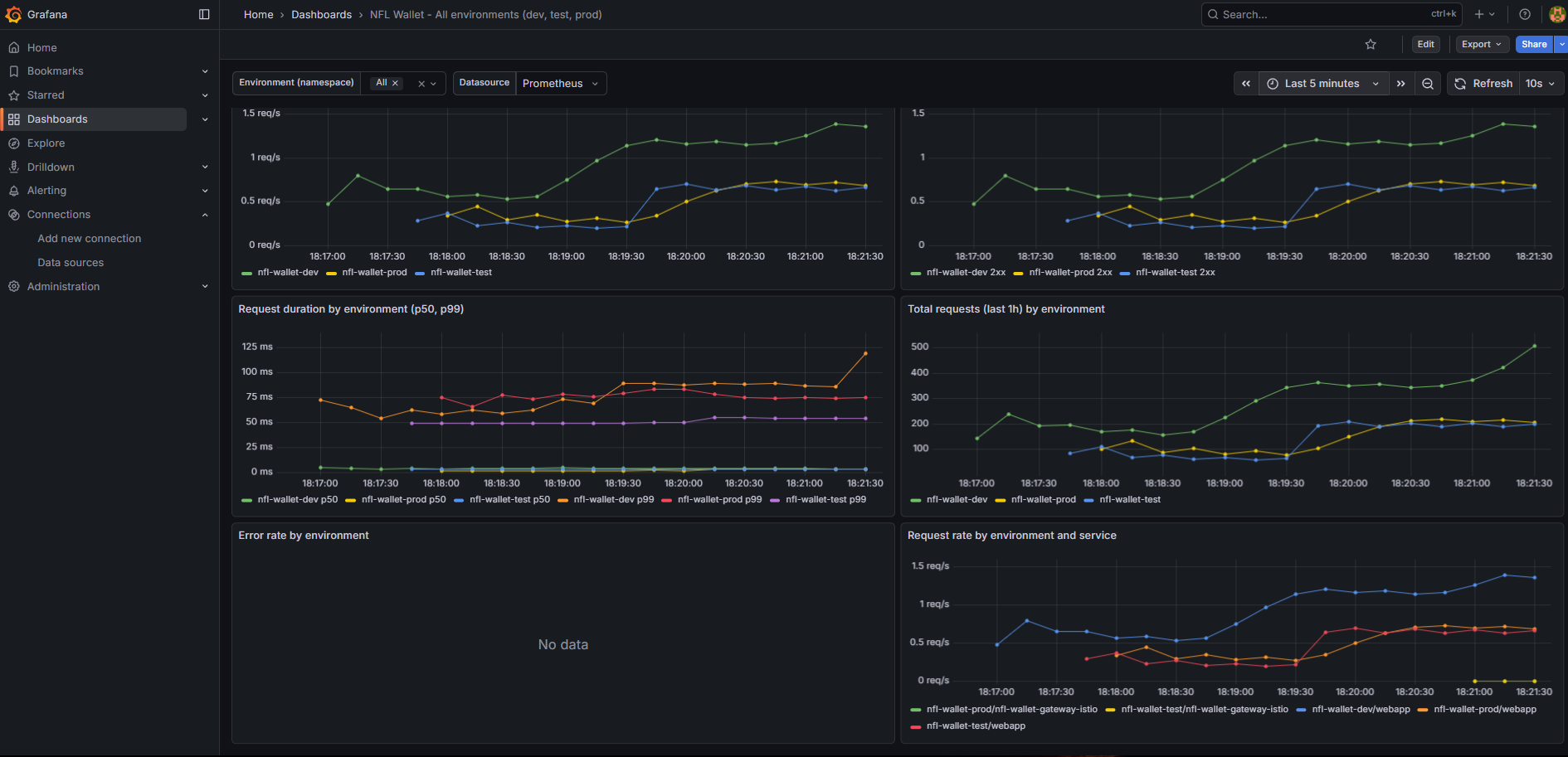 Grafana “Stadium Wallet – All environments” dashboard with metrics: request rate, response codes, duration, error rate.
Mesh topology (Kiali): Kiali visualizes service relationships within the mesh in real time. Nodes represent workloads and edges represent observed traffic. Colors indicate health status: green (healthy), yellow (degraded), red (errors). This enables quick identification of which service is generating errors or receiving unexpected traffic.
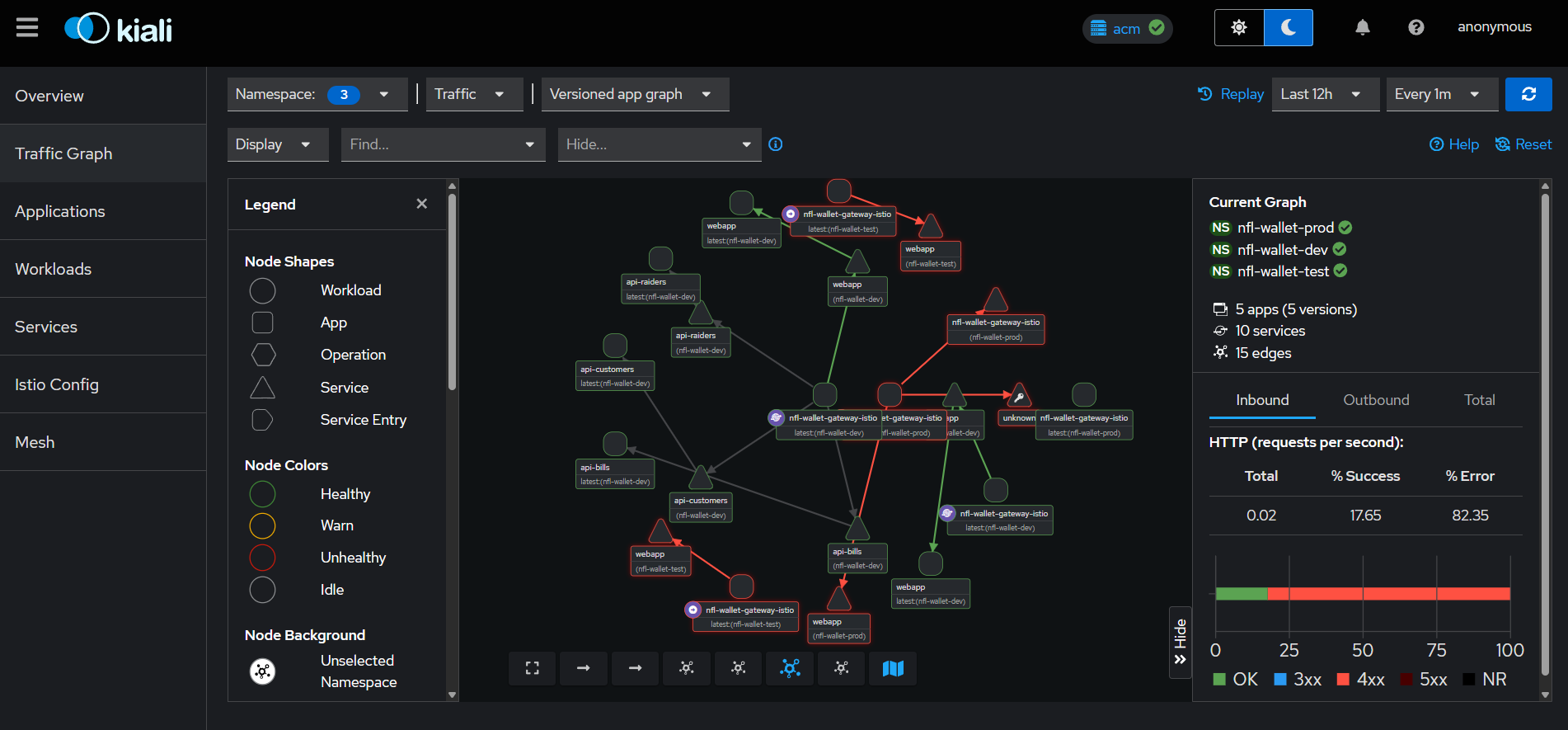 Kiali — Federated Service Mesh topology showing traffic flow across namespaces (dev/test/prod).
Multi-cluster traffic (Kiali): In the ACM configuration, Kiali displays the federated service graph between East and West clusters, including Istio gateways and waypoints. This enables verification that cross-cluster traffic flows correctly through the HBONE tunnel.
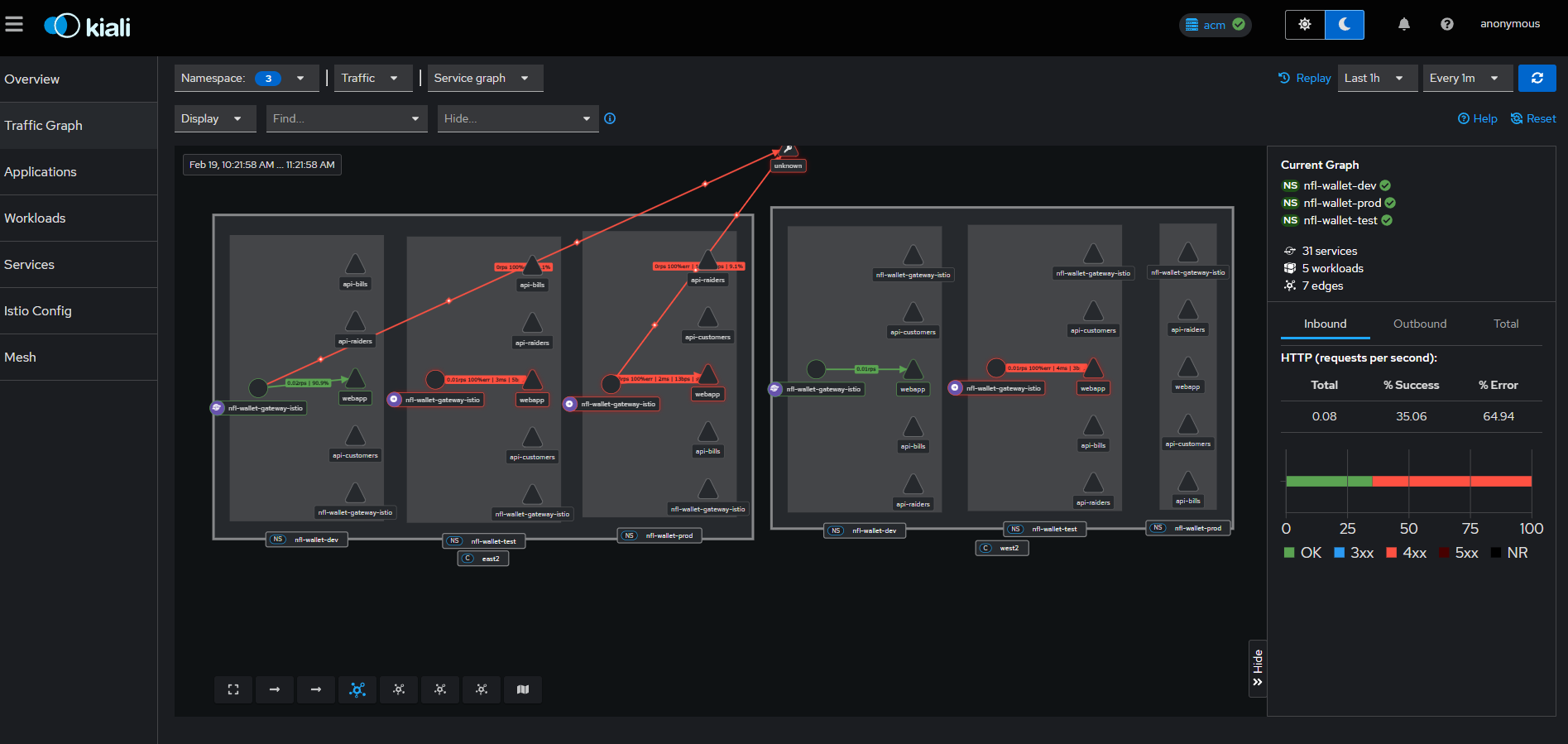 Kiali — Multi-cluster service graph with East/West traffic, gateways and waypoints.
12. Canary / Blue-Green Deployments
The production overlay includes an additional canary Route (nfl-wallet-canary.apps.<cluster-domain>) that points to the same gateway Service (nfl-wallet-gateway-istio), enabling blue/green traffic when the chart creates the corresponding HTTPRoute.
Canary Metrics by Environment
The following Grafana screenshots show traffic behavior during a canary deployment, showing the request distribution between dev, test and prod environments:
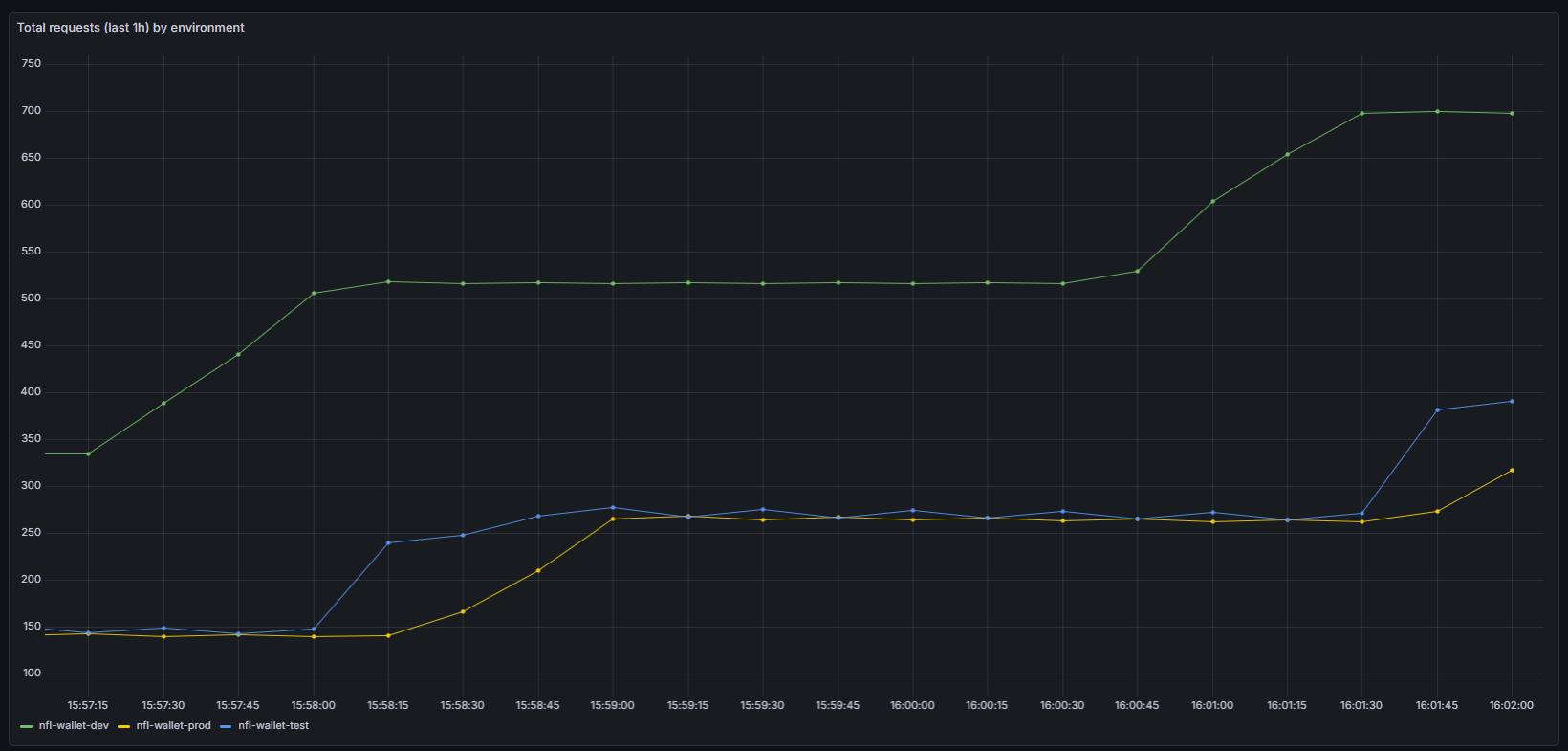 Total requests (last hour) by environment during a canary deployment — nfl-wallet-dev (green), nfl-wallet-prod (yellow), nfl-wallet-test (blue). The gradual traffic increase to production is visible.
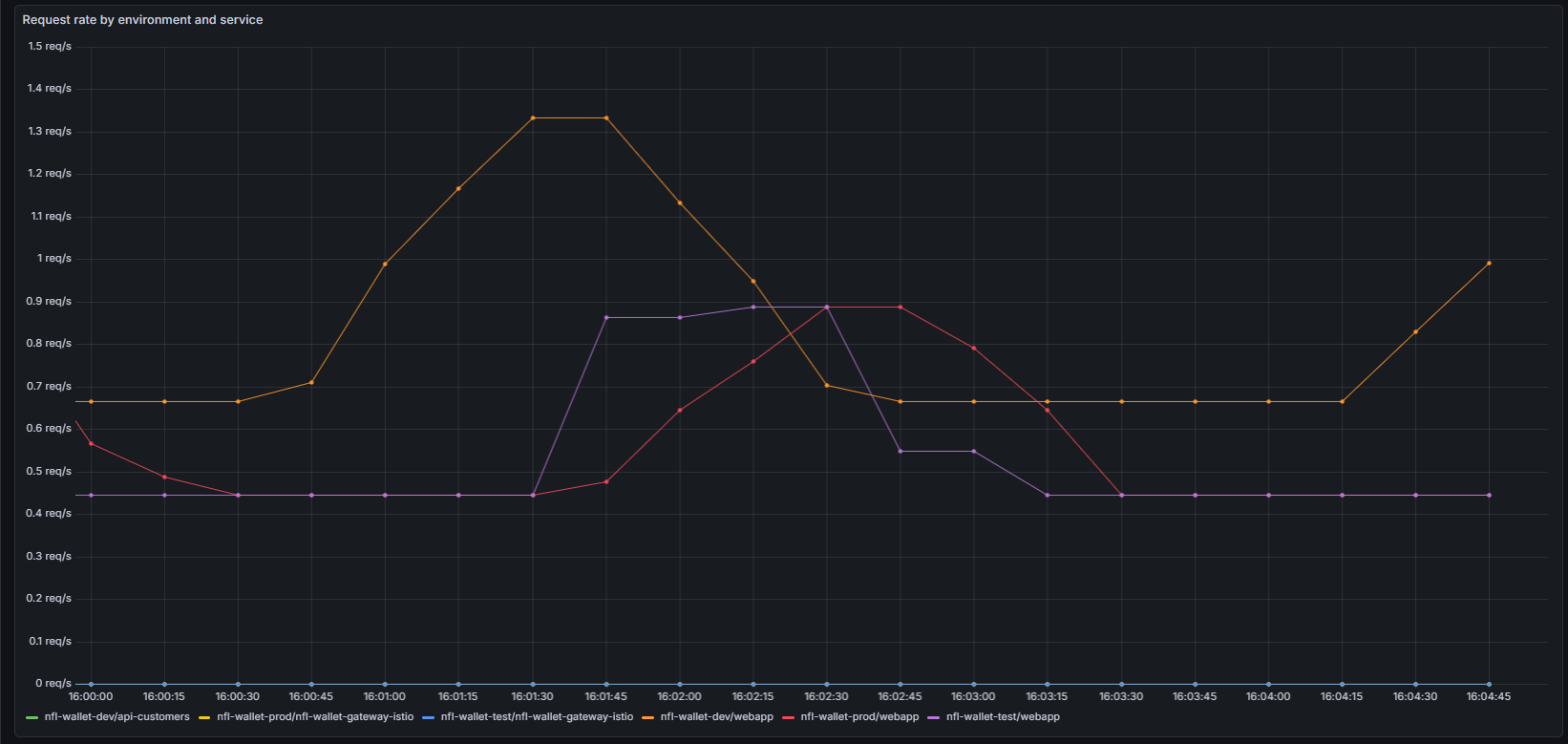 Request rate by environment and service during canary — Shows how api-customers (dev), gateway-istio (prod/test) and webapp distribute traffic between versions.
Canary Definition with HTTPRoutes
Canary deployments are implemented using two HTTPRoutes pointing to the same Gateway but with different hostnames. This allows splitting traffic between the stable version (production) and the canary version:
# Main HTTPRoute (stable production)
apiVersion: gateway.networking.k8s.io/v1
kind: HTTPRoute
metadata:
  name: nfl-wallet-webapp
  namespace: nfl-wallet-prod
spec:
  parentRefs:
  - name: nfl-wallet-gateway
  hostnames:
  - "nfl-wallet-prod.apps.cluster-east.example.com"
  rules:
  - matches:
    - path:
        type: PathPrefix
        value: /
    backendRefs:
    - name: webapp
      port: 5173
      weight: 100      # 100% stable traffic
# Canary HTTPRoute (new version)
apiVersion: gateway.networking.k8s.io/v1
kind: HTTPRoute
metadata:
  name: nfl-wallet-webapp-canary
  namespace: nfl-wallet-prod
spec:
  parentRefs:
  - name: nfl-wallet-gateway
  hostnames:
  - "nfl-wallet-canary.apps.cluster-east.example.com"
  rules:
  - matches:
    - path:
        type: PathPrefix
        value: /
    backendRefs:
    - name: webapp-canary        # Canary version Service
      port: 5173
      weight: 100
For a weighted canary (percentage-based traffic on the same hostname), use a single HTTPRoute with multiple backendRefs:
apiVersion: gateway.networking.k8s.io/v1
kind: HTTPRoute
metadata:
  name: nfl-wallet-webapp-weighted
  namespace: nfl-wallet-prod
spec:
  parentRefs:
  - name: nfl-wallet-gateway
  hostnames:
  - "nfl-wallet-prod.apps.cluster-east.example.com"
  rules:
  - matches:
    - path:
        type: PathPrefix
        value: /
    backendRefs:
    - name: webapp               # Stable version
      port: 5173
      weight: 90                 # 90% of traffic
    - name: webapp-canary        # Canary version
      port: 5173
      weight: 10                 # 10% of traffic
Kustomize Configuration
The canary route is defined in the Kustomize overlays for production:
- Path:
nfl-wallet/overlays/prod/kustomization.yaml(andprod-east,prod-west) - Host:
nfl-wallet-canary.apps.<cluster-domain> - Target: Same gateway Service
nfl-wallet-gateway-istio
The production overlay includes the OpenShift Route for the canary host:
# nfl-wallet/overlays/prod/canary-route.yaml
apiVersion: route.openshift.io/v1
kind: Route
metadata:
  name: nfl-wallet-canary
  namespace: nfl-wallet-prod
spec:
  host: nfl-wallet-canary.apps.cluster-east.example.com
  to:
    kind: Service
    name: nfl-wallet-gateway-istio
  tls:
    termination: edge
    insecureEdgeTerminationPolicy: Redirect
To change the domain, edit the patch in each corresponding overlay.
13. Test Plan & Validation (QA)
Once ArgoCD synchronization is complete, QA/Operations must execute the latest automated QA Test Plan from the GitOps repository. This test plan is executed from the hub cluster and validates both east and west environments in a single run.
| Summary | |||
|---|---|---|---|
10 Automated Tests (qa-test-plan.sh) |
13 Diagram Scenarios (qa-diagrams) |
3 Environments (dev, test, prod) | 2 Clusters (East, West) |
13.1 Automated QA Test Plan (Latest)
Script source: scripts/qa-test-plan.sh (from nfl-wallet-gitops).
# Run all automated tests
./scripts/qa-test-plan.sh

# Run selected tests only
./scripts/qa-test-plan.sh QA-05 QA-06

# Skip TLS verification
./scripts/qa-test-plan.sh --insecure
Prerequisites
| Requirement | Detail |
|---|---|
oc CLI |
Authenticated to hub cluster (oc whoami = hub). Required for QA-01 and QA-02 |
curl |
Required for all HTTP tests (QA-03 to QA-10) |
| HTTPS outbound access | Access to east/west/hub *.apps.<cluster-domain> routes |
| API keys | Defaults can be overridden by environment variables |
Automated Test Coverage (QA-01 to QA-10)
| Test | Validates | Pass Criteria |
|---|---|---|
| QA-01 GitOps Sync | ArgoCD app health/sync status | All required apps Synced and Healthy |
| QA-02 Ambient Mesh | No istio-proxy sidecar injected |
Pods run without sidecar |
| QA-03 Egress ESPN | ESPN route reachability in test | 200 on public path, or auth-path response proving route exists |
| QA-04 RHDH Portal | API catalog + Kuadrant plugin visibility | Manual verification (SKIP in script) |
| QA-05 Rate Limiting | Kuadrant RateLimitPolicy enforcement |
429 appears after quota, or endpoint remains reachable |
| QA-06 AuthPolicy | API key enforcement in test/prod | 401/403 without key, 200 with key |
| QA-07 Cross-Cluster | East/west API and webapp availability | HTTP 200 across both clusters |
| QA-08 Observability | Grafana + Promxy + metrics query | Routes reachable and metric data returned |
| QA-09 Swagger UI | Swagger endpoints for 3 APIs | HTTP 200/301 |
| QA-10 Load Test | Gateway behavior under concurrent load | Success rate >= 30% and optional 429 enforcement |
Standard Environment Variables
export EAST_DOMAIN="cluster-64k4b.64k4b.sandbox5146.opentlc.com"
export WEST_DOMAIN="cluster-7rt9h.7rt9h.sandbox1900.opentlc.com"
export HUB_DOMAIN="cluster-72nh2.dynamic.redhatworkshops.io"
export API_KEY_CUSTOMERS="nfl-wallet-customers-key"
export API_KEY_BILLS="nfl-wallet-bills-key"
export API_KEY_RAIDERS="nfl-wallet-raiders-key"
Chart Versions Validated by QA
| Environment | Chart | Biometric Login | OIDC Policy |
|---|---|---|---|
| dev | 0.1.3 |
Enabled (FHD 1920x1080) | Disabled |
| test | 0.1.3 |
Enabled (FHD 1920x1080) | Enabled |
| prod | 0.1.1 |
Disabled | Disabled |
13.2 Extended Diagram Validation (QA-01 to QA-13)
QA-01 — GitOps Sync
ArgoCD Applications Healthy & Synced
flowchart TD
  A["oc get applications.argoproj.io\n-n openshift-gitops"] --> B{"Apps\nfound?"}
  B -- No --> F1["FAIL: Cannot list apps"]
  B -- Yes --> C["Parse each app:\nname / sync / health"]
  C --> D{"kuadrant-resources-*\nOutOfSync?"}
  D -- Yes --> W["WARNING:\nSharedResourceWarning\napply gateway-resources.yaml"]
  D -- No --> E{"Synced &\nHealthy?"}
  E -- Yes --> P["App OK"]
  E -- No --> F2["App unhealthy"]
  W --> G{"All nfl-wallet\napps OK?"}
  P --> G
  F2 --> G
  G -- Yes --> PASS["PASS"]
  G -- No --> FAIL["FAIL"]
app-nfl-wallet-acm-cluster-decision.yaml ApplicationSet
apiVersion: argoproj.io/v1alpha1
kind: ApplicationSet
metadata:
  name: nfl-wallet
  namespace: openshift-gitops
spec:
  generators:
  - matrix:
      generators:
      - clusterDecisionResource:
          configMapRef: acm-placement
          labelSelector:
            matchLabels:
              cluster.open-cluster-management.io/placement: nfl-wallet-gitops-placement
          requeueAfterSeconds: 180
      - list:
          elements:
          - env: dev
            chartVersion: "0.1.3"
          - env: test
            chartVersion: "0.1.3"
          - env: prod
            chartVersion: "0.1.1"
  template:
    metadata:
      name: 'nfl-wallet-{{env}}-{{name}}'
    spec:
      project: default
      sources:
      - repoURL: 'https://github.com/maximilianoPizarro/nfl-wallet-gitops.git'
        targetRevision: HEAD
        path: 'nfl-wallet/overlays/{{env}}-{{name}}'
      - repoURL: 'https://maximilianopizarro.github.io/NFL-Wallet'
        chart: nfl-wallet
        targetRevision: '{{chartVersion}}'
      destination:
        server: '{{server}}'
        namespace: 'nfl-wallet-{{env}}'
      syncPolicy:
        automated:
          prune: true
          selfHeal: true
        syncOptions:
        - CreateNamespace=true
        - ServerSideApply=true
app-kuadrant-resources.yaml ApplicationSet
apiVersion: argoproj.io/v1alpha1
kind: ApplicationSet
metadata:
  name: kuadrant-resources
  namespace: openshift-gitops
spec:
  generators:
  - list:
      elements:
      - cluster: east
        server: 'https://api.cluster-east:6443'
      - cluster: west
        server: 'https://api.cluster-west:6443'
  template:
    metadata:
      name: 'kuadrant-resources-{{cluster}}'
    spec:
      project: default
      source:
        repoURL: 'https://github.com/maximilianoPizarro/nfl-wallet-gitops.git'
        targetRevision: HEAD
        path: kuadrant-system
      destination:
        server: '{{server}}'
        namespace: kuadrant-system
      syncPolicy:
        automated:
          selfHeal: true
        syncOptions:
        - ServerSideApply=true
app-nfl-wallet-acm.yaml Placement
apiVersion: cluster.open-cluster-management.io/v1beta1
kind: Placement
metadata:
  name: nfl-wallet-gitops-placement
  namespace: openshift-gitops
spec:
  predicates:
  - requiredClusterSelector:
      labelSelector:
        matchLabels:
          nfl-wallet: "true"
---
apiVersion: apps.open-cluster-management.io/v1beta1
kind: GitOpsCluster
metadata:
  name: nfl-wallet-gitops
  namespace: openshift-gitops
spec:
  argoServer:
    cluster: local-cluster
    argoNamespace: openshift-gitops
  placementRef:
    kind: Placement
    name: nfl-wallet-gitops-placement
kuadrant-system/gateway-resources.yaml Manual Patch
apiVersion: apps/v1
kind: Deployment
metadata:
  name: nfl-wallet-gateway-istio
  namespace: nfl-wallet-prod
spec:
  template:
    spec:
      containers:
      - name: istio-proxy
        resources:
          requests:
            cpu: 500m
            memory: 256Mi
          limits:
            cpu: "2"
            memory: 1Gi
QA-02 — Ambient Mesh
Pods have 1 container (no sidecar)
flowchart TD
  A["oc get pods\n-n nfl-wallet-dev/test/prod"] --> B{"Pods\nfound?"}
  B -- No --> S["SKIP: Run from\nmanaged cluster"]
  B -- Yes --> C["Check each pod:\ncount containers"]
  C --> D{"Has\nistio-proxy?"}
  D -- Yes --> F["FAIL: Sidecar detected"]
  D -- No --> E{"Only 1\ncontainer?"}
  E -- Yes --> P["No sidecar — Ambient"]
  E -- No --> W["WARNING: Multiple containers"]
  P --> R{"All pods OK?"}
  W --> R
  F --> R
  R -- Yes --> PASS["PASS"]
  R -- No --> FAIL["FAIL"]
overlays/dev/namespace-mesh.yaml Namespace
apiVersion: v1
kind: Namespace
metadata:
  name: nfl-wallet-dev
  labels:
    istio-injection: enabled
overlays/test/namespace-mesh.yaml Namespace
apiVersion: v1
kind: Namespace
metadata:
  name: nfl-wallet-test
  labels:
    istio.io/dataplane-mode: ambient
overlays/prod/namespace-mesh.yaml Namespace
apiVersion: v1
kind: Namespace
metadata:
  name: nfl-wallet-prod
  labels:
    istio.io/dataplane-mode: ambient
QA-03 — Egress ESPN
ESPN route reachable (test env only)
flowchart TD
  A["curl ESPN route\n/auth/nfl + X-Api-Key"] --> B{"HTTP\ncode?"}
  B -- 200 --> P1["PASS: ESPN OK"]
  B -- 301/302 --> P2["PASS: Redirect active"]
  B -- 401/403 --> C["Route exists\nbut auth failed"]
  C --> D["Try /public/nfl\nno auth required"]
  D --> E{"HTTP\n200?"}
  E -- Yes --> P3["PASS: Public path"]
  E -- No --> P4["PASS: Route exists"]
  B -- other --> F["Fallback:\ntest api-bills on dev"]
  F --> G{"HTTP\n200?"}
  G -- Yes --> P5["PASS: api-bills OK"]
  G -- No --> FAIL["FAIL"]
overlays/test/nfl-wallet-espn-route.yaml HTTPRoute
apiVersion: gateway.networking.k8s.io/v1
kind: HTTPRoute
metadata:
  name: nfl-wallet-espn
  namespace: nfl-wallet-test
spec:
  parentRefs:
  - name: nfl-wallet-gateway
  hostnames:
  - "nfl-wallet-test.apps.cluster-east.example.com"
  rules:
  - matches:
    - path:
        type: PathPrefix
        value: /public/nfl
    backendRefs:
    - name: api-bills
      port: 8081
overlays/test/auth-policy-patch.yaml AuthPolicy
apiVersion: kuadrant.io/v1
kind: AuthPolicy
metadata:
  name: nfl-wallet-gateway-auth
  namespace: nfl-wallet-test
spec:
  targetRef:
    group: gateway.networking.k8s.io
    kind: Gateway
    name: nfl-wallet-gateway
  rules:
    authentication:
      api-key-authn:
        apiKey:
          selector:
            matchLabels:
              api: nfl-wallet-test
        credentials:
          customHeader:
            name: X-Api-Key
    response:
      unauthorized:
        headers:
          content-type:
            value: application/json
        body:
          value: '{"error":"Forbidden","message":"Invalid or missing API Key"}'
overlays/test/api-keys-secret.yaml Secret
apiVersion: v1
kind: Secret
metadata:
  name: nfl-wallet-customers-key
  namespace: nfl-wallet-test
  labels:
    api: nfl-wallet-test
    authorino.kuadrant.io/managed-by: authorino
stringData:
  api_key: changeme-test-key
type: Opaque
QA-04 — RHDH Portal
Developer Hub catalog shows APIs
flowchart TD
  A["Manual Verification"] --> B["1. Navigate to\nRed Hat Developer Hub"]
  B --> C["2. Search for\nnfl-wallet-api-customers"]
  C --> D["3. Verify OpenAPI\nspec renders correctly"]
  D --> E["4. Check Kuadrant Plugin:\nPlanPolicy & AuthPolicy"]
  E --> SKIP["SKIP: Manual"]
developer-hub/catalog-info.yaml Backstage Catalog
apiVersion: backstage.io/v1alpha1
kind: Component
metadata:
  name: nfl-wallet-api-customers
  description: Stadium Wallet - Customers API
  annotations:
    backstage.io/techdocs-ref: dir:.
    kuadrant.io/api-name: nfl-wallet-api-customers
spec:
  type: service
  lifecycle: production
  owner: maximiliano-pizarro
  providesApis:
  - nfl-wallet-customers-api
QA-05 — Rate Limiting
429 after exceeding quota (505 requests)
flowchart TD
  A["Send 505 sequential\ncurl requests with X-Api-Key"] --> B["Count responses:\n200 / 429 / errors"]
  B --> C{"Got any\n429?"}
  C -- Yes --> P1["PASS: Rate limit active\nat request #N"]
  C -- No --> D{"Any\n200s?"}
  D -- Yes --> E{"Any\nerrors?"}
  E -- Yes --> P2["PASS: Reachable,\nno 429 seen"]
  E -- No --> P3["PASS: All 200,\nno RateLimitPolicy"]
  D -- No --> FAIL["FAIL: Unreachable"]
overlays/test/plan-policy.yaml RateLimitPolicy
apiVersion: kuadrant.io/v1beta2
kind: RateLimitPolicy
metadata:
  name: nfl-wallet-rate-limit
  namespace: nfl-wallet-test
spec:
  targetRef:
    group: gateway.networking.k8s.io
    kind: HTTPRoute
    name: nfl-wallet-api-customers
  limits:
    silver:
      rates:
      - limit: 500
        window: 1d
      when:
      - selector: auth.identity.metadata.labels.tier
        operator: eq
        value: silver
    bronze:
      rates:
      - limit: 100
        window: 1d
overlays/test/api-keys-secret.yaml Secret
apiVersion: v1
kind: Secret
metadata:
  name: nfl-wallet-customers-key
  namespace: nfl-wallet-test
  labels:
    api: nfl-wallet-test
    authorino.kuadrant.io/managed-by: authorino
stringData:
  api_key: changeme-test-key
type: Opaque
kuadrant-system/resource-requirements.yaml Authorino + Limitador
apiVersion: operator.authorino.kuadrant.io/v1beta2
kind: Authorino
metadata:
  name: authorino
  namespace: kuadrant-system
spec:
  replicas: 1
  resources:
    requests:
      cpu: 500m
      memory: 256Mi
    limits:
      cpu: "2"
      memory: 1Gi
---
apiVersion: limitador.kuadrant.io/v1alpha1
kind: Limitador
metadata:
  name: limitador
  namespace: kuadrant-system
spec:
  replicas: 1
  resources:
    requests:
      cpu: 250m
      memory: 128Mi
    limits:
      cpu: "1"
      memory: 256Mi
QA-06 — AuthPolicy
401/403 without key, 200 with key, OIDC JWT
flowchart TD
  A["curl WITHOUT\nX-Api-Key"] --> B{"HTTP\n401/403?"}
  B -- Yes --> C["Auth enforced"]
  B -- No --> F1["Not enforced"]
  C --> D["curl WITH X-Api-Key\nup to 5 retries"]
  D --> E{"HTTP\n200?"}
  E -- Yes --> G["API key works"]
  E -- No --> F2["Key rejected"]
  G --> H["OIDC: curl\n.well-known endpoint"]
  H --> I{"HTTP\n200?"}
  I -- Yes --> J["POST token_endpoint\ngrant_type=password\nuser=john.doe"]
  I -- No --> W1["WARNING: RHBK not ready"]
  J --> K{"Got\naccess_token?"}
  K -- Yes --> L["curl with\nBearer token"]
  K -- No --> W2["WARNING: Password reset needed"]
  L --> M{"HTTP\n200?"}
  M -- Yes --> P["JWT accepted"]
  M -- No --> W3["WARNING: Token OK, API non-200"]
overlays/test/auth-policy-patch.yaml AuthPolicy
apiVersion: kuadrant.io/v1
kind: AuthPolicy
metadata:
  name: nfl-wallet-gateway-auth
  namespace: nfl-wallet-test
spec:
  targetRef:
    group: gateway.networking.k8s.io
    kind: Gateway
    name: nfl-wallet-gateway
  rules:
    authentication:
      api-key-authn:
        apiKey:
          selector:
            matchLabels:
              api: nfl-wallet-test
        credentials:
          customHeader:
            name: X-Api-Key
    response:
      unauthorized:
        headers:
          content-type:
            value: application/json
        body:
          value: '{"error":"Forbidden","message":"Invalid or missing API Key"}'
overlays/test/api-keys-secret.yaml Secret
apiVersion: v1
kind: Secret
metadata:
  name: nfl-wallet-customers-key
  namespace: nfl-wallet-test
  labels:
    api: nfl-wallet-test
    authorino.kuadrant.io/managed-by: authorino
stringData:
  api_key: changeme-test-key
type: Opaque
overlays/test/oidc-policy-customers.yaml OIDC
apiVersion: kuadrant.io/v1
kind: AuthPolicy
metadata:
  name: oidc-api-customers
  namespace: nfl-wallet-test
spec:
  targetRef:
    group: gateway.networking.k8s.io
    kind: HTTPRoute
    name: nfl-wallet-api-customers
  rules:
    authentication:
      oidc-rhbk:
        jwt:
          issuerUrl: https://nfl-wallet-rhbk-neuroface-nfl-wallet-test.apps.cluster-east.example.com/realms/neuroface
overlays/test/oidc-policy-bills.yaml OIDC
apiVersion: kuadrant.io/v1
kind: AuthPolicy
metadata:
  name: oidc-api-bills
  namespace: nfl-wallet-test
spec:
  targetRef:
    group: gateway.networking.k8s.io
    kind: HTTPRoute
    name: nfl-wallet-api-bills
  rules:
    authentication:
      oidc-rhbk:
        jwt:
          issuerUrl: https://nfl-wallet-rhbk-neuroface-nfl-wallet-test.apps.cluster-east.example.com/realms/neuroface
overlays/test/oidc-policy-raiders.yaml OIDC
apiVersion: kuadrant.io/v1
kind: AuthPolicy
metadata:
  name: oidc-api-raiders
  namespace: nfl-wallet-test
spec:
  targetRef:
    group: gateway.networking.k8s.io
    kind: HTTPRoute
    name: nfl-wallet-api-raiders
  rules:
    authentication:
      oidc-rhbk:
        jwt:
          issuerUrl: https://nfl-wallet-rhbk-neuroface-nfl-wallet-test.apps.cluster-east.example.com/realms/neuroface
overlays/prod/auth-policy-patch.yaml AuthPolicy
apiVersion: kuadrant.io/v1
kind: AuthPolicy
metadata:
  name: nfl-wallet-gateway-auth
  namespace: nfl-wallet-prod
spec:
  targetRef:
    group: gateway.networking.k8s.io
    kind: Gateway
    name: nfl-wallet-gateway
  rules:
    authentication:
      api-key-authn:
        apiKey:
          selector:
            matchLabels:
              api: nfl-wallet-prod
        credentials:
          customHeader:
            name: X-Api-Key
    response:
      unauthorized:
        headers:
          content-type:
            value: application/json
        body:
          value: '{"error":"Forbidden","message":"Invalid or missing API Key"}'
overlays/prod/api-keys-secret.yaml Secret
apiVersion: v1
kind: Secret
metadata:
  name: nfl-wallet-customers-key
  namespace: nfl-wallet-prod
  labels:
    api: nfl-wallet-prod
    authorino.kuadrant.io/managed-by: authorino
stringData:
  api_key: changeme-prod-key
type: Opaque
QA-07 — Cross-Cluster
East & West serve independent workloads
flowchart TD
  A["curl dev APIs\non EAST cluster"] --> B["api-customers\napi-bills\napi-raiders"]
  C["curl dev APIs\non WEST cluster"] --> D["api-customers\napi-bills\napi-raiders"]
  B --> E{"All\n200?"}
  D --> F{"All\n200?"}
  E -- Yes --> G["East OK"]
  E -- No --> H["WARNING: East timeout"]
  F -- Yes --> I["West OK"]
  F -- No --> J["WARNING: West timeout"]
  G --> K["Test webapp /\non both clusters"]
  H --> K
  I --> K
  J --> K
  K --> L{"Both clusters\nrespond?"}
  L -- Both --> P1["PASS: Both OK"]
  L -- One --> P2["PASS: One OK\nother = sandbox latency"]
  L -- Neither --> FAIL["FAIL"]
overlays/dev-east/kustomization.yaml Kustomization
apiVersion: kustomize.config.k8s.io/v1beta1
kind: Kustomization
namespace: nfl-wallet-dev
resources:
- ../dev
patches:
- path: route-patch.yaml
overlays/dev-west/kustomization.yaml Kustomization
apiVersion: kustomize.config.k8s.io/v1beta1
kind: Kustomization
namespace: nfl-wallet-dev
resources:
- ../dev
patches:
- path: route-patch.yaml
base/gateway-route.yaml Route
apiVersion: route.openshift.io/v1
kind: Route
metadata:
  name: nfl-wallet
spec:
  to:
    kind: Service
    name: nfl-wallet-gateway-istio
  tls:
    termination: edge
    insecureEdgeTerminationPolicy: Redirect
QA-08 — Observability
Prometheus metrics & Grafana reachable
flowchart TD
  A["curl Grafana route\non Hub cluster"] --> B{"HTTP\n200/302?"}
  B -- Yes --> C["Grafana OK"]
  B -- No --> F1["Grafana down"]
  D["curl Promxy route\non Hub cluster"] --> E{"HTTP\n200/302?"}
  E -- Yes --> G["Promxy OK"]
  E -- No --> F2["Promxy down"]
  C --> H{"oc CLI\navailable?"}
  G --> H
  H -- Yes --> I["Query Prometheus:\nistio_requests_total"]
  H -- No --> J["PASS if Grafana OK"]
  I --> K{"result in\nresponse?"}
  K -- Yes --> PASS["PASS: Metrics OK"]
  K -- No --> L{"Grafana\nOK?"}
  L -- Yes --> P2["PASS: Grafana reachable"]
  L -- No --> FAIL["FAIL"]
app-observability-east-west.yaml ApplicationSet
apiVersion: argoproj.io/v1alpha1
kind: ApplicationSet
metadata:
  name: observability-east-west
  namespace: openshift-gitops
spec:
  generators:
  - list:
      elements:
      - cluster: east
        server: 'https://api.cluster-east:6443'
      - cluster: west
        server: 'https://api.cluster-west:6443'
  template:
    metadata:
      name: 'observability-{{cluster}}'
    spec:
      project: default
      source:
        repoURL: 'https://github.com/maximilianoPizarro/nfl-wallet-gitops.git'
        targetRevision: HEAD
        path: nfl-wallet-observability
      destination:
        server: '{{server}}'
        namespace: nfl-wallet-observability
      syncPolicy:
        automated:
          selfHeal: true
        syncOptions:
        - CreateNamespace=true
nfl-wallet-observability/prometheus-route.yaml Route
apiVersion: route.openshift.io/v1
kind: Route
metadata:
  name: promxy
  namespace: nfl-wallet-observability
spec:
  to:
    kind: Service
    name: promxy
  tls:
    termination: edge
QA-09 — Swagger UI
Each API serves /api-service/swagger
flowchart TD
  A["For each API:\ncustomers / bills / raiders"] --> B["curl\n/api-SERVICE/swagger"]
  B --> C{"HTTP\n200 or 301?"}
  C -- Yes --> P["Swagger OK"]
  C -- No --> D["Try alt path:\n/SERVICE/swagger"]
  D --> E{"HTTP\n200 or 301?"}
  E -- Yes --> P2["Alt path OK"]
  E -- No --> F["Not accessible"]
  P --> R{"All APIs\naccessible?"}
  P2 --> R
  F --> R
  R -- Yes --> PASS["PASS"]
  R -- No --> FAIL["FAIL"]
base/gateway-route.yaml Route
apiVersion: route.openshift.io/v1
kind: Route
metadata:
  name: nfl-wallet
spec:
  to:
    kind: Service
    name: nfl-wallet-gateway-istio
  tls:
    termination: edge
    insecureEdgeTerminationPolicy: Redirect
app-nfl-wallet-acm-cluster-decision.yaml Helm chart
apiVersion: argoproj.io/v1alpha1
kind: ApplicationSet
metadata:
  name: nfl-wallet
  namespace: openshift-gitops
spec:
  generators:
  - matrix:
      generators:
      - clusterDecisionResource:
          configMapRef: acm-placement
          labelSelector:
            matchLabels:
              cluster.open-cluster-management.io/placement: nfl-wallet-gitops-placement
          requeueAfterSeconds: 180
      - list:
          elements:
          - env: dev
            chartVersion: "0.1.3"
          - env: test
            chartVersion: "0.1.3"
          - env: prod
            chartVersion: "0.1.1"
  template:
    metadata:
      name: 'nfl-wallet-{{env}}-{{name}}'
    spec:
      project: default
      sources:
      - repoURL: 'https://github.com/maximilianoPizarro/nfl-wallet-gitops.git'
        targetRevision: HEAD
        path: 'nfl-wallet/overlays/{{env}}-{{name}}'
      - repoURL: 'https://maximilianopizarro.github.io/NFL-Wallet'
        chart: nfl-wallet
        targetRevision: '{{chartVersion}}'
      destination:
        server: '{{server}}'
        namespace: 'nfl-wallet-{{env}}'
      syncPolicy:
        automated:
          prune: true
          selfHeal: true
        syncOptions:
        - CreateNamespace=true
        - ServerSideApply=true
QA-10 — Load Test
10 workers × 20 requests concurrent
flowchart TD
  A["Spawn 10 parallel\nworkers"] --> B["Each worker sends\n20 curl + X-Api-Key"]
  B --> C["Collect results:\n200 / 429 / errors"]
  C --> D{"Any\n429?"}
  D -- Yes --> P1["PASS: RateLimit enforced"]
  D -- No --> E{"All\n200?"}
  E -- Yes --> P2["PASS: No rate limit hit"]
  E -- No --> F{"Success\nrate >= 30%?"}
  F -- Yes --> P3["PASS: Intermittent errors"]
  F -- No --> FAIL["FAIL: Too many errors"]
overlays/test/plan-policy.yaml RateLimitPolicy
apiVersion: kuadrant.io/v1beta2
kind: RateLimitPolicy
metadata:
  name: nfl-wallet-rate-limit
  namespace: nfl-wallet-test
spec:
  targetRef:
    group: gateway.networking.k8s.io
    kind: HTTPRoute
    name: nfl-wallet-api-customers
  limits:
    silver:
      rates:
      - limit: 500
        window: 1d
      when:
      - selector: auth.identity.metadata.labels.tier
        operator: eq
        value: silver
    bronze:
      rates:
      - limit: 100
        window: 1d
kuadrant-system/resource-requirements.yaml Authorino + Limitador
apiVersion: operator.authorino.kuadrant.io/v1beta2
kind: Authorino
metadata:
  name: authorino
  namespace: kuadrant-system
spec:
  replicas: 1
  resources:
    requests:
      cpu: 500m
      memory: 256Mi
    limits:
      cpu: "2"
      memory: 1Gi
---
apiVersion: limitador.kuadrant.io/v1alpha1
kind: Limitador
metadata:
  name: limitador
  namespace: kuadrant-system
spec:
  replicas: 1
  resources:
    requests:
      cpu: 250m
      memory: 128Mi
    limits:
      cpu: "1"
      memory: 256Mi
kuadrant-system/gateway-resources.yaml Gateway Proxy
apiVersion: apps/v1
kind: Deployment
metadata:
  name: nfl-wallet-gateway-istio
  namespace: nfl-wallet-prod
spec:
  template:
    spec:
      containers:
      - name: istio-proxy
        resources:
          requests:
            cpu: 500m
            memory: 256Mi
          limits:
            cpu: "2"
            memory: 1Gi
QA-11 — RHBK NeuroFace
Biometric login endpoints (dev/test)
flowchart TD
  A["For each env:\ndev / test"] --> B["For each cluster:\neast / west"]
  B --> C["curl RHBK\n/realms/neuroface"]
  C --> D{"HTTP\n200?"}
  D -- Yes --> E["RHBK healthy"]
  D -- No --> F["RHBK down"]
  E --> G["curl .well-known\n/openid-configuration"]
  G --> H{"HTTP\n200?"}
  H -- Yes --> I["OIDC OK"]
  H -- No --> J["OIDC down"]
  I --> K{"All realm +\nOIDC OK?"}
  F --> K
  J --> K
  K -- Yes --> PASS["PASS"]
  K -- No --> FAIL["FAIL"]
app-nfl-wallet-acm-cluster-decision.yaml RHBK Helm values
apiVersion: argoproj.io/v1alpha1
kind: ApplicationSet
metadata:
  name: nfl-wallet
  namespace: openshift-gitops
spec:
  generators:
  - matrix:
      generators:
      - clusterDecisionResource:
          configMapRef: acm-placement
          labelSelector:
            matchLabels:
              cluster.open-cluster-management.io/placement: nfl-wallet-gitops-placement
          requeueAfterSeconds: 180
      - list:
          elements:
          - env: dev
            chartVersion: "0.1.3"
          - env: test
            chartVersion: "0.1.3"
          - env: prod
            chartVersion: "0.1.1"
  template:
    metadata:
      name: 'nfl-wallet-{{env}}-{{name}}'
    spec:
      project: default
      sources:
      - repoURL: 'https://github.com/maximilianoPizarro/nfl-wallet-gitops.git'
        targetRevision: HEAD
        path: 'nfl-wallet/overlays/{{env}}-{{name}}'
      - repoURL: 'https://maximilianopizarro.github.io/NFL-Wallet'
        chart: nfl-wallet
        targetRevision: '{{chartVersion}}'
      destination:
        server: '{{server}}'
        namespace: 'nfl-wallet-{{env}}'
      syncPolicy:
        automated:
          prune: true
          selfHeal: true
        syncOptions:
        - CreateNamespace=true
        - ServerSideApply=true
overlays/test/oidc-policy-customers.yaml OIDC
apiVersion: kuadrant.io/v1
kind: AuthPolicy
metadata:
  name: oidc-api-customers
  namespace: nfl-wallet-test
spec:
  targetRef:
    group: gateway.networking.k8s.io
    kind: HTTPRoute
    name: nfl-wallet-api-customers
  rules:
    authentication:
      oidc-rhbk:
        jwt:
          issuerUrl: https://nfl-wallet-rhbk-neuroface-nfl-wallet-test.apps.cluster-east.example.com/realms/neuroface
overlays/test/oidc-policy-bills.yaml OIDC
apiVersion: kuadrant.io/v1
kind: AuthPolicy
metadata:
  name: oidc-api-bills
  namespace: nfl-wallet-test
spec:
  targetRef:
    group: gateway.networking.k8s.io
    kind: HTTPRoute
    name: nfl-wallet-api-bills
  rules:
    authentication:
      oidc-rhbk:
        jwt:
          issuerUrl: https://nfl-wallet-rhbk-neuroface-nfl-wallet-test.apps.cluster-east.example.com/realms/neuroface
overlays/test/oidc-policy-raiders.yaml OIDC
apiVersion: kuadrant.io/v1
kind: AuthPolicy
metadata:
  name: oidc-api-raiders
  namespace: nfl-wallet-test
spec:
  targetRef:
    group: gateway.networking.k8s.io
    kind: HTTPRoute
    name: nfl-wallet-api-raiders
  rules:
    authentication:
      oidc-rhbk:
        jwt:
          issuerUrl: https://nfl-wallet-rhbk-neuroface-nfl-wallet-test.apps.cluster-east.example.com/realms/neuroface
QA-12 — Canary Deployment
Prod = v0.1.1, Canary = v0.1.3 via separate hostname
flowchart TD
  A["For each cluster:\neast / west"] --> B["curl prod URL\nnfl-wallet-prod.*"]
  A --> C["curl canary URL\nnfl-wallet-canary.*"]
  B --> D{"HTTP\n200?"}
  D -- Yes --> E["Check body:\nno login/keycloak"]
  D -- 000 --> F["WARNING: Timeout\nsandbox latency"]
  E --> G{"No login\nfound?"}
  G -- Yes --> H["Prod = v0.1.1"]
  G -- No --> I["Wrong version"]
  C --> J{"HTTP\n200?"}
  J -- Yes --> K["Canary reachable"]
  J -- 000 --> L["WARNING: No Route\nor timeout"]
  H --> M{"Prod verified\nAND canary\nreachable?"}
  K --> M
  M -- Both --> PASS["PASS"]
  M -- One --> P2["PASS: partial"]
  M -- Error --> FAIL["FAIL"]
overlays/prod/canary-httproute.yaml HTTPRoute
apiVersion: gateway.networking.k8s.io/v1
kind: HTTPRoute
metadata:
  name: nfl-wallet-webapp-canary
  namespace: nfl-wallet-prod
spec:
  parentRefs:
  - name: nfl-wallet-gateway
  hostnames:
  - "nfl-wallet-canary.apps.cluster-east.example.com"
  rules:
  - matches:
    - path:
        type: PathPrefix
        value: /
    backendRefs:
    - name: webapp
      port: 5173
base-canary/canary-route.yaml Route
apiVersion: route.openshift.io/v1
kind: Route
metadata:
  name: nfl-wallet-canary
spec:
  host: nfl-wallet-canary.apps.cluster-east.example.com
  to:
    kind: Service
    name: nfl-wallet-gateway-istio
  tls:
    termination: edge
    insecureEdgeTerminationPolicy: Redirect
QA-13 — Resource Scaling
RHBK, NeuroFace & Gateway scaled resources
flowchart TD
  A["For each ns:\nnfl-wallet-dev / test"] --> B["oc get deploy\nnfl-wallet-rhbk-neuroface"]
  B --> C{"CPU = 1\nor 1000m?"}
  C -- Yes --> D["RHBK scaled"]
  C -- 500m --> E["WARNING: Chart default\nre-apply ApplicationSet"]
  A --> F["oc get deploy\nneuroface-backend"]
  F --> G{"CPU = 1\nor 1000m?"}
  G -- Yes --> H["NeuroFace scaled"]
  G -- 100m --> I["WARNING: Chart default\nre-apply ApplicationSet"]
  A --> J["oc get deploy\nnfl-wallet-gateway-istio"]
  J --> K{"CPU = 1\nor 1000m?"}
  K -- Yes --> L["Gateway scaled"]
  K -- N/A --> M["WARNING: Apply\ngateway-resources.yaml"]
  D --> R{"All\nscaled?"}
  H --> R
  L --> R
  R -- Yes --> PASS["PASS"]
  R -- No --> FAIL["FAIL"]
app-nfl-wallet-acm-cluster-decision.yaml rhbk.resources
apiVersion: argoproj.io/v1alpha1
kind: ApplicationSet
metadata:
  name: nfl-wallet
  namespace: openshift-gitops
spec:
  generators:
  - matrix:
      generators:
      - clusterDecisionResource:
          configMapRef: acm-placement
          labelSelector:
            matchLabels:
              cluster.open-cluster-management.io/placement: nfl-wallet-gitops-placement
          requeueAfterSeconds: 180
      - list:
          elements:
          - env: dev
            chartVersion: "0.1.3"
          - env: test
            chartVersion: "0.1.3"
          - env: prod
            chartVersion: "0.1.1"
  template:
    metadata:
      name: 'nfl-wallet-{{env}}-{{name}}'
    spec:
      project: default
      sources:
      - repoURL: 'https://github.com/maximilianoPizarro/nfl-wallet-gitops.git'
        targetRevision: HEAD
        path: 'nfl-wallet/overlays/{{env}}-{{name}}'
      - repoURL: 'https://maximilianopizarro.github.io/NFL-Wallet'
        chart: nfl-wallet
        targetRevision: '{{chartVersion}}'
      destination:
        server: '{{server}}'
        namespace: 'nfl-wallet-{{env}}'
      syncPolicy:
        automated:
          prune: true
          selfHeal: true
        syncOptions:
        - CreateNamespace=true
        - ServerSideApply=true
kuadrant-system/resource-requirements.yaml Authorino + Limitador
apiVersion: operator.authorino.kuadrant.io/v1beta2
kind: Authorino
metadata:
  name: authorino
  namespace: kuadrant-system
spec:
  replicas: 1
  resources:
    requests:
      cpu: 500m
      memory: 256Mi
    limits:
      cpu: "2"
      memory: 1Gi
---
apiVersion: limitador.kuadrant.io/v1alpha1
kind: Limitador
metadata:
  name: limitador
  namespace: kuadrant-system
spec:
  replicas: 1
  resources:
    requests:
      cpu: 250m
      memory: 128Mi
    limits:
      cpu: "1"
      memory: 256Mi
kuadrant-system/gateway-resources.yaml Gateway Proxy
apiVersion: apps/v1
kind: Deployment
metadata:
  name: nfl-wallet-gateway-istio
  namespace: nfl-wallet-prod
spec:
  template:
    spec:
      containers:
      - name: istio-proxy
        resources:
          requests:
            cpu: 500m
            memory: 256Mi
          limits:
            cpu: "2"
            memory: 1Gi
14. API Reference
| Service | Service Port | Pod Port | API Path | Documentation |
|---|---|---|---|---|
| api-customers | 8080 | 8080 | /api |
/api/swagger |
| api-bills | 8081 | 8080 | /api |
/api/swagger |
| api-raiders | 8082 | 8080 | /api |
/api/swagger |
| webapp | 5173 | 8080 | / |
N/A |
| Kiali Dashboard | 443 | N/A | / |
Centralized Hub |
| Grafana | 443 | N/A | / |
Centralized Hub |
URLs by Environment
| Environment | Host Pattern | Example |
|---|---|---|
| Dev | nfl-wallet-dev.apps.<clusterDomain> |
nfl-wallet-dev.apps.cluster-thmg4...opentlc.com |
| Test | nfl-wallet-test.apps.<clusterDomain> |
nfl-wallet-test.apps.cluster-thmg4...opentlc.com |
| Prod | nfl-wallet-prod.apps.<clusterDomain> |
nfl-wallet-prod.apps.cluster-thmg4...opentlc.com |
API Keys by Environment
| Environment | Key (customers) | Header |
|---|---|---|
| Dev | Not required | — |
| Test | nfl-wallet-customers-key |
X-Api-Key |
| Prod | nfl-wallet-customers-key |
X-Api-Key |
15. Troubleshooting
Pods Cannot Communicate (Error 503)
Cause: Ambient mode dataplane components are unstable.
# Restart CNI pods
oc -n istio-cni delete pod -l k8s-app=istio-cni-node

# Restart ztunnel
oc -n ztunnel delete pod -l app=ztunnel
ArgoCD Shows “Out of Sync”
Cause: Someone modified a resource directly on the cluster.
Solution: Force sync in ArgoCD → Sync → Replace.
HTTP 403 Forbidden
Cause: AuthPolicy active but API Key not sent, or access pending approval in RHDH.
Solution: Verify X-API-Key header in requests. Check approval status in Developer Hub.
HTTP 500 on /api-bills with AuthPolicy
Cause: AuthConfig in istio-system not correctly linked to gateway host.
# Verify AuthConfig
kubectl get authconfig -n istio-system

# Patch host if needed
kubectl patch authconfig <HASH> -n istio-system \
  --type=json -p='[{"op":"replace","path":"/spec/hosts","value":["<gateway-host>"]}]'
SNO CSR Approval Failure
oc get csr | grep Pending | awk '{print $1}' | xargs oc adm certificate approve
CORS Failure (Frontend/Backend)
Solution: Ensure CORS__AllowedOrigins in API deployments matches the webapp’s public URL.
- Development:
*(wildcard) - Production: Specific frontend HTTPS URL
HTTP 503 “Application is not available”
- With ACM: Use the managed cluster domain (east/west), not the hub
- Verify Route:
oc get route -n nfl-wallet-prod - Verify pods:
oc get pods -n nfl-wallet-prod
No Data in Grafana
- Generate traffic:
./observability/run-tests.sh loop - Verify Prometheus targets (Status → Targets)
- Verify Service labels:
kubectl get svc -n nfl-wallet-prod -l gateway.networking.k8s.io/gateway-name - In Grafana Explore, run
istio_requests_total
16. Publish to Artifact Hub
# 1. Package the chart
helm package helm/nfl-wallet --destination docs/

# 2. Update the Helm repo index
cd docs
helm repo index . --url https://maximilianopizarro.github.io/NFL-Wallet --merge index.yaml
cd ..

# 3. Commit and push
Users can install:
helm repo add nfl-wallet https://maximilianopizarro.github.io/NFL-Wallet
helm repo update
helm install nfl-wallet nfl-wallet/nfl-wallet -n nfl-wallet
Appendix — Screenshots
A.1 Wallet Application
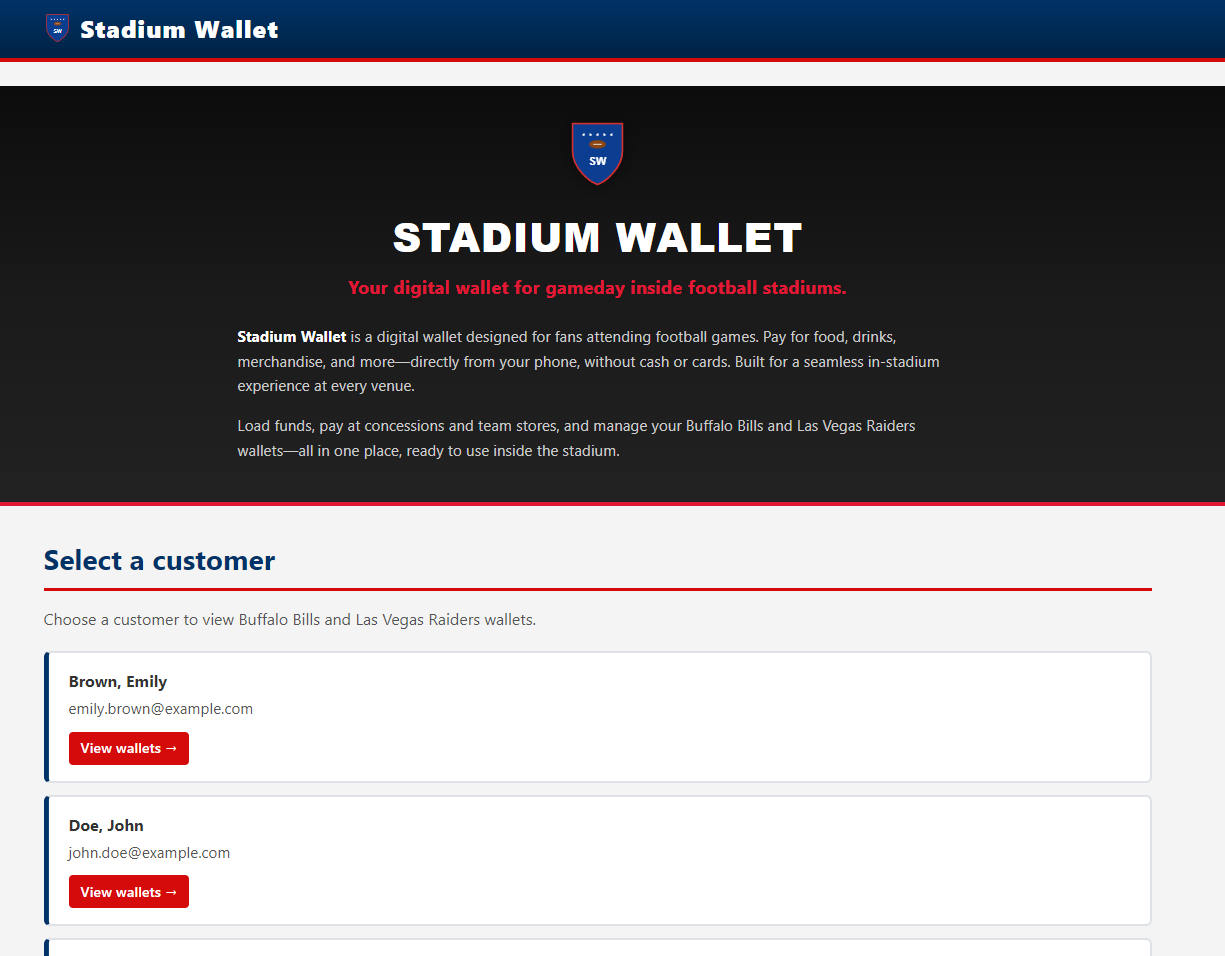 Wallet Landing Page — Entry point of the Stadium Wallet web application.
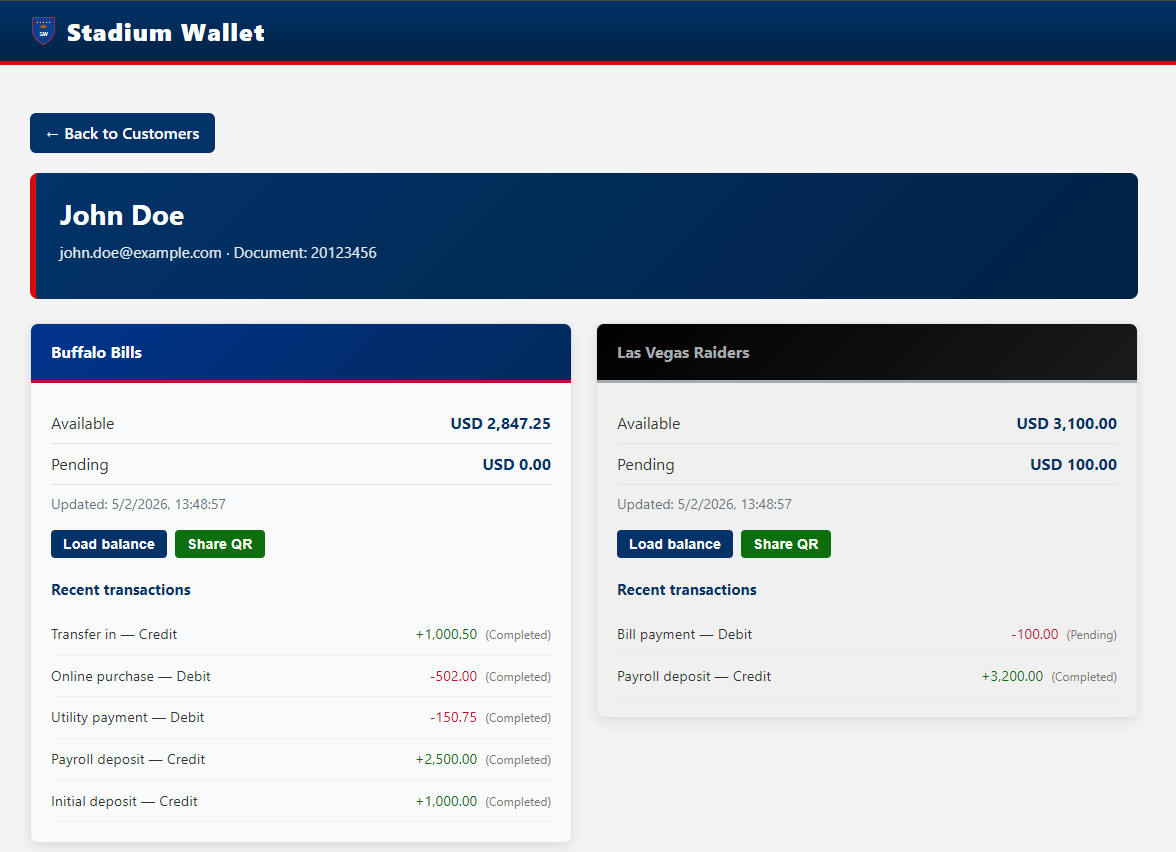 Customer List — Select a customer to view their team wallets.
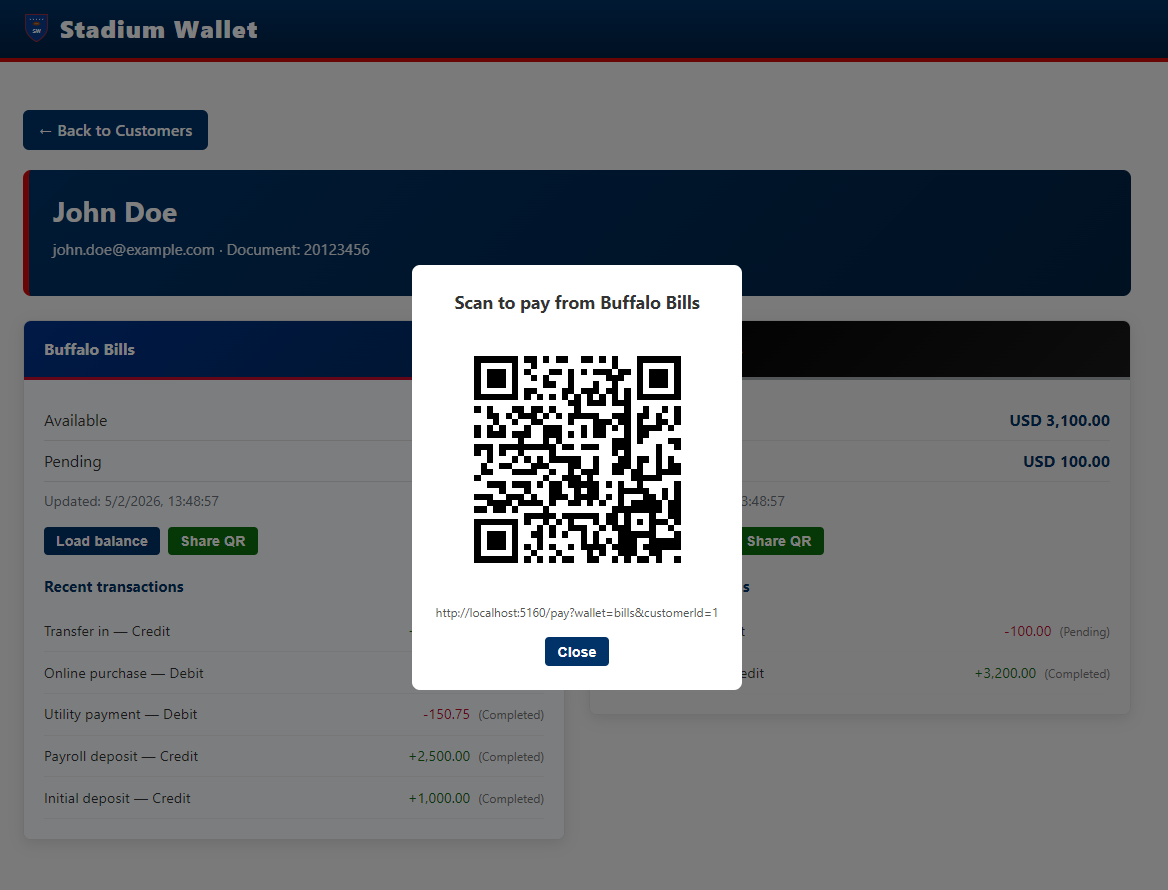 Wallet Balances — Buffalo Bills and Las Vegas Raiders: balances and transactions.
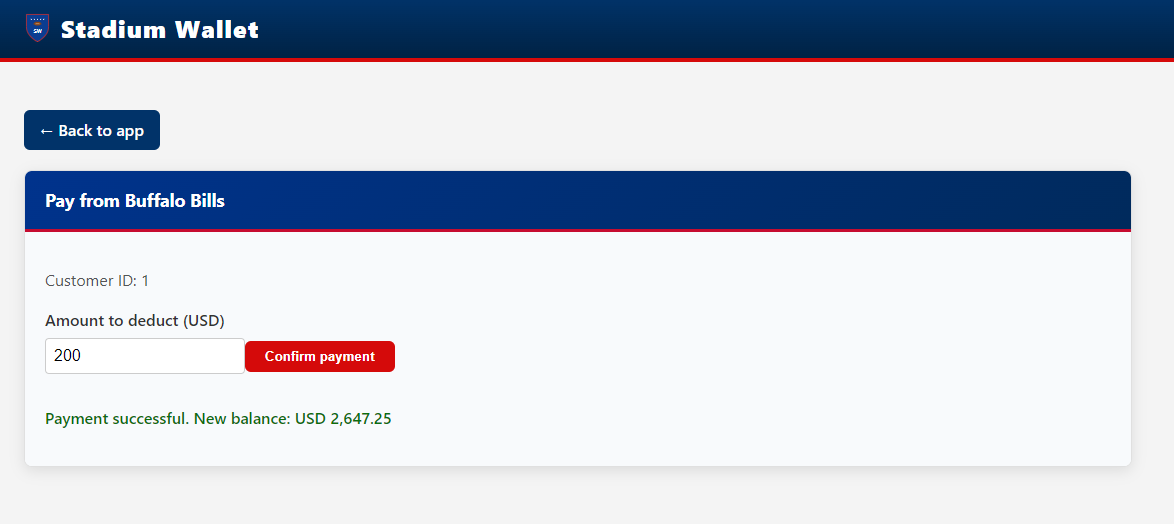 QR Payment Flow — Payment from a team wallet.
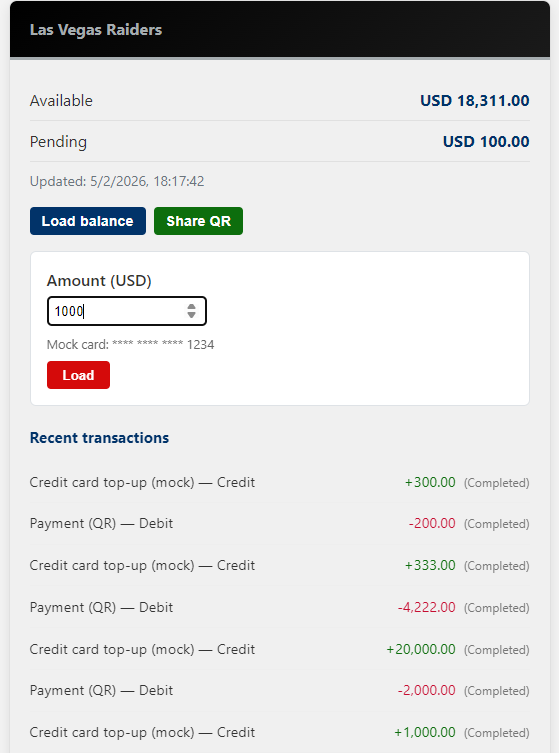 Load Balance — Add funds to a team wallet.
A.2 Platform & Observability
Metrics dashboards: Grafana aggregates metrics emitted by Waypoint Proxies and ztunnel, enabling monitoring of request rate, response codes, duration, and error rate per environment. The dashboard uses the namespace variable to filter between dev, test, and prod.
Grafana — “Stadium Wallet – All environments” dashboard: request rate, response codes, duration, error rate by environment.
Mesh topology and traffic: Kiali provides real-time visualization of the service graph within the mesh. Nodes represent workloads and edges show observed HTTP traffic with success/error rates. This enables diagnosing connectivity issues without inspecting individual logs.
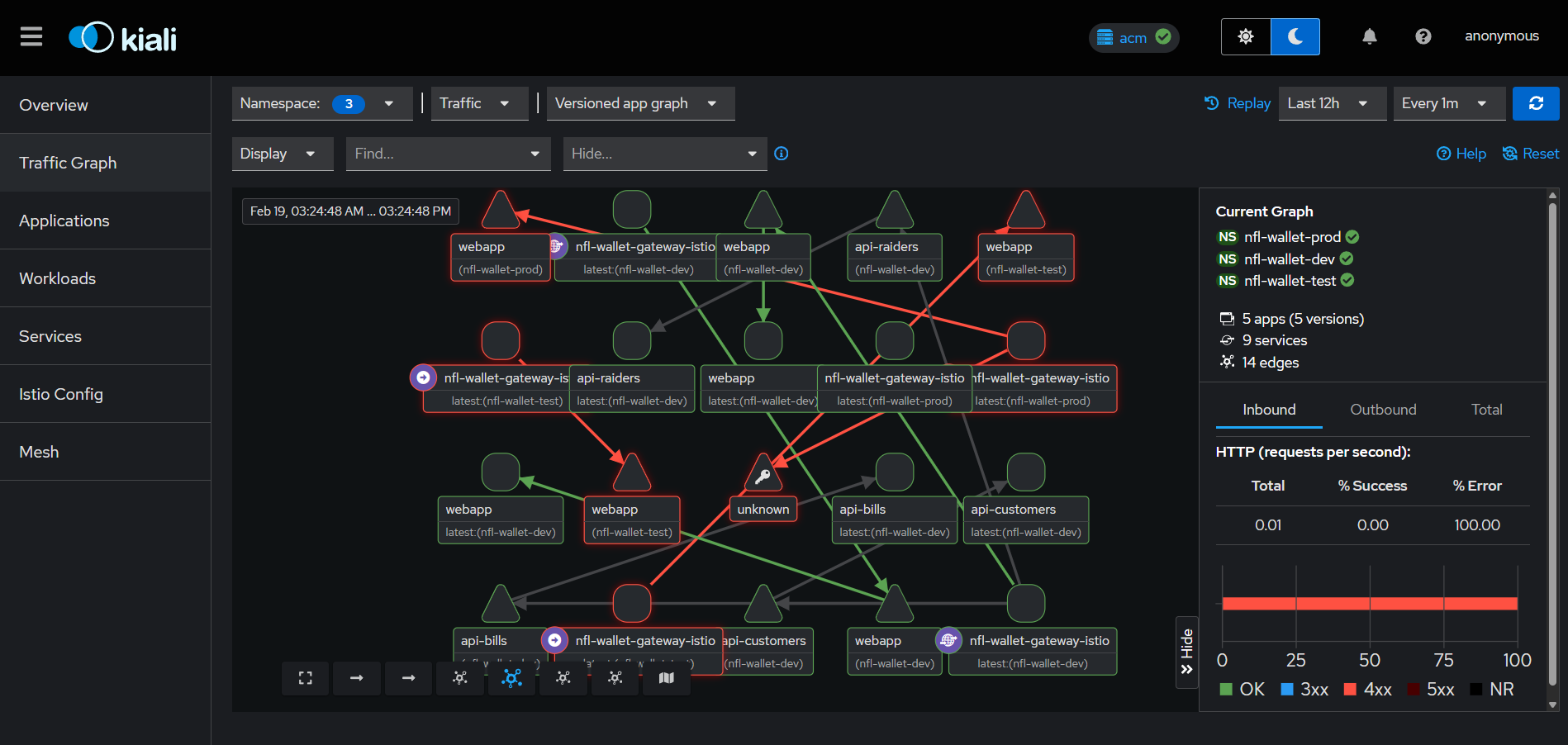 Kiali — Service graph with multi-namespace traffic (dev/test/prod) and HTTP metrics.
Kiali — Detailed Service Mesh topology with node legend, workloads and services.
Kiali — Multi-cluster Service Graph showing traffic between East and West with Istio gateways.
Mesh management from OpenShift Console: The integrated Service Mesh view in OpenShift Console shows active control planes, gateways, and waypoints, providing an operational overview without leaving the management console.
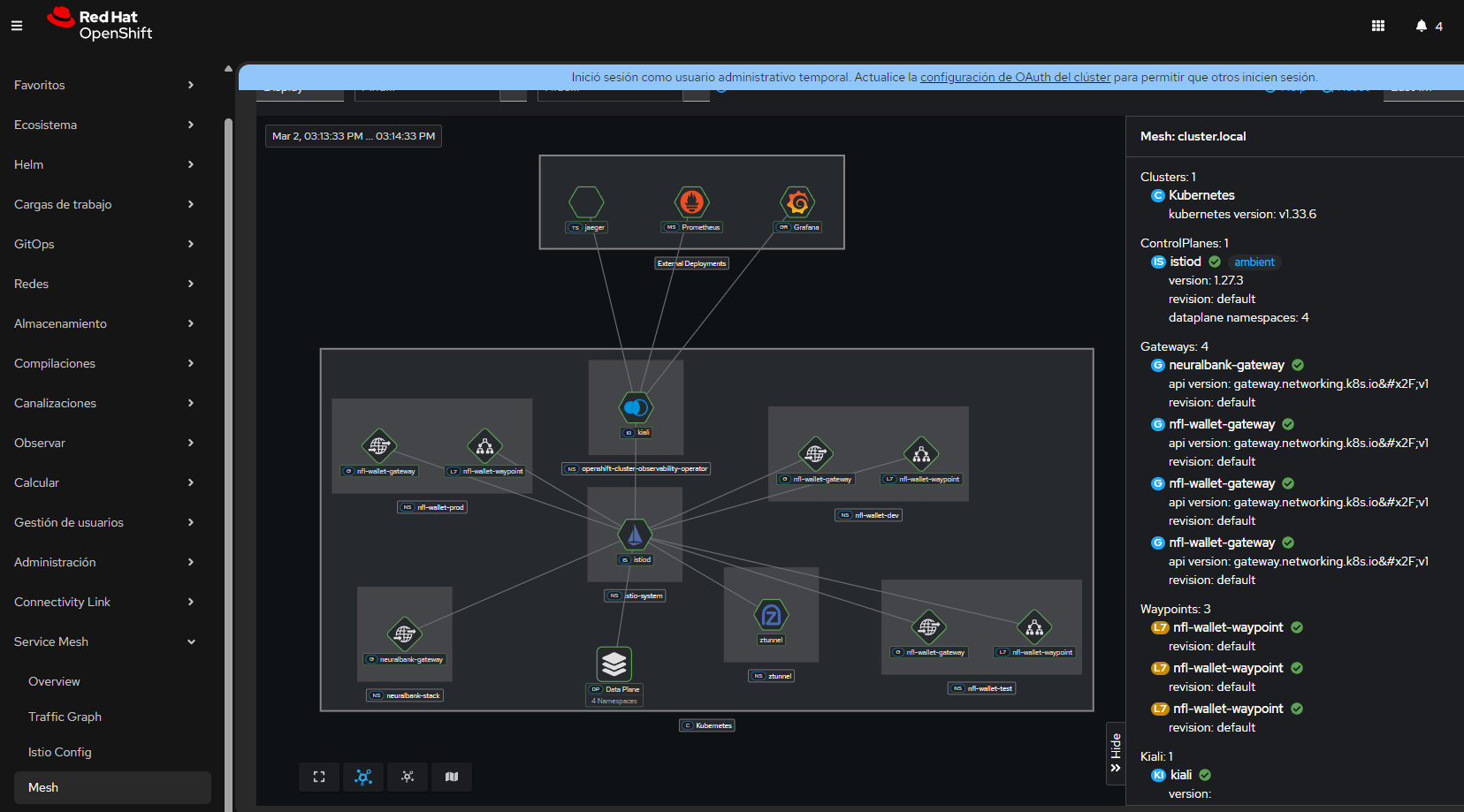 OpenShift Console — Service Mesh view: control planes, gateways, waypoints and components.
Exposed APIs: Stadium Wallet APIs are automatically documented via OpenAPI (Swagger). Each microservice exposes its specification, which RHDH then discovers and registers in the Backstage catalog.
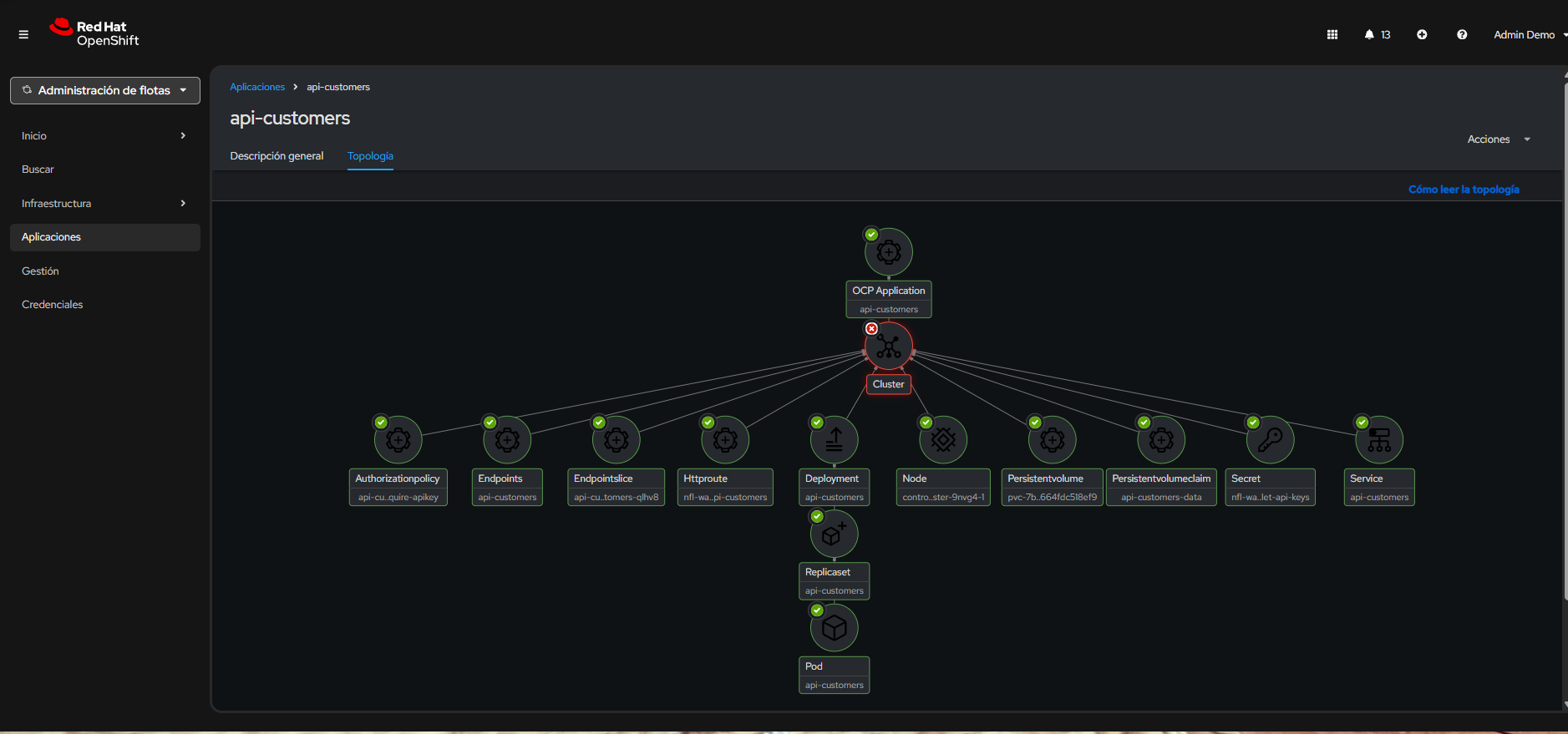 API Customers — Swagger UI for the customers service.
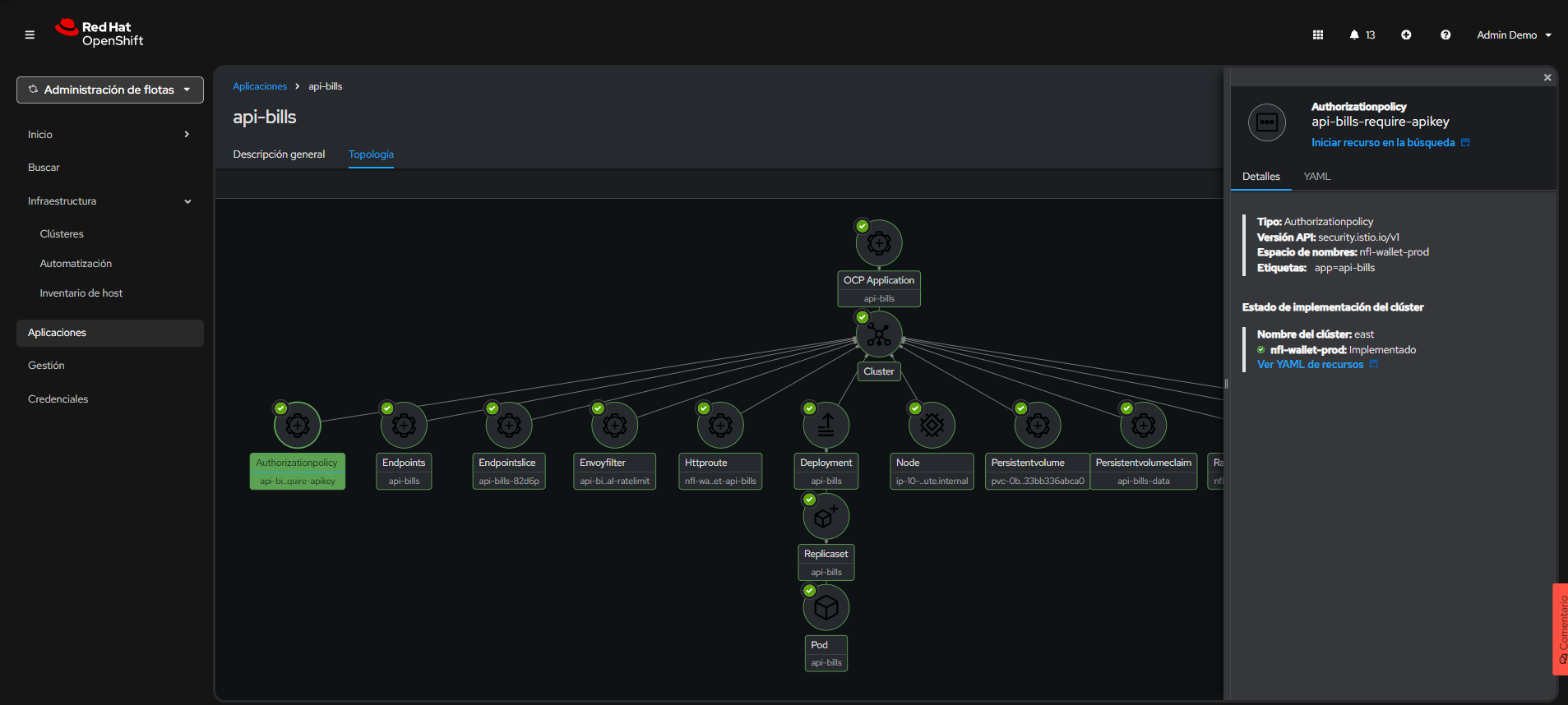 API Bills — Swagger UI for the Buffalo Bills wallet service.
A.3 Red Hat Developer Hub — Kuadrant Plugin
Developer self-service portal: The following screenshots show the complete flow within RHDH: from discovering the API and its policies, to requesting access and obtaining credentials. This flow replaces the manual process of creating tickets and waiting for provisioning — developers obtain their API Key in minutes, with rate limiting tiers already configured.
RHDH Kuadrant Plugin — Policies tab: PlanPolicy and AuthPolicy discovered for nfl-wallet-api-customers. Effective tiers: gold (1000/day), silver (500/day), bronze (100/day).
RHDH Kuadrant Plugin — Definition tab: Stadium Wallet - Customers API v1 (OAS 3.0) with documented endpoints and per-environment server selector.
RHDH Kuadrant Plugin — Access request modal: Silver tier selection (500 per daily), Use Case field and Submit Request button.
RHDH Kuadrant Plugin — Provisioned API Keys with approved Silver tier, generated key and code examples in cURL, Node.js, Python and Go.
Multi-cluster observability with ACM: ACM manages not only workload deployment but also the observability infrastructure. The observability-east-west ApplicationSet deploys Grafana, dashboards, datasources, and routes identically on both clusters, ensuring a consistent monitoring experience regardless of where services run.
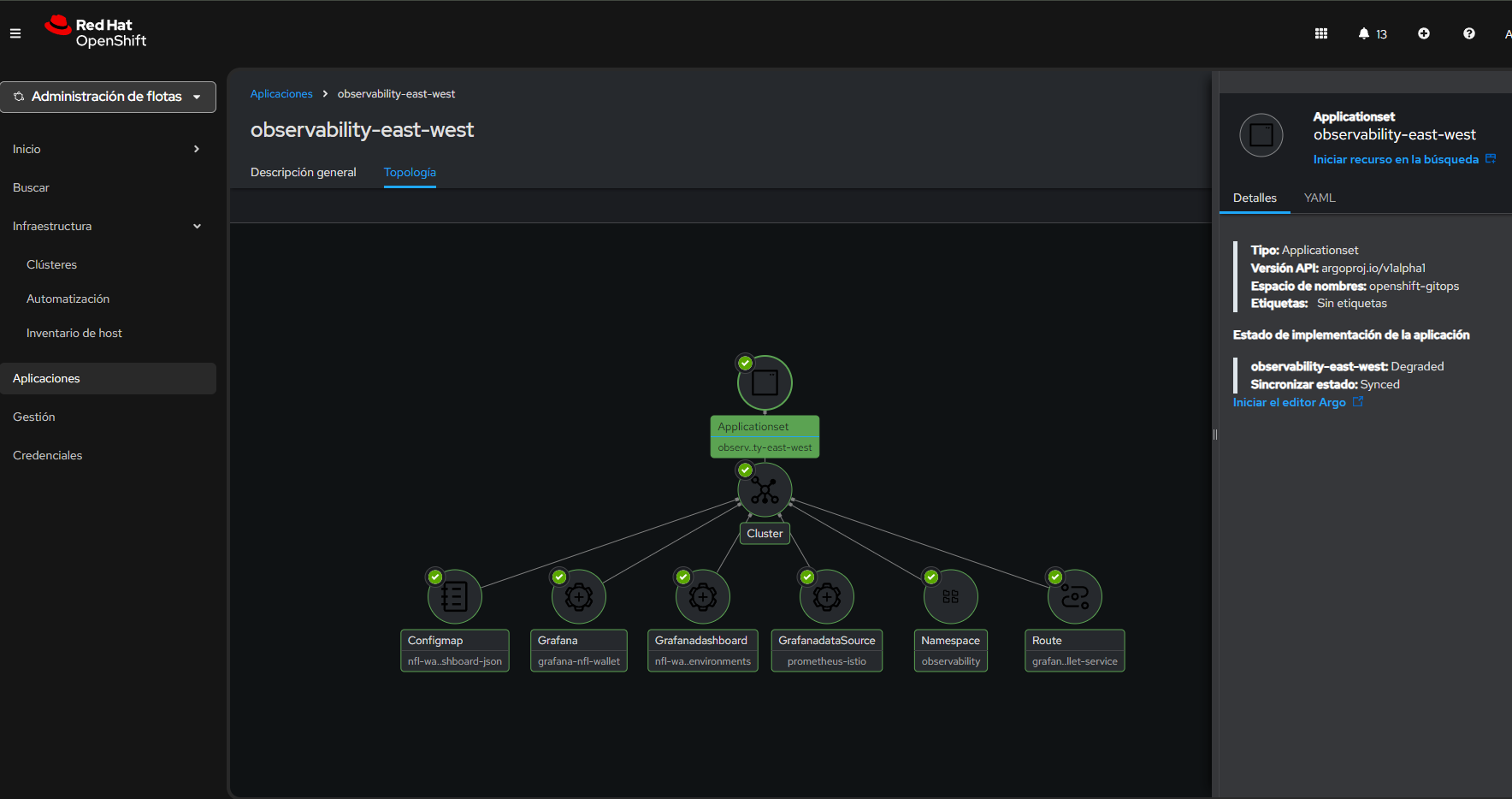 ACM — ApplicationSet observability-east-west: topology with Configmap, Grafana, GrafanaDashboard, GrafanaDataSource, Namespace and Route for centralized observability.
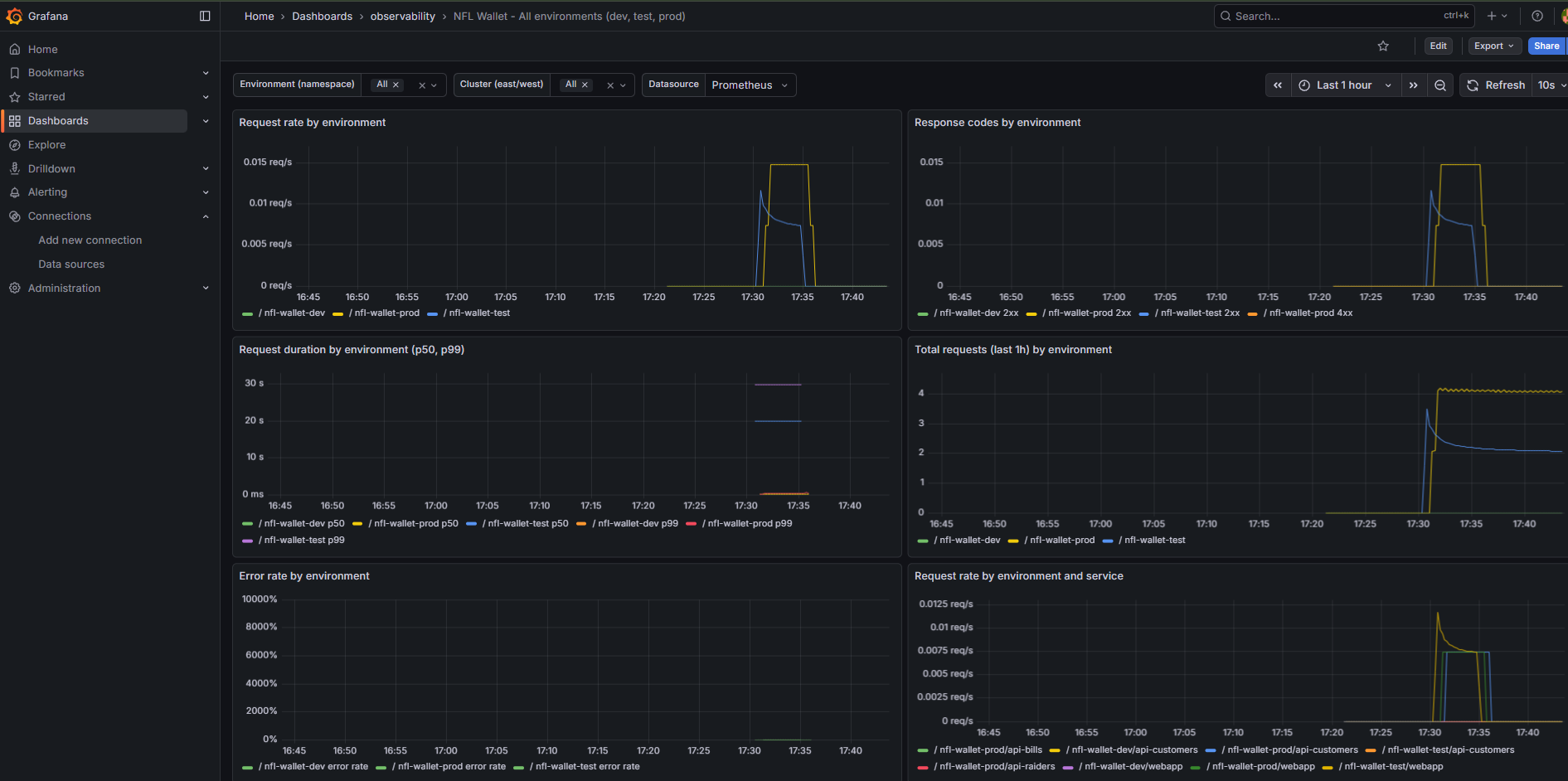 Grafana Multi-Cluster — “Stadium Wallet - All environments” dashboard with cluster filter (East/West): request rate, response codes, request duration (p50/p99), total requests, error rate and request rate by service.
GitOps and cluster management: ArgoCD reconciles the state declared in Git with the actual state of each cluster. ACM complements this by providing the hub and managed clusters topology view, and the status of each distributed Application.
OpenShift GitOps (ArgoCD) — Applications and sync status.
ACM — Topology with hub and managed clusters (East, West).
ACM — ApplicationSet and the 6 generated Applications.
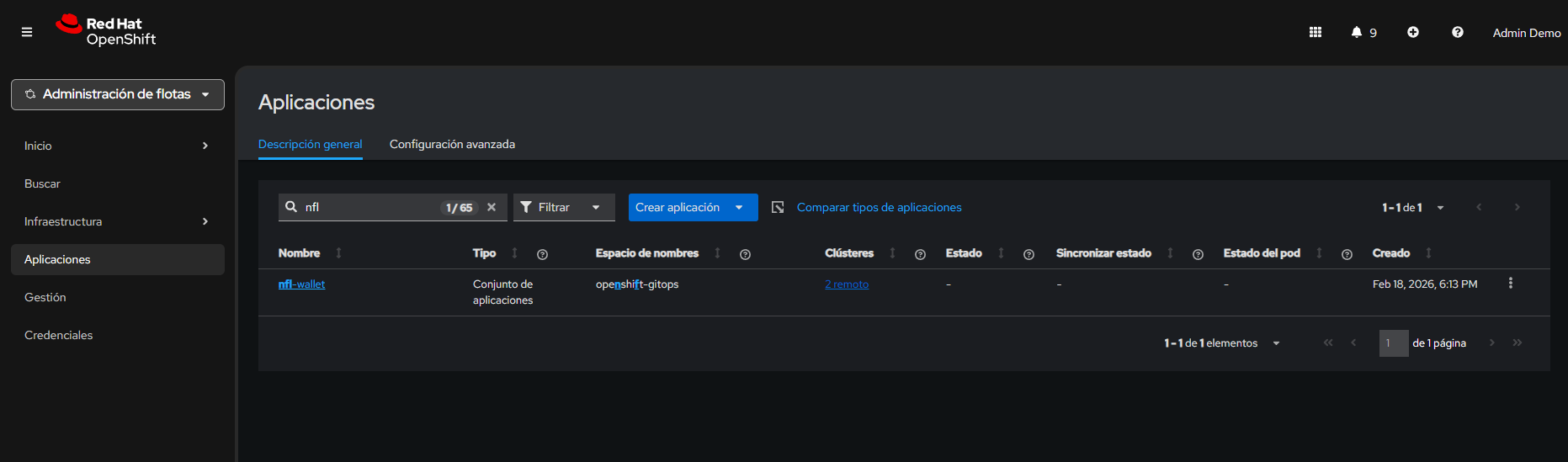 ACM — Advanced Cluster Management overview.
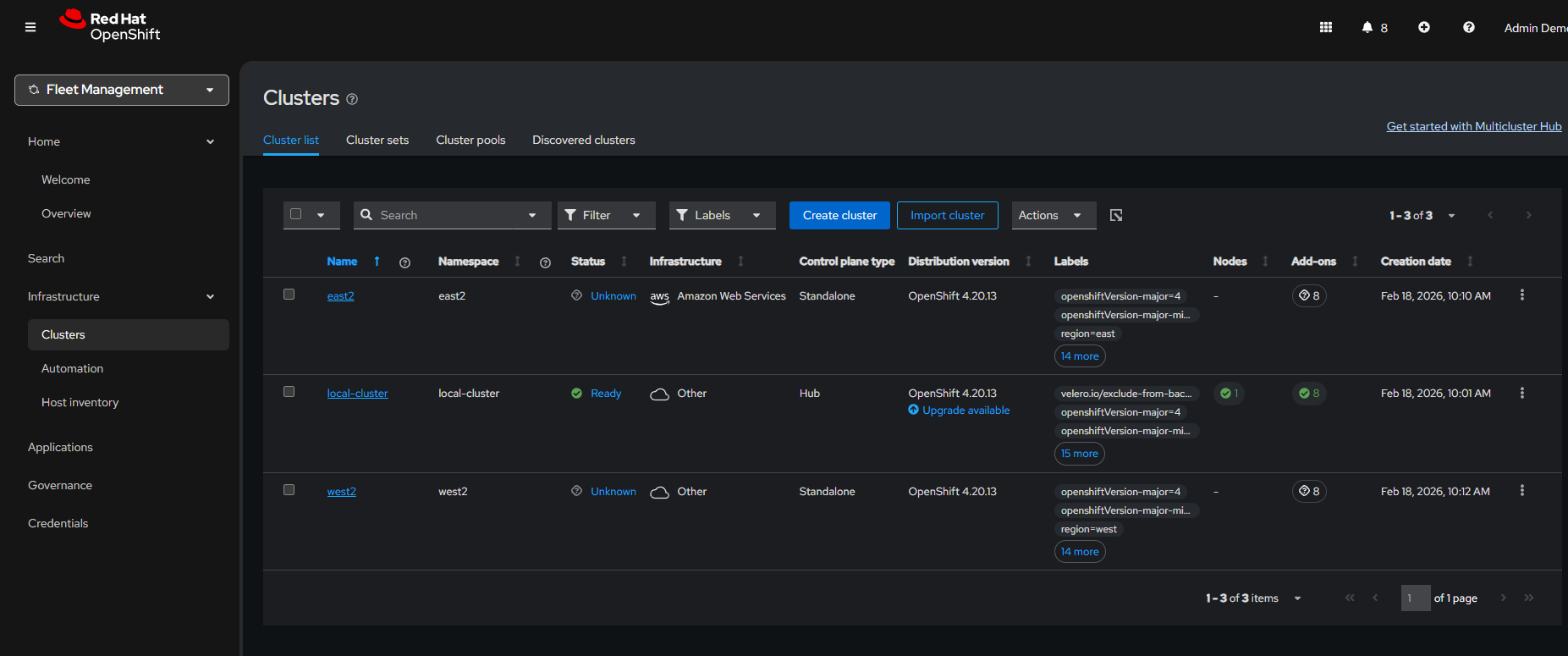 ACM — Managed clusters detail and status.
Detailed metrics and traces: The observability stack provides multiple levels of detail: from aggregated gateway metrics (request rate, error rate) to individual distributed traces showing the complete path of a request through services. This enables investigating issues from the general (is there an increase in errors?) to the specific (which request failed and on which service?).
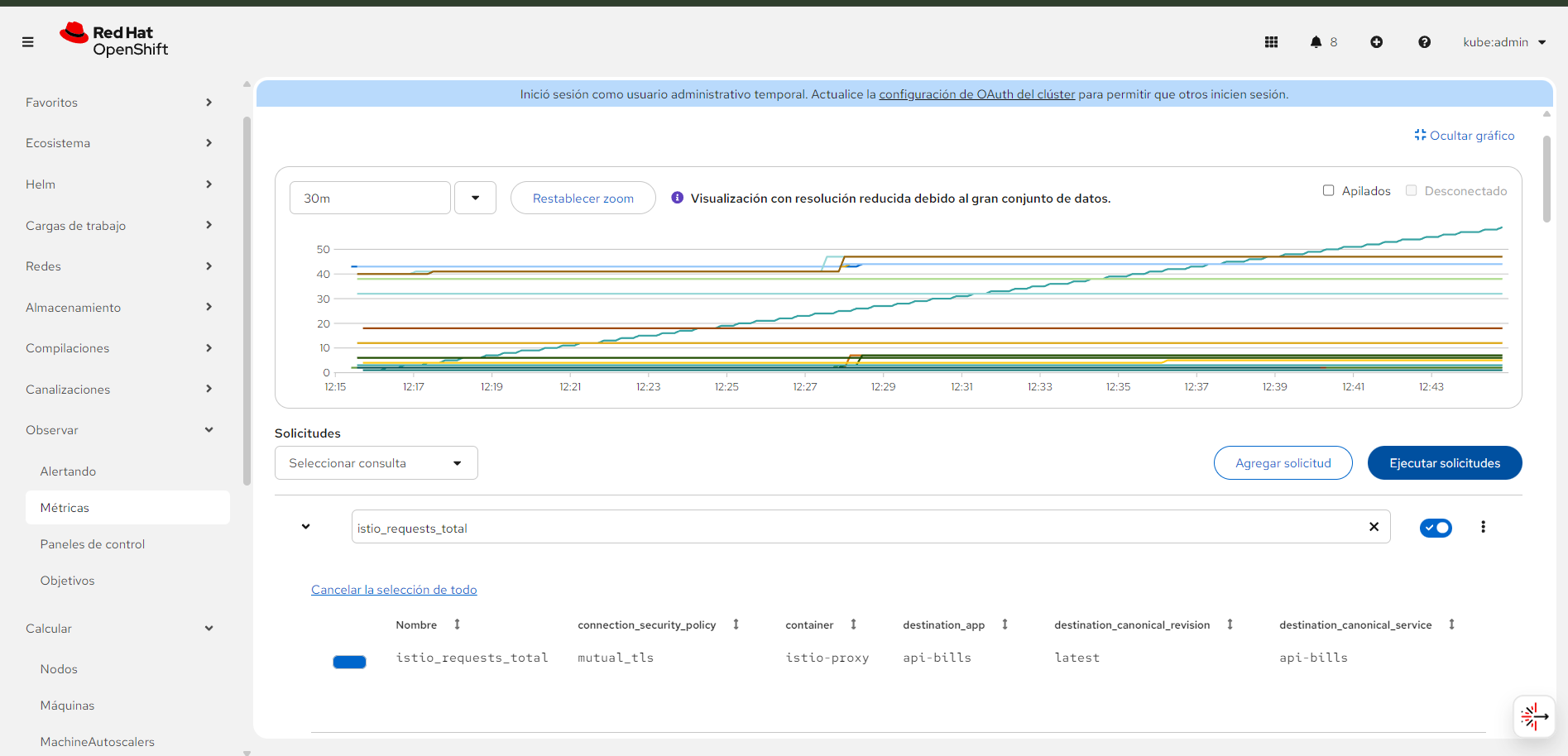 Observability — OpenShift console with monitoring stack metrics.
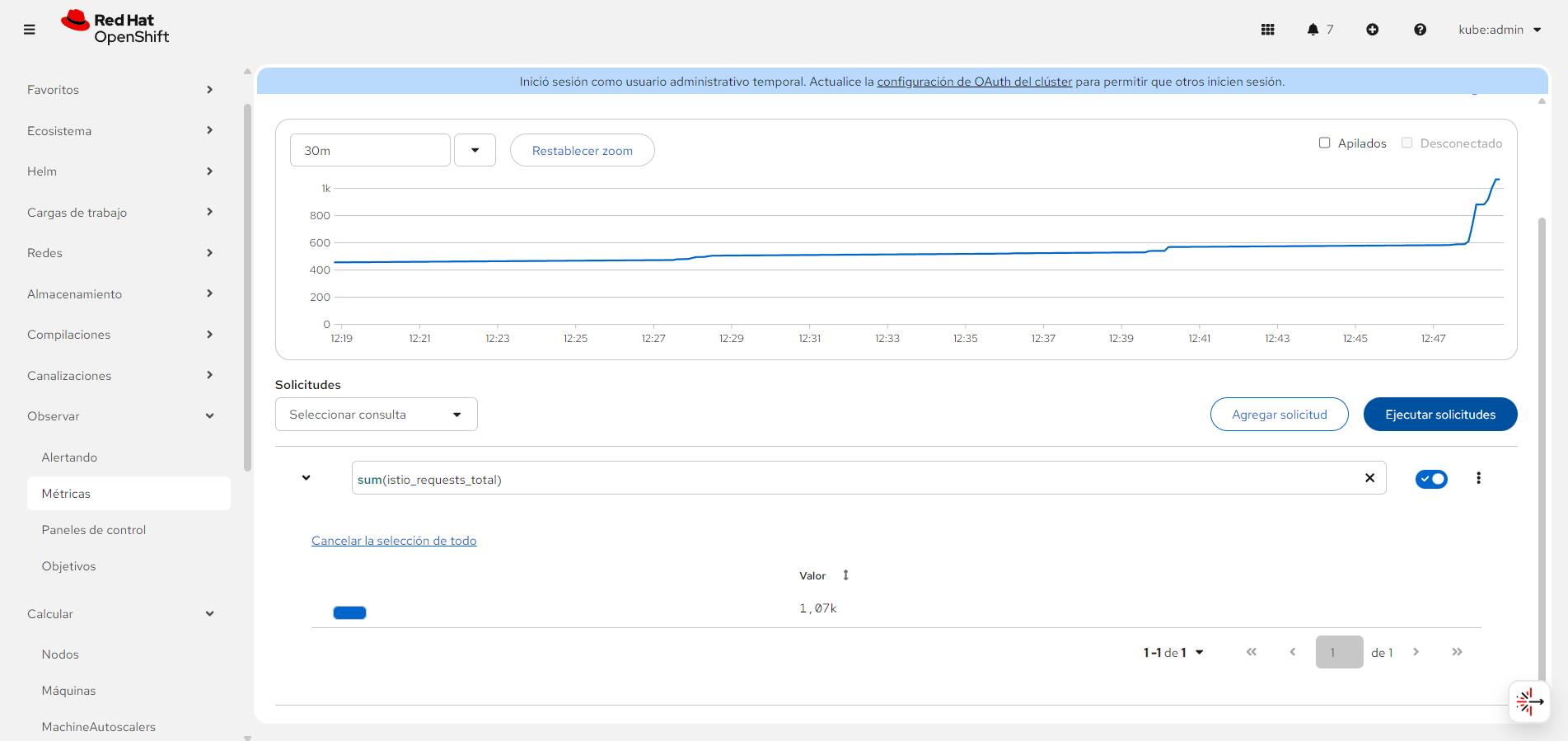 Gateway metrics (request rate, success and error rates) available after PodMonitor/ServiceMonitor configuration.
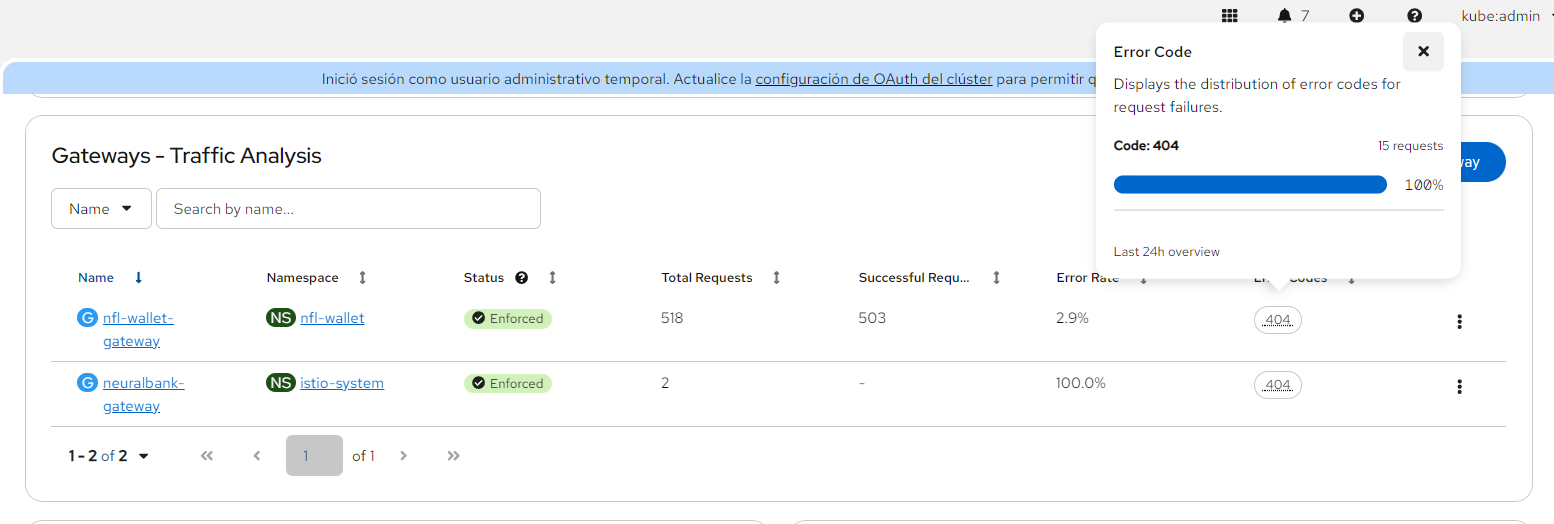 Detailed observability view with Istio/Envoy metrics for the Stadium Wallet gateway.
Traffic analysis and distributed traces: Distributed traces (via TempoStack/Jaeger) show the time each hop takes within a request, enabling bottleneck identification. Traffic analysis complements traces with a request flow view, latency, and response code distribution.
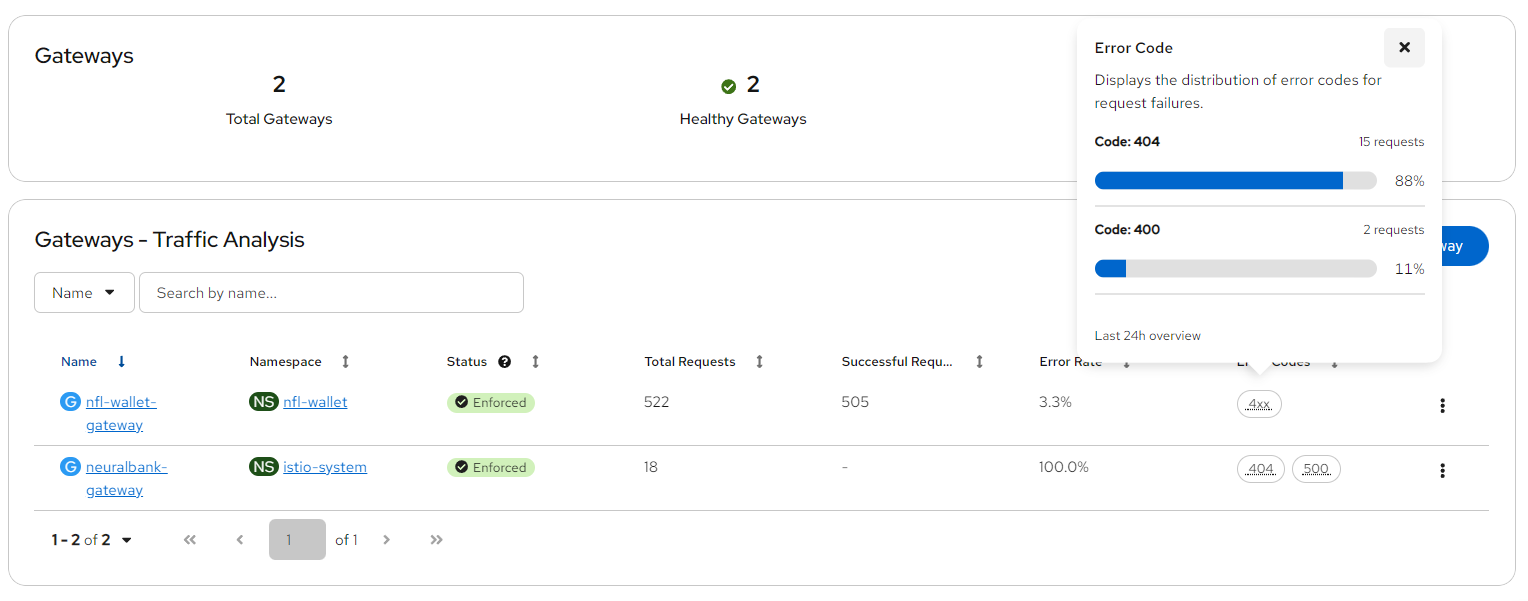 Traffic Analysis — Request flow, latency and response codes.
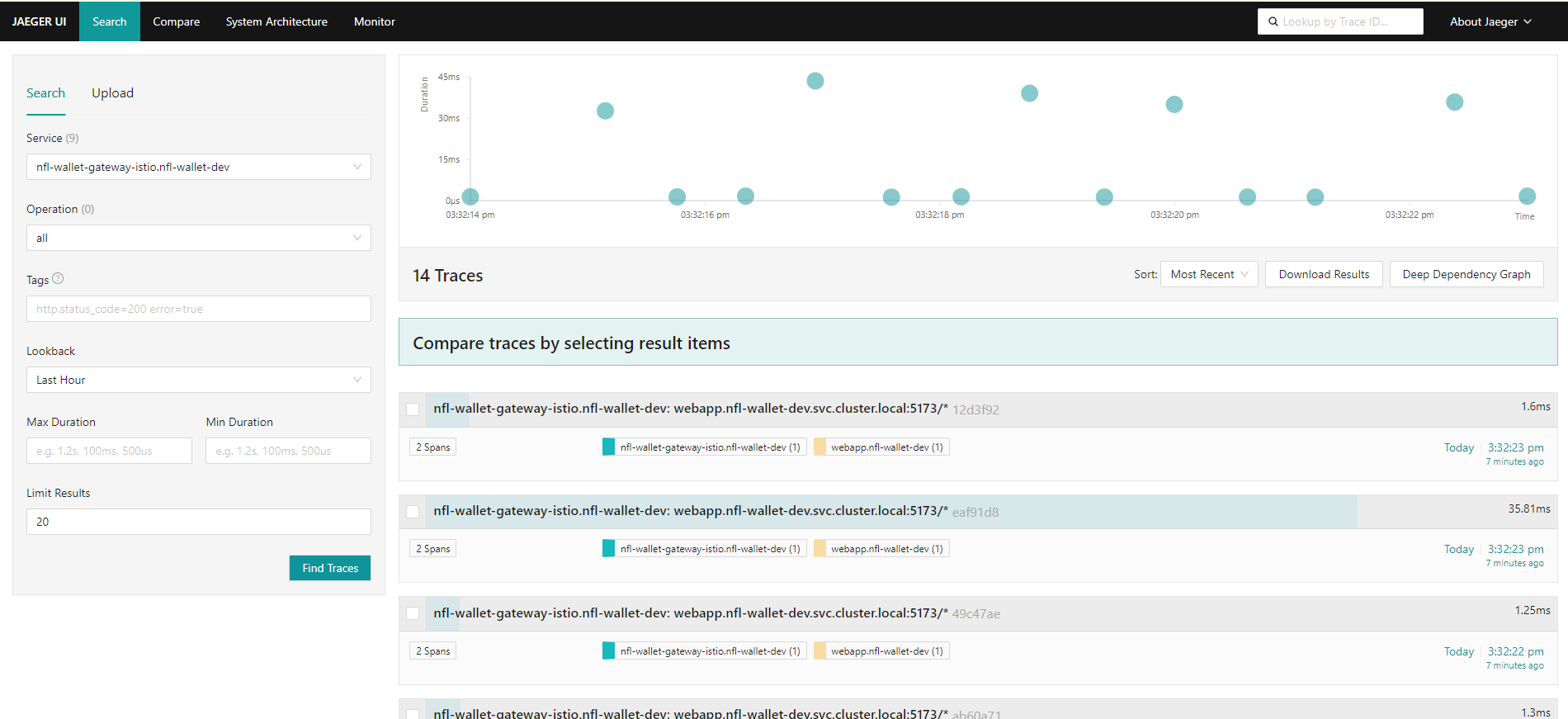 Jaeger — Distributed traces for Stadium Wallet services.
Stadium Wallet v2.0 — Documentation generated for GitHub Pages
Stack: OpenShift 4.20+ · GitOps (ArgoCD) · OSSM 3.2 (Ambient Mode) · Kuadrant · Gateway API · RHDH · Vue.js · .NET 8
Owner: Maximiliano Pizarro, Specialist Solution Architect at Red Hat · Infra & Service Mesh: Francisco Raposo, Senior Specialist Solution Architect at Red Hat