Showroom Docs MCP Server
Quarkus MCP Server that indexes Red Hat product documentation and the "IA Development From Zero To Hero" workshop for OpenShift Lightspeed.
Project maintained by maximilianoPizarro Hosted on GitHub Pages — Theme by mattgraham

Showroom Docs MCP Server
Quarkus MCP Server for OpenShift Lightspeed
Intelligent documentation at your fingertips via chat






English | Espanol
What is it?
Showroom Docs MCP Server is a Model Context Protocol (MCP) server built with Quarkus that indexes and exposes documentation from the “IA Development From Zero To Hero” workshop (Neuralbank) along with a partial snapshot of official documentation from 9 Red Hat products, enabling OpenShift Lightspeed to answer questions based on that context.
Note: The Red Hat product documentation included is a partial extract and may not reflect the latest updates. Red Hat publishes updates to its official documentation on a regular basis. Always refer to docs.redhat.com for the most current and complete information.
Features
- Intelligent search by keywords across 3MB+ of indexed documentation
- 4 MCP Tools exposed via Streamable HTTP for OLS integration
- 46 documents covering the workshop + Red Hat products + Developer products
- Auto-sanitized PDF content: page numbers, legal notices, and artifacts removed
- Quick-start examples from developers.redhat.com with CLI commands and code
- Smart truncation at paragraph boundaries to avoid cut responses
- Container image ready for OpenShift deployment
- Helm chart for declarative installation
Indexed Documentation

| Source | Documents | Content |
|---|---|---|
| Neuralbank Workshop | 27 | Business case, MCP agents, Golden Path, DevSpaces, Keycloak, Connectivity Link, RAG, LLM, Agents, GPU, Platform Eng., Data Eng. |
| Red Hat Products (docs.redhat.com) | 9 | Service Mesh 3.3, Connectivity Link 1.3, Developer Hub 1.9, Lightspeed 1.0, Observability, OpenTelemetry 3.9, Pipelines 1.21, API Mgmt, OpenShift AI (partial extract) |
| Developer Products (developers.redhat.com) | 10 | Quarkus, OpenShift, RHEL, Dev Spaces, OpenShift AI, Developer Hub, Ansible, OpenShift Local, Connectivity Link, 3scale |
Disclaimer: The product documentation is a partial snapshot included for contextual assistance. Red Hat official documentation is updated frequently. For the latest and most complete information, visit docs.redhat.com and developers.redhat.com.
Installation Steps
Step 1: Add Helm Repository and Install
helm repo add showroom-docs-mcp \
  https://maximilianopizarro.github.io/showroom-docs-mcp/

helm repo update

helm install showroom-docs-mcp showroom-docs-mcp/showroom-docs-mcp \
  --namespace openshift-lightspeed \
  --create-namespace \
  --set image.pullPolicy=Always
Step 2: Verify the Pod is Running
oc get pods -n openshift-lightspeed -l app=showroom-docs-mcp
# Expected: 1/1 Running
Step 3: Create LLM Credentials (if needed)
oc create secret generic ols-llm-credentials \
  -n openshift-lightspeed \
  --from-literal=apitoken=<your-api-token>
Step 4: Configure OLSConfig
apiVersion: ols.openshift.io/v1alpha1
kind: OLSConfig
metadata:
  name: cluster
spec:
  featureGates:
    - MCPServer
  llm:
    providers:
      - credentialsSecretRef:
          name: ols-llm-credentials
        models:
          - name: granite-3-8b-instruct
            parameters:
              maxTokensForResponse: 8192
        name: red_hat_openshift_ai
        type: rhoai_vllm
        url: 'http://granite-3-8b-instruct.my-model.svc.cluster.local/v1'
  mcpServers:
    - name: showroom-docs-mcp
      timeout: 10
      url: 'http://showroom-docs-mcp.openshift-lightspeed.svc.cluster.local:8080/mcp'
  ols:
    conversationCache:
      postgres:
        maxConnections: 2000
        sharedBuffers: 256MB
      type: postgres
    defaultModel: granite-3-8b-instruct
    defaultProvider: red_hat_openshift_ai
    deployment:
      api:
        replicas: 1
      console:
        replicas: 1
      dataCollector: {}
      database:
        replicas: 1
      llamaStack: {}
      mcpServer: {}
    logLevel: INFO
    userDataCollection: {}
  olsDataCollector:
    logLevel: INFO
Important: Use
/mcp(Streamable HTTP), not/mcp/sse.
oc apply -f cluster-ols.yml
Step 5: Verify MCP Integration
oc logs -n openshift-lightspeed deploy/lightspeed-app-server \
  -c lightspeed-service-api | grep "tools from MCP"

# Expected:
# Loaded 4 tools from MCP server 'showroom-docs-mcp'
Step 6: Test with Lightspeed
Open the OpenShift web console, click the Lightspeed chat icon, and ask any question about the indexed documentation.
Architecture

How It Works

Example Questions for Lightspeed
Once deployed, open the OpenShift Lightspeed chat and ask:
- “How do I install OpenShift Service Mesh 3.3?”
- “Explain the architecture of Red Hat Developer Hub”
- “What are the steps to deploy a model with OpenShift AI?”
- “How do I configure Connectivity Link gateway policies?”
- “What is the Neuralbank workshop about?”
- “How do I build an MCP agent with Quarkus?”
- “How do I set up Pipelines as Code with Tekton?”
- “How does OpenShift Lightspeed OLSConfig work?”
- “What is RAG and how does it work with vector databases?”
Official Red Hat Documentation
The versions listed below reflect the documentation snapshot included in this server. Visit each link for the latest official content — Red Hat updates its documentation regularly.
| Product | Version | Documentation |
|---|---|---|
| OpenShift Service Mesh | 3.3 | docs.redhat.com |
| Connectivity Link | 1.3 | docs.redhat.com |
| Developer Hub | 1.9 | docs.redhat.com |
| OpenShift Lightspeed | 1.0 | docs.redhat.com |
| OpenShift Observability | 1 | docs.redhat.com |
| OpenTelemetry | 3.9 | docs.redhat.com |
| OpenShift Pipelines | 1.21 | docs.redhat.com |
| API Management | 1 | docs.redhat.com |
| OpenShift AI | 1 | docs.redhat.com |
Screenshots
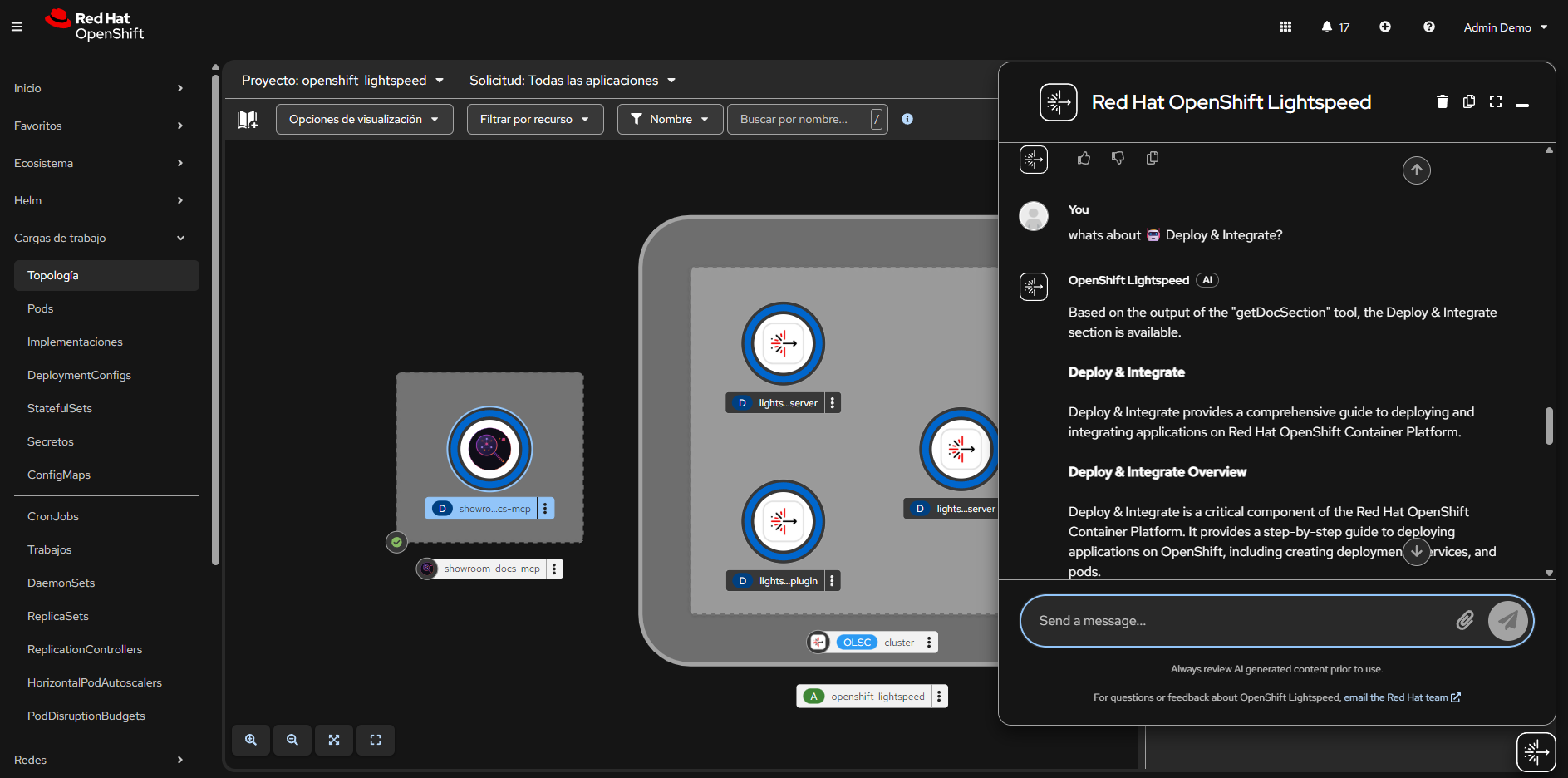
OpenShift Lightspeed answering questions using MCP tools
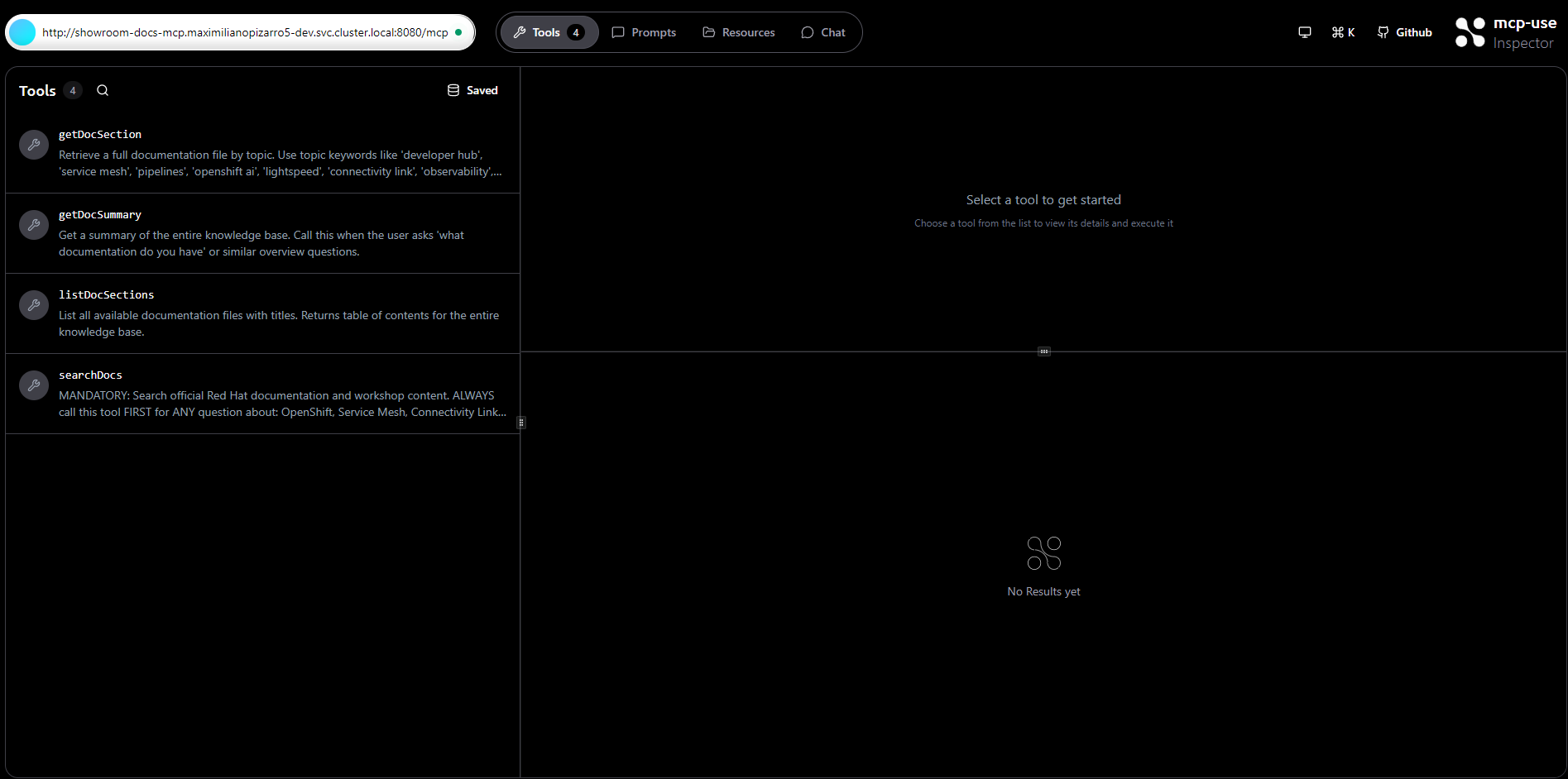
MCP Inspector showing the 4 available tools
Full installation guide – Architecture – OLSConfig configuration – Screenshots