
High-Level Architecture
The platform is composed of four primary layers that work together to deliver end-to-end integration workflow lifecycle management on OpenShift.
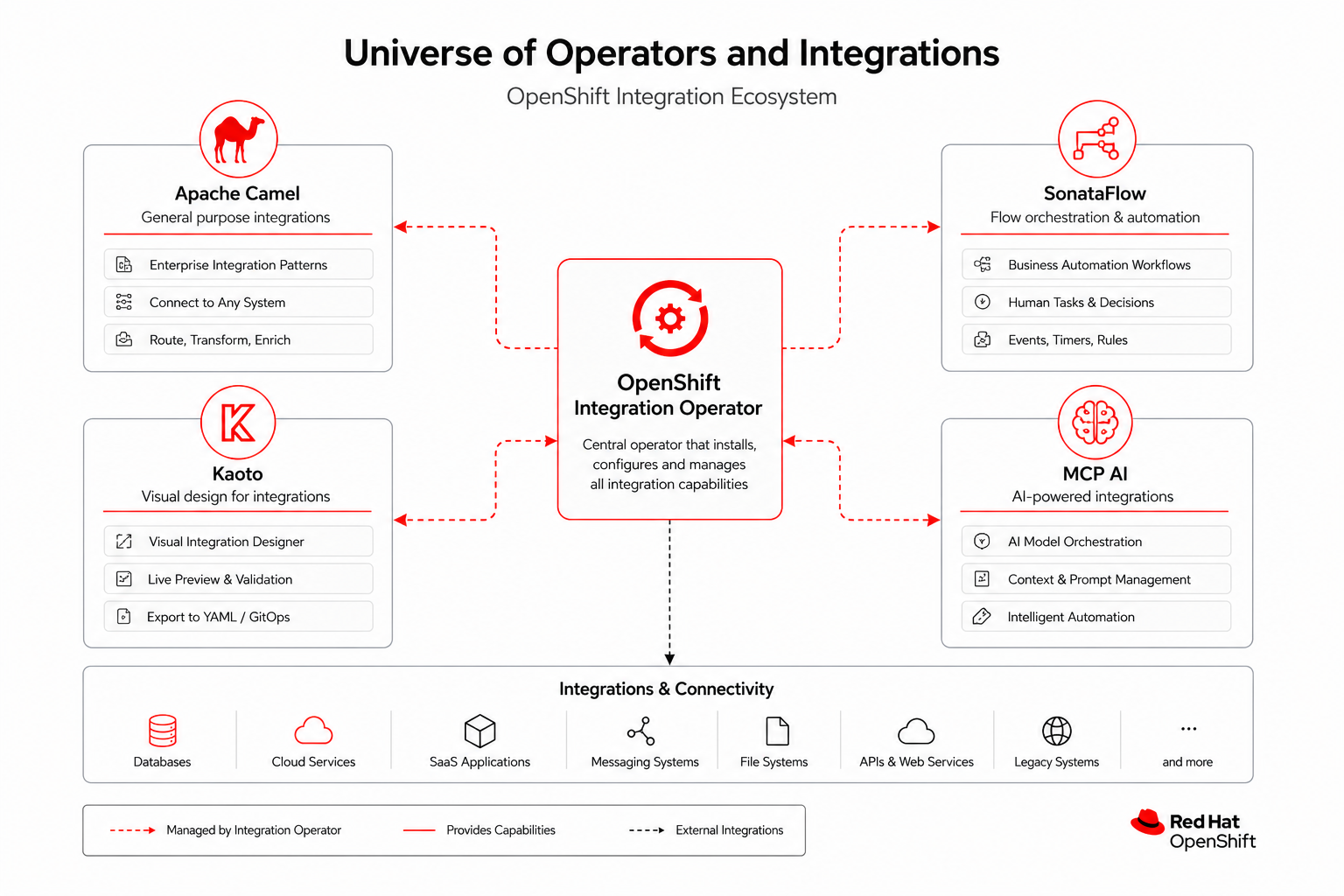
Operator
Quarkus-based Kubernetes operator that watches IntegrationFlow CRs, scaffolds worker projects, pushes to Git, triggers Tekton builds, and tracks ArgoCD applications.
Console Plugin
Dynamic OpenShift Console plugin with Integration Flows list view, embedded Kaoto designer, and live telemetry overlay on the canvas.
Workers
Runtime pods executing Camel routes or SonataFlow definitions. Scaled by HPA based on CPU and memory metrics.
GitOps Layer
Gitea stores scaffolded source; Tekton integration-flow-build pipeline builds container images; ArgoCD syncs deployments to target clusters.
Component Technologies & Versions
The OpenShift Integration Operator platform leverages modern, cloud-native technologies. Below is a summary of the core technologies and their key framework versions.
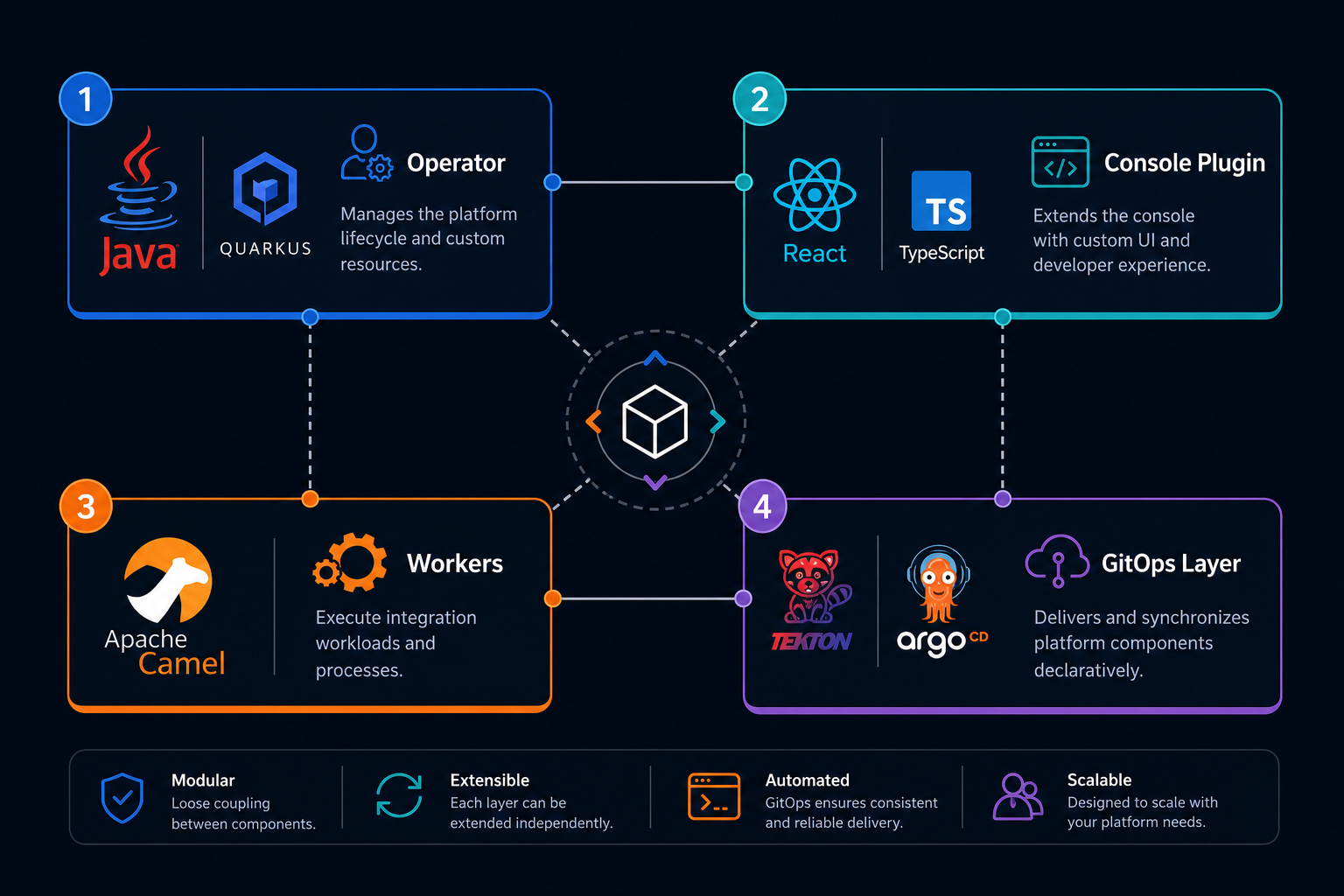
| Component | Technologies & Frameworks | Core Versions |
|---|---|---|
| Operator | Java, Quarkus, Quarkus Operator SDK | Quarkus 3.36.1, Java 17/21, Operator SDK 7.7.5 |
| Console Plugin | TypeScript, React, PatternFly, Webpack, OpenShift Dynamic Plugin SDK | React 17, PatternFly 6, Plugin SDK 4.21.0 |
| Workers (Runtime) | Apache Camel, Camel Quarkus, SonataFlow, OpenTelemetry | Quarkus 3.36.1 (Camel 4.x), Java 21 |
| GitOps Layer | Tekton Pipelines, Argo CD, Gitea/GitHub/GitLab | Managed by OpenShift GitOps / Pipelines |
CRD Model
The IntegrationFlow custom resource (platform.io/v1alpha1, short name
iflow) is namespaced and drives the full lifecycle.
Spec Fields
| Field | Type | Description |
|---|---|---|
deploymentMode |
enum | GITOPS (default) or EPHEMERAL for Quick Try without Git |
ephemeral.ttlSeconds |
integer | TTL for ephemeral runtime (default from Helm ephemeral.defaultTtlSeconds) |
gitRepository |
string | Git remote URL (required for GITOPS, ignored for EPHEMERAL) |
branch |
string | Git branch to push and build (default: main) |
integrationType |
enum | CAMEL_ROUTE, CAMEL_KAMELET, CAMEL_PIPE, CAMEL_TEST, or SONATAFLOW |
engine |
enum | CAMEL or SONATAFLOW |
targeting.strategy |
string | explicit (named clusters), all, or selector (label match) |
targeting.clusters |
[]string | Target clusters when strategy is explicit |
targeting.excludeClusters |
[]object | Clusters to exclude from ApplicationSet (name per entry) |
targeting.clusterSelector.matchLabels |
map | Label selector for dynamic cluster matching (when strategy is selector) |
designRef |
object | Preferred reference to external design (ConfigMap, Git path, etc.) |
kaotoDesign |
string | Deprecated. Inline Kaoto design YAML/JSON — use designRef for new flows |
targetClusters |
[]string | Deprecated. Use targeting.clusters instead |
ephemeral.workerImage |
string | Pin precompiled worker image (EPHEMERAL mode) |
ephemeral.properties |
map | Key-value properties merged into ephemeral worker ConfigMap |
gitProvider |
string | auto, gitea, github, or gitlab |
gitCredentialsSecret |
string | Secret name for Git push credentials |
secrets[] |
[]object | Referenced secrets for worker/runtime (name, keys) |
desiredState |
string | running, paused, or stopped |
schedule |
string | Cron expression for scheduled execution |
resilience.* |
object | Retry, circuit breaker, and backoff settings |
alerting.* |
object | Prometheus alerting rules configuration |
replicas |
integer | Worker replica count hint |
owner, editors, viewers |
string / []string | RBAC metadata for console and API |
See platform comparison and migration guide.
Status Fields
| Field | Type | Description |
|---|---|---|
phase |
enum | Scaffolding, Building, Deploying, Running, Expired, or Error |
deploymentMode |
enum | Active mode: GITOPS or EPHEMERAL |
ephemeralExpiresAt |
string (ISO-8601) | Expiry timestamp when in ephemeral mode |
ephemeralWorkerRef |
string | Reference to deployed ephemeral resource (Deployment, Job, or CR name) |
gitCommitHash |
string | SHA of the last successful Git push (GitOps mode only) |
argoApplicationName |
string | ArgoCD Application name (e.g. iflow-<name>) |
lastScaffoldedHash |
string | SHA-256 of the last scaffolded kaotoDesign — prevents redundant builds when unchanged |
message |
string | Human-readable status or error message |
applicationSetName |
string | Argo CD ApplicationSet name for multicluster flows |
clusterDeployments[] |
[]object | Per-cluster sync/health (clusterName, syncStatus, healthStatus) |
conditions[] |
[]object | Standard conditions (type, status, reason, message) |
sonataFlowName / sonataFlowNamespace |
string | SonataFlow CR location when integrationType is SONATAFLOW |
sonataFlowReady |
string | SonataFlow readiness indicator |
currentState |
string | Lifecycle state mirror (running, paused, stopped) |
circuitBreakerState |
string | Resilience circuit breaker state when configured |
Reconciliation Loop
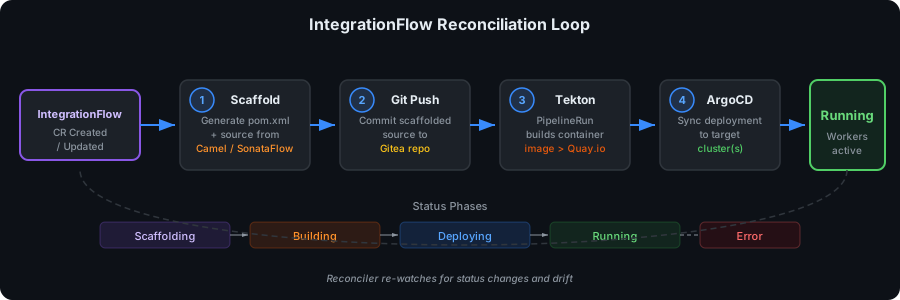
When an IntegrationFlow is created or updated, the reconciler branches on
spec.deploymentMode:
GitOps Mode (default)
When deploymentMode is GITOPS (or unset), the reconciler executes the following
steps in order:
-
Scaffold — The
ScaffoldingServicegenerates a worker project from the selected engine (CAMELorSONATAFLOW) and the Kaoto design payload. Status phase:Scaffolding. -
Git Push — The
GitOpsServicecommits and pushes scaffolded source to the configured Git repository and branch. On failure, phase is set toError. -
Tekton — A
PipelineRunis created referencing the cluster Pipelineintegration-flow-build, passing git URL, branch, commit SHA, and flow name as parameters. Status phase:Building. -
ArgoCD — The ArgoCD Application name (
iflow-<flowName>) is recorded in status for tracking. ArgoCD syncs the built image to the target cluster(s). Status phase:Deploying→Running. - Deploy — Worker pods start executing the integration flow. HPA monitors load and scales replicas within configured bounds.
Ephemeral Mode (Quick Try)
When deploymentMode is EPHEMERAL, Git push, Tekton, and ArgoCD are skipped.
The reconciler scaffolds in memory and deploys runtime resources directly via
EphemeralRuntimeService:
- Scaffold — Generate worker artifacts from
kaotoDesign(no Git commit). - Deploy — Type-specific deployer creates ConfigMap + Deployment (Camel Route), Kamelet/Pipe CRs (Camel K), Job (Camel Test), or SonataFlow CR in
kogito-bpm. - TTL — Set
status.ephemeralExpiresAt; on expiry, phase becomesExpiredand deployments scale to zero. - Cleanup — Finalizer
platform.io/ephemeral-cleanupremoves labeled resources on delete. - Promote —
POST /api/flows/{name}/promote-to-gitopsswitches to GitOps and triggers the standard pipeline.
Telemetry Pipeline
Runtime observability flows from OpenTelemetry collectors through the operator API to the console plugin, enabling real-time visual feedback on the Kaoto canvas.
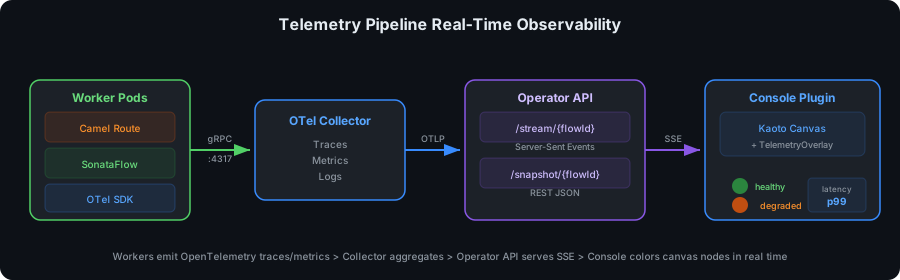
- OpenTelemetry — Worker pods emit traces and metrics to the OTel collector (
otel-collector:4317by default). - Operator API — The operator exposes
/api/telemetry/stream/{flowId}as a Server-Sent Events (SSE) stream and/api/telemetry/snapshot/{flowId}for point-in-time node status. - Console Canvas — The
TelemetryOverlaycomponent subscribes to the SSE stream and colors Kaoto nodes based on per-node health (healthy,degraded,error) and latency.
MCP Bridge
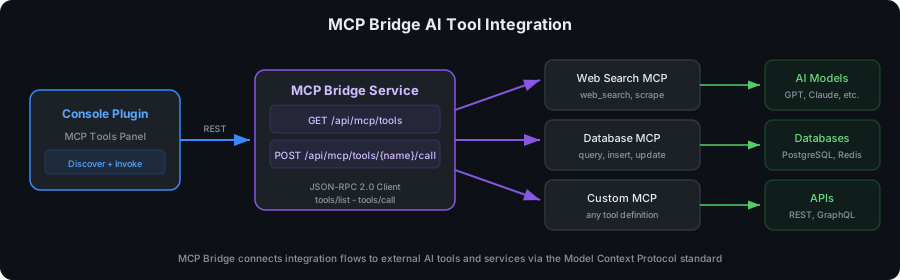
The Model Context Protocol (MCP) bridge enables AI-powered workflow steps by connecting integration flows to external MCP tool servers.
Tool Discovery
GET /api/mcp/tools?serverUrl=<mcp-server> sends a JSON-RPC 2.0
tools/list request to the MCP server and returns available tool definitions with name,
description, and input schema.
Tool Invocation
POST /api/mcp/tools/{toolName}/call?serverUrl=<mcp-server> sends a JSON-RPC 2.0
tools/call request with the tool name and arguments. The response content can be
consumed by Camel processors or SonataFlow function states in the worker runtime.
POST /api/mcp/tools/web_search/call?serverUrl=https://mcp.example.com
Content-Type: application/json

{ "query": "OpenShift integration patterns" }
Security and SSRF mitigation
The serverUrl query parameter accepts any URL when the allowlist is empty — the operator will
proxy JSON-RPC requests to that host from inside the cluster. This creates a potential
server-side request forgery (SSRF) vector if untrusted users can obtain a valid Kubernetes token.
- Production: Always configure an allowlist via Helm — only prefix-matched URLs are accepted.
- Auth: Every call requires
Authorization: Bearer <k8s-token>validated via TokenReview. - Empty allowlist: Permits all URLs (development only).
helm upgrade --install openshift-integration-operator \
  helm/openshift-integration-operator \
  --namespace openshift-integration \
  --set mcp.allowedServerUrls[0]=https://mcp.example.com \
  --set mcp.allowedServerUrls[1]=http://mcp-tools.internal.svc
See also Troubleshooting — MCP allowlist and AI Models & MCP.
Worker Autoscaling
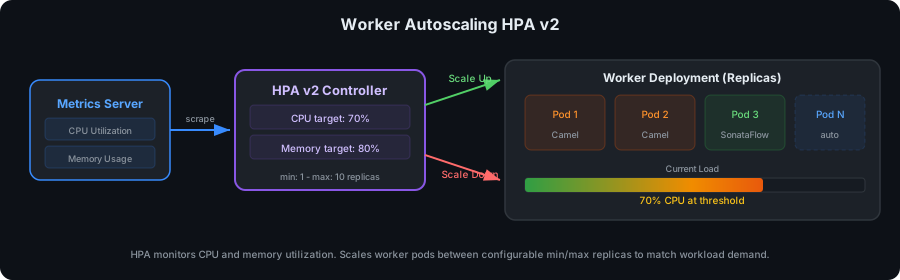
Each IntegrationFlow with a worker Deployment gets its own
HorizontalPodAutoscaler (HPA v2). The reconciler creates one HPA per flow with
scaleTargetRef pointing at that flow's Deployment — not a shared global autoscaler.
- GitOps flows:
base/hpa.yamlis scaffolded to Git and synced by Argo CD on each target cluster. - Ephemeral flows: The reconciler creates
iflow-<name>-hpatargetingiflow-<name>-worker. - Min replicas: 1 (Helm
workers.minReplicas) - Max replicas: 10 (Helm
workers.maxReplicas) - CPU target: 70% utilization (
workers.targetCPUUtilization) - Memory target: 80% utilization (
workers.targetMemoryUtilization)
With ten flows in Running phase, each flow scales independently based on its own worker pod
utilization. Disable autoscaling globally with workers.enabled=false.
helm upgrade --install openshift-integration-operator \
  helm/openshift-integration-operator \
  --namespace openshift-integration \
  --set workers.maxReplicas=20