jhipster-online-helm-chart
JHipster Online Helm Chart for Red Hat OpenShift








Table of Contents
- Overview
- Architecture
- Container Images
- Stack compatibility (JH9 / JH8 / PyHipster)
- Chart Versions
- Installation
- Configuration
- Security Considerations
- Values Reference
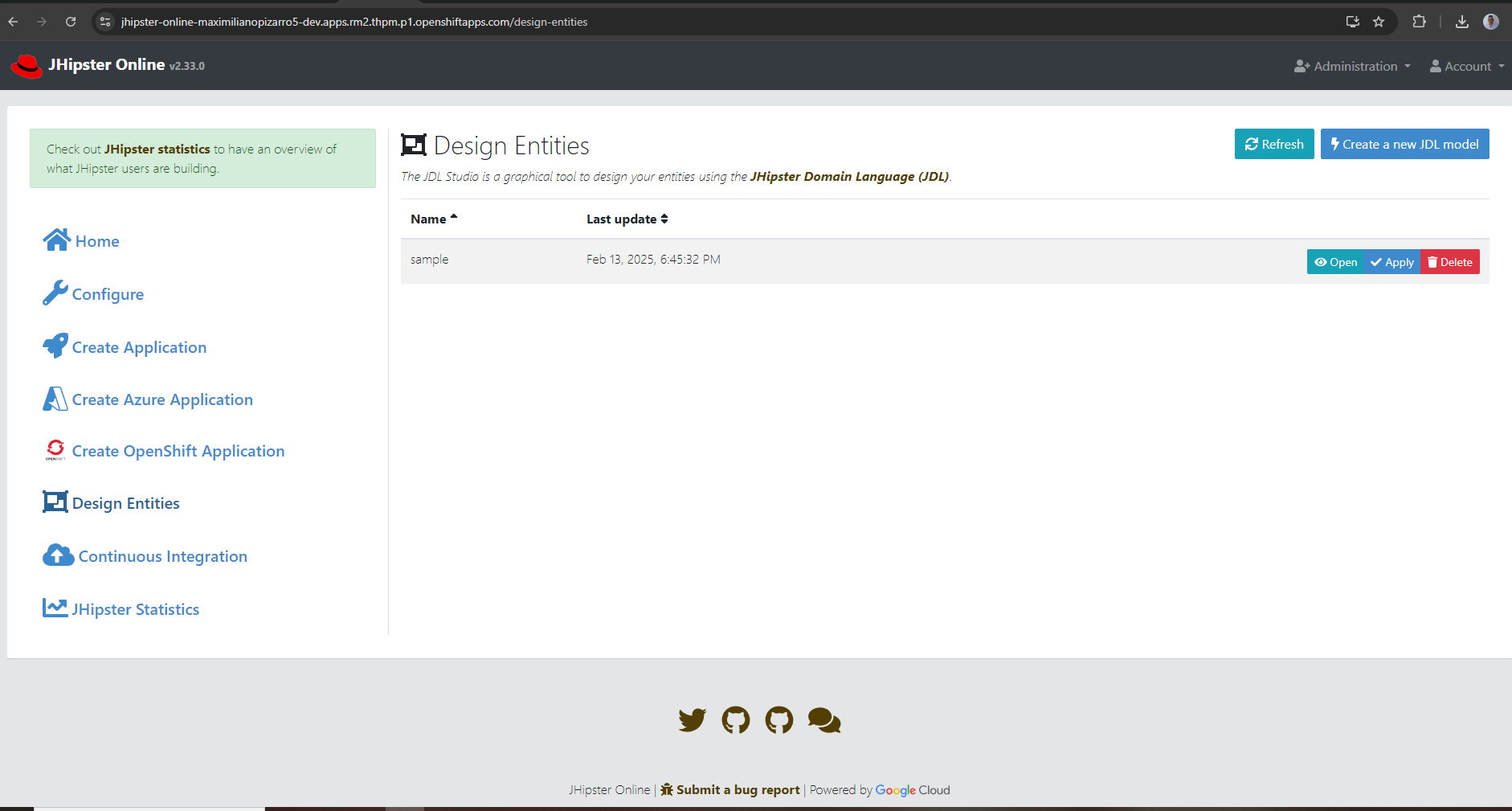
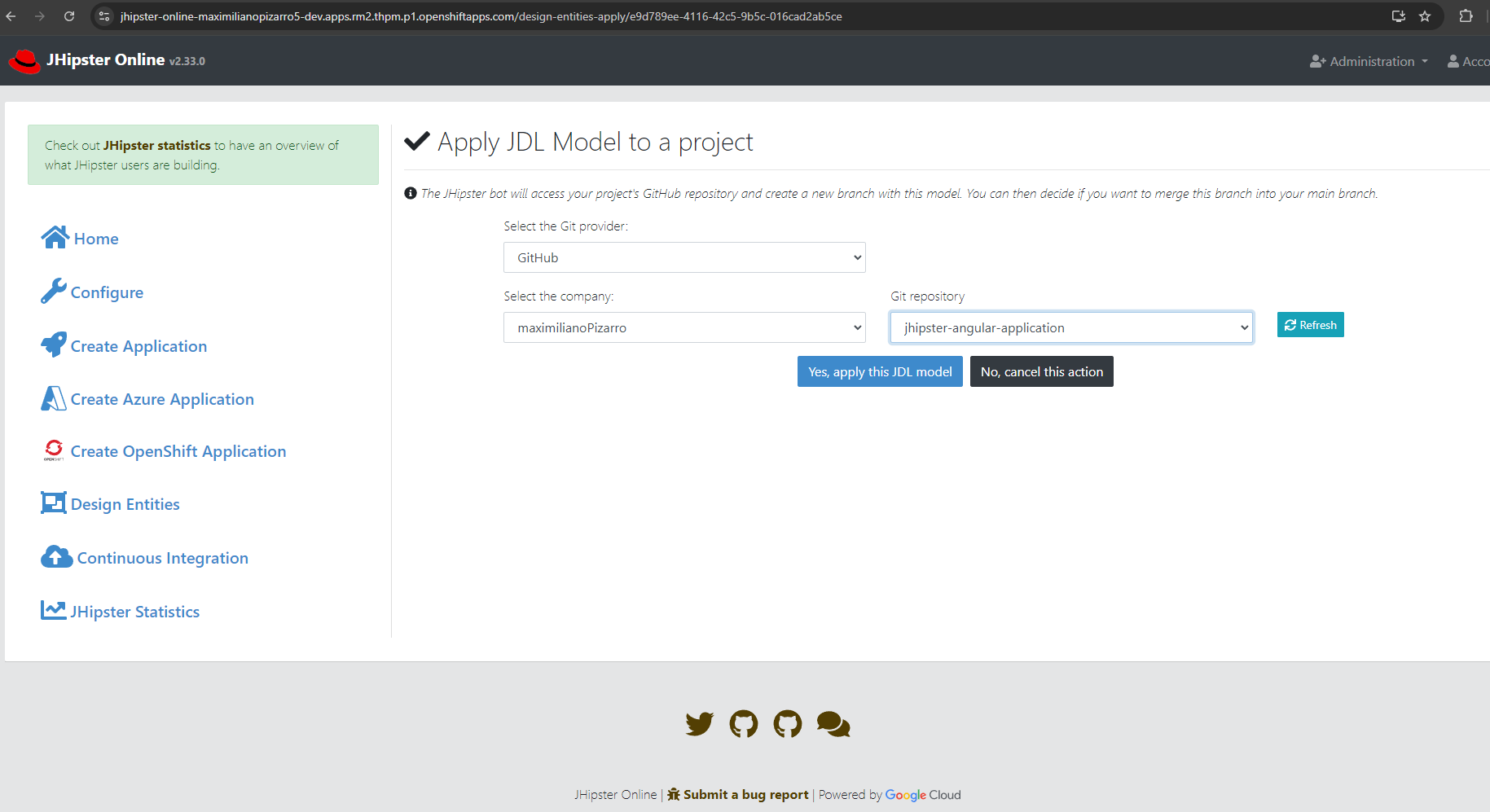
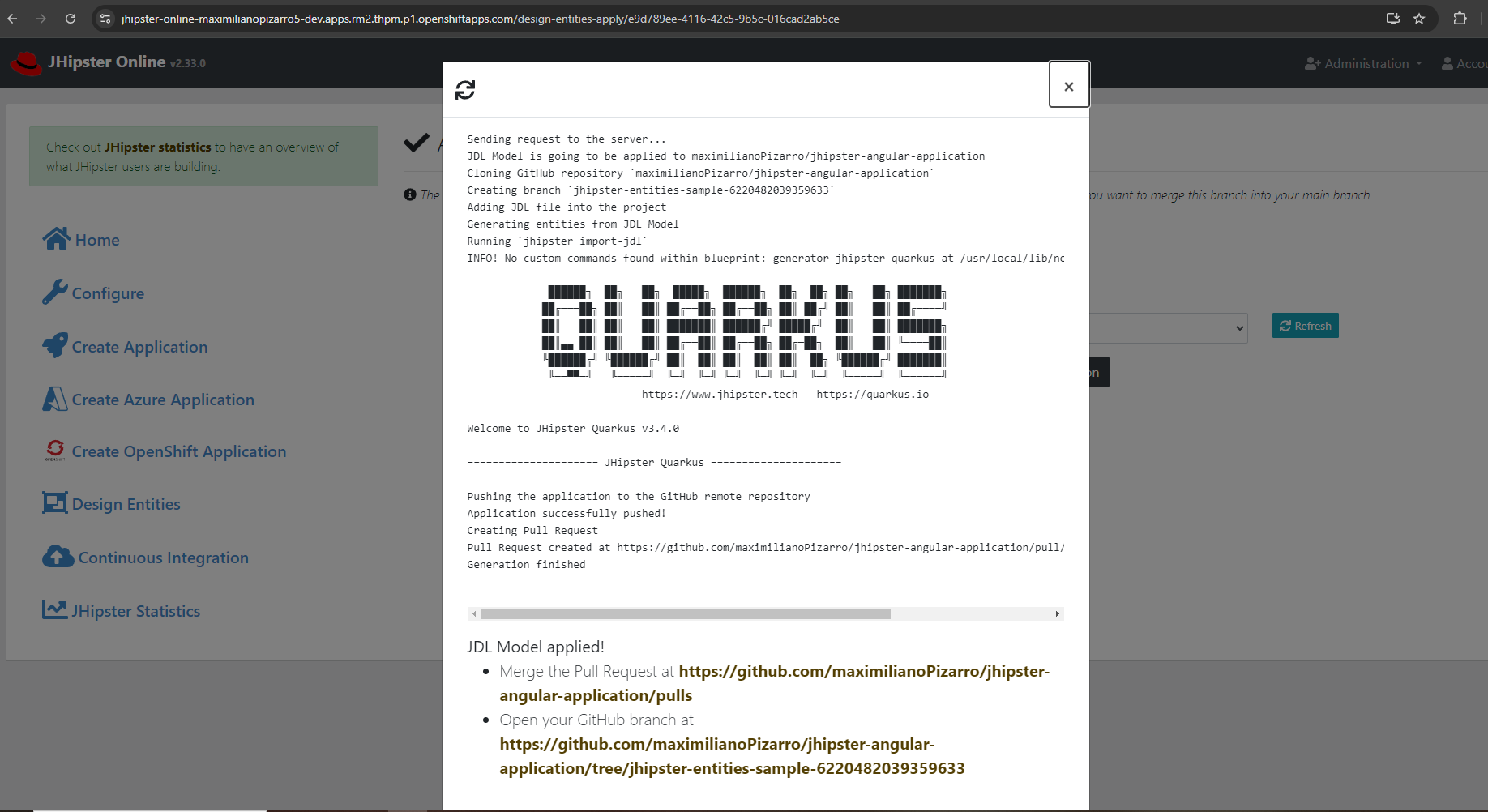
- JDL Studio
- Packaging
- Links
Overview
This Helm chart deploys JHipster Online 2.41.1 on Red Hat OpenShift. The stack includes:
- JHipster Online 2.41.1 — web UI for generating JHipster applications without local installation
- generator-jhipster 9.0.0 — generates Spring Boot 3.4+ / Java 21 projects
- generator-jhipster-quarkus 4.0.0 — generates Quarkus projects (JH9-compatible)
- generator-jhipster-micronaut 4.0.0 — Micronaut blueprint in the main runtime image (JH9-compatible)
- JHipster 8 HTTP worker (optional, default on) — separate Deployment with generator-jhipster 8.11 + dotnet / nodejs / azure-container-apps blueprints; main app delegates those stacks via
APPLICATION_JHIPSTER8WORKER_*(see JHipster 8 Worker) - PyHipster HTTP worker (optional, default on) — separate Deployment for Python/PyHipster generation; wired via
APPLICATION_PYHIPSTERWORKER_*; setpyhipsterWorker.enabled: falseto disable (see PyHipster Worker) - MCP HTTP worker (optional, default on) — Node sidecar on port 8083 for MCP-style generation (
POST /generate,/preview); the chart deploys a separate Deployment + Service and setsAPPLICATION_MCPWORKER_*on the main app; setmcpWorker.enabled: falseto disable (see MCP Worker) - JDL Studio — visual editor for JHipster Domain Language models (sidecar on port 8081)
- JDL AI Assistant — AI-assisted JDL drafting with RAG, powered by in-cluster vLLM models (Granite, Nemotron, Qwen)
- Editor AI — in-app assist for Helm YAML and JDL (complete, explain, fix, generate-from-prompt) via
/api/editor-ai/*; uses the sameAPPLICATION_JDL_AI_*settings and API key as JDL AI (upstream) - MariaDB — optional in-cluster database for user data, JDL models, and statistics (
mariadb.enabled, default true); setenabled: falseand pointenv.SPRING_DATASOURCE_*at an external MariaDB/MySQL when the bundled pod is not desired - Cluster requirement — Kubernetes ≥ 1.25 (OpenShift 4.12+); see
kubeVersionin Chart.yaml. - Developer Sandbox defaults — a single values.yaml: Route on, RBAC
editfor the pod ServiceAccount, in-cluster deploy enabled, JDL AI URLs forsandbox-shared-models; setenv.APPLICATION_JDL_AI_API_KEYat install (e.g.oc whoami -t). For other clusters, turn those off in the same file (see RBAC for In-Cluster Deploy). - Runtime image (upstream) — redhat-developer-demos/jhipster-online
Dockerfile.quarkus/Dockerfile.spring-boot: UBI8 OpenJDK 21, Node 22.19, Maven 3.9.15, WAR at/deployments/jhonline.war. - v2.41.1 highlights — MCP Server Generator UI at
/generate-mcp-server(form-driven config, live preview, JDL → MCP tools AI); dark mode with CSS custom properties and navbar toggle (ThemeService+prefers-color-scheme); backend framework statistics (newbackend_frameworkcolumn, line/pie charts for Spring Boot, Quarkus, Micronaut, Rust, .NET, etc.); client framework aggregation fixes (Svelte, “No client”); roadmap (Quarkus backend migration, OIDC login, Fabric8 MCP pipelines). See upstream RELEASE-NOTES-2.41.1. - v2.41.0 highlights — local full stack via
podman-compose.yml+Dockerfile.local; Rust generator improvements (SQLite,StackProfileResolverforbackendFramework: rust, H2→SQLite coercion in.yo-rc.jsonshim). See upstream README — New Features in v2.41.0. - Chart 1.1.2 / app 2.41.1 — MCP worker (Node, port 8083,
mcpWorker.enabledtrue by default),mariadb.enabledfor in-cluster MariaDB (true by default; setfalseand overrideenv.SPRING_DATASOURCE_*for an external database), Route timeout120sannotation (aligned withmcpWorker.timeoutSeconds), 2.41.1-* runtime images.
Source application: redhat-developer-demos/jhipster-online
Architecture
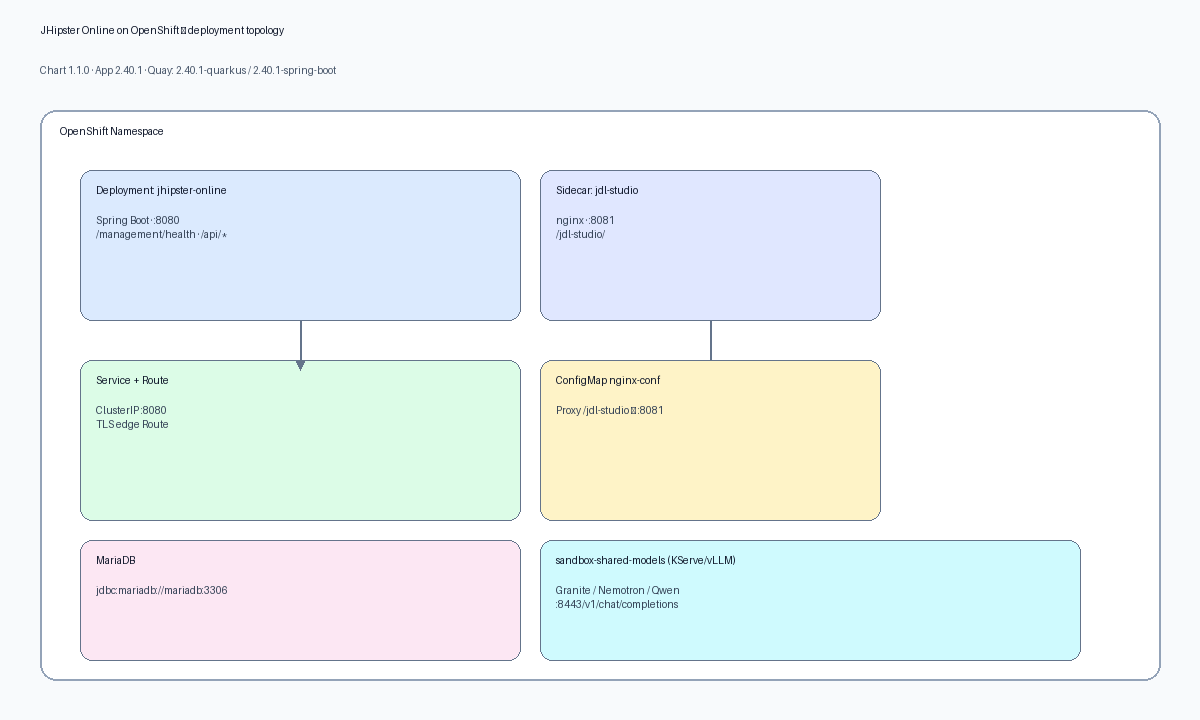
Diagram source: nanobanana (Gemini) or local script — see image/README.md. Regenerate with
GEMINI_API_KEYor runpython scripts/render_diagrams.pyfrom the repo root.
Component Summary
| Component | Image | Port | Purpose |
|---|---|---|---|
| jhipster-online | quay.io/maximilianopizarro/jhipster-online:2.41.1-quarkus |
8080 | Spring Boot app — generation, Git push, Fabric8 deploy, JDL AI |
| jdl-studio | quay.io/maximilianopizarro/jdl-studio |
8081 | nginx sidecar serving JDL Studio UI (same pod as main app) |
| jhipster8-worker | quay.io/maximilianopizarro/jhipster-online-jhipster8-worker:2.41.1-jhipster8-worker |
8081 | HTTP worker — JH8 CLI for .NET, Node/NestJS, Azure ACA (jhipster8Worker.enabled) |
| pyhipster-worker | quay.io/maximilianopizarro/jhipster-online-pyhipster-worker:2.41.1-pyhipster-worker |
8082 | HTTP worker — PyHipster / Python stack (pyhipsterWorker.enabled) |
| mcp-worker | quay.io/maximilianopizarro/jhipster-online-mcp-worker:2.41.1-mcp-worker |
8083 | HTTP worker — Node MCP sidecar (POST /generate, /preview; mcpWorker.enabled, default true) |
| mariadb | registry.redhat.io/rhel8/mariadb-103 |
3306 | In-cluster database (mariadb.enabled, default true) |
| AI models | KServe InferenceServices in sandbox-shared-models |
8443 | vLLM OpenAI-compatible endpoints |
Deployment Topology
The chart creates the following OpenShift resources:
| Resource | Name | Condition |
|---|---|---|
| Deployment | jhipster-online (2 containers) |
Always |
| Deployment | jhipster-online-jhipster8-worker |
jhipster8Worker.enabled=true |
| Deployment | jhipster-online-pyhipster-worker |
pyhipsterWorker.enabled=true |
| Deployment | jhipster-online-mcp-worker |
mcpWorker.enabled=true |
| Deployment | mariadb |
mariadb.enabled=true (default) |
| Service | jhipster-online (8080) |
Always |
| Service | jhipster-online-jhipster8-worker |
jhipster8Worker.enabled=true |
| Service | jhipster-online-pyhipster-worker |
pyhipsterWorker.enabled=true |
| Service | jhipster-online-mcp-worker |
mcpWorker.enabled=true |
| ConfigMap | nginx-conf |
Always |
| Route | jhipster-online (TLS edge) |
route.enabled=true |
| ServiceAccount | per fullname | serviceAccount.create=true |
| HPA | per fullname | autoscaling.enabled=true |
| Ingress | per fullname | ingress.enabled=true |
| RoleBinding | edit for SA |
openshift.grantEditRoleToServiceAccount=true |
| HTTPRoute + RateLimitPolicy + AuthPolicy | per fullname | kuadrant.enabled=true |
Container Images
Runtime images are published via GitHub Actions to Quay.io:
| Tag | Dockerfile | Base | Generators |
|---|---|---|---|
2.41.1-quarkus (default) |
Dockerfile.quarkus |
UBI8 OpenJDK 21 + Maven 3.9.15 + Node 22.19 | generator-jhipster 9.0.0 + generator-jhipster-quarkus 4.0.0 |
2.41.1-spring-boot |
Dockerfile.spring-boot |
UBI8 OpenJDK 21 + Maven 3.9.15 + Node 22.19 | generator-jhipster 9.0.0 |
JHipster 8 worker image (HTTP sidecar workload — separate pod from the main app):
| Image | Tag | Purpose |
|---|---|---|
quay.io/maximilianopizarro/jhipster-online-jhipster8-worker |
2.41.1-jhipster8-worker |
generator-jhipster 8.11 + dotnet / nodejs / azure-container-apps blueprints; invoked by main app when jhipster8Worker.enabled=true |
quay.io/maximilianopizarro/jhipster-online-pyhipster-worker |
2.41.1-pyhipster-worker |
PyHipster / Python Flask worker HTTP API; invoked when pyhipsterWorker.enabled=true |
quay.io/maximilianopizarro/jhipster-online-mcp-worker |
2.41.1-mcp-worker |
Node MCP worker HTTP API (POST /generate, /preview); mcpWorker.enabled true by default in chart 1.1.2 |
Registry: quay.io/maximilianopizarro/jhipster-online (main app), jhipster-online-jhipster8-worker, jhipster-online-pyhipster-worker, and jhipster-online-mcp-worker as needed.
Set image.tag in values.yaml and match env.JAVA_APP_JAR to the WAR path baked into that image (default: /deployments/jhonline.war).
Unversioned tags (:quarkus, :spring-boot, :latest) remain pinned to 2.33.0 to avoid breaking existing deployments.
Stack compatibility (JH9 / JH8 / PyHipster)
This chart deploys the main app (JHipster 9 CLI in the Quarkus/Spring Boot image) plus optional JHipster 8, PyHipster, and MCP HTTP workers. The matrix below matches upstream ARCHITECTURE.md (JHipster Online 2.41.1).
Main pod (JHipster 9)
| Stack | Blueprint | JH / notes | UI |
|---|---|---|---|
| Spring Boot | (default) | 9.0.0 | enabled |
| Quarkus | generator-jhipster-quarkus@4.0.0 | 9.0.0 | enabled |
| Micronaut | generator-jhipster-micronaut@4.0.0 | 9.0.0 | enabled |
| Rust | generator-jhipster-rust@1.0.0 | ^9.0.0 | enabled (experimental) |
JHipster 8 worker (jhipster8Worker Deployment)
Runs generator-jhipster@8.11.0 in a separate HTTP service; main app delegates when jhipster8Worker.enabled=true.
| Stack | Blueprint | JH version | CLI on worker |
|---|---|---|---|
| .NET Core | generator-jhipster-dotnetcore@4.5.0 | 8.10.x | jhipster-dotnetcore |
| Node/NestJS | generator-jhipster-nodejs@3.2.0 | 8.10.x | nhipster |
| Azure ACA | generator-jhipster-azure-container-apps@1.0.9 | 8.6+ | jhipster-azure-container-apps |
PyHipster worker (pyhipsterWorker Deployment)
Runs generator-pyhipster@0.0.9 on Node 18 (Yeoman 5), separate from the JH8 worker image.
| Stack | Blueprint | CLI on worker |
|---|---|---|
| Python | generator-pyhipster@0.0.9 | pyhipster |
Not supported: Go (generator-jhipster-go@1.0.0 on npm is an empty placeholder). For Rust / Python / experimental stack notes, see upstream ARCHITECTURE.md.
Chart Versions
| Chart Version | App Version | Key Changes |
|---|---|---|
| 1.1.2 | 2.41.1 | App 2.41.1 image tags; MCP worker (port 8083, mcpWorker.enabled true by default) + APPLICATION_MCPWORKER_*; mariadb.enabled (true by default) for bundled MariaDB or external DB via env overrides; Route haproxy.router.openshift.io/timeout: 120s to prevent 504s on AI/model cold starts |
| 1.1.1 | 2.41.0 | App 2.41.0 image tags (2.41.0-quarkus / spring-boot / jhipster8-worker / pyhipster-worker); same chart layout as 1.1.0; docs stack compatibility matrix aligned with upstream ARCHITECTURE.md; v2.41.0 app highlights (Rust/SQLite, podman-compose local stack) |
| 1.1.0 | 2.40.1 | JHipster 8 HTTP worker + PyHipster worker (pyhipsterWorker, default on); main app JH9 + Quarkus 4.0.0; image.pullPolicy Always; main container 2Gi + MaxRAMPercentage 65; Developer Sandbox defaults (Route, RBAC edit, JDL AI); Helm deploy OPENSHIFT_USE_HELM_CLI / OPENSHIFT_HELM_*; Editor AI |
| 1.0.4 | 2.40.0 | JDL AI assistant with 3 sandbox models, startupProbe, jdl-studio probes, Kuadrant policies, RBAC RoleBinding |
| 1.0.0 | 2.40.0 | Initial chart for JHipster Online 2.40.0 with JHipster 9 generators |
| 0.1.0 | 2.33.0 | Legacy chart for JHipster Online 2.33.0 |
Installation
From Helm Repository
# Add repository
helm repo add jhipster-online https://maximilianopizarro.github.io/jhipster-online-helm-chart/

# Install (latest)
helm install jhipster-online jhipster-online/jhipster-online \
  --version 1.1.2 -n <your-namespace>

# With AI models token
helm install jhipster-online jhipster-online/jhipster-online \
  --version 1.1.2 -n <your-namespace> \
  --set-string "env.APPLICATION_JDL_AI_API_KEY=$(oc whoami -t)"
Note: The release name
jhipster-onlineis mandatory. Using a different name requires updating the nginx ConfigMap proxy target and restarting the deployment.
Red Hat Developer Sandbox
values.yaml is written for a first try on Red Hat Developer Sandbox: OpenShift Route, openshift.grantEditRoleToServiceAccount: true, env.OPENSHIFT_DEPLOYMENT_ENABLED: "true", CPU/memory limits suited to Sandbox quotas, and JDL AI model URLs under sandbox-shared-models. You only need a cluster token for inference.
From this repository (recommended for Sandbox):
oc login --token=... --server=https://api.sandbox...openshift.com:6443

helm upgrade --install jhipster-online . -n <your-dev-namespace> \
  --set-string "env.APPLICATION_JDL_AI_API_KEY=$(oc whoami -t)"
From the Helm repository (same packaged defaults; no extra -f):
oc project <your-dev-namespace>

helm repo update
helm upgrade --install jhipster-online jhipster-online/jhipster-online \
  --version 1.1.2 -n <your-dev-namespace> \
  --set-string "env.APPLICATION_JDL_AI_API_KEY=$(oc whoami -t)"
Set GitHub OAuth with --set-string for env.APPLICATION_GITHUB_CLIENT-ID and env.APPLICATION_GITHUB_CLIENT-SECRET (or a small secret values file). Watch rollout: oc rollout status deployment/jhipster-online -n <your-dev-namespace>.
Outside Sandbox (tighter security or no in-cluster deploy): in the same values.yaml (or overrides via --set), set openshift.grantEditRoleToServiceAccount: false, env.OPENSHIFT_DEPLOYMENT_ENABLED: "false", and adjust resources / model URLs as needed.
- JDL AI: three models in
sandbox-shared-modelsandAPPLICATION_JDL_AI_INSECURE_TLS=trueby default. - Same image tag, new digest: with
image.pullPolicy: Always(default), runoc login ...if needed, thenoc rollout restart deployment/jhipster-online -n <ns>after the registry image is updated so pods pull the new digest.
Uninstall
helm uninstall jhipster-online -n <your-namespace>
Configuration
Startup console, JVM, and resources
The JHipster ASCII banner stays enabled by default (Spring Boot default). The chart does not set SPRING_MAIN_BANNER_MODE=off. To make startup output easier to read in OpenShift (encoding + heap inside the cgroup) the chart sets:
| Mechanism | Default in chart | Purpose |
|---|---|---|
JAVA_OPTS_APPEND |
UTF-8 system properties + -XX:MaxRAMPercentage=65.0 |
Cleaner multi-byte output and JVM heap sized to the container memory limit (UBI OpenJDK run script). |
resources |
requests 768Mi / 100m, limits 2Gi / 1 CPU |
Sized for Developer Sandbox; set resources: {} to unset or raise for production |
LOGGING_PATTERN_CONSOLE |
single-line pattern | Structured plain-text lines after the banner. |
Optional Spring Boot tuning via env (only if you need it):
env:
  # Example: disable banner in log aggregators only (not the default in this chart)
  # SPRING_MAIN_BANNER_MODE: "off"
  # SPRING_OUTPUT_ANSI_ENABLED: "never"   # strip ANSI in captured logs
Generator Mode (Quarkus / Spring Boot)
The OpenShift generator reads Tekton pipelines, Devfile, and Helm scaffold templates from the application bundle (classpath helm-template/ and related resources in redhat-developer-demos/jhipster-online). Upstream removed standalone kubernetes/*.yaml files that used to be referenced by URL; the chart does not set OPENSHIFT_TEKTON_URL-PIPELINE, OPENSHIFT_DEVSPACE_URL-DEVFILE, or OPENSHIFT_BACKSTAGE_URL-BACKSTAGE.
Quarkus (default):
# values.yaml
env:
  APPLICATION_JHIPSTER-CMD_CMD: jhipster-quarkus
image:
  tag: "2.41.1-quarkus"
Spring Boot:
# values.yaml
env:
  APPLICATION_JHIPSTER-CMD_CMD: jhipster
image:
  tag: "2.41.1-spring-boot"
JHipster 8 Worker
The main JHipster Online pod runs JHipster 9 (Quarkus / Spring Boot in the same image via APPLICATION_JHIPSTER-CMD_CMD and image.tag). Blueprints that are still on JHipster 8 (.NET, Node/NestJS, Azure Container Apps) run in a separate Deployment that exposes a small HTTP API (/health for probes). When jhipster8Worker.enabled is true (default in values.yaml):
- The chart creates Deployment and ClusterIP Service named
<Helm release name>-jhipster8-worker(for--name jhipster-online, that isjhipster-online-jhipster8-worker). - The main pod receives:
APPLICATION_JHIPSTER8WORKER_ENABLED=trueAPPLICATION_JHIPSTER8WORKER_BASE_URL=http://<fullname>-jhipster8-worker:<port>APPLICATION_JHIPSTER8WORKER_TIMEOUT_SECONDSfromjhipster8Worker.timeoutSeconds
Default worker listen port is 8081 (same numeric port as the JDL Studio sidecar on the main pod — they are different pods, so there is no conflict).
Disable to save Sandbox quota
helm upgrade --install jhipster-online . -n <ns> \
  --set jhipster8Worker.enabled=false \
  --set-string "env.APPLICATION_JDL_AI_API_KEY=$(oc whoami -t)"
Or in values.yaml:
jhipster8Worker:
  enabled: false
Combined pod counts (workers + optional MariaDB) are in the table under MariaDB (in-cluster).
The worker image uses imagePullPolicy: IfNotPresent. Tune jhipster8Worker.replicas and worker image resources in your fork if you need HA or heavier generations.
PyHipster Worker
PyHipster runs in a dedicated HTTP worker pod (default port 8082, probes on /health) with image quay.io/maximilianopizarro/jhipster-online-pyhipster-worker:2.41.1-pyhipster-worker. By default pyhipsterWorker.enabled: true in values.yaml; the chart deploys Deployment and ClusterIP Service <Helm release name>-pyhipster-worker and the main pod receives:
APPLICATION_PYHIPSTERWORKER_ENABLED=trueAPPLICATION_PYHIPSTERWORKER_BASE_URL=http://<fullname>-pyhipster-worker:<port>APPLICATION_PYHIPSTERWORKER_TIMEOUT_SECONDSfrompyhipsterWorker.timeoutSeconds
Requires an application build that implements the PyHipster worker client and a published worker image. To disable (save Sandbox pods or if the image is not ready):
pyhipsterWorker:
  enabled: false
Default port, timeout, replicas, and image match values.yaml.
MCP Worker
The MCP worker is a separate Node HTTP service (default port 8083, probes on GET /health) exposing POST /generate and POST /preview for MCP-oriented generation flows. By default mcpWorker.enabled: true in values.yaml (chart 1.1.2); the chart deploys Deployment and ClusterIP Service <Helm release name>-mcp-worker (selector app.kubernetes.io/component: mcp-worker) and injects into the main jhipster-online container:
APPLICATION_MCPWORKER_ENABLED=trueAPPLICATION_MCPWORKER_BASE_URL=http://<fullname>-mcp-worker:<mcpWorker.port>(same DNS pattern as JH8 / PyHipster:fullnamefrominclude "jhipster-online.fullname" .)APPLICATION_MCPWORKER_TIMEOUT_SECONDSfrommcpWorker.timeoutSeconds
The application exposes the MCP Server Generator page at /generate-mcp-server: form-driven configuration, live file preview tree from the worker, optional extra tool file slot, and JDL → MCP tools AI generation via the same OpenAI-compatible backend as the JDL AI assistant.
Requires a JHipster Online 2.41.1+ application build that calls the worker and a published image (default quay.io/maximilianopizarro/jhipster-online-mcp-worker:2.41.1-mcp-worker). To disable (save Sandbox quota or if the image is not ready):
mcpWorker:
  enabled: false
Or: helm upgrade --install ... --set mcpWorker.enabled=false.
MariaDB (in-cluster)
The chart can deploy a MariaDB 10.3 workload (Secret, Deployment, Service, PVC) used by the default env.SPRING_DATASOURCE_URL (jdbc:mariadb://mariadb:3306/jhipsteronline). mariadb.enabled defaults to true in values.yaml. Set mariadb.enabled: false to omit the in-cluster database and override at least:
SPRING_DATASOURCE_URLSPRING_DATASOURCE_USERNAMESPRING_DATASOURCE_PASSWORD
to point at your external MariaDB/MySQL (reachable from the application pod).
Developer Sandbox pod count (optional workers)
Base workload is 1 pod (main jhipster-online). +1 if mariadb.enabled (default true). Each enabled optional worker (JH8, PyHipster, MCP) adds 1 pod.
jhipster8Worker.enabled |
pyhipsterWorker.enabled |
mcpWorker.enabled |
Approx. pods* |
|---|---|---|---|
| true (default) | true (default) | true (default) | 5 |
| true (default) | true (default) | false | 4 |
| true | false | false | 3 |
| true | false | true | 4 |
| false | true | false | 3 |
| false | true | true | 4 |
| false | false | false | 2 |
| false | false | true | 3 |
*Assumes mariadb.enabled=true (default). With mariadb.enabled=false, subtract 1 from the total.
GitHub OAuth
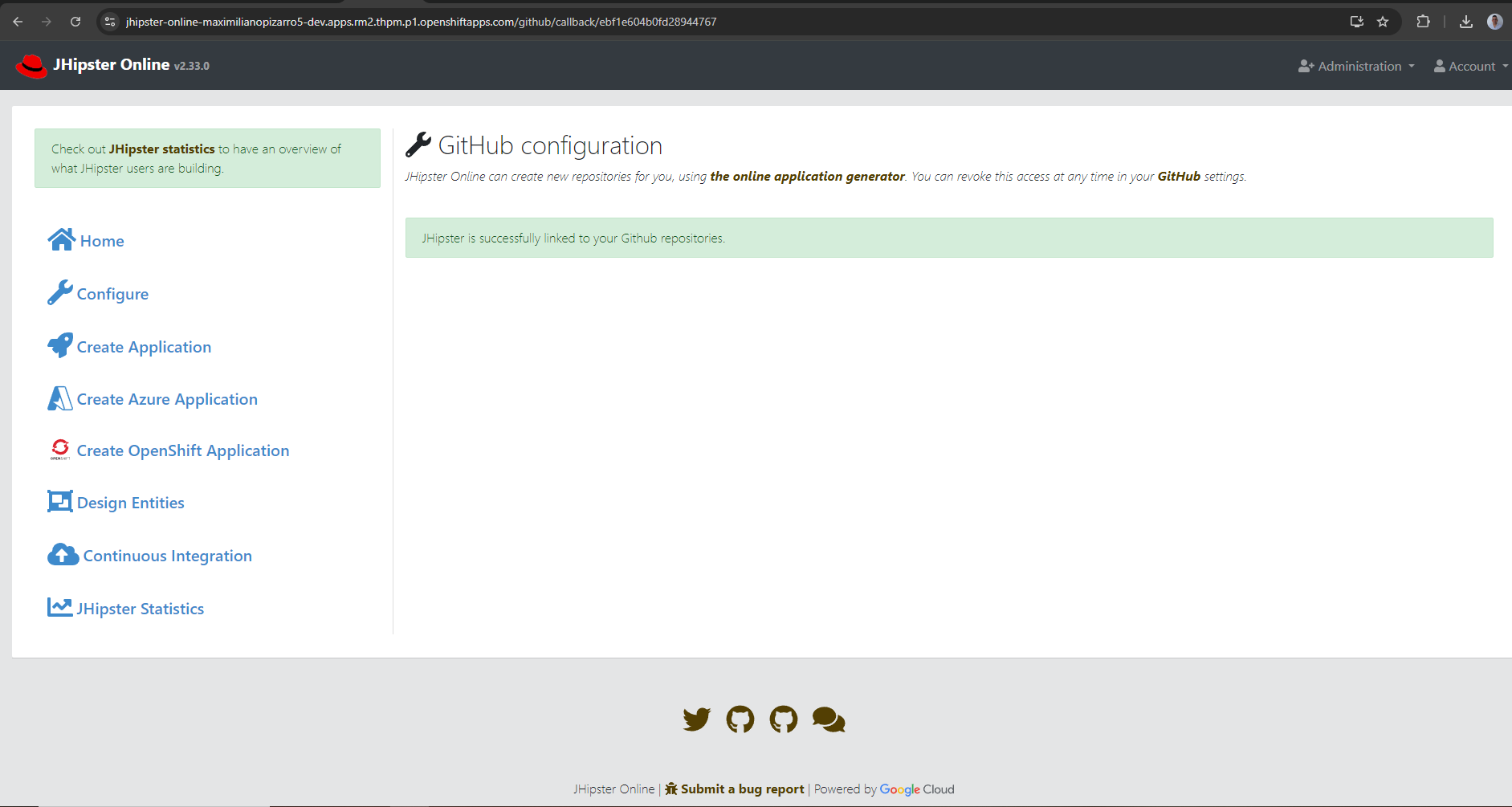
Go to https://github.com/settings/developers to create an OAuth App:
env:
  APPLICATION_GITHUB_HOST: https://github.com
  APPLICATION_GITHUB_CLIENT-ID: <your-client-id>
  APPLICATION_GITHUB_CLIENT-SECRET: <your-client-secret>
GitLab / Gitea OAuth
JHipster Online also supports GitLab and Gitea as Git providers. Configure them with the same env pattern:
env:
  # GitLab
  APPLICATION_GITLAB_HOST: https://gitlab.com
  APPLICATION_GITLAB_CLIENT-ID: <your-client-id>
  APPLICATION_GITLAB_CLIENT-SECRET: <your-client-secret>
  APPLICATION_GITLAB_REDIRECT-URI: https://<your-jhipster-online-url>/api/gitlab/callback
  # Gitea
  APPLICATION_GITEA_HOST: https://gitea.com
  APPLICATION_GITEA_CLIENT-ID: <your-client-id>
  APPLICATION_GITEA_CLIENT-SECRET: <your-client-secret>
  APPLICATION_GITEA_REDIRECT-URI: https://<your-jhipster-online-url>/api/gitea/callback
All three providers (GitHub, GitLab, Gitea) support OAuth login, organization/repo sync, repository creation, push via JGit, and pull request creation. Credentials can also be configured at runtime by admins via Administration > Git Runtime Config without restarting the app. See upstream Gitea configuration for full details.
Developer Hub and Dev Spaces
Dev Spaces / Devfile: the Devfile content used when generating OpenShift projects is bundled with the application, not loaded from a raw.githubusercontent.com URL.
Backstage / Developer Hub: if you register the service in a Backstage catalog, you can still point at the upstream catalog entity file in the repo: catalog-info.yaml (src/main/kubernetes/catalog-info.yaml). That is optional catalog metadata only; it is separate from the generator’s embedded templates.
Packaged chart repository and OpenShift Helm deploy
Upstream application-prod.yml exposes Spring properties that map to these chart defaults in values.yaml:
| Env variable | Default | Purpose |
|---|---|---|
APPLICATION_HELM_TEMPLATE_PACKAGE_CHART_REPOSITORY_ON_GENERATE |
true |
After rendering the generated app’s helm/ chart, run helm package and helm repo index so chart-repository/ (.tgz + index.yaml) can be published (e.g. GitHub Pages). Requires the helm CLI on the JHipster Online image if you leave this enabled. |
APPLICATION_HELM_TEMPLATE_CHART_REPOSITORY_INDEX_BASE_URL |
(empty) | Optional helm repo index --url base; when empty the app uses its GitHub Pages convention. |
APPLICATION_HELM_TEMPLATE_HELM_BINARY |
helm |
Binary used for packaging (separate from OpenShift deploy below). |
OPENSHIFT_USE_HELM_CLI |
true |
When OPENSHIFT_DEPLOYMENT_ENABLED=true, prefer helm upgrade --install for in-cluster installs (placeholder in upstream application-prod.yml). |
OPENSHIFT_HELM_BINARY |
helm |
Helm binary for deploy operations. |
OPENSHIFT_HELM_TIMEOUT_SECONDS |
600 |
Timeout passed to Helm. |
OPENSHIFT_HELM_FALLBACK_TO_FABRIC8 |
true |
If Helm CLI deploy fails, fall back to Fabric8 client apply. |
Set OPENSHIFT_USE_HELM_CLI to false if your runtime image has no Helm CLI and you rely on Fabric8 only (matches upstream application-dev.yml literal default).
JDL AI Assistant (OpenShift AI Models)
The Design Entities page shows an AI-assisted JDL draft panel when APPLICATION_JDL_AI_ENABLED=true and at least one OpenAI-compatible completions URL is configured. The backend calls POST .../v1/chat/completions (vLLM, KServe, Ollama, OpenAI, etc.).
Editor AI (Helm chart YAML editor and JDL refine): authenticated endpoints under /api/editor-ai/* reuse application.jdl-ai — the same models, timeouts, RAG flags, and APPLICATION_JDL_AI_API_KEY as above. No extra environment variables are required once JDL AI is configured.
RAG (retrieval):
- Lexical (default): keyword/token overlap over bundled chunks in
rag-chunks.jsonfrom the application image. - Semantic (optional): embeddings + cosine similarity when
APPLICATION_JDL_AI_RAG_SEMANTIC_ENABLED=trueandAPPLICATION_JDL_AI_EMBEDDINGS_URLpoints toPOST .../v1/embeddings. On failure, the app falls back to lexical ranking.
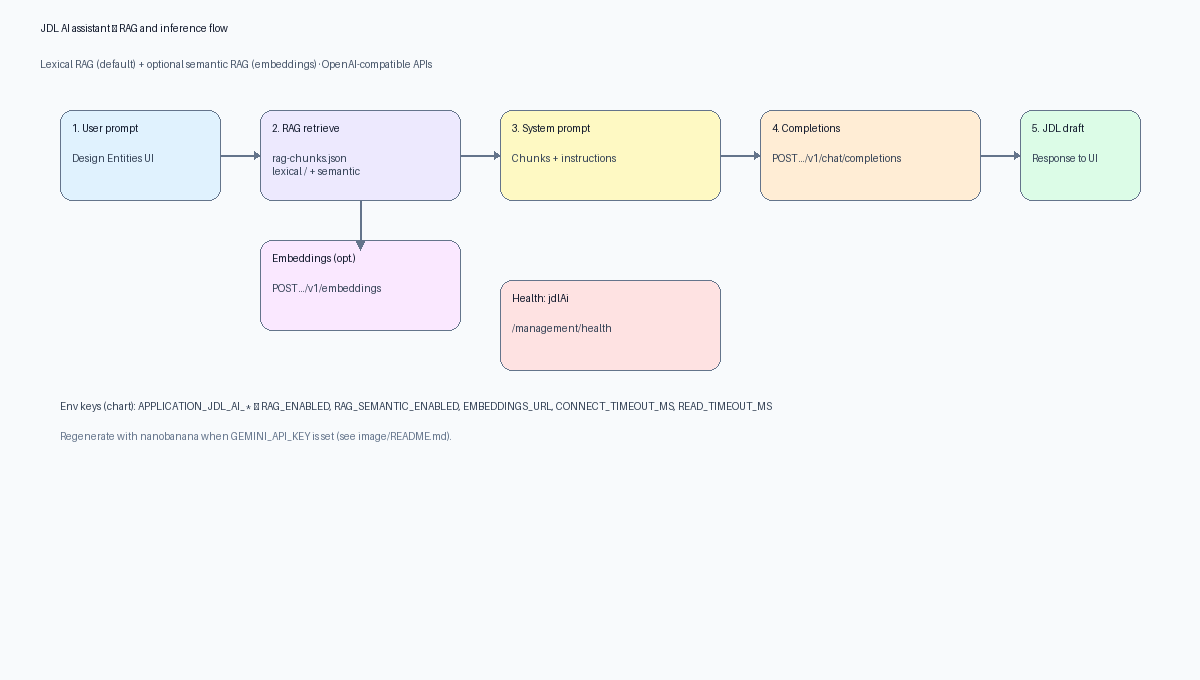
Regenerate with nanobanana:
nanobanana diagram "RAG pipeline for JDL AI…" --type=flowchartthen save asimage/ai-rag-flow.png.
Available Models (Developer Sandbox)
| Model | ID | vLLM Model ID | Context Length |
|---|---|---|---|
| IBM Granite 3.1 8B | granite-31-8b |
isvc-granite-31-8b-fp8 |
65536 |
| NVIDIA Nemotron Nano 9B v2 | nemotron-nano-9b-v2 |
isvc-nemotron-nano-9b-v2-fp8 |
65536 |
| Qwen3 8B | qwen3-8b |
isvc-qwen3-8b-fp8 |
40960 |
All models are served via KServe + RHAIIS (vLLM) in the sandbox-shared-models namespace with FP8 quantization.
Quick start (Helm)
helm upgrade --install jhipster-online jhipster-online/jhipster-online \
  --version 1.1.2 -n <your-namespace> \
  --set-string "env.APPLICATION_JDL_AI_API_KEY=$(oc whoami -t)"
Full configuration reference (environment variables)
Spring maps dotted YAML to env with underscores and uppercase; the chart uses the APPLICATION_JDL_AI_* keys below.
| Env variable | Default in chart | Purpose |
|---|---|---|
APPLICATION_JDL_AI_ENABLED |
true |
Feature gate (assistant visible only if enabled and a completions URL exists). |
APPLICATION_JDL_AI_INSECURE_TLS |
true |
Trust self-signed / cluster TLS for upstream HTTP clients (typical on Sandbox). Use false with proper CA bundles in production. |
APPLICATION_JDL_AI_DEFAULT_MODEL_ID |
granite-31-8b |
Default entry in the UI model picker when models[] is configured. |
APPLICATION_JDL_AI_API_KEY |
(empty) | Authorization: Bearer … for chat and embeddings. Prefer --set-string or a Secret — never commit tokens. |
APPLICATION_JDL_AI_RAG_ENABLED |
true |
Lexical RAG on/off. |
APPLICATION_JDL_AI_RAG_TOP_K |
6 |
Number of chunks to inject. |
APPLICATION_JDL_AI_RAG_MAX_CHARS |
14000 |
Character budget for RAG context in the system prompt. |
APPLICATION_JDL_AI_RAG_SEMANTIC_ENABLED |
false |
When true, rank chunks with embeddings + cosine similarity (requires embeddings URL). |
APPLICATION_JDL_AI_EMBEDDINGS_URL |
(empty) | OpenAI-compatible POST .../v1/embeddings URL (required for semantic RAG). |
APPLICATION_JDL_AI_EMBEDDINGS_MODEL |
text-embedding-3-small |
Model id in the embeddings JSON body. |
APPLICATION_JDL_AI_CONNECT_TIMEOUT_MS |
15000 |
Connect timeout to completions/embeddings upstream. |
APPLICATION_JDL_AI_READ_TIMEOUT_MS |
120000 |
Read timeout for long generations. |
APPLICATION_JDL_AI_HELP_TEXT |
(see values.yaml) | Hint shown under the assistant card in the UI. |
APPLICATION_JDL_AI_MODELS_*_{ID,LABEL,MODEL,API_URL} |
(3 models) | Multi-model picker; index 0, 1, 2 in env names as in values.yaml. |
For property names in YAML (e.g. application.jdl-ai.rag-semantic-enabled), see the application README — JDL AI assistant.
Multi-model values.yaml example
env:
  APPLICATION_JDL_AI_ENABLED: "true"
  APPLICATION_JDL_AI_INSECURE_TLS: "true"
  APPLICATION_JDL_AI_DEFAULT_MODEL_ID: granite-31-8b
  APPLICATION_JDL_AI_RAG_ENABLED: "true"
  APPLICATION_JDL_AI_RAG_TOP_K: "6"
  APPLICATION_JDL_AI_RAG_MAX_CHARS: "14000"
  APPLICATION_JDL_AI_RAG_SEMANTIC_ENABLED: "false"
  APPLICATION_JDL_AI_EMBEDDINGS_URL: ""
  APPLICATION_JDL_AI_EMBEDDINGS_MODEL: "text-embedding-3-small"
  APPLICATION_JDL_AI_CONNECT_TIMEOUT_MS: "15000"
  APPLICATION_JDL_AI_READ_TIMEOUT_MS: "120000"
  APPLICATION_JDL_AI_MODELS_0_ID: granite-31-8b
  APPLICATION_JDL_AI_MODELS_0_LABEL: "IBM Granite 3.1 8B (FP8)"
  APPLICATION_JDL_AI_MODELS_0_MODEL: isvc-granite-31-8b-fp8
  APPLICATION_JDL_AI_MODELS_0_API_URL: "https://isvc-granite-31-8b-fp8-predictor.sandbox-shared-models.svc.cluster.local:8443/v1/chat/completions"
  APPLICATION_JDL_AI_MODELS_1_ID: nemotron-nano-9b-v2
  APPLICATION_JDL_AI_MODELS_1_LABEL: "NVIDIA Nemotron Nano 9B v2 (FP8)"
  APPLICATION_JDL_AI_MODELS_1_MODEL: isvc-nemotron-nano-9b-v2-fp8
  APPLICATION_JDL_AI_MODELS_1_API_URL: "https://isvc-nemotron-nano-9b-v2-fp8-predictor.sandbox-shared-models.svc.cluster.local:8443/v1/chat/completions"
  APPLICATION_JDL_AI_MODELS_2_ID: qwen3-8b
  APPLICATION_JDL_AI_MODELS_2_LABEL: "Qwen3 8B (FP8)"
  APPLICATION_JDL_AI_MODELS_2_MODEL: isvc-qwen3-8b-fp8
  APPLICATION_JDL_AI_MODELS_2_API_URL: "https://isvc-qwen3-8b-fp8-predictor.sandbox-shared-models.svc.cluster.local:8443/v1/chat/completions"
  APPLICATION_JDL_AI_API_KEY: ""   # set at install with --set-string or External Secrets
Single-model / external endpoint (Ollama, OpenAI, route on cluster)
Use either one global URL (via Spring application.jdl-ai.api-url / matching env in your image) or a single APPLICATION_JDL_AI_MODELS_0_* entry. Example pattern for a single route:
env:
  APPLICATION_JDL_AI_ENABLED: "true"
  APPLICATION_JDL_AI_DEFAULT_MODEL_ID: my-model
  APPLICATION_JDL_AI_MODELS_0_ID: my-model
  APPLICATION_JDL_AI_MODELS_0_LABEL: "My vLLM"
  APPLICATION_JDL_AI_MODELS_0_MODEL: my-serving-knative-name
  APPLICATION_JDL_AI_MODELS_0_API_URL: "https://my-model-predictor-my-ns.apps.example.com/v1/chat/completions"
Authentication and secrets
| Approach | When to use |
|---|---|
helm --set-string env.APPLICATION_JDL_AI_API_KEY=… |
Quick Sandbox demos (oc whoami -t). |
Kubernetes Secret + envFrom / workload patch |
Production; rotate token without editing Helm values. |
| External Secrets Operator | Sync from Vault / cloud secret manager; no plaintext in Git. |
Never store long-lived API keys in Git. Treat APPLICATION_JDL_AI_API_KEY like any other credential.
Semantic RAG example
env:
  APPLICATION_JDL_AI_RAG_SEMANTIC_ENABLED: "true"
  APPLICATION_JDL_AI_EMBEDDINGS_URL: "https://your-embeddings-route.apps.example.com/v1/embeddings"
  APPLICATION_JDL_AI_EMBEDDINGS_MODEL: "text-embedding-3-small"
Health monitoring
Actuator GET /management/health includes a jdlAi component: whether a completions URL is configured and the feature is wired. Use the existing chart readiness probe on /management/health to surface a not-ready pod if health aggregation is configured accordingly, or scrape the JSON for dashboards.
REST API (application)
| Method | Path | Description |
|---|---|---|
| GET | /api/jdl-ai/config |
Enabled flag, help text, RAG options, default model id, model list. |
| POST | /api/jdl-ai/generate |
Body: { "prompt": "…", "modelId": "…" } — returns JDL draft or 502/503 on misconfiguration / upstream errors. |
Troubleshooting
| Symptom | Things to check |
|---|---|
| Assistant missing in UI | APPLICATION_JDL_AI_ENABLED, at least one model URL, image version supports JDL AI. |
| 401/403 from model route | APPLICATION_JDL_AI_API_KEY, token expiry, SAR for sandbox-shared-models. |
| TLS / handshake errors | APPLICATION_JDL_AI_INSECURE_TLS=true only if appropriate; prefer proper CA trust in prod. |
| Timeouts on long prompts | Raise APPLICATION_JDL_AI_READ_TIMEOUT_MS. |
| Semantic RAG does nothing | APPLICATION_JDL_AI_EMBEDDINGS_URL set, RAG_SEMANTIC_ENABLED=true, embedding model compatible. |
For full upstream documentation, see JDL AI assistant (models, RAG, embeddings) in the application README.
OpenShift Route and Kuadrant
Route is enabled by default (route.enabled: true). The Route template includes haproxy.router.openshift.io/timeout: "120s" to prevent 504 Gateway Timeout errors when AI model endpoints (KServe/vLLM) are slow to respond (e.g. cold starts after idle scaling). This is aligned with mcpWorker.timeoutSeconds (120) and APPLICATION_JDL_AI_READ_TIMEOUT_MS (120000). For production with faster models, lower the value by editing the Route annotation or the template.
For Kuadrant Gateway API integration:
kuadrant:
  enabled: true
  gateway:
    name: my-gateway
    namespace: gateway-ns
    sectionName: https
  httpRouteHostname: "jhipster.apps.example.com"
  keycloakIssuerUri: "https://keycloak-.../realms/jhipster"  # enables AuthPolicy
RBAC for In-Cluster Deploy
By default openshift.grantEditRoleToServiceAccount: true and env.OPENSHIFT_DEPLOYMENT_ENABLED: "true" so the JHipster Online UI can deploy generated apps on Developer Sandbox. The chart creates a RoleBinding granting the built-in edit ClusterRole to the ServiceAccount used by the Deployment.
Generated repositories (Helm deploy from the UI): On Red Hat Developer Sandbox, the same ServiceAccount can use edit for workloads (Deployments, Services, Routes, Secrets, PVCs, Tekton, etc.) but cannot create or read extra Role / RoleBinding resources in rbac.authorization.k8s.io. If the generated app chart tried to install those, helm upgrade --install would fail with 403 before other resources apply. JHipster Online 2.41.1 upstream defaults generated helm/values.yaml to rbac.create: false, so the optional rbac-deployer.yaml templates are skipped and in-cluster Helm deploy matches Sandbox permissions. On clusters where your deployer may create namespace-scoped Roles, install or upgrade with --set rbac.create=true.
To disable in-cluster deploy or use a narrower role elsewhere:
openshift:
  grantEditRoleToServiceAccount: false
env:
  OPENSHIFT_DEPLOYMENT_ENABLED: "false"
Least privilege: Prefer a dedicated ServiceAccount and the minimal
Role/ClusterRolefromsrc/main/kubernetes/rbac.yaml(jhipster-online-deployer) instead of namespace-wideeditwhen your cluster policy allows it.
Security Considerations
JWT signing (jhipster.security.authentication.jwt)
JHipster Online uses JWT for API security. In production:
- Configure
jhipster.security.authentication.jwt.base64-secret(or key store) via environment variables or mounted secrets, not committed YAML. - Plan rotation (new key + staged rollout); document who owns secrets (Vault, OpenShift secrets, ESO).
HTTPS
Terminate TLS at the OpenShift Route / Ingress or an edge proxy. Do not expose plain HTTP for production OAuth callbacks.
Workload identity for OpenShift deploy
The chart defaults to granting edit to the pod ServiceAccount for Sandbox try-out. That is broad. Where possible:
- Create a dedicated
ServiceAccount(serviceAccount.create: true+name). - Bind only the rules required from
rbac.yamlinstead ofedit. - Avoid running as
defaultSA in shared namespaces.
AI credentials
Treat APPLICATION_JDL_AI_API_KEY like any cloud API key: short-lived tokens where possible, Secret/ESO injection, and audit access to sandbox-shared-models.
Values Reference
| Key | Type | Default | Description |
|---|---|---|---|
replicaCount |
int | 1 |
Number of replicas |
image.repository |
string | quay.io/maximilianopizarro/jhipster-online |
Container image registry |
image.tag |
string | 2.41.1-quarkus |
Image tag |
image.pullPolicy |
string | Always |
Pull policy for the jhipster-online container (imagePullPolicy); use IfNotPresent to reduce pulls if your tag is immutable |
service.type |
string | ClusterIP |
Service type |
service.port |
int | 8080 |
Service port |
route.enabled |
bool | true |
Create OpenShift Route |
ingress.enabled |
bool | false |
Create Ingress |
autoscaling.enabled |
bool | false |
Enable HPA |
mariadb.enabled |
bool | true |
Deploy in-cluster MariaDB (Secret, Deployment, Service, PVC); set false and override env.SPRING_DATASOURCE_* for external DB |
jhipster8Worker.enabled |
bool | true |
JHipster 8 HTTP worker pod |
jhipster8Worker.port |
int | 8081 |
Worker listen port / Service port |
jhipster8Worker.timeoutSeconds |
int | 600 |
Client timeout for delegation |
pyhipsterWorker.enabled |
bool | true |
PyHipster worker pod |
pyhipsterWorker.port |
int | 8082 |
Worker listen port / Service port |
mcpWorker.enabled |
bool | true |
MCP Node worker pod (POST /generate, /preview) |
mcpWorker.port |
int | 8083 |
MCP worker listen port / Service port |
mcpWorker.timeoutSeconds |
int | 120 |
Client timeout for MCP calls |
openshift.grantEditRoleToServiceAccount |
bool | true |
Bind edit role to pod SA (Sandbox default; set false for least privilege) |
kuadrant.enabled |
bool | false |
Enable Kuadrant policies |
resources |
object | Sandbox-sized | CPU/memory for the jhipster-online container; set {} to unset |
env.JAVA_APP_JAR |
string | /deployments/jhonline.war |
WAR path inside the container (must match the image layout) |
env.JAVA_OPTS_APPEND |
string | (UTF-8 + MaxRAMPercentage) | Extra JVM flags (UBI OpenJDK run-java.sh) |
env.LOGGING_PATTERN_CONSOLE |
string | (pattern) | Log line format (logging.pattern.console) |
env.OPENSHIFT_DEPLOYMENT_ENABLED |
string | "true" |
Enable in-cluster deploy from UI (openshift.deployment.enabled) |
env.OPENSHIFT_USE_HELM_CLI |
string | "true" |
Prefer Helm CLI for deploy (openshift.deployment.use-helm-cli; upstream prod placeholder) |
env.OPENSHIFT_HELM_BINARY |
string | helm |
Helm binary for deploy |
env.OPENSHIFT_HELM_TIMEOUT_SECONDS |
string | "600" |
Helm operation timeout (seconds) |
env.OPENSHIFT_HELM_FALLBACK_TO_FABRIC8 |
string | "true" |
Fall back to Fabric8 if Helm fails |
env.APPLICATION_JDL_AI_ENABLED |
string | "true" |
Enable JDL AI assistant |
env.APPLICATION_JDL_AI_DEFAULT_MODEL_ID |
string | granite-31-8b |
Default AI model |
env.APPLICATION_JDL_AI_API_KEY |
string | "" |
Bearer token for model auth |
env.APPLICATION_JDL_AI_RAG_ENABLED |
string | "true" |
Lexical RAG |
env.APPLICATION_JDL_AI_RAG_SEMANTIC_ENABLED |
string | "false" |
Semantic RAG (embeddings) |
env.APPLICATION_JDL_AI_EMBEDDINGS_URL |
string | "" |
Embeddings endpoint URL |
env.APPLICATION_JDL_AI_EMBEDDINGS_MODEL |
string | text-embedding-3-small |
Embeddings model id |
env.APPLICATION_JDL_AI_CONNECT_TIMEOUT_MS |
string | "15000" |
Upstream connect timeout |
env.APPLICATION_JDL_AI_READ_TIMEOUT_MS |
string | "120000" |
Upstream read timeout |
env.APPLICATION_JDL_AI_INSECURE_TLS |
string | "true" |
Trust insecure TLS to models (dev/Sandbox) |
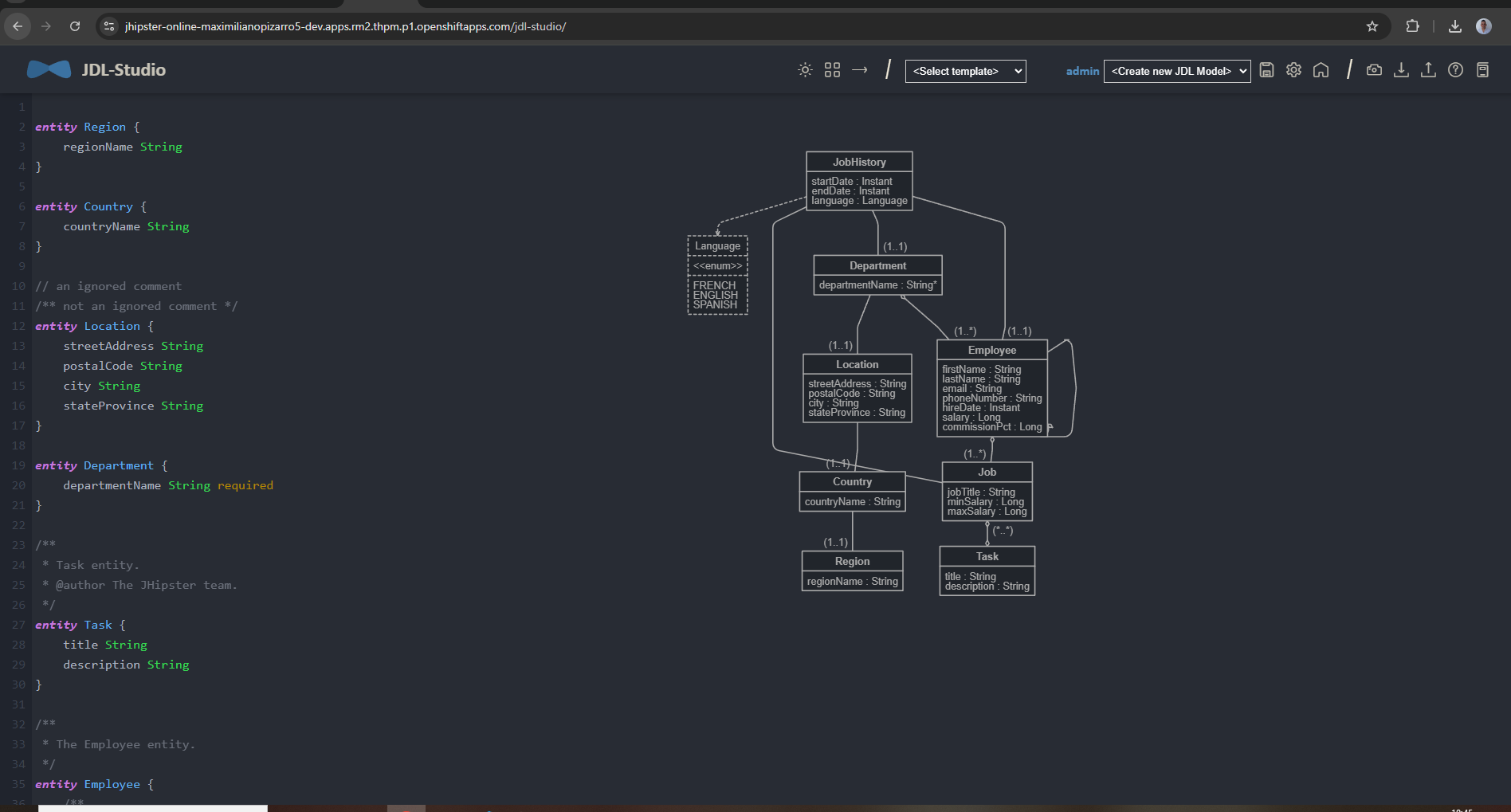
JDL Studio
Packaging
To publish on GitHub Pages for this chart repo: after packaging, commit charts/jhipster-online-*.tgz and index.yaml together so helm repo update picks up the new digest or version.
# Optional: regenerate README / Artifact Hub diagrams (no API key)
python scripts/render_diagrams.py

# Package chart
helm package -u . -d charts

# Regenerate index from charts/*.tgz (merge keeps older chart entries), then keep repo root index.yaml
helm repo index charts \
  --url https://raw.githubusercontent.com/maximilianoPizarro/jhipster-online-helm-chart/main/charts \
  --merge index.yaml
cp charts/index.yaml index.yaml
rm charts/index.yaml
Links
- Helm Chart Repository (GitHub Pages)
- Application Source Code
- Artifact Hub
- Container Images (Quay.io)
- README diagram assets (
image/) - Release Notes 2.41.1
- Release Notes 2.40.1
- Release Notes 2.40.0
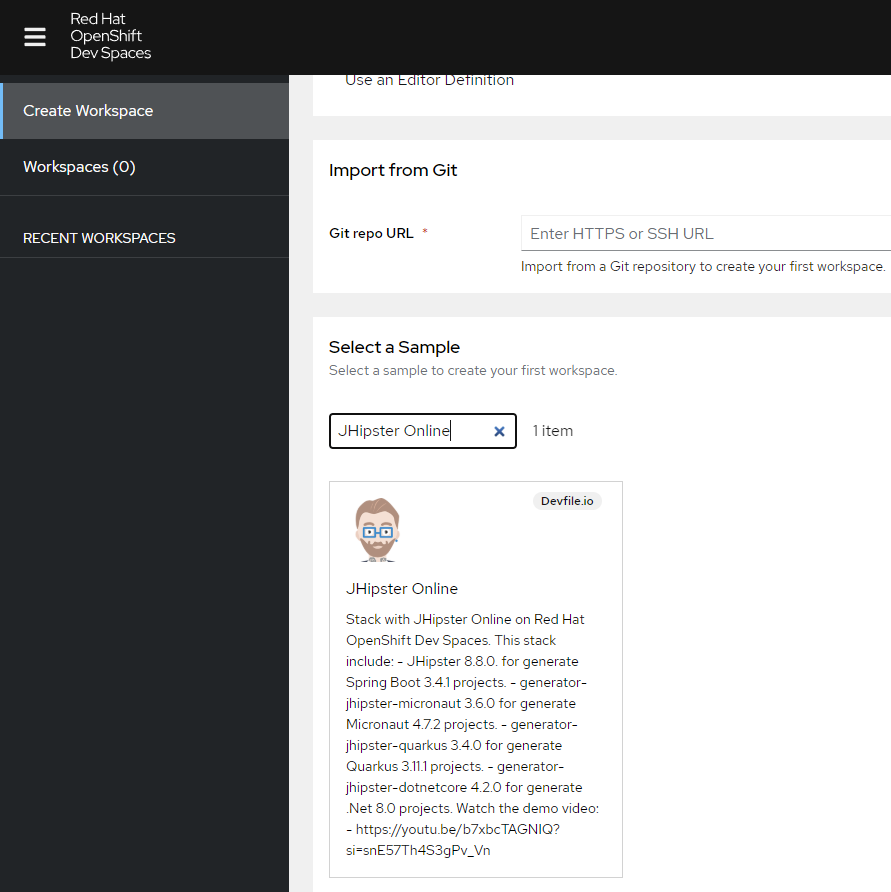
Try on Red Hat OpenShift Dev Spaces — search “JHipster Online” in the sample catalog:

Build Here. Go Anywhere.

Join Red Hat Developer for product trails, hands-on learning, tools, technologies, and community.